What Is Workflow Automation and Why It Matters Now
Learn what is workflow automation, how it works for ops teams, and where AI fits. Clear patterns, ROI examples, and build vs buy guidance.
Your customer onboarding process looks automated from the outside. A new deal enters the CRM, billing needs the account details, the shared inbox needs a notification, and someone asks for approval in a Slack thread. Two days later, a manager discovers that the billing record has a different address, the approval is buried in conversation history, and nobody can explain which step failed.
That situation is why workflow automation matters. It isn't just a button that performs one repetitive action. It's a governed software layer that routes work, moves data between systems, applies business rules, and brings a person into the process when judgment or approval is required. The opportunity is substantial but unfinished: about 60% of businesses had implemented automation in at least one workflow, while only 4% had fully automated hands-free operations, according to this 2026 workflow automation statistics summary. Teams aren't deciding whether automation exists. They're deciding whether their current automations can survive real operational complexity.
Table of Contents
- Workflow Automation in Plain Language
- Core Building Blocks Behind Every Workflow
- Rule-Based Automation Versus Agentic AI Workflows
- Business Benefits and ROI That Operations Teams Can Measure
- Common Pitfalls and Risk Controls That Keep Automation Alive
- Build Versus Buy for Founder-Led and PE-Backed Teams
- Practical Next Steps and When to Run an Operations Diagnostic
Workflow Automation in Plain Language
Take customer onboarding. A sales representative marks an opportunity as won in a CRM. Finance needs a customer record and payment terms, billing needs an account configuration, customer success needs an implementation task, and an operations manager may need to approve unusual commercial terms. If people copy the same fields between systems and chase approval through chat, the process depends on memory, timing, and luck.
Workflow automation turns that chain into an executable process. A trigger starts the work, integrations move the relevant data, orchestration determines the sequence, and the system records what happened. When the process reaches a decision that requires authority or context, the workflow assigns a human checkpoint rather than pretending every decision can be encoded safely.
That distinction separates workflow automation from task automation. Task automation might create a CRM record, send an email, or call an API. Workflow automation connects those actions into an end-to-end path involving several applications, teams, and controls. The system isn't merely doing more clicks. It's coordinating the movement of work and information across the process.
The operational boundary that generic advice misses
I've seen teams automate the easy middle of a process and leave the integration boundary untouched. The CRM action works. The webhook fires. Then an ERP rejects a field value, an API limit delays the next step, or an approval arrives without the context needed to make a decision. The automation appears successful in a demo, but operations still carries the exception work manually.
Practical rule: Automate the path, not just the individual action. A workflow isn't production-ready until its owners know what happens when data is missing, an integration fails, or a person doesn't respond.
The objective also shouldn't be framed as immediate headcount reduction. A reliable workflow reduces repetitive transfer, waiting, and reconciliation so people can spend more time on judgment, customer issues, and growth. That creates capacity, but only if the team measures the process and owns the system after launch.
What the system must contain
A useful workflow usually combines five elements:
- Triggers that detect the event starting work.
- Integrations that connect the CRM, billing platform, internal application, and other systems.
- Orchestration that sequences actions, branches on rules, retries failures, and preserves state.
- Human-in-the-loop checkpoints for approvals, reviews, and exceptions.
- AI-enabled steps for classification, summarization, extraction, or decision support where fixed rules aren't enough.
The next question isn't whether these components exist. It's how they work together without creating a brittle collection of scripts.
Core Building Blocks Behind Every Workflow
A procurement approval workflow is a useful model because it contains structured data, policy rules, external systems, and a clear need for human authority. Start with the business outcome, such as creating an approved purchase order, then design the workflow around the information and decisions required to reach it.
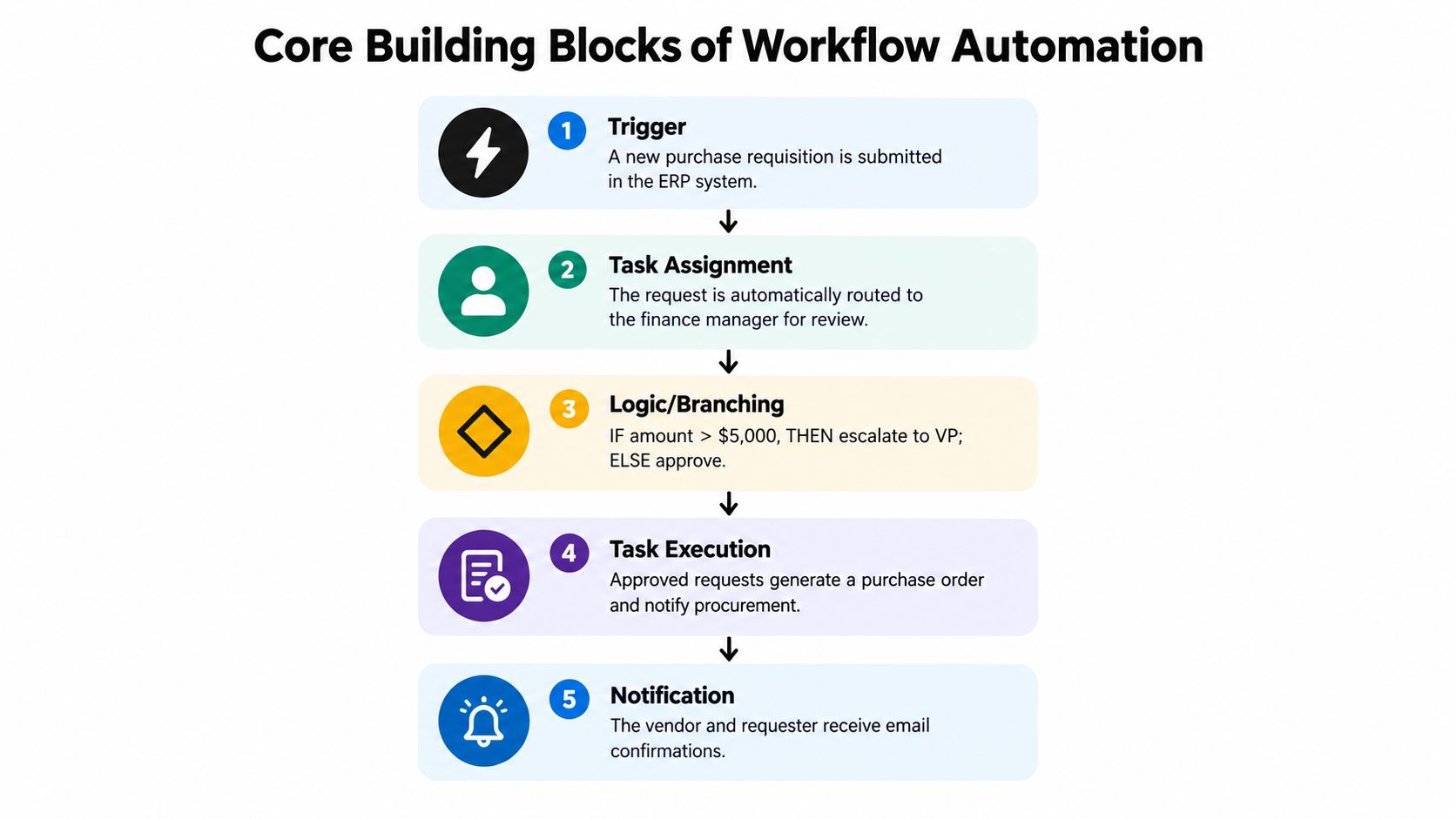
1. Triggers start the process
A trigger is the event that tells the system work is ready. It might be a purchase requisition submitted in an ERP, a CRM stage change, an inbound webhook, or a scheduled condition evaluated by an internal service.
For procurement, the trigger is simple: a new purchase requisition is submitted in the ERP system. The workflow should capture an identifier, requester, amount, department, vendor information, and any attached documentation. If the trigger contains too little context, every later step becomes harder to operate.
2. Integrations move usable data
Integrations connect the systems that participate in the process. The workflow may read the requisition from the ERP, look up the finance manager in an internal directory, send an approval request through a collaboration tool, and create a purchase order after approval.
Many builds become unreliable. APIs impose limits, fields use different names, and one system may represent a vendor as an object while another expects a plain identifier. In the procurement example, the integration maps the ERP's requester and cost-center fields into the approval service's expected structure, while preserving the original requisition ID for traceability.
3. Orchestration controls sequence and state
Orchestration is the control layer. It decides which action runs next, evaluates branches, retries transient failures, and prevents duplicate execution when a request is delivered twice.
A procurement workflow might apply a rule such as: if the amount exceeds the configured approval threshold, route the request to an additional finance authority; otherwise, continue to standard approval. The exact threshold belongs in the organization's policy configuration, not buried in code that nobody can review.
4. Human-in-the-loop checkpoints preserve authority
Some steps should stop and wait for a person. An approval system needs clear assignees, response deadlines, escalation paths, and a record of the decision. A notification alone isn't an approval control because it doesn't guarantee that anyone acted.
For procurement, the workflow routes the request to the finance manager, starts an SLA timer, escalates an overdue decision, and records the approver, timestamp, and outcome. The process keeps moving without turning a sensitive decision into an invisible automated action.
5. AI-enabled steps handle ambiguity
AI fits where inputs are difficult to structure or interpret. An LLM can classify an attached quote, summarize a vendor's terms, extract key fields from a document, or flag language that deserves review. Deterministic rules remain safer for policy gates, access permissions, duplicate prevention, and final system writes.
In the procurement example, an AI step can summarize unusual contract language and produce a risk note for the finance manager. The workflow then applies a deterministic gate that prevents purchase-order creation until the required human approval is recorded.
Rule-Based Automation Versus Agentic AI Workflows
Operations leaders shouldn't choose between rules and AI as if they were competing philosophies. They solve different classes of problems, and the strongest systems combine them deliberately.
Rule-based automation is deterministic. Given the same valid input, it follows the same path. That makes it appropriate for invoice routing, user provisioning, approval thresholds, status changes, and SLA escalations. It also makes testing, auditing, and rollback relatively straightforward.
Agentic AI workflows are probabilistic and goal-oriented. An agent can interpret an unstructured inbox, decide which internal tool to query, draft a response, or extract meaning from a messy document. This flexibility is useful when the input varies too much for a long list of fixed conditions.
| Dimension | Rule-Based Automation | Agentic AI Workflows |
|---|---|---|
| Input type | Structured fields and known events | Unstructured text, documents, and ambiguous requests |
| Decision style | Explicit conditions and fixed paths | Context-sensitive planning toward a defined goal |
| Strength | Reproducibility, auditability, and policy enforcement | Interpretation, summarization, and adaptive task selection |
| Main failure mode | Breaks when fields, formats, or process paths change | Produces inconsistent or incorrect actions without guardrails |
| Best control | Versioned rules, validation, retries, and approval gates | Tool restrictions, structured outputs, evaluations, and human review |
| Suitable output | Authorized system action | Recommendation, classification, draft, or bounded next step |
The handoff matters more than the label. An LLM might classify an incoming customer case and extract the account identifier. A rule-based stage can validate that identifier, check permissions, assign the case according to policy, and write the result to the operational system. Conversely, a deterministic gate can constrain an agent to approved tools and require a human approval before any sensitive action.
Rule-based systems struggle with highly variable input because every new variation demands another condition or exception path. Agentic systems struggle when a process requires strict compliance, exact reproducibility, or an irreversible action without review. A capable agent still needs an owner, an observable execution history, bounded permissions, and a clear failure queue.
For teams evaluating custom AI workflows, the portfolio agent example from Internal Systems illustrates the broader architectural question: the value isn't just in adding a model, but in placing model-driven work inside a controlled operational system.
Governance isn't a separate layer added after deployment. It defines what the workflow is allowed to do.
Business Benefits and ROI That Operations Teams Can Measure
The most defensible automation business case starts with the process dashboard, not a promise about artificial intelligence. Track cycle time, first-pass yield, exception volume, and the amount of employee time redirected toward judgment work. Those measures show whether orchestration improved the actual operating system or merely moved manual effort into a new queue.
Consider a standard accounts-receivable flow from quote to collection. A manual process may require someone to confirm the quote, prepare billing data, check payment terms, reconcile an account, and chase exceptions across systems. Orchestration can pass approved data through each stage, stop only when a rule or exception requires attention, and create a visible work item for the person responsible.
The requested planning benchmark for a standard AR flow is a 30% to 60% reduction in rework. Treat that as a target to validate through your own baseline, not as a guaranteed outcome. Measure rework by counting corrected records, repeated handoffs, or reopened tasks, then compare the same definition before and after the pilot.
| Process KPI | Baseline manual | Target after orchestration | How it is measured |
|---|---|---|---|
| Cycle time | Time from initial request to completed outcome | Shorter end-to-end elapsed time | Compare event timestamps across the process |
| First-pass yield | Work completed without correction or rerouting | Higher share of clean first executions | Count completed cases without rework |
| Exception volume | Cases requiring manual intervention | Fewer avoidable exceptions, with real risks still visible | Track exception records by cause and owner |
| Redirected capacity | Time spent transferring data and chasing status | More time available for judgment work | Compare logged operational effort by activity |
The evidence base supports evaluating more than labor savings. A systematic review of robotic process automation and intelligent automation describes direct benefits such as reduced human, financial, and time resources, along with indirect benefits including customer satisfaction, innovation, and business continuity. Its synthesis includes reported examples of 50% cost savings and thousands of person-hours saved per month in large deployments, but those examples shouldn't be copied into a small company's forecast without comparable scope and controls.
Build a financeable ROI model
Separate the economics into three lines:
- One-time build cost, including discovery, architecture, implementation, testing, and deployment.
- Ongoing license cost, including workflow platforms, model usage, monitoring, or integration services.
- Recurring maintenance hours, including rule changes, API updates, exception review, and model evaluation.
Then assign a financial value to the KPI movement. If cycle time falls but exception volume rises, the workflow hasn't created durable capacity. If rework falls and first-pass yield improves, the process is becoming more predictable.
Avoid pitching the first business case as headcount elimination. A better argument is that the team can absorb additional volume, improve response quality, or reduce leadership escalation without adding equivalent manual coordination. The real-estate lead automation example reflects this type of operational framing, where the workflow connects intake, routing, and follow-up rather than treating one automated action as the entire result.
Common Pitfalls and Risk Controls That Keep Automation Alive
Most automation programs don't fail because the first workflow can't run. They fail after launch, when an API changes, an exception appears outside the happy path, or the person who built the flow moves on. The team then discovers that nobody owns the process, the logs don't explain the failure, and manual workarounds have become the actual system.
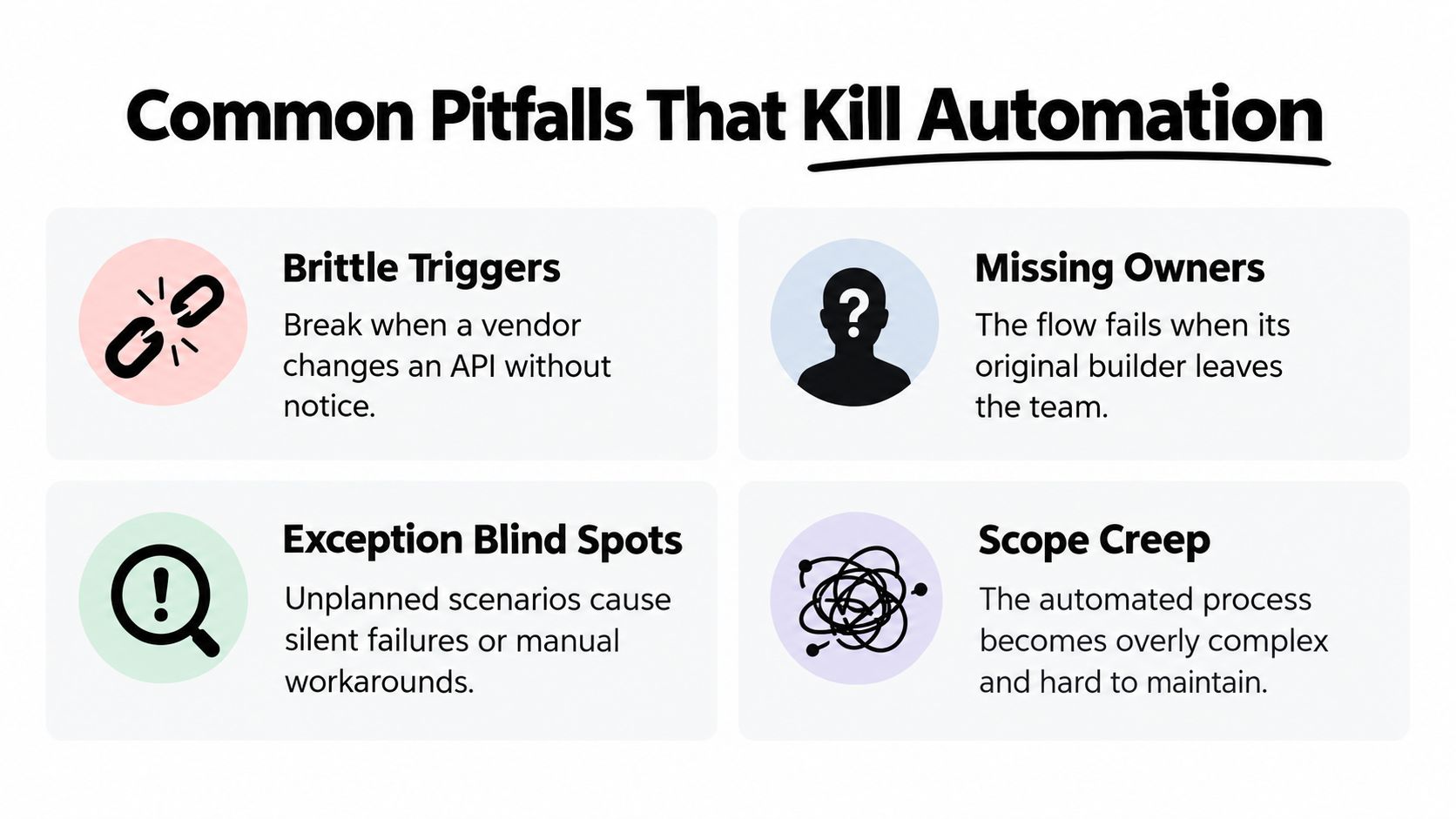
Four failure modes worth controlling
Brittle triggers break when a vendor changes an API, renames an event, alters a payload, or changes authentication behavior. A practical control is a trigger change-log reviewed regularly, with a test event and an alert when the expected schema changes.
Missing owners turn a workflow into orphaned infrastructure. Assign a named service owner who can approve changes, review failures, and coordinate with the software or vendor team. The owner doesn't need to write every line of code, but they must be accountable for the workflow's outcome.
Exception blind spots create silent operational debt. A failed payment sync shouldn't disappear into an application log. Send it to an exception queue with the business record, failure reason, retry state, assigned owner, and an SLA timer.
Scope creep makes a useful process too complex to maintain. Teams add every edge case before proving the core path, until nobody can explain the state machine. Keep the initial workflow bounded, record deferred scenarios, and add complexity only when the KPI or risk case justifies it.
A lightweight registry prevents shadow automations from spreading across disconnected tools. Record each workflow's purpose, trigger, systems, owner, data sensitivity, dependencies, escalation path, and retirement condition. That registry can live in an internal application or controlled documentation system, as long as someone maintains it.
A workflow without an owner is not automation. It's an undocumented dependency waiting for an incident.
Risk control isn't overhead added to slow delivery. It is the operating mechanism that keeps a workflow useful after the launch enthusiasm fades. Governance literature emphasizes process selection, lifecycle management, benefits measurement, technology integration, and governance as separate dimensions of successful automation, as described in this business process automation literature record. That matches what operations teams see in production: failures cluster at ownership, data, and system boundaries.
Build Versus Buy for Founder-Led and PE-Backed Teams
Build versus buy is usually framed as a technology preference. For operational teams, it's a process and risk decision. A founder-led company may need speed and a smaller tool footprint, while a PE-backed business may need repeatable unit economics, clean ownership, and evidence that a value-creation initiative will survive integration.
Score the process across four filters. Use 1 when the factor is simple, 2 when it has meaningful complications, and 3 when it is central to the decision. The total isn't a mathematical truth. It forces the team to expose assumptions before committing to a platform or custom build.
| Filter | Score 1 (Buy) | Score 2 (Hybrid) | Score 3 (Custom Build) |
|---|---|---|---|
| Process differentiation | Common process with standard requirements | Standard core with company-specific changes | Process creates a meaningful operating advantage |
| Integration depth | One primary system and standard connector | Several systems with manageable sync needs | Deep, bidirectional orchestration across core systems |
| Data sensitivity | Low-risk operational data | Some confidential or regulated information | Sensitive data, strict permissions, or detailed audit needs |
| Time-to-value | Immediate configuration matters most | Pilot first, then extend selectively | Durable capability matters more than fast setup |
Low scores generally favor buying or configuring a known platform. Mid-range scores favor a fixed-scope build around the highest-value gap, often with a managed integration for the standard pieces. High scores point toward a custom internal system with an accountable owner, explicit monitoring, and a delivery plan that includes handoff.
Founder-led teams should resist tool sprawl. A new platform may solve the visible task while creating another place to configure, monitor, and reconcile work. PE-backed teams should resist generic standardization that ignores operating differences between acquired companies. Clean data and clear process ownership matter more than having the same interface everywhere.
The build versus buy comparison for AI tooling is useful when the decision includes LLMs or agents, because the recurring cost isn't just the model. It also includes evaluation, permissions, tool access, observability, and change management.
A practical rule is simple: complex orchestration across three or more core systems deserves a diagnostic or audit before anyone signs a build or buy commitment. The architecture may be straightforward, or the team may be underestimating the data ownership problem.
Practical Next Steps and When to Run an Operations Diagnostic
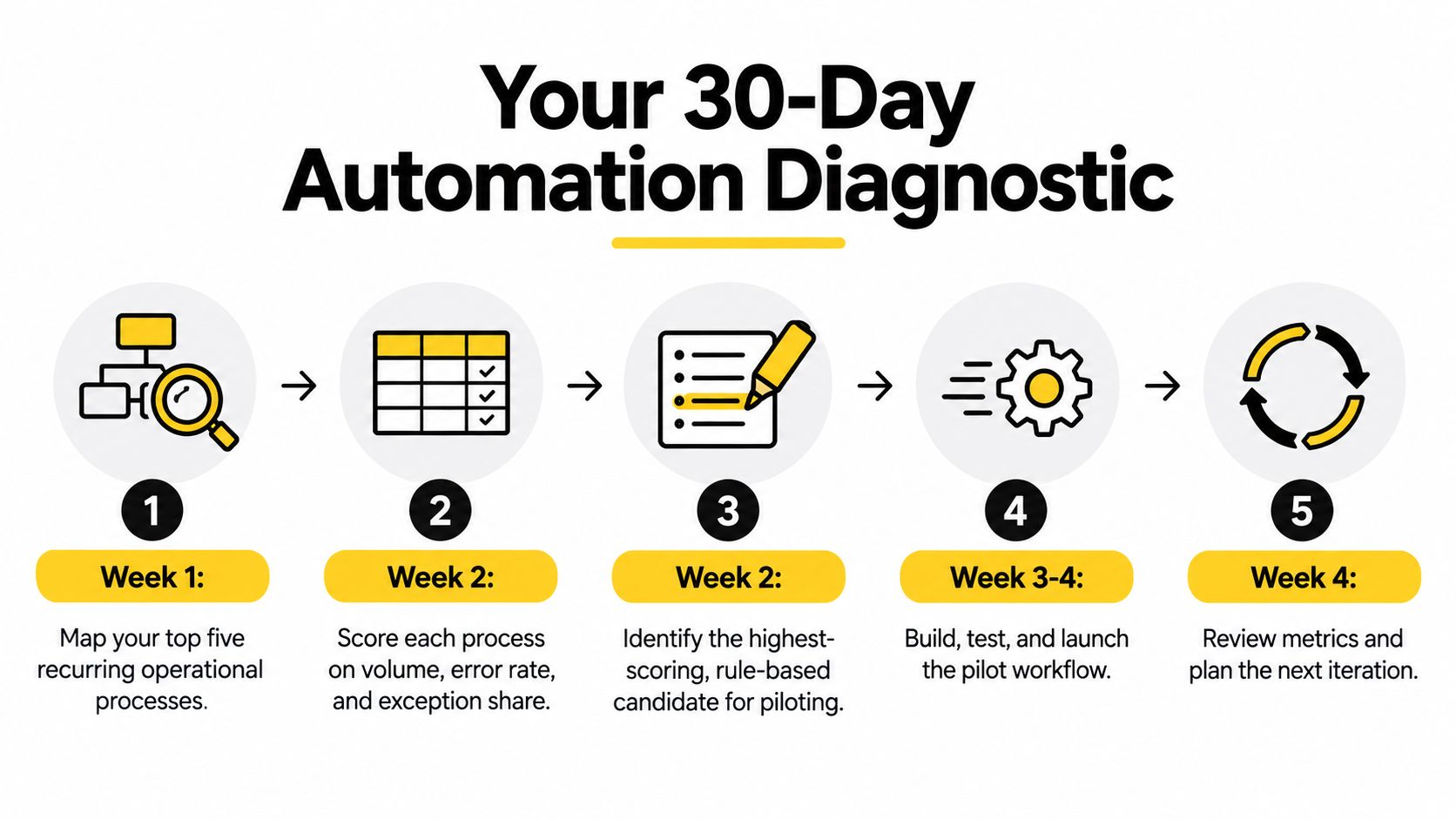
A disciplined automation program can start with a 30-day working plan. The point isn't to automate everything. It's to identify one repeatable process where the inputs are sufficiently clear, the outcome matters, and the team can measure whether the change worked.
Assess
Map the top five recurring operational processes. Include the systems involved, handoffs, approval points, common exceptions, and the person who currently keeps the process moving. Score each process on volume, error rate, and exception share. A high-volume workflow with clear rules is usually a stronger first candidate than a strategically important process full of ambiguous decisions.
Create two artifacts: a process map and an ROI baseline. The baseline doesn't need perfect historical data, but everyone should agree on how cycle time, rework, and exceptions are counted.
Pilot
Choose one rule-based flow before adding AI. Examples include routing a known request type, synchronizing approved records, or escalating an overdue approval. Build the smallest complete path, including failure handling and a human checkpoint, rather than automating only the happy-path action.
If an AI step is justified, contain it. Let an LLM classify or summarize incoming information, then pass its structured output into deterministic validation and approval stages. Don't give an agent broad write access before the team has tested its reliability and defined an exit path.
Instrument
Deploy a runbook with the workflow, its owner, dependencies, alert routes, and rollback procedure. Track the selected KPI, exception reasons, and manual interventions from the first production run. The system should make it easy to answer what happened, where it stopped, and who needs to act.
Scale
Scale only after the pilot has a stable owner, an observable execution history, and a defined decision about whether the result meets the exit criterion. The enterprise agentic automation roadmap recommends beginning with data assessment and a pilot agent, moving to governed multi-agent implementation, and then expanding enterprise orchestration. Its phased approach is a useful reminder that reliability should precede breadth.
Watch for conditions that justify an Operations Diagnostic instead of a light Audit: cross-team handoffs, multiple SaaS tools duplicating data, unclear systems of record, or post-deal integration pressure in a PE-backed rollup. An Audit can assess recurring workflows, rank ROI, document architecture, and recommend a build sequence. A Diagnostic is useful when leadership needs to identify the highest-value opportunities before deciding what deserves deeper analysis.
The output should lead directly to a fixed-price Build path where scope is clear, not to months of open-ended discovery. For a founder, the minimum checklist is short:
- One process owner named
- One KPI tracked
- One exit criterion defined
The technology should follow those decisions, not substitute for them.
Internal Systems designs custom software, integrations, monitored orchestrations, and AI-enabled workflows for operational teams that need more than disconnected automations. Start with the Internal Systems Operations Diagnostic to identify the highest-value workflow, clarify the architecture, and move from a measured opportunity to a shipped system.