Systems Integrator Services That Actually Work
Cut through the noise around systems integrator services. Learn what to integrate, what to delete, and how to measure real ROI for growth-stage firms.
Most advice about systems integrator services starts in the wrong place. It tells you to connect your CRM to your accounting platform, add an AI agent, or replace a fragile automation with cleaner middleware. That sounds practical, but it can leave the underlying operation untouched. You may end up moving bad data faster, approving the wrong work more efficiently, or automating a process nobody should still be doing.
A good integrator doesn't begin with, “Which tools need to connect?” They begin with, “Which workflow is worth preserving?” The answer may be a new integration, a custom internal system, an AI-assisted queue, or the deletion of an unnecessary handoff.
The commercial opportunity is substantial. One market estimate valued the global systems-integration services sector at USD 451.6 billion in 2024 and projected it to reach USD 847.5 billion by 2033, with a projected 6.88% CAGR from 2025 through 2033. That estimate includes infrastructure integration, enterprise applications, consulting, and lifecycle management, so it is broader than custom software development alone (IMARC's systems integration services market estimate). The size of the market doesn't make every project sensible. It makes disciplined selection more important.
Table of Contents
- Why Buyers Treat Systems Integrator Services as a Connector Problem
- Defining Systems Integrator Services in Plain Language
- Where Integration Creates ROI and Where It Burns Cash
- The Three Engagement Models and Their Timelines
- How to Choose an Integrator You Can Fire
- Three Real Workflows an Integrator Might Ship in 2026
- Your 90-Day Plan for an Honest Integration Project
Why Buyers Treat Systems Integrator Services as a Connector Problem
Buyers with a CRM, an ERP, a service platform, and an AI tool often assume the project is to make data travel between them. That framing gives vendors a technical scope quickly. It also lets operators preserve unnecessary approvals, duplicate records, and unclear ownership rules inside the workflow.
Start with the decision, not the connection. A system that copies a lead from HubSpot into a custom scoring queue earns its place when it helps a sales leader prioritize accounts, routes exceptions to the right person, and records why the recommendation was accepted or rejected. The same connection is vanity infrastructure when it only mirrors records that nobody reviews.
The highest-value output may be a redesigned workflow, a deleted handoff, or a narrower decision queue. Another connector is often the least valuable option.
McKinsey found that workflow redesign had the strongest relationship with EBIT impact among 25 organizational attributes, while only 21% of organizations using generative AI reported substantially redesigning at least some workflows (McKinsey's research on rewiring organizations for AI value). The operational lesson is direct: adding AI or integration without changing how work gets done preserves old habits at a higher cost.
AI governance belongs in that operating design. Define who can approve an automated action, which exceptions require review, what gets logged, and who can stop or reverse the workflow. Treat those controls as operating infrastructure, not paperwork added after launch.
The three decisions that matter
Answer these questions before selecting a provider:
- Is integration the right intervention? If the process is unstable, rarely repeated, or owned by nobody, connecting applications will make the confusion harder to see.
- What engagement shape fits the uncertainty? A diagnostic, an audit, and a fixed-price build solve different problems. Treating them as interchangeable creates vague scopes and weak handoffs.
- Can your team run the result without the vendor? Someone on your side must own the code, decisions, alerts, documentation, and rollback process. Otherwise, you have bought dependency instead of capability.
Practical rule: An integration earns its place when it shortens a decision, removes a recurring handoff, or makes a high-value workflow safer to operate.
The strongest systems integrator may recommend deleting a form, combining two approval paths, or assigning one accountable owner before writing an API. That is not a smaller engagement. It is better operations.
Defining Systems Integrator Services in Plain Language
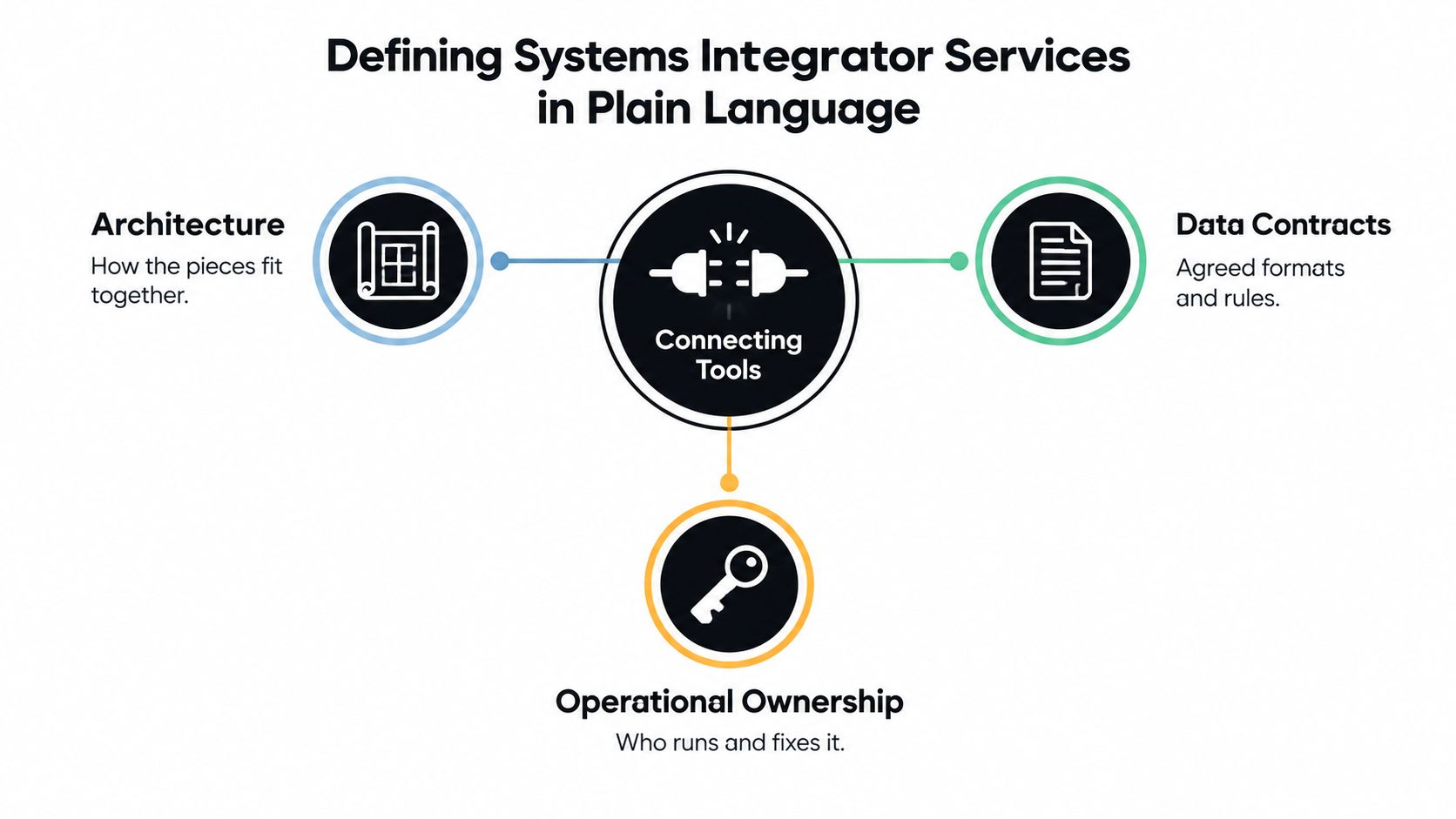
In plain English, a systems integrator connects software, data, and operational decisions so people don't have to keep moving information by hand. That definition is incomplete, though. A reliable service must also decide what data means, what happens when a transfer fails, who can approve an action, and who fixes the system after launch.
NIST defines interoperability as the capability of functional units to communicate, execute programs, or transfer data under specified conditions. Its guidance also covers data curation activities such as preprocessing, classification, reduction, and format transformation (NIST's systems integration guidance). In practical terms, an integration needs more than a working API. It needs data contracts, accepted formats, transformation rules, identity controls, error states, monitoring, and operational ownership.
Six services that appear in serious engagements
Existing-tool integration connects platforms such as a CRM, accounting application, ticketing system, and internal admin panel. The useful outcome isn't a collection of synchronized records. It's a shared workflow, often with bidirectional updates, that lets teams act from consistent information.
Automation handles repeatable tasks and approvals. A custom service might receive a completed order, validate required fields, create an internal work item, and alert a reviewer only when a rule fails. The automation should expose its assumptions instead of hiding them inside an opaque flow.
AI-enabled workflows add classification, summarization, routing, retrieval, or decision support to a defined queue. A model shouldn't sit beside the business process as a novelty chatbot. It should receive approved context, produce a traceable output, and trigger only the actions it is authorized to take.
Operational audits examine how work moves. The output should identify rework, unclear ownership, exception volume, and decision delays, then rank the workflows worth changing.
Custom software development creates the missing internal surface, such as an operations dashboard, review queue, administrative panel, or case-management application. Build custom software when commercial tools force the team into workarounds that affect important decisions.
Orchestration coordinates multiple steps across applications and people. Think of it as a conductor that knows what must happen next, which events are safe to automate, and when a human must take over.
For a useful plain-language perspective on how governance sits beside connectors, review data governance on Croft. The distinction matters because an integrator is not just a software vendor selling a product, an agency delivering a front end, or a staff-augmentation shop supplying developers. The integrator owns the relationship between architecture, workflow, data behavior, and operational responsibility.
Where Integration Creates ROI and Where It Burns Cash
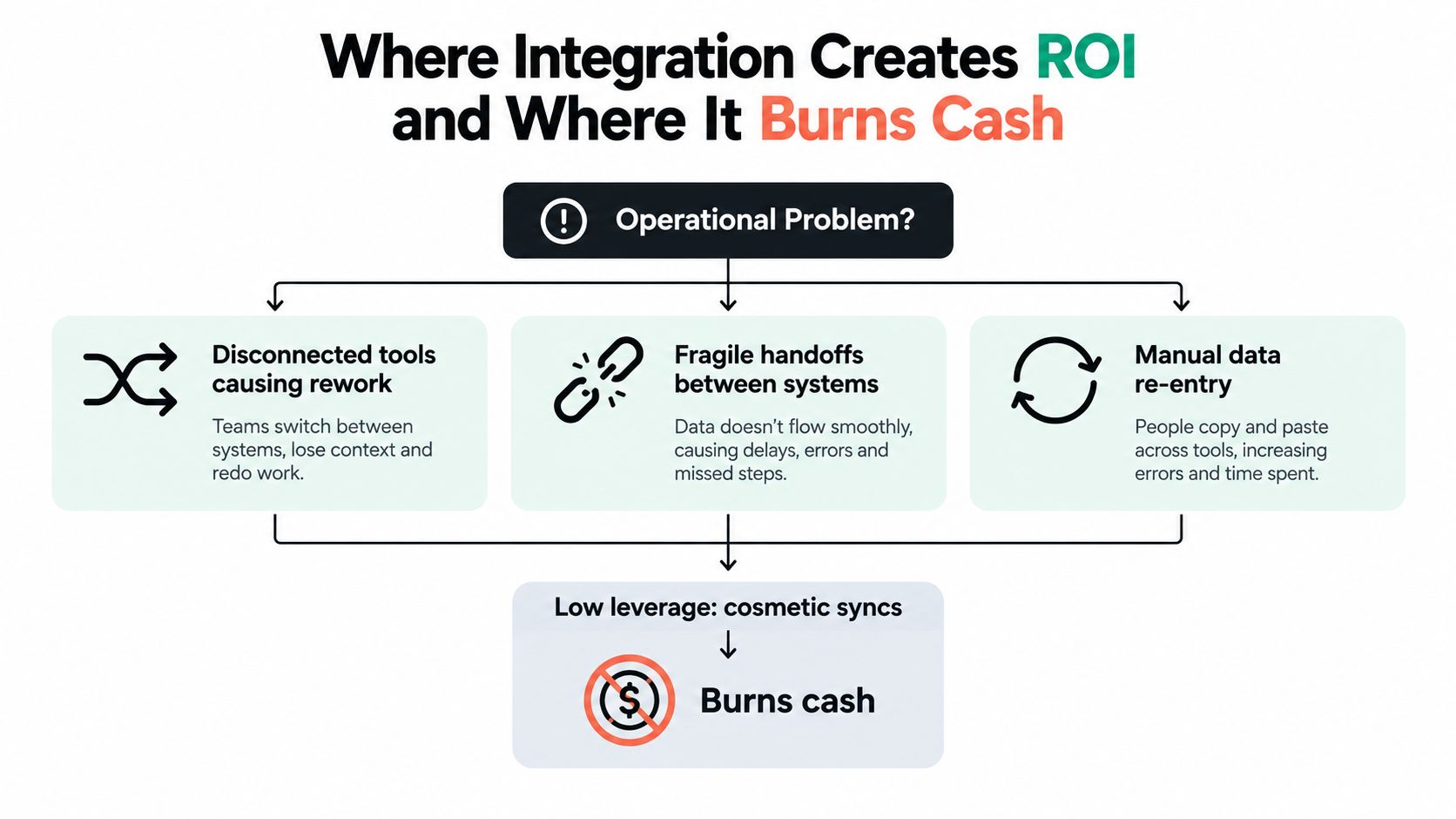
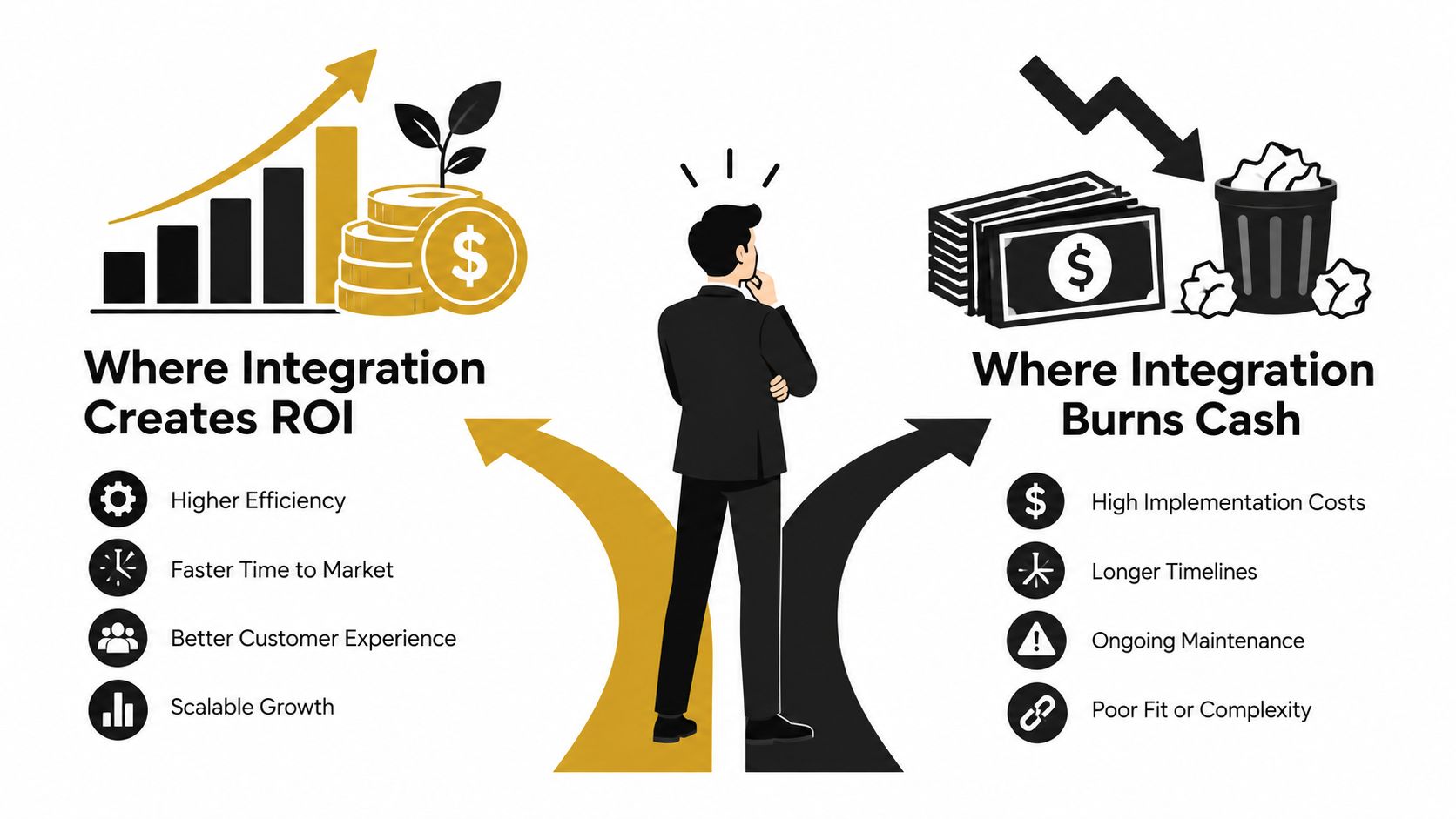
Integration creates value when it removes a repeated constraint. Three patterns usually deserve serious attention: disconnected tools that force rework, fragile handoffs that need constant supervision, and leadership bottlenecks where one person must interpret information before the team can act.
The first pattern is visible in duplicate entry. A sales representative updates a deal in the CRM, operations rekeys the information into an internal system, and finance later checks the same details before invoicing. A well-designed custom workflow can validate the record once, distribute approved fields, and send only exceptions to a human.
The second pattern is less obvious. An automation may appear to work while dropping edge cases, failing after an application change, or creating duplicate work items. Monitoring, retry rules, reconciliation, and clear ownership matter more than the initial connection.
The third pattern involves decisions rather than transfers. A founder may review every inbound lead, an insurance manager may read every claim summary, or a private-equity operating partner may assemble portfolio updates manually. AI can help, but only when the workflow defines evidence, thresholds, human review, and the final metric.
Use the build, buy, or delete test
Before approving a statement of work, classify the workflow.
- Delete it when it exists only because two teams lack a shared operating rule.
- Consolidate it when several tools capture the same decision with conflicting fields.
- Buy capability when a stable, well-supported product already handles the requirement without forcing critical workarounds.
- Build custom software when the workflow is strategically important, specific to your operation, and poorly served by existing tools.
- Integrate it when the process is stable, repeated, and benefits from reliable movement between systems.
Record a baseline before development begins. Track cycle time, rework, rejected records, escalation volume, synchronization delay, reconciliation variance, and recovery time after a failure. These measures tell you whether the project changed operations or merely produced a more polished architecture diagram.
Consider a CRM-to-accounting sync. If sales uses inconsistent deal stages, finance has separate approval rules, and nobody owns the handoff, the sync will encode those contradictions. The team will spend more time resolving automated mismatches, not less. A short audit that standardizes the workflow may create more value than a technically impressive connector.
A custom lead-scoring workflow can provide a useful pattern for connecting business data to a measurable decision. See this real-time lead-scoring project example for the type of operational surface such a build can require.
This video offers another visual explanation of the decision between useful integration and costly complexity:
The Three Engagement Models and Their Timelines
Buyers often ask for “an integration project” before they know whether the workflow is stable enough to build. That mistake turns uncertainty into scope creep. The commercial shape should match what you know.
A diagnostic is for a narrow question. You want to identify promising opportunities, reject an obvious bad idea, or decide whether a larger audit is justified. A brief online intake can work when the operational pain is clear and the decision-maker can provide direct context.
An audit is the right entry point when several workflows compete for attention. A fixed-price audit lasting one to two weeks can map recurring work, rank opportunities, document architecture, and recommend a build sequence. It should produce decisions, not a generic list of observations.
A fixed-price build makes sense after the workflow and acceptance criteria are defined. A typical custom system build may run 60 to 90 or more days, depending on scope and handoff requirements. The price should reflect a defined outcome, not a pile of hours. For a structured comparison of whether a custom build is warranted, review this build-versus-buy analysis for AI tooling.
Comparing diagnostic, audit, and build engagements
| Engagement | Output | Duration | Price Model | Best For |
|---|---|---|---|---|
| Diagnostic | Ranked opportunities and one clear avoid decision | Brief online intake | Fixed or low-cost entry engagement | Founder-led teams with a visible bottleneck |
| Audit | Workflow map, ROI ranking, architecture, and build sequence | 1–2 weeks | Fixed price | COOs and Heads of Operations choosing among competing priorities |
| Custom build | Working internal software, integrations, AI workflow, documentation, and handoff | 60–90+ days | Fixed price after audit | Teams with a defined process and accountable owner |
Do not use a build to discover the problem. Do not commission an audit when the workflow, owner, decision rules, and acceptance test are already clear. The right moment to move from diagnostic to audit is when you need evidence across several processes. Move from audit to build when one workflow has a measurable constraint, an available owner, and a credible operating design.
How to Choose an Integrator You Can Fire
Choose an integrator by the system your team can run without them, not by the polish of the sales presentation. Your team should own the repository, deployment configuration, workflow definitions, prompts, model settings, documentation, and monitoring accounts when the engagement ends. If ownership remains unclear, dependency is already part of the design.
Ask which components run without vendor access. Ask how a new employee learns the system, how an engineer replaces a component, and who can approve changes. The best integrator leaves your team with control, not a permanent support obligation.
Questions that reveal who owns the system after launch
Who approves automation? Your provider should define an approval boundary with you. A lead-ranking agent can classify prospects and recommend outreach, while a human approves high-value messages. An accounts-payable agent can prepare a payment batch, while a human reviews new vendors, duplicate matches, or payments above an internal threshold.
How are AI decisions logged? A serious workflow records the input context, model or prompt version, output, confidence or uncertainty signal, source evidence, reviewer action, final disposition, and reason for an override. NIST's Generative AI risk-management guidance recommends lifecycle oversight and documentation when humans or other systems override an AI decision. Treat that record as operating infrastructure, not paperwork added after launch.
What happens when the system is wrong? Require alerts, fallback procedures, manual queues, retry behavior, and rollback instructions. The provider should demonstrate failure handling before launch. A workflow without a recovery path is an incident waiting to happen.
What happens at handoff? Demand runbooks, architecture diagrams, data mappings, test cases, access details, and a named internal owner. Documentation must explain how to change a rule, inspect a failed run, and recover from a failed deployment. If the handoff depends on a vendor expert remembering undocumented steps, you do not own the system.
Red flags worth treating as exit signals
Walk away from account-manager-only communication when the people making technical decisions are inaccessible. Be cautious with proprietary platforms that trap your data or prevent another engineer from maintaining the workflow. Hourly pricing without an explicit outcome makes useful delivery hard to distinguish from prolonged discovery.
Reject promises of autonomous AI that omit human review, audit logs, retention controls, model changes, and authority limits. EY's survey of 975 C-suite leaders across 21 countries found that 99% had integrated AI across most or all initiatives or were actively doing so. 71% reported moderate-to-strong controls against threats such as unauthorized access, corruption, or theft, while 51% said governance frameworks remained challenging and 50% were actively investing in governance (EY's 2025 AI adoption and governance survey). Governance belongs in the operating design: approval rights, logs, retention, rollback, and ownership should be specified before deployment.
Three Real Workflows an Integrator Might Ship in 2026
The most useful AI workflows are narrow, connected, and reviewable. They don't attempt to replace an entire department. They take a defined queue, gather approved context, make a bounded recommendation, and leave a reliable record.
IBM's 2024 survey of 5,000 executives found that organizations were using generative AI in customer service at 70%, IT at 65%, and product development at 65%, with 77% considering the technology market-ready, up from 36% in 2023 (IBM's survey on scaling generative AI). Those adoption levels make operational design more important, not less. Teams need workflows that can be audited and maintained, not isolated demonstrations.

Lead scoring for a founder-led B2B firm
Before the build, the founder reads inbound forms, checks the CRM, searches old proposals, and decides which prospects deserve a response. Salespeople wait for that judgment, while the organization loses the reasoning behind each decision.
The integrator connects the form, CRM, account history, enrichment sources, and sales queue. An LLM summarizes the account context and proposes a score using approved criteria such as fit, urgency, buying signal, and missing information. It doesn't send an offer or reject a prospect automatically. The founder or sales lead reviews uncertain cases and can override the recommendation.
Track qualified-lead rate, review time, conversion rate, and revenue contribution against a pre-launch baseline. McKinsey found that 55% of respondents in its 2023 global survey said their organizations had adopted AI, but only 23% said at least 5% of organizational EBIT was attributable to AI use (McKinsey's 2023 State of AI survey). High usage isn't proof of value. Downstream commercial outcomes are.
Claims triage for an insurance operation
Claims arrive through several channels and require staff to gather policy details, classify the case, identify missing documents, and route serious matters. The custom workflow retrieves approved policy context, extracts relevant facts, classifies the claim, and creates a review record with source evidence.
Routine, high-confidence cases can move through a defined path. Ambiguous cases go to a claims specialist, while high-impact decisions remain blocked until an authorized employee approves them. The system logs the model output, uncertainty signal, human override, final disposition, and override reason. The outcome metric is not “AI usage.” It is reduced review time without an unacceptable increase in misrouting or escalation.
A practical implementation pattern for connected lead workflows is described in this real-estate lead automation project. The same principle applies to claims: integrate the model into an accountable queue rather than placing a chatbot beside it.
Portfolio reporting for a private-equity operating partner
The operating partner spends each reporting cycle requesting updates, reconciling definitions, and assembling a narrative from portfolio-company systems. A custom reporting service pulls approved operating data, validates required fields, identifies changes from the prior period, and drafts a concise review pack.
The AI layer can summarize variance explanations and flag missing evidence, but it shouldn't invent a management conclusion. Each portfolio company retains responsibility for source data, while the operating partner controls the review and approval step. Track reporting cycle time, unresolved data exceptions, and the time required to reach the next intervention decision.
Your 90-Day Plan for an Honest Integration Project
A credible project can start with four phases. The calendar matters less than the decision gates, but a 90-day plan creates enough structure to prevent endless discovery and premature automation.
Days 1 through 15 for the baseline
Choose one workflow with a named owner. Document the current steps, systems, decisions, exceptions, handoffs, and failure points. Record cycle time, rework, review effort, rejected records, and escalation volume. If the team can't agree on what the workflow is, stop and run an audit.
Days 16 through 30 for the redesign
Decide what to delete, consolidate, buy, build, and integrate. Define the target workflow before selecting connectors or models. Write data contracts, authority limits, approval rules, audit requirements, and the metric that will determine success.
The first gate is simple: does the redesigned process shorten a decision or remove meaningful recurring work? If it only moves data between systems, reject the build.
Days 31 through 75 for delivery
Build the smallest useful operational surface. That may include a custom queue, an API layer, an AI classifier, a dashboard, or bidirectional synchronization. Test normal cases, missing data, duplicates, model uncertainty, permission failures, and downstream outages. Add alerts and manual fallback paths before release.
The second gate asks whether the client team can see what the system did and why. If an operator can't review, override, or recover from a decision, the workflow isn't ready.
Days 76 through 90 for transfer
Run the system with the internal owner. Deliver code, documentation, data mappings, test cases, access details, monitoring instructions, and rollback procedures. Have the client team change a rule, investigate an exception, and restore a failed process without relying on the vendor.
Two failure modes should stop the project early. The first is integrating a process that should have been deleted. The second is accepting a build the client team cannot operate after handoff. Keep asking one question throughout: does this workflow shorten a decision, or does it only move data?
Internal Systems designs custom software, system integrations, and AI-enabled workflows for operational teams that need to replace manual cross-tool work with dependable internal systems. If you need to identify the right workflow, audit competing opportunities, or deliver a fixed-price build with code and documentation your team can own, visit Internal Systems.