System Integration Solutions That Unify Operations
Learn system integration solutions — patterns, ROI, architectures, AI workflows and a roadmap to connect CRM, billing and ERP without fragile fixes.
Your CRM shows a promising deal. Billing still waits for someone to create the invoice. The ERP has a different customer record, analytics lags behind the latest activity, and an operations manager spends part of the afternoon checking whether each handoff happened. Everyone is using software, yet the business still depends on people moving information from one screen to another.
That's the operational gap system integration solutions are meant to close. The useful question isn't whether two tools can connect. It's whether your custom software, automation, and AI workflows can move work forward reliably, preserve data quality, and give the right people a clear operating view. For growth-stage teams, that distinction separates a connected patchwork from a dependable internal system.
Table of Contents
- Why Disconnected Tools Stall Growth Stage Operations
- What System Integration Solutions Actually Do
- Core Integration Patterns and When to Use Each
- Business Benefits and ROI That Operations Leaders Can Measure
- Typical Integrations and AI Enabled Workflows in Practice
- Implementation Roadmap From Diagnosis to Handoff
- Pitfalls That Break Integrations and How to Avoid Them
Why Disconnected Tools Stall Growth Stage Operations
A founder-led company often reaches the same point after a period of successful growth. Sales adopts a CRM, finance adds billing software, operations introduces an ERP, and leadership wants dashboards that combine everything. Each choice makes sense in isolation. The trouble begins when a closed deal must become an invoice, an invoice must update finance records, and the resulting information must appear in reporting without manual intervention.
At first, a person handles the gaps. A sales coordinator copies a customer name into billing. Someone in finance checks the ERP before approving a payment. An analyst cleans exports before preparing a report. These actions feel small, but they create a process that depends on memory, timing, and repeated context switching.
Practical rule: If a workflow requires people to repeatedly transfer the same information between systems, treat that transfer as an integration candidate, not as permanent administration.
Point tools and no-code patches can help a team move quickly, but they often struggle when the workflow becomes business-critical. A connector may update one record but not the related records. A field change in one application can quietly break a downstream automation. An AI assistant may produce a useful summary while leaving the record, approval, or notification unchanged.
The result is an organization with software everywhere but no single working surface. Teams ask which system is correct, who last edited the record, and whether an automation completed. Leaders then add more checks, which increases the manual workload the original tools were supposed to remove.
The operating problem behind the technical problem
Integration spending has grown into a major enterprise category. The global system integration market was valued at USD 421.4 billion in 2025 and is projected to reach USD 1,228.6 billion by 2033, implying a 14.8% CAGR from 2026 to 2033, according to Grand View Research's system integration market analysis. The same source estimates the market at USD 467.0 billion in 2026, an increase of more than USD 45 billion in one year.
For an operations leader, the significance isn't the market size alone. It signals that integration has moved beyond a narrow IT concern. Custom software and connected workflows now support cloud migration, automation, reporting, and coordinated decisions across the business.
The practical path starts with diagnosis. Map where work enters, where it changes hands, where people retype it, and where an AI model could assist without owning a critical decision. Then design the smallest reliable operating surface that removes the highest-cost handoffs first.
What System Integration Solutions Actually Do
Think of integration as a universal adapter for business software. A travel adapter doesn't turn every appliance into the same device. It lets devices with different plugs work safely with the available power source. System integration solutions perform a similar function for applications, data, and workflows.
A CRM stores a customer in one format. Billing uses another. An ERP may require additional fields, while an analytics platform needs structured events or transformed records. Integration software and custom services translate those differences, move the relevant information, and coordinate what should happen next.
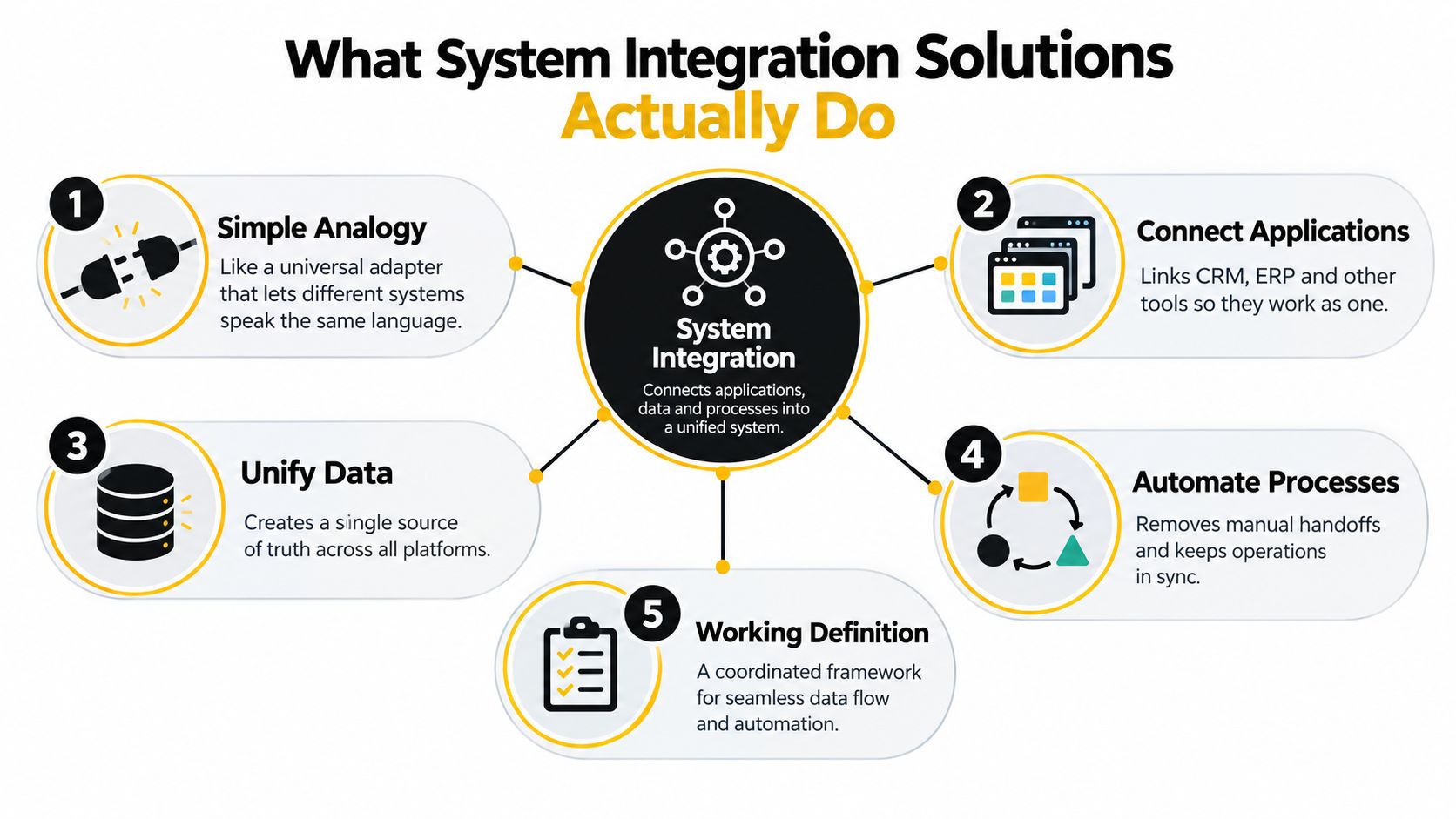
Start with the outcome, then inspect the mechanism:
- Connect applications. A CRM event can trigger billing, customer onboarding, or an internal task without someone exporting a file.
- Unify data. The integration layer defines how customer, deal, invoice, or policy information maps between systems.
- Coordinate workflows. A process can wait for approval, retry a failed request, alert an owner, and record the result.
- Add custom logic. Custom software can enforce business rules that generic connectors don't understand.
- Support AI safely. An AI agent can classify, summarize, or route information while deterministic software controls the surrounding handoffs.
A superficial connection might export a CSV from the CRM once a day. A reliable integration may create or update the billing record, return the invoice identifier to the CRM, notify the account owner if validation fails, and retain an audit trail. Both move data, but only one supports an operational process.
Integration isn't “making tools talk.” It's designing how work, data, errors, and ownership move across tools.
Enterprise integration has developed through several stages. One account traces an early major effort to the 1960s, when the U.S. transportation industry adopted shared formats so invoices, manifests, and purchase orders could be exchanged electronically instead of retyped at each handoff, as described in Fortune Business Insights' system integration overview. Later, Enterprise Application Integration middleware used a hub-and-spoke model, with adapters connecting applications to a central hub that translated formats and routed messages.
By the 2010s, the same source describes SaaS as the default and cloud as the standard environment for integrations. Modern orchestration extends the earlier goal of interoperability with reusable APIs, event handling, monitoring, identity controls, and AI workflow governance.
Core Integration Patterns and When to Use Each
No single pattern solves every integration problem. The right choice depends on whether a workflow needs immediate updates, scheduled analysis, high-volume transfer, flexible routing, or controlled two-way changes.
A practical pattern comparison
| Pattern | Best For | Trade-off to Watch |
|---|---|---|
| APIs and unified API layers | Real-time actions such as updating a CRM after a lead qualification decision | Poorly governed APIs can multiply dependencies and expose sensitive operations |
| iPaaS | Standard connections across common SaaS applications | Convenience can limit custom logic, testing depth, and control over unusual workflows |
| ETL and ELT | Moving and transforming data for analytics or model preparation | Batch movement may leave operational users working with stale information |
| Event-driven messaging | Decoupled processes such as order, payment, or status events | Teams must design for retries, duplicate events, ordering, and observability |
| Bidirectional sync | Keeping related records aligned across systems that both need to write updates | Conflicting edits, ownership rules, and loop prevention require deliberate design |
APIs and unified API layers work well when an action must happen close to the moment that an event occurs. For example, a custom lead-scoring service can receive approved CRM data, return a score and explanation, and update the lead record. A unified API layer can standardize authentication, validation, versioning, and monitoring instead of forcing each application to maintain a separate bespoke interface.
A good example is a real-time lead workflow that combines CRM activity, firmographic data, and an AI classification step. The real-time lead scoring project example illustrates the kind of custom workflow where integration and decision support need to operate together.
Match the pattern to the failure you can tolerate
Use iPaaS when the workflow is conventional and the team values speed of configuration. Use ETL or ELT when the destination is an analytical environment and a delayed refresh is acceptable. Use event-driven messaging when one event should trigger several independent consumers without tightly coupling every application.
Choose bidirectional sync cautiously. It's useful when sales needs billing status and finance needs commercial context, but it becomes fragile when both systems can change the same field without clear ownership. Define the system of record for each field, then decide how conflicts are rejected, resolved, or escalated.
The engineering objective is not to eliminate every interface. It's to replace uncontrolled point-to-point dependencies with reusable services, explicit data contracts, and visible failure handling. One research article reports that API-led connectivity produced a 47% reduction in integration development time, a 39% decrease in maintenance costs, a 58% improvement in interoperability, and a 43% reduction in integration-related incidents, as documented in the published API-led connectivity research. Those figures are best treated as a benchmark from that research, not a promise for every implementation.
Business Benefits and ROI That Operations Leaders Can Measure
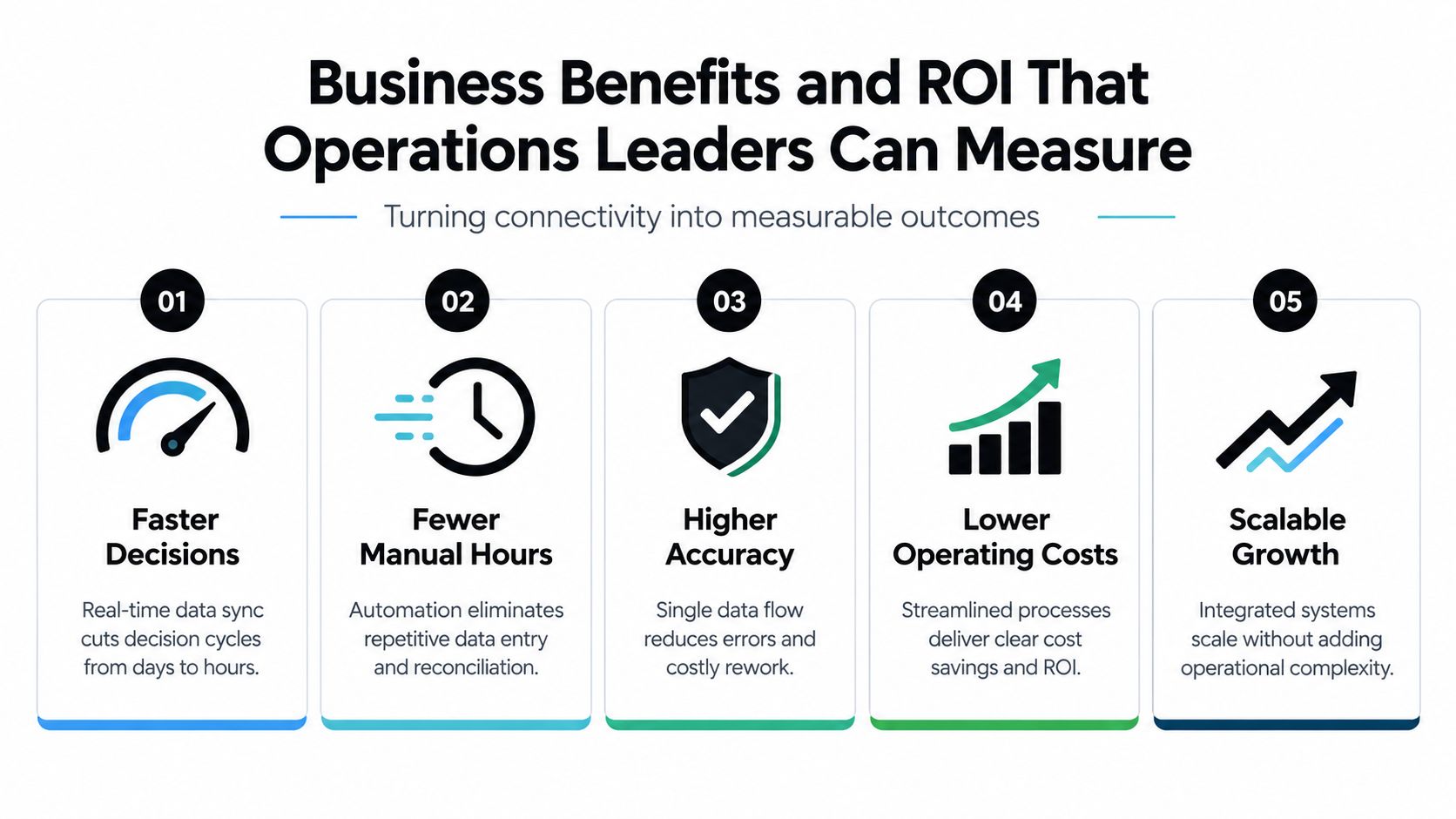
Operations leaders shouldn't approve an integration because it sounds modern. They should approve it when the workflow removes recurring effort, shortens a decision cycle, reduces rework, or lowers the likelihood of an expensive failure.
Begin with the recurring handoff. Identify who copies the information, how often the activity occurs, what happens when the value is wrong, and what decision remains blocked until the transfer finishes. This produces a clearer ROI case than counting connected applications.
SAPinsider found that only one-fifth of organizations have fully integrated systems with real-time data flow. The same research reports that 42% still rely on manual processes in some form and 40% say most systems are integrated while manual processes remain, according to SAPinsider's enterprise integration research report. Separate field research reported teams losing up to 15 hours per week, or more than 780 hours per year, on manual record updates between tools, as summarized in the verified research data.
Build an ROI case around operational evidence
Track the hours spent on transfer and reconciliation, the number of exceptions requiring review, the time between an event and a decision, and the consequences of incorrect or missing data. Then compare those costs with the build, monitoring, hosting, and ownership requirements of the proposed system.
A unified API architecture can create measurable technical improvements that support business outcomes. A published case-based analysis reports average API response times improving from 250 ms to 85 ms and uptime rising from 99.5% to 99.99% after implementation. It also reports a 65% reduction in integration project delivery timelines and a 47% increase in developer productivity, as described in the case-based API management analysis.
Those measures matter when a delayed response blocks a customer-facing workflow or when an unavailable service forces staff into a manual fallback. They don't replace business metrics, but they help explain why architecture quality affects operating cost.
Prioritize a build when it removes a repeated handoff, supports a high-value decision, or prevents a known operational risk. Consider the build-versus-buy comparison for AI tooling when an AI component is part of the proposed solution. The decision should account for data access, governance, workflow ownership, and the cost of maintaining the tool after launch.
Typical Integrations and AI Enabled Workflows in Practice
A useful system map follows the work rather than the org chart. A lead enters the CRM, a qualified opportunity becomes a billing event, the ERP records the financial and operational state, analytics combines the resulting data, and custom software coordinates the exceptions.
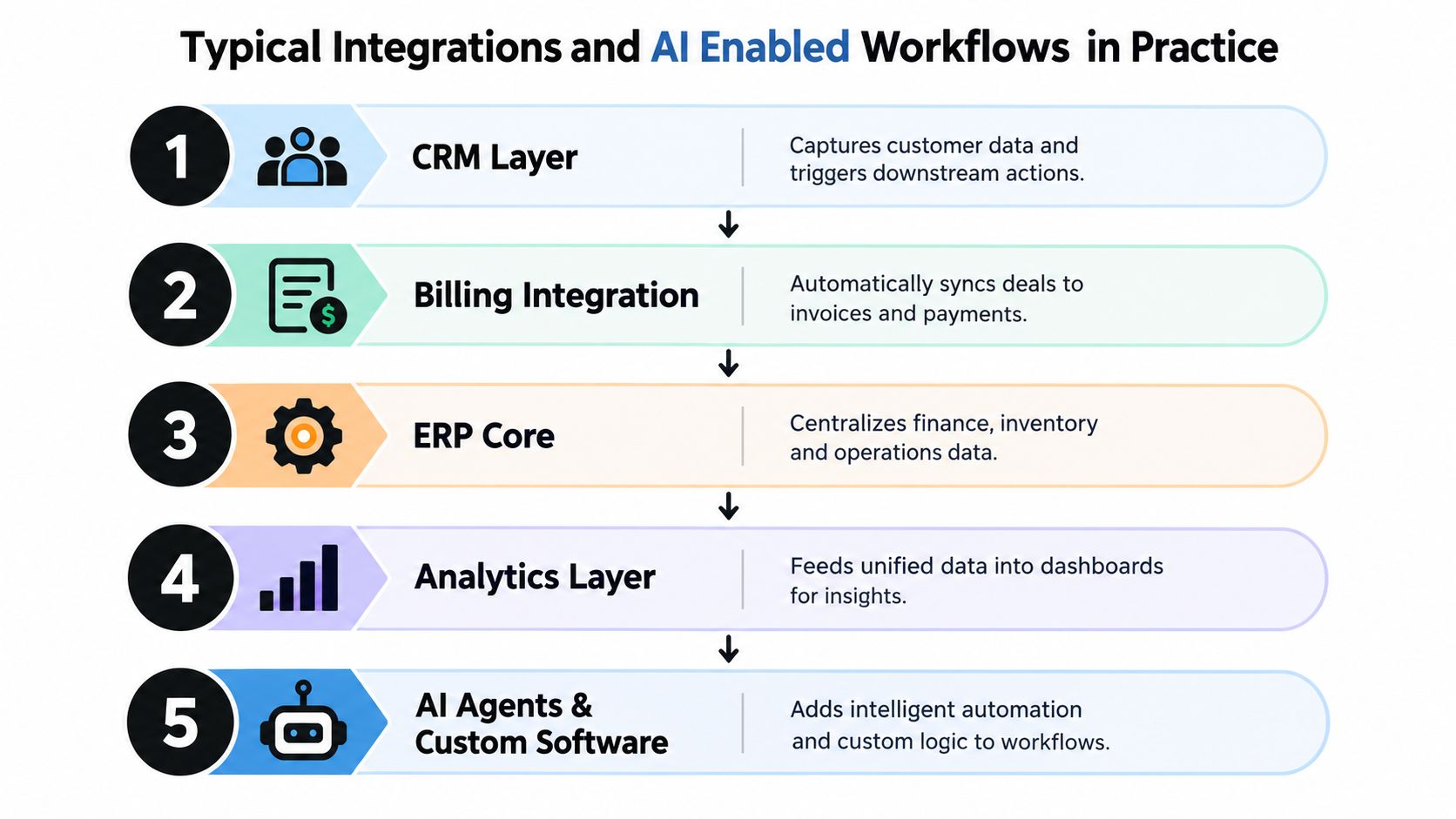
A practical workflow might look like this:
- CRM to billing: When an approved deal reaches the correct stage, custom software validates the customer and contract fields, creates the invoice workflow, and returns the billing status to the CRM.
- Billing to ERP: Payment and invoice events update the ERP, where finance can review exceptions without asking sales to confirm the latest commercial state.
- ERP to analytics: Structured events feed operational dashboards so leaders can see pipeline, billing, and delivery information in one decision surface.
- AI for classification: An AI agent classifies an inbound request, identifies its likely queue, and proposes a route. Deterministic automation creates the task and records the decision.
- AI for summarization: A support or account-risk agent summarizes sanitized ticket or account information, while permissions and approval rules control what happens afterward.
AI should usually occupy a bounded step, not control the entire workflow. A 2026 workflow report says AI is the largest single step category in workflows but still represents only 18% of workflow steps, according to Zapier's Q2 2026 workflow report. That supports a practical design: use AI for lead triage, risk summarization, or delay prediction, and use deterministic software for notifications, record updates, approvals, and handoffs.
Managed file transfer also connects closely with automation. A 2026 industry report says 90% of respondents integrate managed file transfer with automation, as reported in Stonebranch's Global State of IT Automation report. An invoice intake process can use this approach to move a file into a document service, trigger extraction, route approval, and archive the result without repeated uploads.
Security must be designed before an LLM reaches internal systems. Maintain an inventory of every model, plugin, and agent, classify access as sanctioned, tolerated, or restricted, and review permissions whenever capabilities or integrations change, following the guidance in Cyberhaven's enterprise LLM security checklist. A production deployment guide also recommends TLS 1.3 and AES-256 encryption, private endpoints where available, rate limiting, input validation, output filtering, and monitoring, as outlined in this enterprise LLM integration guide.
An operations dashboard can make these flows visible. The insurance operations dashboard project represents the type of custom software that brings workflow status, exceptions, and decision information into one working surface.
Implementation Roadmap From Diagnosis to Handoff
A reliable implementation starts before anyone chooses a connector or model. The first task is to identify the operational workflow that deserves intervention and define what success looks like for the people who use it.
Diagnosis
Map the current process from trigger to completed outcome. Record each application, human handoff, decision, exception, and manual update. Rank opportunities by recurring effort, decision value, error exposure, and technical feasibility.
A useful diagnostic should identify three highest-ROI builds and one to avoid, rather than producing a long catalog of possible improvements. The build to avoid may have unclear ownership, unstable source data, or too little recurring value to justify monitoring.
Architecture
Define the system of record for each important field. Choose the integration pattern, data contracts, authentication model, retry behavior, audit requirements, and alert ownership. Decide where AI adds useful judgment and where deterministic rules should remain in control.
Scope clarity should determine pricing. A fixed-price build makes sense after requirements, dependencies, and acceptance criteria are understood. When those details remain uncertain, paid discovery is safer than pretending the scope is fixed.
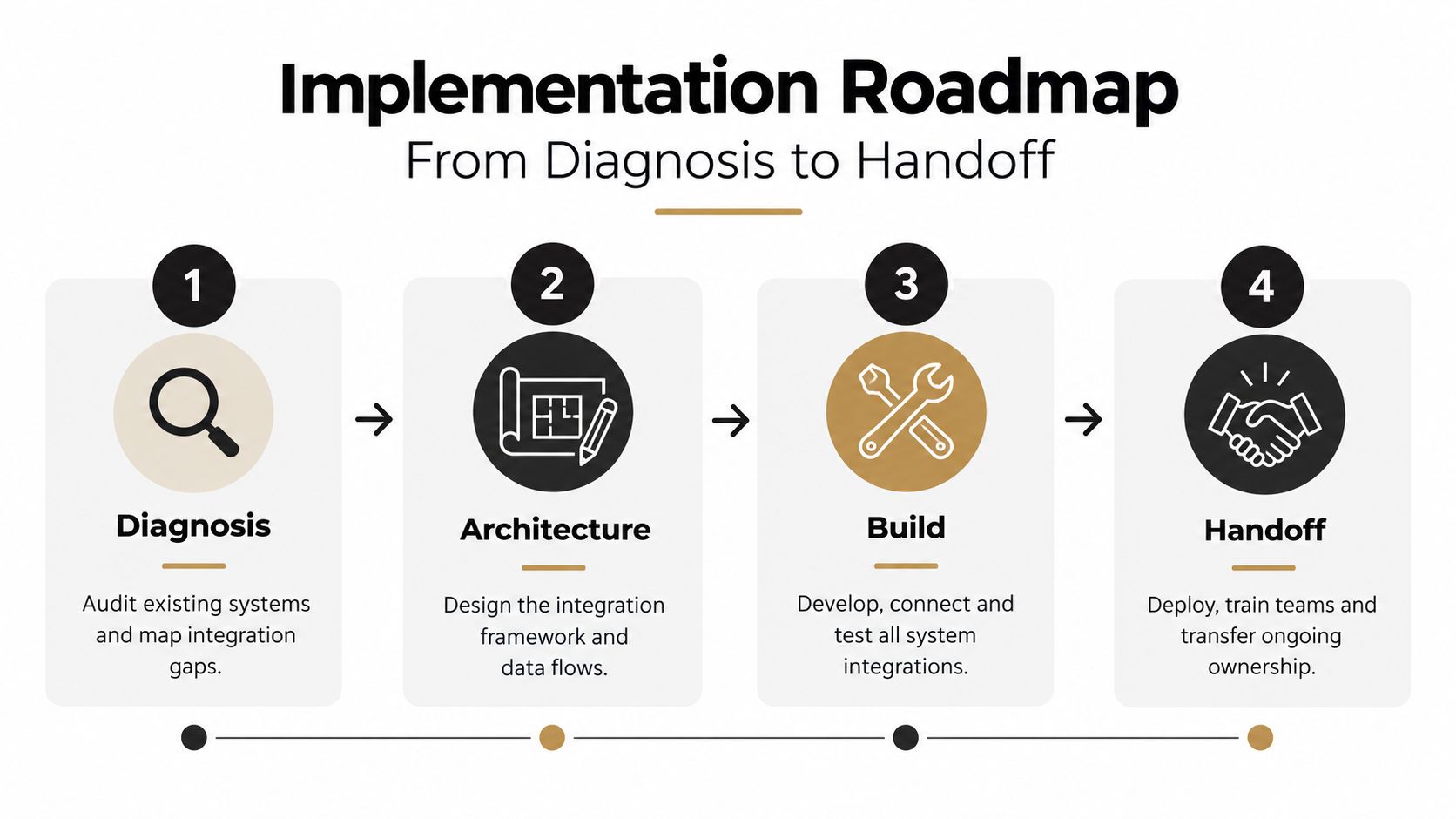
Build and validate
Develop the smallest complete workflow, not an isolated connection. Test normal paths, duplicate events, missing fields, permission failures, service outages, model uncertainty, and human overrides. Give operations stakeholders visible weekly progress so they can correct assumptions before they become expensive rework.
Custom system builds may run 60 to 90 or more days, depending on scope and dependencies. That timeline should be treated as a planning range, not a guarantee. The important control is staged delivery with clear acceptance criteria at each meaningful capability.
Handoff
A system isn't complete when the integration runs once. Client teams need code ownership, documentation, workflow maps, credentials under their control, runbooks, alert procedures, and training for the people responsible for daily operation.
Before handoff, ask:
- Who owns each failure? A named person or team should receive actionable alerts.
- Can the team replay a failed event? Recovery shouldn't require a developer to reconstruct the entire process.
- What changed in the source system? Field and API changes need a review path.
- Can users override AI output? Human review should be explicit where the consequence warrants it.
- What happens when the integration is paused? A documented fallback prevents hidden manual work from returning without notice.
Pause the project if the business process is still changing rapidly, no owner accepts responsibility, or the source data can't support a dependable workflow. Integration should reduce uncertainty, not encode it permanently.
Pitfalls That Break Integrations and How to Avoid Them
The most dangerous integration is often the one that appears finished. A team may connect systems while leaving manual reconciliation in place, exactly the gap identified in SAPinsider's findings. Remove the human handoff itself, not just the export that precedes it.
Fragile point-to-point fixes create another problem. They may work for one workflow, then fail when a field changes or a second process needs the same data. Use reusable API services, explicit ownership, validation, retries, monitoring, and a clear record of every completed or failed action.
AI introduces a separate governance risk. A 2025 to 2026 survey reported that 70% of enterprises had not gone beyond basic integration for AI tools, with 29% citing time lost to manual data transfers, 36% citing security and privacy risks, and 22% still manually moving data between siloed AI systems, according to Zapier's survey announcement. The same report says average API uptime fell from 99.66% to 99.46% year over year and downtime increased 60%.
Design for that reality with least-privilege access, sanitized inputs, output validation, audit logs, rate limits, and human escalation. A reliable operating surface tells users what happened, what failed, and what they need to do next.
Internal Systems provides diagnosis, architecture, custom system builds, system integrations, monitored automation, and AI-powered workflows for operational teams. Visit Internal Systems to review an Operations Diagnostic or Operations Audit and identify the integration work that should be built first.