10 System Integration Methods for Custom Software
Compare 10 system integration methods for custom software and AI workflows, including trade-offs, security, maintenance costs, and implementation criteria.
Your operations team is moving data between a CRM, an accounting platform, an internal dashboard, and an AI workflow. A deal closes in the CRM, finance needs the transaction, the dashboard needs a fresh status, and the AI model needs enough context to score risk or recommend the next action. Someone may still be exporting records, checking mismatched fields, and correcting failed automations by hand.
The cheapest-looking connection isn't always the lowest-cost choice. A direct API link may solve today's handoff, then become a fragile dependency when a vendor changes its schema. A data lake may improve analysis but fail to trigger an urgent operational action. An AI classifier may route work quickly but create risk if nobody reviews low-confidence decisions.
The system integration methods below form a practical architecture ladder for custom software and AI-enabled workflows. Each method is evaluated by fit, complexity, security, observability, migration risk, and ownership. The examples focus on operational systems, custom dashboards, AI agents, machine learning, and automation, not generic database or spreadsheet tooling.
Table of Contents
- 1. API-First Integration Architecture
- 2. Middleware and Event-Driven Orchestration
- 3. Data Lake and Unified Warehouse Architecture
- 4. AI-Powered Intelligent Routing and Classification
- 5. Custom Dashboards and Real-Time Operational Visibility
- 6. Robotic Process Automation and Task Orchestration
- 7. Bidirectional Data Sync and CDC
- 8. Microservices and Modular Custom Software Architecture
- 9. Semantic Search and LLM-Powered Context Retrieval
- 10. Security, Privacy, and Compliance Frameworks
- Top 10 System Integration Methods Comparison
- Turn the Shortlist Into a Safe Build Plan
1. API-First Integration Architecture
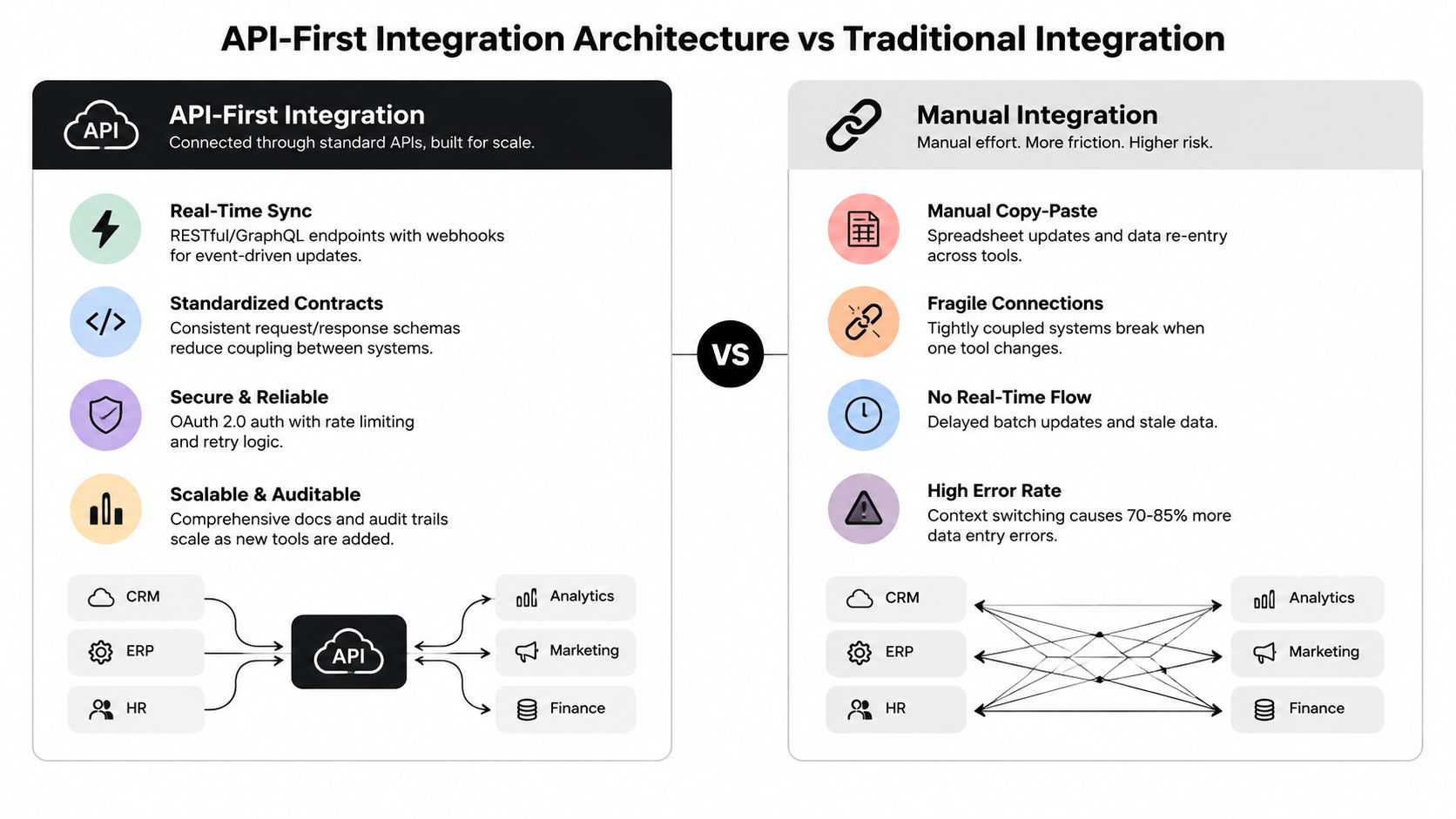
API-first architecture makes application programming interfaces the primary connection layer between custom software and existing enterprise tools. RESTful APIs work well for predictable resource operations, while GraphQL can help a custom interface request precisely the data it needs. Both approaches create a cleaner foundation than manual exports because applications exchange data through documented contracts.
An insurance underwriting platform might use a unified API layer to combine Salesforce client data, an accounting system for premium tracking, and an AI risk assessment engine. A real estate dashboard could consume Zillow or MLS APIs, an internal deal database, and an AI property valuation model through standardized endpoints. A private equity monitoring system could combine portfolio company APIs, financial data providers, and custom machine learning models for risk prediction.
Build the contract before the connection
Start with an Operations Audit that maps every data flow. Record which third-party APIs exist, which endpoints are stable, what authentication each requires, and whether the provider imposes rate limits or permission boundaries. Don't let a developer discover those constraints after the dashboard or AI workflow has already been designed.
Put middleware between important API consumers and producers. Apache Kafka or custom orchestration can absorb bursts, separate services from provider outages, and handle rate limits without forcing every application to understand every upstream behavior.
Use versioning from launch. A /v1 and /v2 strategy gives your custom software room to adopt a changed vendor contract without breaking live workflows. Add retries with exponential backoff, idempotency keys, and dead-letter queues so transient failures don't create duplicate records or silent data loss.
Practical rule: Treat API contracts, authentication flows, response-time monitoring, and error alerts as operational handoff materials, not developer-only notes.
API-first is the best starting point when systems expose reliable APIs and teams need real-time, bidirectional interaction. Avoid making it the only layer when providers are unstable, workflows have many dependent steps, or legacy applications can't expose usable endpoints.
2. Middleware and Event-Driven Orchestration
Middleware becomes the coordination layer when several systems must react to the same operational event. Instead of making every application call every other application directly, services publish events and subscribers respond asynchronously. That separation reduces coupling and gives operations teams a place to inspect, replay, and govern workflows.
Consider an M&A process. When Salesforce records a closed deal, an event can trigger bank reconciliation, compliance checks, a portfolio system update, and AI-driven risk reassessment. In insurance, an incoming claim can start data validation, fraud detection, investigator routing, and customer status notifications. For a solar company, equipment sensor events can trigger predictive maintenance checks, parts ordering, and technician dispatch.
Use orchestration when the workflow has dependencies
Choose event-driven orchestration for workflows with three or more dependent steps or tools. A single CRM-to-dashboard update probably doesn't need a full event backbone. A claims process with validation, machine learning review, human investigation, notification, and audit logging does.
Map the current manual workflow during an Operations Diagnostic before choosing a platform. Identify repetitive actions, decision points, handoffs, and failure points. Then define event schemas, including the identifier, timestamp, source, payload, and version. Schema versioning matters because an AI service, SaaS application, or custom tool may evolve independently.
Instrument every event with correlation IDs. Operations staff should be able to trace one claim, deal, or sensor alert across every step without asking developers to reconstruct logs. Monitor workflow failure rates, latency percentiles, and dead-letter queue depth. Add replay capability so a failed step can be re-executed with corrected data instead of forcing staff to restart the entire process.
This method adds platform and governance overhead, but it pays off when workflows are high-frequency, asynchronous, and failure-sensitive. Don't introduce it merely because event-driven architecture sounds modern. Introduce it when independent systems must respond reliably without waiting on one another.
3. Data Lake and Unified Warehouse Architecture
A data lake or unified warehouse architecture creates a decision layer for operational data. It brings together raw and processed records from CRMs, accounting systems, custom applications, AI models, external providers, and sensor feeds. The value isn't just storage. It gives analysts, custom dashboards, and machine learning pipelines a shared context instead of forcing each team to reconcile isolated sources.
A private equity monitoring platform might ingest portfolio company financial statements, industry benchmarks, operational metrics, and AI risk models into a unified executive view. A wealth management system could consolidate client accounts across custodians, external holdings, and performance models. An insurance underwriting lake could combine applicant data, claims history, external risk information, and underwriter notes before feeding an ML scoring service.
Start with trustworthy ingestion
Conduct a data inventory during the Operations Audit. List systems of record, transactional applications, file uploads, third-party APIs, and sensor sources. For every dataset, capture its owner, update pattern, business meaning, sensitivity, and expected freshness.
Begin with incremental ingestion, such as hourly or daily batches, before attempting real-time streaming. Batch pipelines are easier to troubleshoot, validate, and replay. Move a source to streaming only when the operational decision depends on lower latency.
Add validation at ingestion. Check required fields, unexpected nulls, value ranges, duplicate records, and freshness. Metadata tagging and a data catalog such as Apache Atlas or Collibra should show where a dataset came from and how current it is. Mask personally identifiable information and sensitive financial data with column-level encryption or hashing, then run automated quality tests on every pipeline execution.
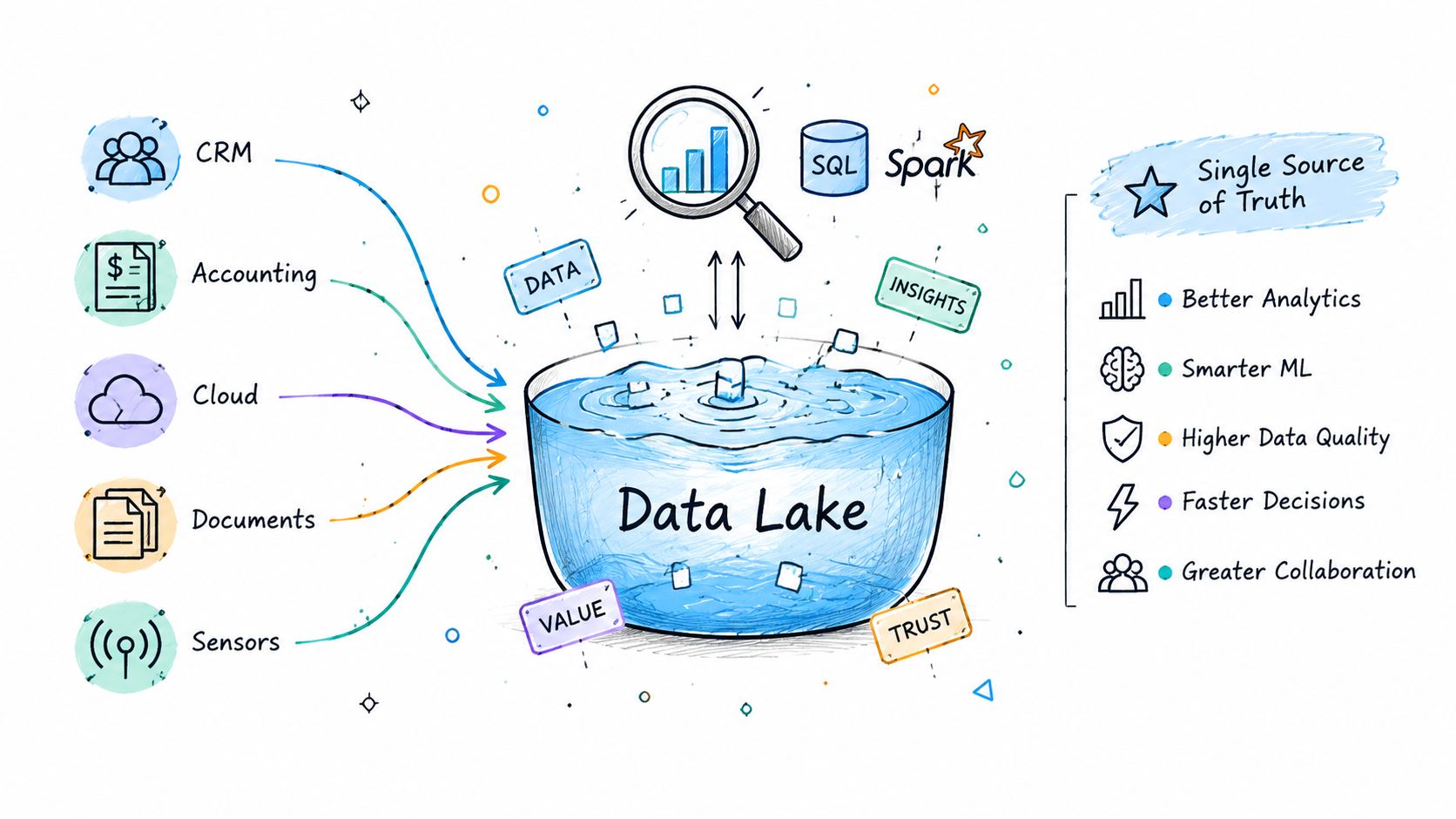
Choose this architecture when teams need cross-system analytics, historical context, model training, or a unified reporting surface. Avoid using it as a substitute for transactional integration. A lake can tell an operations manager that risk is rising, but an event-driven workflow or API still needs to assign the task and update the source system.
4. AI-Powered Intelligent Routing and Classification
AI-powered routing turns incoming work into structured operational decisions. A classifier can read a claim, email, ticket, lead, or portfolio alert, identify its category, and send it to the right queue or person. This is especially useful when leadership currently acts as the routing layer because every decision waits for a founder, partner, or senior operations manager.
An insurance workflow can classify quotes by risk profile and route them to underwriters with the right expertise. A real estate system can tag opportunities by property type, geography, and investment thesis, then assign them to the appropriate partner or fund. A solar service workflow can distinguish maintenance, warranty, billing, and installation requests. A private equity platform can classify KPI anomalies by severity and route them to the portfolio manager or CFO.
Keep humans in the decision loop
Start with high-frequency, lower-stakes decisions such as ticket categorization. Don't begin by automating investment approvals, underwriting decisions, or other actions where a wrong classification creates material exposure. The model should support the operating team, not hide uncertainty from it.
Set a confidence threshold. High-confidence predictions can move directly into the next workflow, while low-confidence cases should enter a human review queue with the source text, model reasoning signals, and recommended destination. Operations staff need a simple correction mechanism so their decisions become labeled feedback for future training.
Explainability also supports adoption and compliance. SHAP values or feature importance can show why a structured record was routed to a particular queue. For LLM-based classification, retain the input, prompt version, model version, output, and reviewer decision. Monitor accuracy, precision, recall, and false-positive rates regularly. Retraining can be scheduled weekly or monthly when the workflow changes quickly, but the schedule should follow drift and feedback quality rather than calendar habit.
A useful starting point is a real-time lead scoring workflow that connects classification with downstream prioritization. Choose this method when incoming work is repetitive and historical decisions are available. Avoid it when labels are inconsistent, the workflow changes constantly, or no owner can review uncertain cases.
5. Custom Dashboards and Real-Time Operational Visibility
A custom dashboard is the working surface that turns integrated data into action. It should do more than display charts. It should show the queue, explain the exception, expose the underlying record, and let an authorized user trigger the next workflow without switching across several applications.
An insurance operations dashboard might show underwriting queue depth by risk class, approval activity, turnaround patterns, and policy trends. A private equity platform could display portfolio KPIs, covenant status, revenue misses, turnover spikes, and debt-ratio breaches with drill-down access to supporting documents. A real estate fund dashboard might track deal stages, capital deployed, hold time, and returns against target. A solar operations view could combine fleet health, service queues, technician utilization, and predictive maintenance alerts.
Design for decisions, not reporting
Interview the CEO, operations manager, and individual contributors separately during the Operations Audit. Each role makes different decisions and needs different levels of context. A chief executive may need exceptions and trend direction, while a dispatcher needs unit status, technician availability, and an action button.
Start each dashboard with five to seven core metrics, rather than filling the screen with every available measure. Add thresholds and escalation rules for anomalies and business-critical events. Not every change deserves a notification. Design mobile-first when field teams work away from desks, and use visual hierarchy so urgent exceptions stand out without turning the interface into an alarm panel.
The dashboard should also expose data freshness and integration status. If a metric is stale because an upstream API failed, the user needs to know before acting. Add a feedback mechanism so operations staff can request a changed metric or view based on actual usage.
An insurance operations dashboard illustrates the right product direction, a purpose-built interface connected to operational workflows. Choose custom dashboards when teams waste time assembling status from multiple tools. Avoid building one before defining ownership, source systems, and the decisions each screen must support.
6. Robotic Process Automation and Task Orchestration
RPA uses software bots to operate at the user-interface layer. That makes it useful when a legacy application, custom vendor portal, or no-code tool lacks a reliable API. A bot can open an application, read an incoming document, fill fields, save a record, and pass the result to a human queue.
An insurance bot can extract application details, populate an underwriting system, run risk checks, and create an initial assessment. An accounts payable workflow can read invoice emails, extract line items, match purchase orders, and create accounting entries. A real estate automation can collect comparable property data and feed a valuation model. A solar operations bot can retrieve equipment information, check warranties, generate service orders, and notify customers.
Use RPA as a bridge, not a permanent dependency
RPA fits high-frequency, rule-based work with stable screens and clear exceptions. Document every step, decision point, and fallback before development. Bots can't reliably automate a process that humans perform differently each time or explain inconsistently.
Build a human queue for exceptions. If a bot encounters a changed field, missing document, or unexpected value, it should preserve the context and escalate rather than fail. Track execution success, execution time, and error frequency, then train operations staff to resolve simple layout or credential issues.
RPA can keep a business moving while a longer-term API or middleware integration is built. As systems stabilize, migrate important high-volume flows away from screen automation. UI changes, authentication updates, and browser behavior can break bots without changing the business process.
The supplied video offers a practical visual introduction to this automation pattern:
Choose RPA when integration access is limited and the process is documented. Avoid it for complex, exception-heavy workflows or as the foundation of an AI system that needs durable contracts and reliable event history.
7. Bidirectional Data Sync and CDC
Bidirectional synchronization keeps connected applications aligned as records change. Change Data Capture, or CDC, observes inserts, updates, and deletes in a source system, then propagates those changes downstream. The design is valuable when teams need a consistent working view without asking staff to reconcile records manually.
A Salesforce and accounting integration can send a closed deal and amount to accounting for revenue processing, then return invoice payment status to Salesforce. A portfolio platform can receive financial data from portfolio company systems while sending updated guidance or outlook back to those companies. A real estate operation can synchronize property details between an internal deal system and public listing services.
Decide ownership before you sync
Map every important field during discovery. “Customer status” may have one owner, while “payment status” belongs to another system. Without field-level ownership, two-way synchronization creates conflicts that software can't resolve intelligently.
Implement CDC first in the direction with the highest operational frequency. Then define conflict rules explicitly. A most-recent-update rule may work for some fields, while system-specific authority works better for others. Don't let the sync engine make these decisions implicitly.
Add reconciliation jobs to catch missed changes and surface discrepancies. Monitor propagation lag and alert when it exceeds the business tolerance. Test failure and recovery paths, including replaying missed changes, manually resynchronizing a record, and preventing duplicate updates.
This method requires stronger governance than one-way replication because every destination can become a new source of change. Choose it when users update records in multiple systems. Avoid it when one application should clearly own the data. In that case, use one-way events or APIs and keep the ownership model simple.
8. Microservices and Modular Custom Software Architecture
Microservices split a custom system into independently deployable business capabilities. A lead scoring service, invoice processing service, portfolio analysis service, and AI model-serving service can each expose its own API and release cycle. This lets a team update one capability without redeploying the entire application.
An insurance platform might separate application intake, ML risk scoring, pricing, document generation, and compliance checks. A real estate system could isolate deal tracking, valuation, document management, investor reporting, and AI-assisted property analysis. A private equity platform might use separate services for financial reporting, KPI monitoring, AI analytics, investor communications, and deal sourcing.
Earn the complexity
Start with a monolith when the custom system is simple and the team can change it safely as one unit. Move toward microservices when scaling needs, release bottlenecks, or team coordination make the monolith expensive to operate. Splitting a small application too early creates more deployments, contracts, logs, and failure paths than the business needs.
Define boundaries around business capabilities, not technical layers. A “lead scoring service” is meaningful to operations. A “database service” or “UI service” usually isn't. Give each service clear ownership, API contracts, data models, and service-level expectations.
Containerization and orchestration can make later decomposition easier, but they don't remove the need for operational discipline. Add distributed logging and tracing with tools such as the ELK Stack or Datadog. Use timeouts, circuit breakers, and fallback responses so an unavailable recommendation service doesn't take down the entire workflow.
Build for graceful degradation. If the AI valuation service fails, the deal pipeline should still open the record and mark the recommendation as unavailable.
Choose microservices when independent capabilities need independent release or scaling. Avoid them when one small team owns a tightly connected workflow and a modular monolith would provide the same separation with less maintenance.
9. Semantic Search and LLM-Powered Context Retrieval
Semantic search lets an operational system retrieve information by meaning rather than exact keywords. Embedding models represent queries and documents in a way that helps a retrieval layer find related records, decision notes, risk assessments, and past outcomes. An LLM can then use that retrieved context to summarize evidence or support the next action.
A portfolio manager asking why a deal was rejected should receive relevant investment committee notes, financial analysis, and prior decision records. An underwriting team searching for similar loan defaults should find comparable cases even when the wording differs. A client service agent could ask for the history behind a risk flag and receive a concise answer linked to source documents.
Retrieval quality controls the answer
Connect the retrieval layer to governed operational sources, not an indiscriminate document dump. Preserve permissions at retrieval time so a user can't ask an AI agent to reveal records they couldn't access directly. Store document provenance, source timestamps, model versions, and the retrieved passages used for each answer.
Use chunking and metadata that match the workflow. A policy document, deal memo, customer interaction, and model output shouldn't all be indexed with the same assumptions. Filter by client, portfolio, jurisdiction, record type, or date before semantic ranking where those constraints matter.
Add citations or source links inside the custom interface, and give users a way to flag an irrelevant passage or incomplete answer. Retrieval-augmented generation should support judgment, not replace it in regulated or high-impact decisions.
A client portfolio agent is a practical pattern for combining portfolio context with an AI interface. Choose semantic retrieval when valuable knowledge is trapped in documents and historical decisions. Avoid it when source content is ungoverned, access rules are unclear, or the workflow needs deterministic transactional behavior rather than contextual assistance.
10. Security, Privacy, and Compliance Frameworks
Security, privacy, and compliance aren't separate from integration architecture. They determine which systems may exchange data, which fields an AI workflow may process, who can approve an action, and what evidence the business must retain. Put those controls into the custom software design before the first connector moves production data.
A finance workflow may use field-level encryption and strict role-based access control for customer personally identifiable information while automating evidence collection for compliance reviews. An insurance system can encrypt documents and preserve immutable logs for underwriting decisions. A SaaS company can place security gates in its CI/CD pipeline with static and dynamic analysis, dependency scanning, and automated evidence collection.
Make controls observable
Classify sensitive fields early. Data lineage should show where a field originated, where it moved, which model processed it, and who accessed or changed it. Use managed cloud services such as key management and data-loss prevention tools where they reduce the burden on a small operations engineering team.
Log authentication, authorization, data changes, workflow decisions, model outputs, and administrative actions. Separate operational logs from sensitive payloads where possible, and apply retention rules that match the business and regulatory context. An AI routing workflow should record the input version, prediction, confidence, reviewer action, and final outcome.
Run tabletop exercises and incident simulations so an operations team knows how to revoke access, pause automations, isolate a failed integration, and communicate an incident. Security maturity increases maintenance work at the beginning, but it reduces uncertainty when vendors change, models drift, or a workflow fails.
Choose this framework for every method, with stricter controls for finance, insurance, healthcare, and other sensitive operations. Avoid treating compliance as a final review. A connection that works technically but can't be audited, restricted, or shut down safely isn't ready for production.
Top 10 System Integration Methods Comparison
| Approach | Implementation Complexity (🔄) | Resource Requirements (⚡) | Expected Outcomes (⭐ 📊) | Ideal Use Cases (💡) | Key Advantages (⭐) |
|---|---|---|---|---|---|
| API-First Integration Architecture | High 🔄🔄🔄, design APIs, auth, versioning | Moderate ⚡⚡, API engineers, docs, middleware | ⭐⭐⭐ 📊 Near‑real‑time sync, fewer manual errors, audit trails | CRMs, accounting, real‑time dashboards, third‑party integrations | Standard contracts; scalable; auditable; real‑time data |
| Middleware & Event‑Driven Orchestration | High 🔄🔄🔄, event modeling, orchestration logic | High ⚡⚡⚡, streaming infra, SRE, workflow engineers | ⭐⭐⭐ 📊 Resilient async workflows, high throughput, visible pipelines | Multi‑step approvals, M&A flows, high‑volume event processing | Decoupling; reliability; replayability; horizontal scale |
| Data Lake & Unified Warehouse | Medium 🔄🔄, ingestion, cataloging, governance | High ⚡⚡⚡, storage, ETL/ELT, data engineers | ⭐⭐⭐ 📊 Single source of truth, analytics & ML readiness | Executive dashboards, ML training, cross‑system reconciliation | Consolidation; historical depth; flexible schema for analytics |
| AI‑Powered Intelligent Routing & Classification | Medium‑High 🔄🔄🔄, model training, feedback loops | Moderate‑High ⚡⚡⚡, labeled data, ML infra, monitoring | ⭐⭐⭐ 📊 Faster routing, consistent decisions, reduced bottlenecks | Ticket triage, lead routing, compliance alert escalation | Automates triage; improves with feedback; scales decisioning |
| Custom Dashboards & Real‑Time Visibility | Medium 🔄🔄, UX, data pipes, alerts tuning | Moderate ⚡⚡, front‑end devs, data queries, alerting | ⭐⭐⭐ 📊 Faster decisions, visibility, management by exception | Ops command center, SLA monitoring, exec briefings | Contextual metrics; drill‑downs; action triggers for workflows |
| RPA & Task Orchestration | Low 🔄, UI automation workflows, exception handling | Low‑Moderate ⚡⚡, bots, licensing, ops maintainers | ⭐⭐ 📊 Rapid time‑to‑value, large error reduction for repetitive tasks | Legacy UI automation, invoice processing, form filling | Works without APIs; quick deploy; near‑zero manual entry errors |
| Bidirectional Data Sync & CDC | High 🔄🔄🔄, CDC pipelines, conflict resolution | High ⚡⚡⚡, DB expertise, replication tools, monitoring | ⭐⭐⭐ 📊 Continuous consistency across systems; reduced reconciliation | CRM↔Accounting, master data, portfolio consolidation | Real‑time replication; transactional consistency; audit logs |
| Microservices & Modular Custom Software | High 🔄🔄🔄, service design, deployment pipelines | High ⚡⚡⚡, DevOps, containers, observability | ⭐⭐⭐ 📊 Independent deploys, faster feature iteration, resilience | Complex platforms needing team autonomy and scale | Independent scaling; tech flexibility; reduced deployment risk |
| Semantic Search & LLM‑Powered Retrieval | Medium‑High 🔄🔄🔄, embeddings, index maintenance | High ⚡⚡⚡, vector stores, LLM inference, data curation | ⭐⭐⭐ 📊 Rapid precedent lookup, condensed context, onboarding aid | Knowledge retrieval, precedent lookup, decision support | Works on unstructured data; summarization; contextual QA |
| Security, Privacy & Compliance Frameworks | Medium‑High 🔄🔄🔄, policies, controls, audits | Moderate‑High ⚡⚡⚡, tooling, compliance engineers, audits | ⭐⭐⭐ 📊 Reduced legal risk, certified controls, forensic trails | Finance, insurance, healthcare, regulated SaaS | Risk reduction; trust; enables certifications (SOC2, ISO) |
Turn the Shortlist Into a Safe Build Plan
The right system integration method depends on the operating decision, not the popularity of the technology. Start by asking whether the team needs a transaction to complete immediately, an event to trigger several actions, a historical data layer for analytics, an AI recommendation, or a controlled user interface for daily work. That answer usually narrows the architecture faster than comparing platform feature lists.
Evaluate API availability first. Reliable vendor APIs support API-first designs and direct custom software connections. Unstable APIs, legacy applications, and screen-only workflows may require RPA as a bridge. Next, define data ownership at the field level. Decide which system owns customer identity, transaction status, payment state, risk classification, and every other value that could be edited in more than one place.
Then assess latency and workflow complexity. Use synchronous APIs when a user needs an immediate response and the dependency is available. Use asynchronous events when several systems must react independently or when temporary outages shouldn't block the originating action. Use a lake or warehouse when the purpose is historical analysis, model training, or cross-system visibility rather than transactional execution.
The most mature architecture isn't automatically the best architecture. A small custom application may need a modular monolith, one stable API, and a focused dashboard. A complex claims workflow may need event orchestration, CDC, AI classification, human review, and a governed data layer. Build only the reliability and observability the operating risk justifies, but don't omit retries, ownership, and failure handling to make the first estimate look smaller.
Use this implementation checklist
- Inventory systems and data: List applications, APIs, event sources, documents, sensor feeds, owners, permissions, and update patterns.
- Define the source of truth: Assign ownership for every shared field and document conflict resolution before implementing bidirectional flows.
- Classify sensitive fields: Identify PII, financial information, confidential documents, model inputs, and audit requirements.
- Document contracts and schemas: Record API versions, event payloads, authentication flows, transformations, and compatibility rules.
- Choose synchronous or asynchronous flows: Match latency to the decision and use events where independent processing improves resilience.
- Add retries and idempotency: Prevent transient failures from becoming lost updates or duplicate transactions.
- Create human review for AI decisions: Route uncertain classifications, recommendations, and exceptions to an accountable person.
- Instrument logs and alerts: Track response errors, queue depth, workflow failures, data freshness, model behavior, and synchronization lag.
- Test failure and replay paths: Simulate provider outages, malformed data, changed schemas, duplicate events, and recovery.
- Pilot one high-ROI workflow: Choose a narrow process with visible operational pain and a clear owner before expanding the architecture.
- Document ownership for handoff: Give operations teams runbooks, contracts, dashboards, escalation paths, and access to maintain the system independently.
The business case for this discipline is substantial. The global system integration market is projected at USD 467.0 billion in 2026 and USD 1,228.6 billion by 2033, with a 14.8% CAGR, according to Grand View Research's system integration market estimate. Another forecast places the market at USD 481.81 billion in 2026 and USD 1,134.33 billion by 2034, with an 11.30% CAGR, showing that organizations continue investing in connected applications, data, and workflows.
The backlog explains why architecture matters. A 2021 market study reported that 89% of organizations had a data integration backlog, while 66% planned to invest in iPaaS and 27% already had, as described in the Business Wire market study. Yet technical connectivity alone doesn't guarantee operational integration. A 2026 industry study found that only 7.7% to 12.1% of organizations reported executing any single business-integration discipline well, according to AJOT's coverage of the JBF Consulting study. Governance, process redesign, training, and clear ownership must accompany the software connection.
AI makes the architecture choice even more important. A 2026 synthesis of 45 empirical studies reported up to 47% lower forecasting error, 25% to 35% route-cost savings, and 92% accuracy for real-time demand adjustment, as detailed in the Journal of International Social Science and Innovation research. A 2025 operational pipeline connected IoT sensors, GPS, traffic analysis, and weather APIs to reinforcement-learning models for real-time route adjustments, described in this cloud-based routing paper. Those outcomes depend on dependable feeds, schema validation, model monitoring, and fallback behavior. AI can't rescue an integration that loses events or hides stale data.
Internal Systems can support that path through an Operations Diagnostic, Operations Audit, custom system build, system integrations, operational automation, and AI-powered workflows. Its delivery model covers diagnosis, architecture, implementation, and handoff, so the client team can operate the resulting internal system rather than depend on an opaque black box.
Internal Systems designs custom software, integrated dashboards, operational automations, and AI-enabled workflows for teams that need connected systems instead of manual cross-tool work. Visit Internal Systems to discuss an Operations Diagnostic or Audit and identify the first integration workflow worth building.