Software ROI Calculation Guide for Custom Systems
Master software ROI calculation for custom builds and AI workflows. Framework, formulas, templates and pitfalls for ops teams.

A lot of operations teams hit the same point at once. Intake lives in one tool, approvals in Slack, notes in email, reporting in a spreadsheet, and the founder still has to step in when something important stalls. Then a vendor demo or an internal build idea lands on the table, and somebody asks the question that matters. What's the return?
Most software ROI calculation work falls apart right there because the team treats the decision like license math. That works for simple subscriptions. It doesn't work for custom software, internal dashboards, AI agents, or workflow automation that changes who does what, when, and in which system.
For operations leaders, ROI is less about proving that software can save time and more about proving that the business can absorb the change fast enough to realize those savings. That's the difference between a decent build and a useful one.
Table of Contents
- Why Software ROI Calculation Matters for Operations Teams
- How to Scope Your ROI Model and Baseline Current Workflows
- Mapping Total Cost of Ownership Without Missing Hidden Costs
- Quantifying Benefits From Time Savings to AI Enabled Gains
- Applying Formulas and Running Sensitivity Scenarios With Templates
- Avoiding Common Pitfalls and Governing ROI After Handoff
Why Software ROI Calculation Matters for Operations Teams
The most common situation is not “we need software.” It's “we can't keep running this process manually without adding headcount, delaying decisions, or creating more exceptions.”
I've seen this in founder-led firms where a team can still technically get work done, but every cycle depends on copy-paste, side messages, and manual checks. Nothing looks broken enough to trigger urgency. Yet everyone feels the drag. A coordinator waits for underwriting input. Sales asks ops for status. Finance asks whether the numbers are current. Leadership asks for a dashboard by Friday, and someone rebuilds it from scratch.
That's where software ROI calculation matters. It gives operations a way to decide whether a custom system should be built at all, what it has to replace, and how long the business can tolerate the transition.
ROI is a decision tool, not a finance ritual
A credible ROI model does three jobs:
- Clarifies the operational problem: Which workflow is failing, where the handoffs break, and what happens when volume rises.
- Sets the bar for approval: What benefit has to show up in labor savings, throughput, error reduction, or decision speed.
- Creates an exit condition: If adoption risk, exception volume, or integration complexity is too high, the team should walk away or narrow scope.
That's why I don't start with a feature list. I start with the workflow and ask who touches it, where work waits, and which steps are repeatable enough to automate.
Practical rule: If you can't point to a recurring operational bottleneck, you're not modeling ROI yet. You're pricing curiosity.
A useful example is an internal operations dashboard that replaces status chasing across multiple systems. Teams often assume the value is “better visibility.” The value is usually narrower and more measurable: fewer manual updates, faster exception review, cleaner routing, and less leadership involvement in routine follow-up. A project like an insurance ops dashboard is easier to justify when the team links it to a specific recurring workflow instead of a generic desire for reporting.
What success actually looks like
Operations teams should define success in practical terms:
- The system gets used in the real workflow
- The manual workaround disappears
- An owner tracks the result after handoff
- The savings show up in fewer hours, fewer errors, or faster cycle movement
If those conditions won't hold, the ROI case is weak even if the spreadsheet says otherwise.
That's also why steady-state savings can mislead. A tool may look attractive once everyone is trained and the edge cases are handled. The harder question is whether your team can get there without a long period of confusion, duplicate work, and founder escalation.
How to Scope Your ROI Model and Baseline Current Workflows
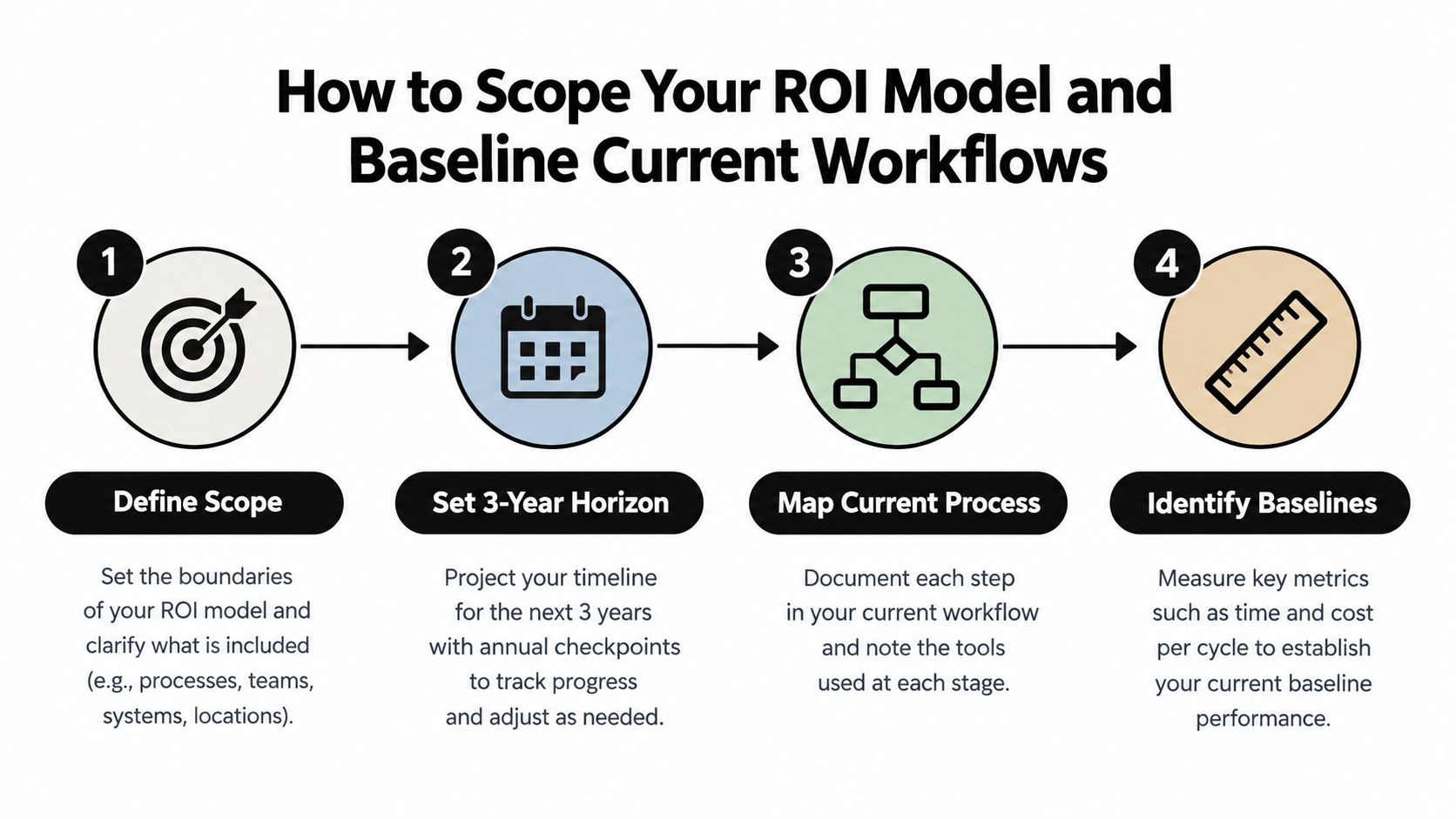
Before you estimate benefits, define the system boundary. Otherwise every ROI model turns into a mix of wishful savings and missing costs.
Start with one workflow, not the whole department
Custom software projects get over-scoped fast. Someone wants intake fixed, then asks for reporting, then approvals, then customer communications, then AI summaries on top. The ROI case gets muddy because the inputs no longer refer to one process.
Use a tighter scope:
- Pick one recurring workflow
- Define where it starts and ends
- List every human handoff and every system touched
- Leave adjacent nice-to-haves out of the first model
For a claims intake workflow, for example, the scope might begin when a submission arrives and end when the file is routed to the correct reviewer with complete data. It shouldn't include every downstream reporting use case unless that work is part of the same cycle.
Use a multi-year view before you talk about formulas
For custom software, a 3-year horizon is a practical planning frame because it forces the team to think beyond launch and include recurring support, maintenance, and operating behavior. Guidance on custom software ROI recommends modeling from a process map, totaling baseline costs such as manual work hours, SaaS, error corrections, training, switching, and compliance, then forecasting savings over a 3-year horizon and calculating payback as investment divided by monthly net benefit. That same guidance notes that annual maintenance commonly runs at 15 to 20% of initial build cost in many models (custom software ROI guidance).
That doesn't mean every decision needs a complex financial model. It means the team should stop pretending the build ends at launch.
Build the baseline from the current process map
A baseline sheet should come from observed work, not memory. If you can, sample a real period and walk the process with the people doing it.
Track the current state with categories like these:
- Manual work hours: Time spent entering, validating, chasing, formatting, reviewing, and rekeying.
- Existing software spend: SaaS subscriptions tied directly to that workflow.
- Error correction effort: Rework, duplicate handling, exception cleanup, and quality checks.
- Switching cost: Time lost moving across email, Slack, CRM, document storage, and admin panels.
- Compliance or oversight effort: Required reviews, logging, approval evidence, and audit preparation.
Don't average across unrelated teams. Baseline the actual people who do the work you plan to change.
Choose the right labor rate and measurement window
The labor rate in a software ROI calculation should reflect the loaded cost of the role, not just salary. If the process touches an operations coordinator, analyst, manager, and reviewer, don't blend them into one flat assumption unless that simplification won't distort the model.
A good measurement window is long enough to catch normal variation. Monthly is often useful for presentation, but weekly samples can expose where work bunches up and where exceptions create hidden labor.
AI workflows need a task map, not a speed assumption
For AI agents, LLM summarization, or routing models, don't ask, “How much faster is AI?” Ask, “Which task sequence changes, and who still owns the handoff?”
Independent workplace research found that productivity gains from generative AI vary by role, function, and organization, and that ROI cases should be evaluated by task sequence and handoff design rather than average speed alone. An MIT Sloan summary of that research emphasizes that AI's biggest effect comes from reshaping how tasks are sequenced, grouped, and handed off between humans and machines (Generative AI in real-world workplaces research).
That matters in practical terms. An AI triage layer may save very little if a manager still rechecks every case manually. The gain appears only when the handoff is redesigned so routine items move cleanly and exceptions surface with enough context to review quickly.
Mapping Total Cost of Ownership Without Missing Hidden Costs
Weak ROI cases usually break. The team prices the build or the license, maybe adds a setup estimate, and calls that the investment. For custom software and AI workflows, that's incomplete.
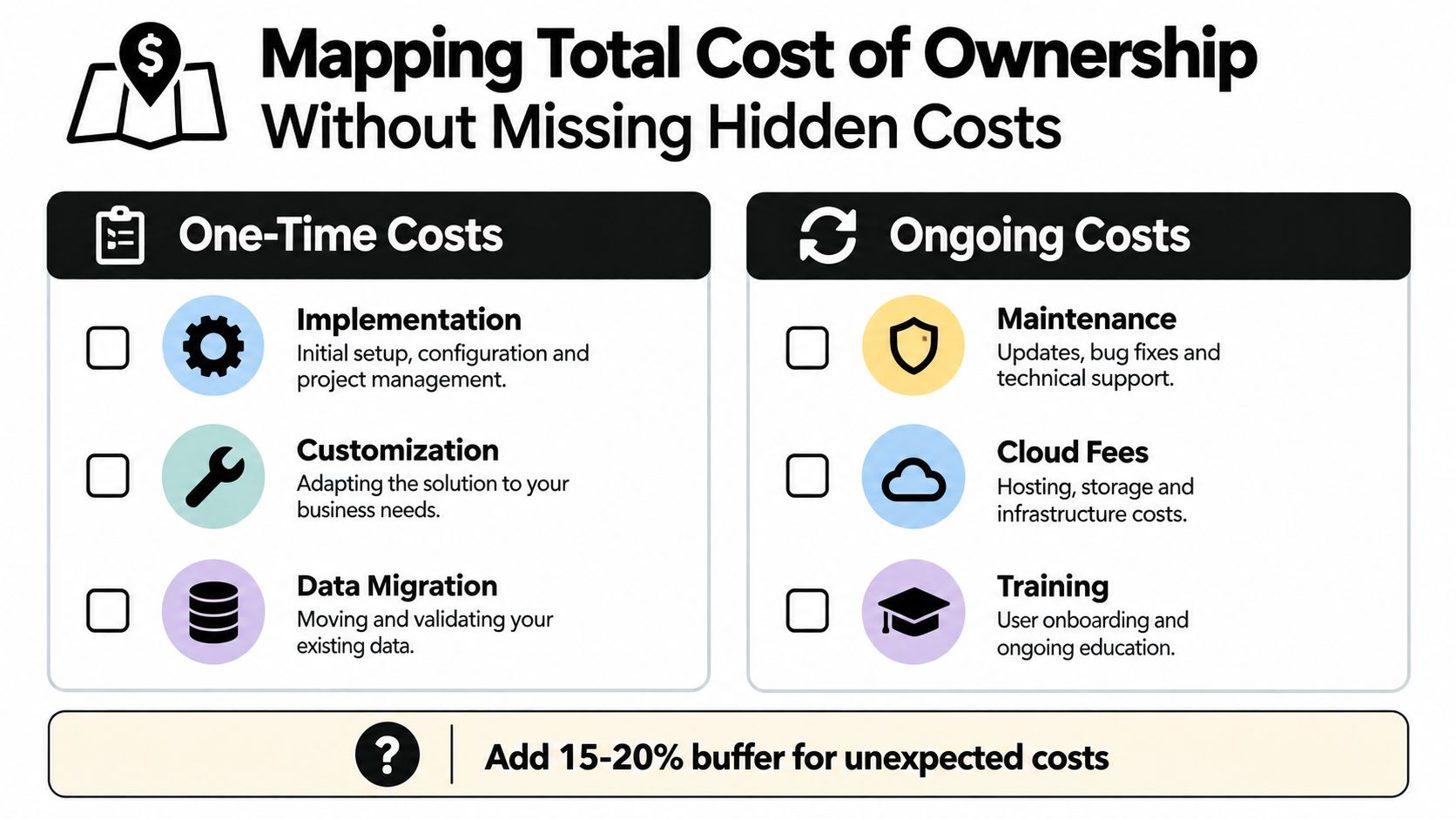
A sound model should treat software investment as total cost of ownership, not just license fees. The core method is to include implementation, customization, training, support, and maintenance, then calculate ROI as (benefits - total costs) / total costs × 100. Practical guidance also recommends baselining the workflow first, quantifying hours saved, assigning a loaded labor rate, adding error-reduction savings and any revenue enabled by faster throughput, then applying a risk haircut of roughly 10 to 30% to benefits and calculating payback alongside ROI and NPV (software implementation ROI calculation guide).
One-time costs that belong in the model
For a custom internal system, one-time costs often include:
- Implementation work: Delivery, testing, deployment, and production readiness.
- Customization: Workflow-specific business rules, dashboards, admin tools, and permissions.
- Data preparation: Cleanup, migration mapping, field normalization, and labeling for AI use cases.
- Documentation: SOP updates, admin notes, exception rules, and handoff material.
- Initial training: Sessions for operators, managers, and system owners.
If you're comparing internal build options and packaged AI products, a practical reference point is build vs buy AI tooling, especially when the workflow is specific enough that generic tools still require heavy adaptation.
The transition layer most teams underprice
Most software ROI content still undercounts the first year because it treats software like a license decision instead of an operating-change decision. Independent guidance on AI and automation ROI calls out a transition layer that many calculators miss: retraining, process documentation, temporary productivity loss, exception handling, and integration maintenance. That same guidance says the five most commonly omitted cost lines, change management, integration, retraining, data preparation, and ongoing tuning, can equal 30% to 60% of licence cost in year one, with integration alone often budgeted at 20% to 40% of licence cost (AI and automation ROI benchmarks).
That framing applies even when you aren't buying a simple seat-based tool. In custom systems, the same problem shows up as underpriced implementation drag.
Teams don't usually miss ROI because the workflow had no upside. They miss it because nobody budgeted the friction of getting people to use the new path.
Recurring costs that continue after launch
Recurring cost categories are less dramatic, but they decide whether the model stays honest:
| Cost area | What belongs here |
|---|---|
| Support | Bug triage, user support, admin help |
| Maintenance | Fixes, dependency updates, workflow changes |
| Integration upkeep | API changes, field changes, retry logic, sync monitoring |
| Infrastructure | Hosting, model usage, storage, logging |
| Ongoing tuning | Prompt changes, classifier adjustment, threshold review |
For operational automation and internal control work, the business case should quantify benefits and costs separately, include both one-time and recurring costs, and present intangible benefits explicitly. That's especially relevant when resilience, reduced oversight, and audit readiness matter alongside labor savings (ISACA ROI framework for automated internal controls).
A practical check is simple. If your year-one model doesn't include the cost of adoption, exceptions, and upkeep, it's probably not a total cost of ownership model yet.
Quantifying Benefits From Time Savings to AI Enabled Gains
Once the cost side is complete, benefits need the same discipline. Teams often inflate the case by mixing hard savings, soft improvements, and hypothetical upside into one line item.
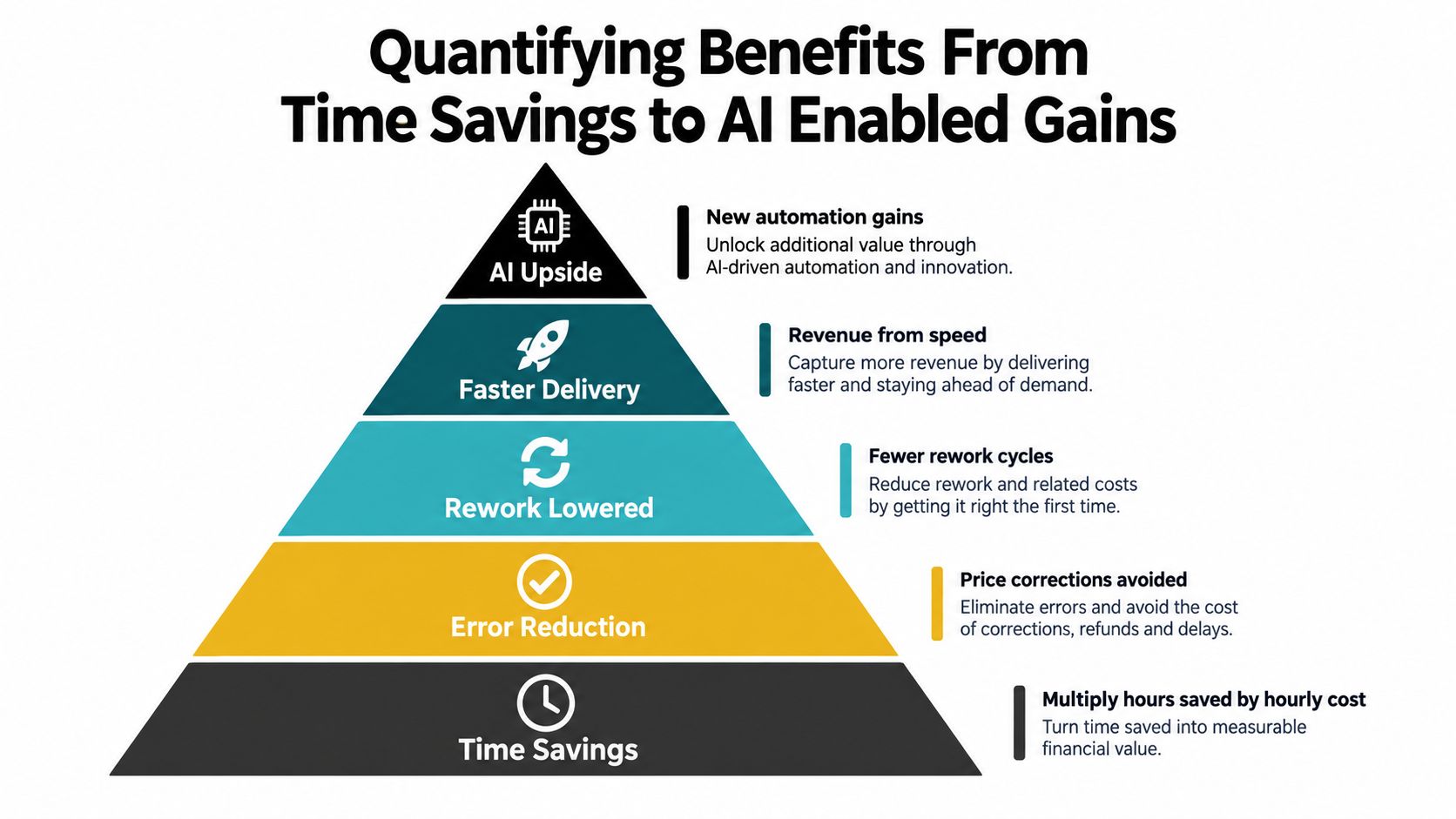
Start lower in the stack. Earn the right to model AI upside after you've priced the labor and rework the workflow already creates.
Convert time savings into auditable value
The cleanest benefit is labor time returned to the team. But only count hours that can be redeployed.
Use this logic:
- Track hours saved by task: Intake review, status updates, duplicate entry, QA checks, follow-up.
- Apply the loaded labor rate: Match the rate to the role doing the work.
- Ask what happens to the time: Capacity for more throughput, reduced overtime, delayed hiring, or reassigned higher-value work.
For example, an operations team using an internal dashboard may remove recurring status-check work from coordinators and managers. That matters only if those saved hours reduce queue time, support more volume, or eliminate routine escalation.
Price error reduction and rework separately
Error reduction gets buried too often inside general efficiency claims. Keep it distinct.
A practical approach is to estimate:
- corrections avoided
- review cycles removed
- duplicate records prevented
- downstream cleanup effort eliminated
This is especially important for custom systems that centralize data entry or standardize approvals. The gain isn't just “fewer mistakes.” It's fewer touches after the original work should have been done once.
Faster throughput can enable revenue
Some custom software doesn't just save labor. It moves work through the pipeline faster.
That can matter in workflows like:
- lead qualification
- underwriting intake
- client onboarding
- exception triage
- delay or risk prediction in delivery operations
A real-world example is real-time lead scoring, where the value usually comes from routing speed and prioritization quality rather than a vague claim that AI “improves sales.” If the system gets the right lead in front of the right rep sooner, the commercial upside comes from throughput and response timing.
This video gives a useful visual frame for how teams think about operational workflow gains in practice.
AI gains should be modeled at the handoff level
AI benefits are easiest to overstate when teams use average speed as the headline metric. That's not how the work moves.
Model AI-enabled gains by asking:
- Which tasks can the model classify, summarize, route, or predict reliably?
- Which tasks still require human judgment?
- What information reaches the human at the handoff?
- Which exceptions stay in the queue?
A lead-scoring model, client risk triage assistant, or delay prediction workflow can be valuable even if no single step becomes dramatically faster. The gain often comes from cleaner sequencing. Fewer low-value reviews. Better priority order. Less waiting for missing context.
Working rule: If a human still has to rebuild the context that the AI should have carried forward, don't count the full time saving.
Separate tangible and intangible value
Not every benefit belongs in the same bucket.
| Benefit type | How to handle it |
|---|---|
| Labor savings | Quantify directly |
| Error reduction | Quantify where correction effort is known |
| Revenue enabled by speed | Model conservatively and tie to throughput |
| Resilience | Present explicitly, but don't hide it inside labor math |
| Audit readiness | State separately if it matters to the workflow |
Apply a conservative haircut before presenting the final case. Practical implementation guidance recommends a 10 to 30% risk reduction on projected benefits to account for adoption lag, exception volume, and timing uncertainty, especially in new workflows or AI-assisted operations, as noted in the earlier software implementation ROI reference.
Applying Formulas and Running Sensitivity Scenarios With Templates
Once the inputs are credible, the formulas are straightforward. The hard part isn't the arithmetic. It's making sure the denominator includes total cost, and the output helps a founder or operating partner make a decision.
Use a small set of metrics together
I use four views because each answers a different question:
- ROI asks whether the investment returns more value than it costs.
- Payback period asks how quickly monthly net benefit covers the investment.
- NPV asks whether the value of future benefits still looks attractive after discounting them over time.
- IRR asks what return rate the project implies compared with other uses of capital.
For custom software and AI workflows, ROI and payback usually carry the conversation. NPV helps when the project has a larger upfront build cost and recurring benefits over several years. IRR is useful when finance wants a comparison across initiatives.
The basic formulas in plain language
Use these formulas:
- ROI = (benefits - total costs) / total costs × 100
- Payback = total investment / monthly net benefit
- NPV = the present value of future net cash flows minus the upfront investment
- IRR = the discount rate at which NPV becomes zero
The key discipline is simple. Total costs belong in the denominator. Not just licenses. Not just development. Everything required to get the workflow live and keep it operating.
A worked example without fake precision
Suppose you're modeling a custom internal system for intake, routing, and exception handling. Your baseline shows recurring manual effort, visible rework, and a slow review queue. Your cost model includes build, documentation, training, integration work, and ongoing support. Your benefit model includes labor saved, reduced correction effort, and faster throughput. Then you apply a conservative haircut to the benefits before calculating return.
That gives you a board-ready structure like this:
| Line item | Example input |
|---|---|
| Total investment | One-time build and implementation plus recurring support and maintenance |
| Annual benefits | Labor savings, reduced rework, throughput gains |
| Monthly net benefit | Monthly benefits minus monthly recurring costs |
| Payback view | Total investment divided by monthly net benefit |
| Multi-year view | Annual net benefit across the planning horizon |
You don't need a complicated model to present this well. You need a model that someone else can audit.
Sensitivity scenarios matter more than one headline ROI
Founders usually don't challenge the formula. They challenge the assumptions. That's why sensitivity scenarios are more persuasive than a single “expected ROI” figure.
Use a table like this:
| Scenario | Assumptions Changed | ROI | Payback |
|---|---|---|---|
| Conservative | Slower adoption, heavier benefit haircut, lower realized throughput gains | Lower than base case | Longer than base case |
| Base case | Expected adoption and measured workflow improvement | Mid-range return | Mid-range recovery period |
| Upside | Faster adoption, cleaner handoffs, stronger realized capacity gain | Higher than base case | Shorter than base case |
Label the assumptions clearly:
- adoption speed
- loaded labor rates
- percentage haircut on benefits
- exception volume
- timing of recurring maintenance costs
That format keeps the discussion in operational reality. It also prevents teams from defending one fragile estimate.
Present the model so a skeptical operator can change one assumption and see what breaks.
A reusable template structure
A useful template usually has five tabs or sections:
- Scope and workflow map
- Current-state baseline
- Total cost of ownership
- Benefits with assumptions
- Outputs and scenarios
If you're presenting to a founder, drop the spreadsheet language and summarize in plain terms: what work changes, what it costs to get there, when the savings start, and what could delay them.
That makes software ROI calculation useful. Not because the math is impressive, but because the model can survive a hard conversation.
Avoiding Common Pitfalls and Governing ROI After Handoff
Most failed ROI cases don't fail because the build was useless. They fail because the team approved the idea without a control system for adoption, maintenance, and post-launch measurement.

The mistakes that show up over and over
A few patterns are predictable:
- Vague baselines: Nobody measured the current workflow well enough to prove change.
- Double-counted benefits: The same saved hour appears under labor reduction, faster delivery, and headcount avoidance.
- Missing maintenance: Teams ignore the recurring upkeep that follows launch. As noted earlier, custom software models often include annual maintenance at 15 to 20% of initial build cost.
- AI optimism: The team counts average model speed instead of checking whether humans still redo the work at the handoff.
- No exception owner: Edge cases accumulate and slowly pull the team back into manual operations.
Governance is what protects realized ROI
The handoff plan should be as concrete as the build plan. Small senior teams often deliver good systems, then watch value leak because nobody owns post-launch operations.
A workable governance setup usually includes:
- Named owner: One ops lead responsible for adoption, issue triage, and metric review.
- Live dashboard: A clear view of throughput, exception volume, manual overrides, and queue aging.
- Alerts: Signals when syncs fail, classification confidence drops, or review backlog rises.
- Monthly review: Compare projected versus realized value and document what changed.
- Course-correction triggers: Specific conditions that force prompt updates, retraining, workflow redesign, or rollback of one feature.
A handoff isn't complete when the code is deployed. It's complete when someone inside the business can operate the system without the build team standing behind them.
A short decision checklist
Before approving a custom software or AI workflow project, check these points:
| Check | Question |
|---|---|
| Workflow clarity | Can the team map the current process step by step? |
| Cost completeness | Does the model include transition and recurring costs? |
| Benefit discipline | Are labor, rework, and throughput gains separated cleanly? |
| Adoption plan | Who trains users, handles exceptions, and tracks usage? |
| Ownership after handoff | Who is accountable for realized ROI? |
If two or three of those answers are weak, the right move is often to narrow the build, run a pilot, or pause.
For founder-led teams, that restraint usually creates more value than approving an oversized project with a polished spreadsheet and no operating plan.
Internal Systems helps operations teams identify, rank, and deliver custom software and AI-enabled workflows with a clear path from baseline to handoff. If you're trying to build a real software ROI calculation around a specific workflow, from intake and routing to internal dashboards and AI triage, visit Internal Systems to review the diagnostic, audit, and delivery options.