Operations Management Tools: A Decision Framework
Operations management tools explained: capability categories, an ROI-driven decision framework, build-vs-buy tradeoffs, and AI workflow patterns
The popular advice is to buy the operations management tool with the longest feature list. That advice creates expensive clutter. A new platform can add another login, another data owner, another integration to maintain, and another place where work gets stuck.
The better question is narrower: which recurring workflow is costing the business time, context, and decision quality, and what is the smallest reliable system that can improve it? For founder-led and growth-stage companies, that usually means connecting existing applications, automating controlled handoffs, and adding AI only where people can supervise the result.
Toyota's historical kanban system offers a useful analogy. Kanban specified which parts were needed, where they were needed, and when they were needed, allowing replenishment to follow downstream demand rather than relying only on forecasts. Toyota later reduced the average time from order receipt to vehicle delivery from 50 days to 25 days, a 50% reduction, after replacing monthly production planning with a 10-day order system. The lesson for modern internal software is clear: value comes from connecting signals, decisions, movement, and commitments in one process, not from digitizing an isolated task. Toyota's history of kanban and just-in-time production documents that progression.
Table of Contents
- What Operations Management Tools Really Do
- Mapping the Categories and Capabilities
- A Five-Lens Framework for Choosing Tools
- Build Versus Buy for Growing Teams
- Integration Patterns That Actually Hold Together
- AI Workflow Patterns From Pilot to Production
- Your Next Steps for Scoping Operations Tools
What Operations Management Tools Really Do
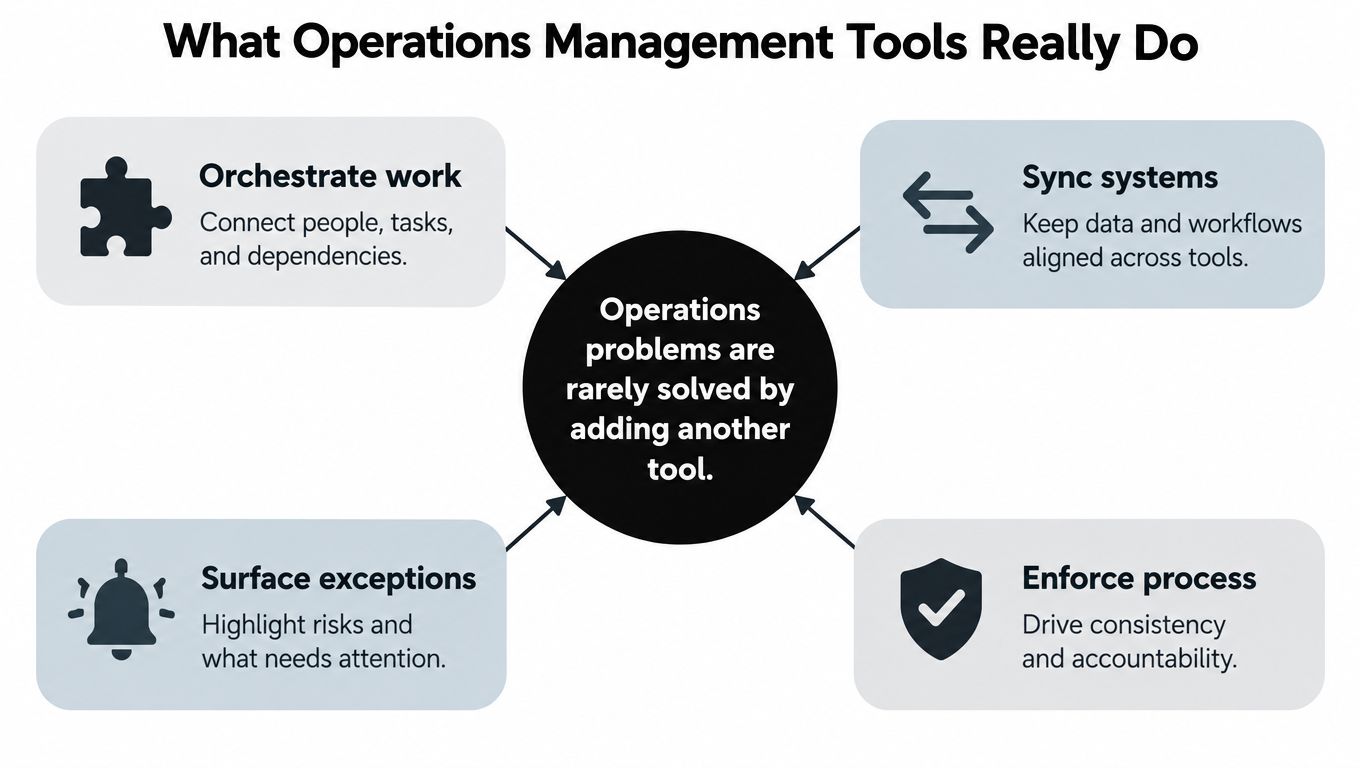
Most operations problems aren't solved by adding another tool. They get worse when the new system hides ownership, duplicates data, or forces people to move between disconnected screens.
I define operations management tools by the job they perform, not by whether they're called a dashboard, workflow platform, automation layer, or AI application. A useful system makes work status visible, connects demand signals to decisions, removes manual handoffs, and surfaces exceptions before they become expensive.
Start with the workflow, not the category
Think of a control tower at an airport. The control tower isn't valuable because it has one impressive screen. It matters because operators can see aircraft, routes, runway availability, delays, and handoffs together, then make decisions before a local issue becomes a system-wide problem.
A custom internal system should provide the same operational view. For example, a client onboarding workflow might combine a signed contract from a CRM, payment status from finance, required documents from a file system, and approval status from an internal queue. The working surface should show what is complete, what is blocked, who owns the next action, and what evidence supports the current status.
Practical rule: If a tool shows activity but doesn't help someone decide or act, it's an observation layer, not an operations system.
Look for symptoms before choosing software:
- Context switching: Staff repeatedly open several applications to answer one operational question.
- Manual transfer: Someone copies customer, project, payment, or status information from one system into another.
- Rework: Different teams maintain competing versions of the same record.
- Founder bottlenecks: Routine decisions wait for a founder because the context and approval rules aren't visible.
- Exception blindness: The standard path works, but nobody reliably tracks failed syncs, missing documents, overdue approvals, or unusual cases.
If these symptoms don't exist, adding a tool may create overhead without solving a meaningful constraint. If they do exist, document the workflow first. A practical introduction to the relationship between repeatable processes and automation is the CodeWords automation guide, which is useful background before evaluating specific platforms.
The working definition is simple: an operations management tool is a controlled layer that helps people see, decide, and execute across a recurring workflow. That layer may be purchased, custom-built, or assembled from existing systems. The decision should follow the workflow.
Mapping the Categories and Capabilities
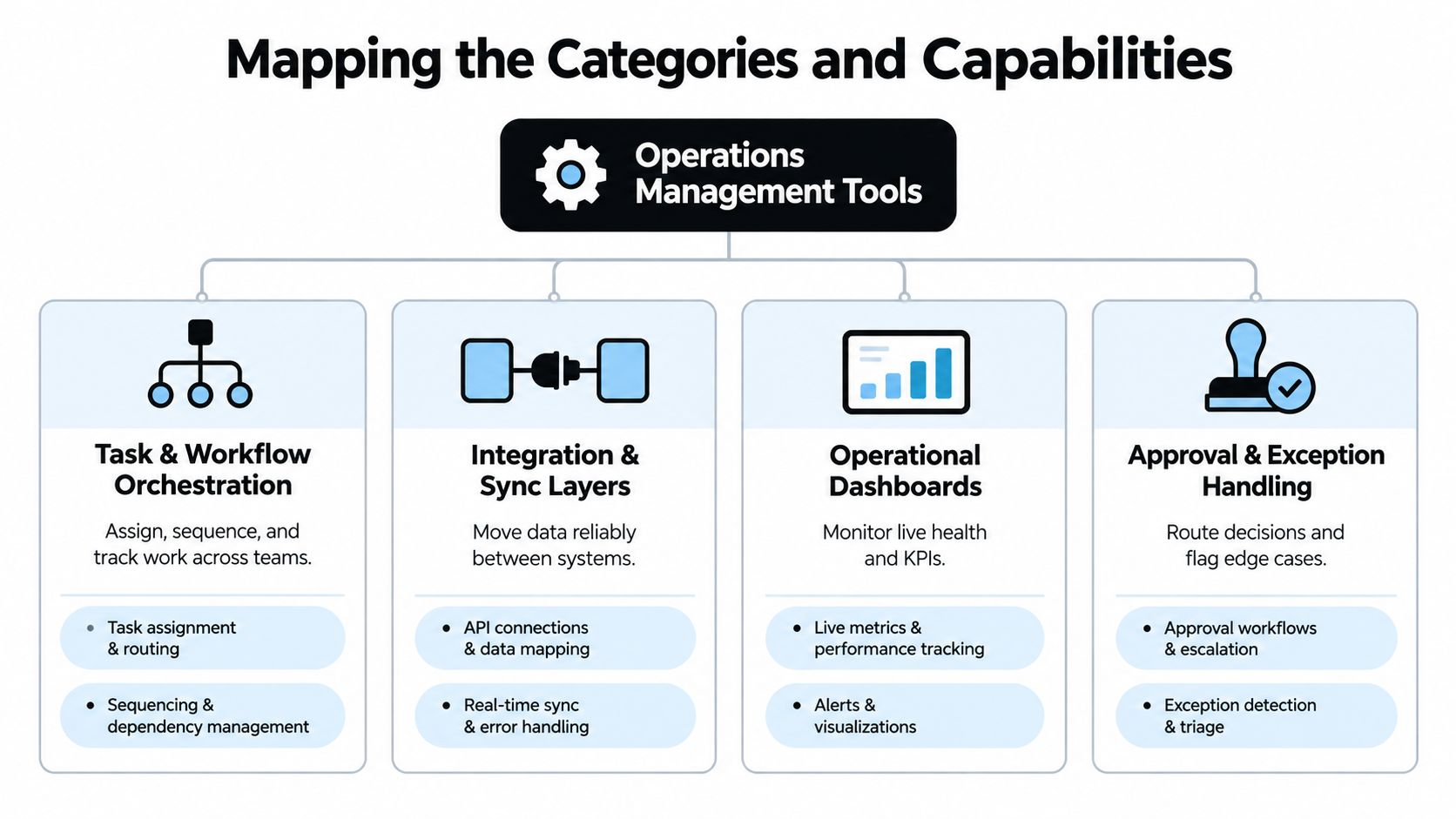
The market becomes easier to evaluate when each category is tied to a change in the workflow. The categories overlap, but they don't perform the same job.
Orchestration changes who does what next
Task and workflow orchestration assigns, sequences, and tracks work. A custom intake workflow might classify a new request, create the correct task set, assign an owner, enforce prerequisites, and escalate an overdue approval. Without orchestration, the team may see the request but still rely on messages and memory to move it forward.
The useful question isn't whether a platform has templates. Ask whether it can represent your actual decision points, ownership rules, dependencies, and exception paths without forcing the team into workarounds.
Integration changes where information lives
Integration and sync layers move data between systems reliably. Consider a CRM containing a signed opportunity and a finance application containing invoice status. A bidirectional integration can expose both in one working surface, while preserving the authoritative source for each field.
The difference between a useful sync and a fragile one is control. The integration needs validation, clear ownership, failure visibility, and a way to reconcile records when a downstream system rejects an update. A dashboard that merely displays stale values doesn't solve the operational problem.
A practical example is the insurance operations dashboard, where a unified operational view can help teams monitor work across multiple sources rather than asking staff to reconstruct status manually.
Dashboards observe, but exception handling intervenes
Operational dashboards monitor current health and key performance indicators. They can show queue age, pending approvals, unresolved errors, service-level status, and workload by owner. They become valuable when the underlying event data is consistent enough to explain why a metric changed.
Approval and exception handling adds the missing action layer. An approval queue can route a high-risk request to a senior reviewer, return incomplete submissions to the originating team, and record the decision with its evidence. This is more useful than a red status indicator that leaves somebody to decide what happens next.
AI adds interpretation and decision support
AI-assisted capabilities sit above reliable process and data foundations. They can classify inbound requests, extract fields from documents, summarize account history, score leads, flag client risk, or predict likely delays. The model should recommend or route work before it executes irreversible actions.
A delay-prediction model might identify a project at risk because required approvals remain pending and a supplier event hasn't arrived. The workflow can then create an escalation task, attach the source evidence, and ask a human to confirm the next action. The model contributes interpretation, while orchestration changes the outcome.
This progression matters because each layer depends on the previous one. Dashboards observe. Integrations connect. Orchestration moves work. AI supports decisions. Buying the AI layer first usually produces an impressive demonstration and a weak operating process.
A Five-Lens Framework for Choosing Tools
A candidate workflow deserves investment only after it passes five tests. Run them in sequence, because a failure in an early lens can make later technical work irrelevant.
Lens one identifies the actual constraint
List recurring handoffs, then mark where work waits, gets copied, gets rechecked, or returns for correction. Don't begin with the software currently available. Begin with the operational event that consumes time or delays a decision.
Ask:
- Which handoff occurs repeatedly?
- Which person performs the transfer?
- What information must they reconstruct?
- Where does the workflow leave the standard path?
- Which delay affects customers, revenue, cash, or leadership attention?
A workflow with no clear owner or finish condition isn't ready for automation. Clarify the process before selecting a platform.
Lens two ranks economic value
Instrument the current process before changing it. Capture throughput, median and tail cycle time, rework rate, exception frequency, and human touch time. These measures create a baseline for judging whether the system improves operations rather than only increasing automation activity.
Stable, rules-based, high-volume processes with structured inputs and few exceptions are usually easier to automate predictably. Judgment-heavy workflows can still benefit from software, but they need explicit approval gates and evidence capture.
Lens three checks integration fit
For every important field, name the authoritative system. A customer identifier may originate in a CRM, invoice status in finance, delivery status in a project system, and support severity in a service platform. If two systems can overwrite the same field without a defined rule, the architecture is already unstable.
The integration question is not “can these systems connect?” It's “which system owns this decision, what event triggers the update, and how does the team resolve a conflict?”
Lens four tests resilience
Assume that a connection will fail. Define retry behavior, duplicate prevention, queued work, audit history, and escalation. Decide who owns the exception after launch, because an error alert without an accountable operator just transfers the problem to an inbox.
Lens five protects independence
A system is not finished when it works in development. The operating team needs documentation, access controls, workflow versioning, monitoring, and a way to retire or modify the automation. Client ownership of code and documentation matters because dependency on the original builder can erase the value of customization.
| Evaluation Lens | Key Question | What a Strong Candidate Looks Like |
|---|---|---|
| Needs assessment | Where does work repeatedly wait or get re-entered? | A visible bottleneck with a named owner |
| ROI ranking | Can the baseline be measured? | Clear cycle time, rework, throughput, and touch-time measures |
| Integration fit | Which system owns each field and decision? | One authoritative source per critical data element |
| Resiliency | What happens when the normal path fails? | Retries, audit logs, exception queues, and escalation rules |
| Ownership | Who can operate and change the system after launch? | Documented workflows, accessible code, monitoring, and handoff |
The best candidate isn't the most impressive workflow. It's the one where the current cost is visible, the rules are sufficiently stable, and the business can verify improvement.
Build Versus Buy for Growing Teams
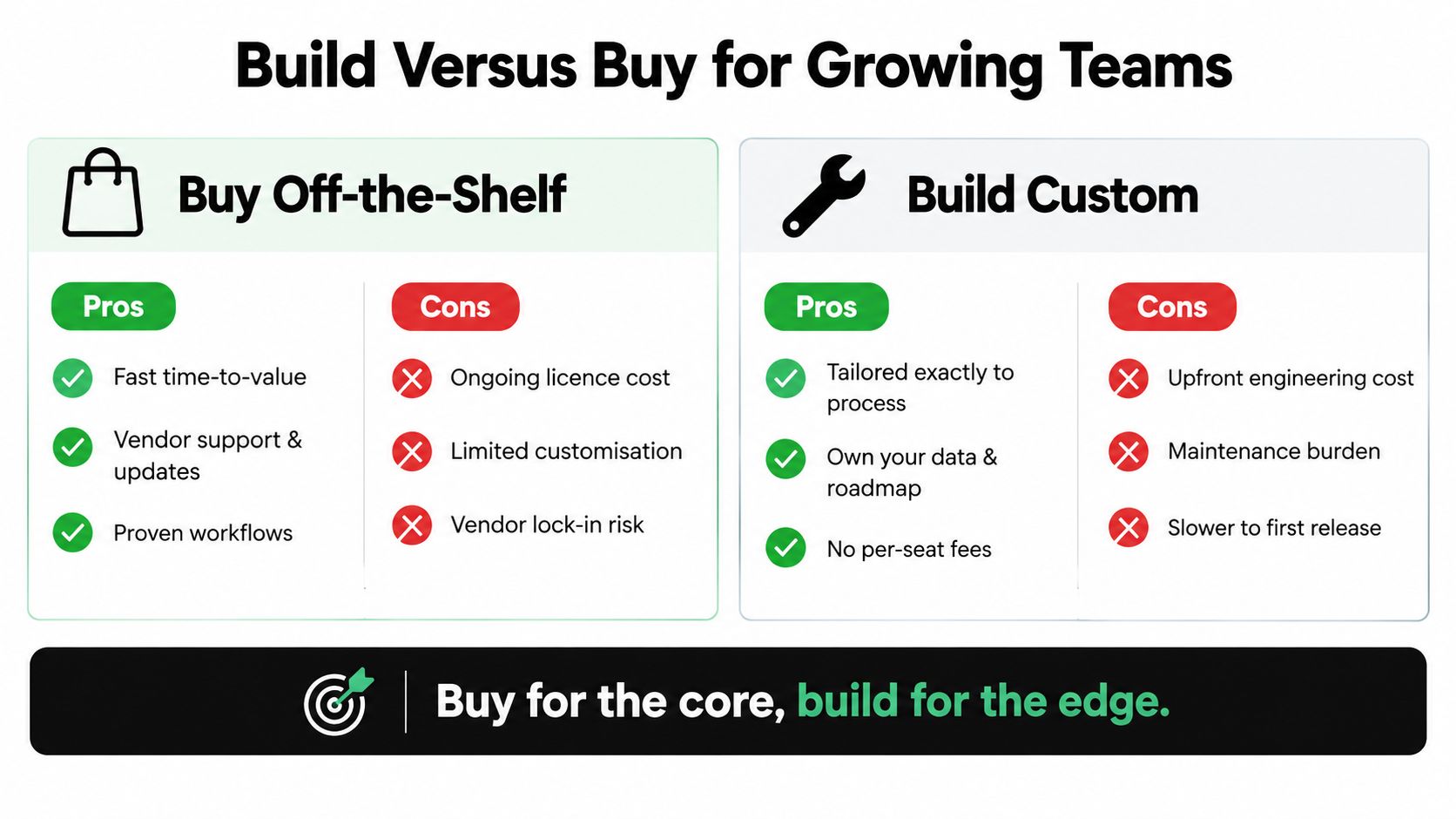
Once a workflow is proven worth fixing, the build-versus-buy decision becomes practical rather than ideological. Purchased software offers faster access to established features and vendor maintenance. A custom system offers a closer fit to the company's process and a roadmap the company controls.
Neither option removes maintenance. Bought software shifts maintenance toward subscriptions, configuration, vendor changes, data exports, and product boundaries. Custom software shifts it toward engineering discipline, testing, infrastructure, security, and internal ownership.
Buy the stable core
Buying makes sense when the process is common, the vendor's workflow matches the business, and the company benefits from ongoing product investment. A mature platform can provide user management, standard reporting, permissions, and support without requiring the internal team to create every foundation.
The danger appears when the company keeps adding workarounds to fit a near-match. Staff may maintain duplicate fields, export records for manual reconciliation, or use custom scripts that nobody owns. The license cost is visible. The cost of adapting the business to the tool is often not.
Build the edge that creates differentiation
A narrow custom internal system makes sense when the workflow crosses product boundaries, contains company-specific decisions, or creates repeated manual transfer that no single purchased platform handles well. The custom layer shouldn't replace every existing application. It can create one working surface across the CRM, finance, project, support, and document systems already in use.
For founder-led businesses in the $500K to $20M revenue range, the key question is not whether they can afford a large platform. It's whether a focused system can remove a recurring bottleneck without creating a new dependency.
Internal Systems describes this choice in its build-versus-buy comparison for AI tooling, including the trade-off between custom workflows and the maintenance burden of ownership.
Make handoff part of the purchase decision
A custom build isn't independent if only the original developer understands it. Require the code, architecture, workflow definitions, documentation, credentials, monitoring instructions, and change process at handoff. The team should know how to inspect failed jobs, update routing rules, revoke access, and retire an automation.
A sensible answer is often hybrid: buy the core, build the edge. Use established products for commodity capabilities, then build the narrow orchestration and decision-support layer that connects the company's actual work.
Integration Patterns That Actually Hold Together
Fragile automations are usually blamed on the automation platform. In practice, the deeper failure is often unclear data ownership, inconsistent schemas, or missing failure handling.
A durable integration starts with a shared language for the workflow. Define the entities, events, statuses, and identifiers before writing the connector.
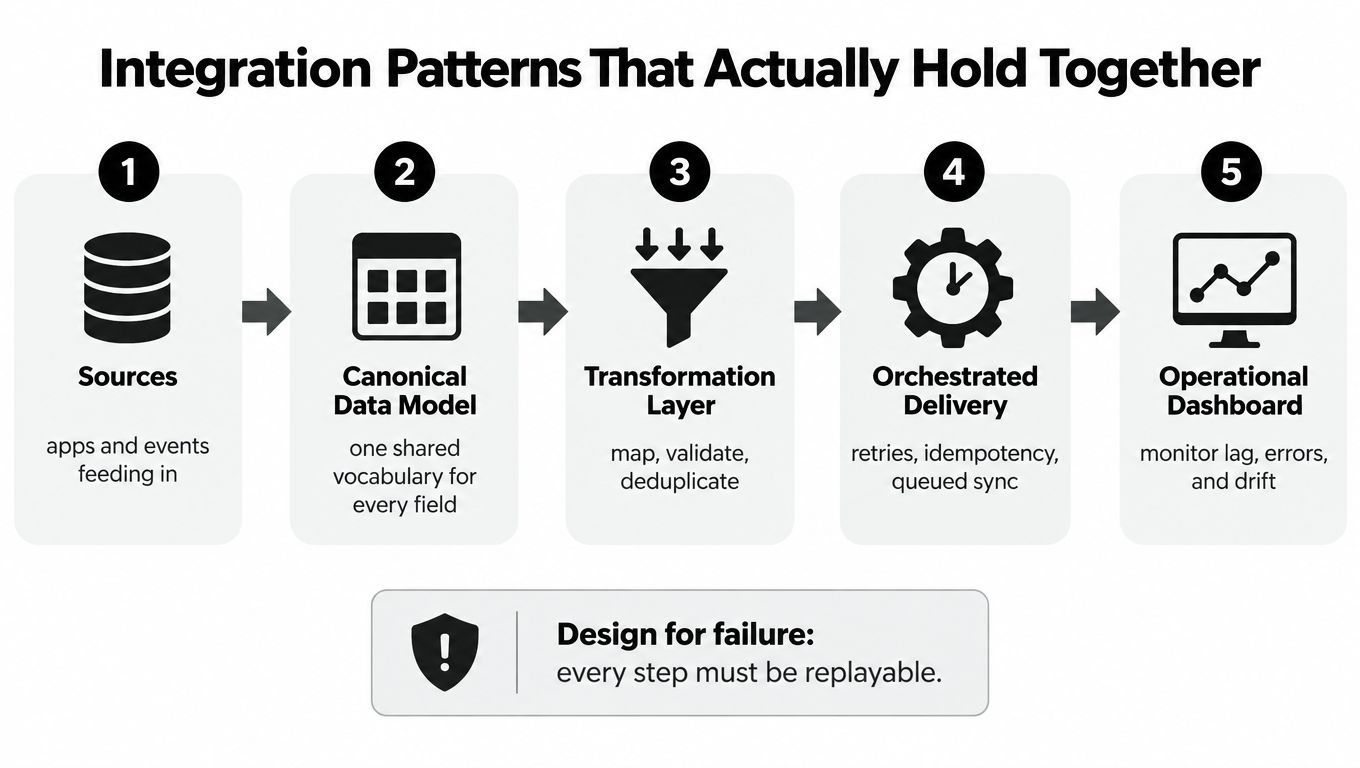
Build a canonical event record
Across CRM, finance, project, and support systems, capture:
- Entity ID: The customer, project, request, invoice, or case involved.
- Event type: What happened, such as approval requested, payment received, or document rejected.
- Actor: The user, service, or agent that caused the event.
- Timestamp: When the event occurred, so the team can calculate waiting and processing time.
- Status: The current state and any transition reason.
- Source system: Where the event originated.
- Correlation ID: The identifier that connects related actions across services.
This structure makes a handoff reconstructable. It also enables cycle-time analysis because timestamps show where work waits rather than where people think it waits.
Replace copying with a controlled working surface
Suppose a sales coordinator copies a signed contract from the CRM into a project system, then copies the project status into finance notes. The routine appears simple until a customer changes scope, an invoice is delayed, or one update fails. Staff then reconcile three versions manually.
A better design keeps the CRM authoritative for the commercial record, the finance application authoritative for billing status, and the project system authoritative for delivery status. A custom surface reads each source, presents the combined state, and sends approved updates through defined paths. It doesn't pretend that every system owns every field.
Design for failure before launch
Every integration needs:
- Idempotent actions: Repeating a message doesn't create duplicate records or payments.
- Retry limits: Temporary failures get another attempt without causing an endless loop.
- Dead-letter queues: Messages that cannot be processed move to a visible review queue.
- Audit logs: Operators can see the input, transformation, outcome, and responsible service.
- Threshold alerts: The team receives an alert when lag, failure volume, or queue age breaches an operational threshold.
A generic “integration error” is not an operating control. The alert should tell an owner what failed, which record was affected, what the system tried, and what action is available.
The following video provides a visual reference for thinking about operational workflows and connected execution.
Integration quality should be measured by reduced reconciliation effort, faster exception resolution, and trustworthy status, not by the number of connected applications.
AI Workflow Patterns From Pilot to Production
Buying an AI-enabled operations platform doesn't create transformation. It creates a capability that still needs a bounded process, usable data, supervision, and a response to failure.
McKinsey's 2025 global survey found that 23% of respondents said their organizations were scaling an agentic AI system in at least one business function, while 39% had begun experimenting with AI agents. The survey defines scaling as expanding deployment within at least one function, not deploying autonomous agents across an entire company. McKinsey's State of AI 2025 supports a practical sequencing rule: start with one bounded workflow.
Use a deployment ladder
Start with tasks that are observable and reversible:
- Classification: Label inbound requests by type, priority, or required team.
- Field extraction: Pull structured values from approved documents and show the source text.
- Summarization: Prepare a concise account, project, or incident summary for review.
- Routing: Send work to an owner based on rules plus model-supported interpretation.
- Decision support: Predict delay, client risk, or likely exception, then present evidence and confidence.
- Drafted action: Prepare an update, response, or task for human approval.
Log the inputs, retrieved sources, outputs, confidence, overrides, and final decisions. Define a confidence threshold below which the system must escalate. Monitor accuracy, cycle time, exception volume, and the rate at which reviewers reject recommendations.
A bounded agent might classify an inbound insurance request, extract policy details, route an exception, and request approval. It shouldn't change a contract, issue a payment, or make a customer-facing commitment without a human gate.
For teams designing this progression, scalable workflow automation with AI offers useful context on combining automation with model-assisted steps rather than treating AI as an isolated feature.
Restrict what the agent can read and do
AI governance starts at the workflow and data levels. Restrict which users and agents can invoke a capability, limit retrieval to approved records, redact sensitive fields before model calls, separate read from write permissions, and log tool actions.
A portfolio-risk agent can summarize approved investment records and flag a possible concern. It shouldn't access payroll data or modify a risk rating without a separate approval. This design is supported by IBM's 2025 breach research, which found that 13% of organizations reported breaches involving AI models or applications, and among those organizations, 97% reported lacking proper AI access controls. The IBM findings on AI model and application breaches make access control a prerequisite, not an optional policy document.
A practical implementation of this pattern is a client portfolio agent that supports review and routing while preserving human control over consequential decisions.
Your Next Steps for Scoping Operations Tools
Start this week with one workflow, not an enterprise-wide software plan.
Write down recurring handoffs across sales, delivery, finance, support, and leadership. Mark the handoffs that create the most delay, copying, rework, or escalation. Then assign an authoritative system to each critical field. If nobody can answer where a field comes from, don't automate it yet.
Choose one candidate and establish a baseline:
- Cycle time: How long does the workflow take from trigger to completion?
- Rework: How often does someone correct or repeat an action?
- Decision latency: How long does an item wait for a decision or approval?
- Exception volume: How often does the workflow leave its standard path?
- Human touch time: Which steps require manual review, transfer, or reconciliation?
Define “done” before development begins. A useful acceptance definition might require a unified status view, an owned exception queue, an audit trail, documented permissions, and measurable improvement in the selected workflow. Don't accept “the integration runs” as the finish line.
Know what a useful audit produces
A diagnostic should identify the highest-value builds and the workflow to leave alone. A deeper audit should rank candidates by process economics, document data ownership, define the architecture, specify controls, and recommend a build sequence.
Use fixed-price scoping after the workflow is understood. Use paid discovery when the systems, owners, or requirements remain unclear. That distinction protects both sides because the delivery team isn't guessing at hidden complexity, and the client isn't paying for a vague promise disguised as a build.
The readiness signal is practical: when existing applications and no-code automations create more maintenance than value, a narrow, owned internal system is often the next sensible move. Build the smallest working surface that removes a real bottleneck, then earn the right to expand it through measured reliability.
Internal Systems diagnoses recurring operational workflows, designs the architecture, and builds custom software, integrations, automations, and AI-assisted workflows with client ownership of the code and documentation at handoff. If your team is spending too much time reconciling systems or waiting on avoidable decisions, visit Internal Systems to scope the workflow that should be fixed first.