Operational Scalability: A Guide for Growth Teams
Learn what operational scalability means for growth-stage teams in 2026 and discover practical strategies to scale your operations efficiently.
A 60-person services firm wins two enterprise clients in the same quarter. Revenue climbs immediately, but the operating system buckles. Dashboards load slowly, project handoffs disappear into chat, finance reconciles figures in side spreadsheets, and senior staff spend their days approving work that should have moved without them.
That moment is the scaling wall. Demand keeps rising while margin, cycle time, service quality, and morale move in the wrong direction. Hiring more people may hide the symptoms, but it won't repair the operating model.
Operational scalability means absorbing more volume, complexity, and users without proportional increases in cost, errors, or decision delay. A custom internal system can help, but only after the company defines ownership, decision rights, workflow states, data contracts, and exception rules. The sections below turn that principle into a practical playbook covering warning signals, KPIs, architecture, governed AI, and a phased build sequence.
Table of Contents
- Why Growth-Stage Operations Hit a Scaling Wall
- The Real Meaning of Operational Scalability
- Four Warning Signs Your Operations Cannot Scale
- KPIs and Diagnostics That Measure Scalability
- Architecture Patterns for Scalable Internal Systems
- Scaling AI and Automation Without Losing Control
- A Phased Roadmap to Build Scalable Operations
- Audit Checklist and Next Steps
Why Growth-Stage Operations Hit a Scaling Wall
Growth-stage firms rarely fail because one employee works too slowly. They fail because work crosses too many boundaries without a reliable system controlling the handoff. Sales promises a delivery date, operations interprets the promise differently, finance waits for missing information, and leadership becomes the escalation layer for routine decisions.
The result is a hidden tax on every new client or request. Each additional account adds more coordination, more status checking, and more opportunities for conflicting records. The company appears busy and successful, yet experienced operators spend less time improving delivery and more time reconstructing what happened.
The wall is an operating-model problem
A useful diagnostic is to ask what happens when a person is unavailable. If a workflow stops because one coordinator knows which message to read, which document to trust, or which exception to approve, the business has encoded process knowledge in individuals rather than in a system.
That doesn't mean every process needs custom software. It does mean the company must separate three problems:
- Capacity: Can the team handle the incoming volume?
- Coordination: Can departments move work between defined states?
- Control: Can leaders see ownership, exceptions, approvals, and outcomes?
Hiring addresses capacity. It rarely fixes coordination or control. A well-designed internal system can connect existing tools, enforce workflow rules, surface queues, and give decision-makers a shared operational view.
Practical rule: If leadership must ask three people for the status of one request, the company has a workflow design problem before it has a staffing problem.
Start with the highest-volume recurring process, not the most politically visible one. Map the request, each handoff, every approval, the data transferred, and the point where work waits. That map will show whether the constraint is missing automation, unclear authority, disconnected systems, or a process that shouldn't exist in its current form.
The Real Meaning of Operational Scalability
In 1913, Henry Ford's moving assembly line reduced Model T assembly time from about 12 hours to roughly 90 minutes, as described in this history of workflow automation and standardized work. The important lesson isn't about cars. Ford didn't solve production by asking each worker to move faster. He redesigned the process into repeatable, sequenced tasks.
Modern internal systems apply the same logic to digital work. A contract review pipeline can receive a document, extract defined fields, route unusual clauses to the right reviewer, record the decision, and create the next task. A customer triage assistant can classify an inquiry, retrieve account context, suggest a response, and escalate based on explicit policy.
Software capacity isn't operational scalability
Infrastructure scalability answers a narrow question: can the servers process more requests? Operational scalability asks whether the company can absorb more work without multiplying coordination, rework, cost, and decision latency.
That distinction matters. A fast API won't fix approvals that live in chat. A powerful language model won't fix incomplete customer records. A larger queue won't help if no one owns exceptions. Technology can enforce a good operating model, but it can also accelerate a bad one.
A scalable custom system usually combines three layers:
- Clean integrations that bring data from SaaS tools and external systems into a controlled domain model.
- Deterministic orchestration that defines states, permissions, transitions, deadlines, and audit events.
- AI augmentation at judgment-heavy steps where classification, summarization, or decision support adds value.
The broader automation market reflects this shift toward connected execution. IFTTT reported 27 million users, while Zapier, launched in 2011, later reached a $5 billion valuation and connected more than 7,000 applications, according to this history of automation platforms. Adoption doesn't prove that a company's operating model is ready. It proves that integration-led work has become a standard response to coordination complexity.
Operational scalability is therefore a property of process architecture and governance. Headcount still matters, but each added person should enter a system with clear work states, reliable context, and bounded decision rights.
Four Warning Signs Your Operations Cannot Scale
The scaling wall leaves evidence in operational data long before the income statement makes the problem obvious. Look for patterns across time, not isolated incidents. One late approval isn't a system failure. A steadily expanding approval queue is.
Decision latency grows faster than the team
If the team grows but routine decisions take longer, authority is becoming centralized. Approvals routed through chat are a common example. The request lacks a formal state, the approver lacks complete context, and the sender follows up manually.
Track the time from a decision-ready event to an approved or rejected outcome. If that interval keeps expanding, define approval thresholds, required inputs, substitutes, and escalation rules inside the workflow.
Rework rises with volume
A finance team that closes the books in side spreadsheets is often compensating for missing system controls. People copy values between tools, reconcile conflicting records, and correct errors that the workflow should have prevented.
An automation study in telecommunications reported a 71% reduction in processing time, an 86% reduction in error rate, and a fourfold increase in requests processed per hour after validation workflows were automated, as documented in this telecommunications workflow study. The lesson is diagnostic: repetitive validation and handoff work often creates more capacity than just adding staff.
Manual handoffs multiply
Count how many times a request changes owner or system before resolution. A support ticket may move from inbox to chat, from chat to an account record, then back to a queue because the next action wasn't explicit.
Manual handoffs create waiting time and context loss. Build a shared workflow state and make each transition produce an event, an owner, a timestamp, and the next permitted action.
Automation coverage stalls
A company may have many isolated automations and still lack scalable operations. If every workflow is built as a one-off, each new request requires custom logic, undocumented exceptions, and another maintenance burden.
The signal is a growing automation backlog with little reuse. Create common components for identity, permissions, notifications, audit logging, and retries. Then new workflows can use a stable foundation instead of starting from scratch.
KPIs and Diagnostics That Measure Scalability
You can't manage operational scalability from a dashboard that only reports revenue or open tasks. Measure how work moves, where it waits, and what it costs to complete. Instrument the process before expanding the system.
Start with event logs from your custom application, ticketing platform, approval service, and integrations. Each meaningful event should include the request ID, workflow state, owner, timestamp, and outcome. Process-mining views can reveal loops and bottlenecks, while control-chart dashboards show whether variation is normal or deteriorating.
Five measures worth instrumenting
- Throughput: Measure completed units per FTE-hour. Separate completed work from merely created work, or the metric will reward queue accumulation.
- Cycle latency: Measure the elapsed time from a valid request to resolution. Break it into active work and waiting time so the team knows whether the constraint is execution or coordination.
- Error and rework rate: Count items returned for correction, not only formal defects. Rework often appears first as reopened tickets, duplicate approvals, or revised records.
- Decision cycle time: Measure how long requests wait for a person or policy decision. This exposes leadership bottlenecks that throughput alone can conceal.
- Automation coverage: Track the share of eligible workflow steps completed without manual intervention, while excluding steps that require deliberate human judgment.
Use a queue-time analysis for tickets and approvals, a process-mining event log for multi-system workflows, and a control-chart dashboard for recurring quality measures. A practical insurance operations dashboard example shows the kind of operational surface that can bring queues, ownership, and decisions into one view.
| KPI | What It Measures | Diagnostic Source | Healthy Benchmark |
|---|---|---|---|
| Throughput | Completed work per FTE-hour | Event logs and capacity reports | Improving output without matching headcount growth |
| Cycle latency | Request-to-resolution duration | Queue-time analysis | Stable or falling as volume increases |
| Error or rework rate | Work returned for correction | Workflow outcomes and audit events | Declining repeat failures |
| Decision cycle time | Time awaiting approval or judgment | Approval logs | Bounded by explicit SLA rules |
| Automation coverage | Eligible steps completed automatically | Orchestrator telemetry | Expanding through reusable workflow components |
Don't import generic benchmark ranges when your process definitions differ from another company's. Establish a baseline, segment by workflow type, and compare the same process over time. The goal is not a flattering number. It's evidence that added volume produces efficiency instead of moving work from one overloaded team to another.
Architecture Patterns for Scalable Internal Systems
Most internal systems become fragile when screens, business rules, integrations, and AI prompts live in one undifferentiated application. A change to a form breaks an approval path. A vendor API change corrupts downstream records. A model response bypasses the control that should have stopped it.
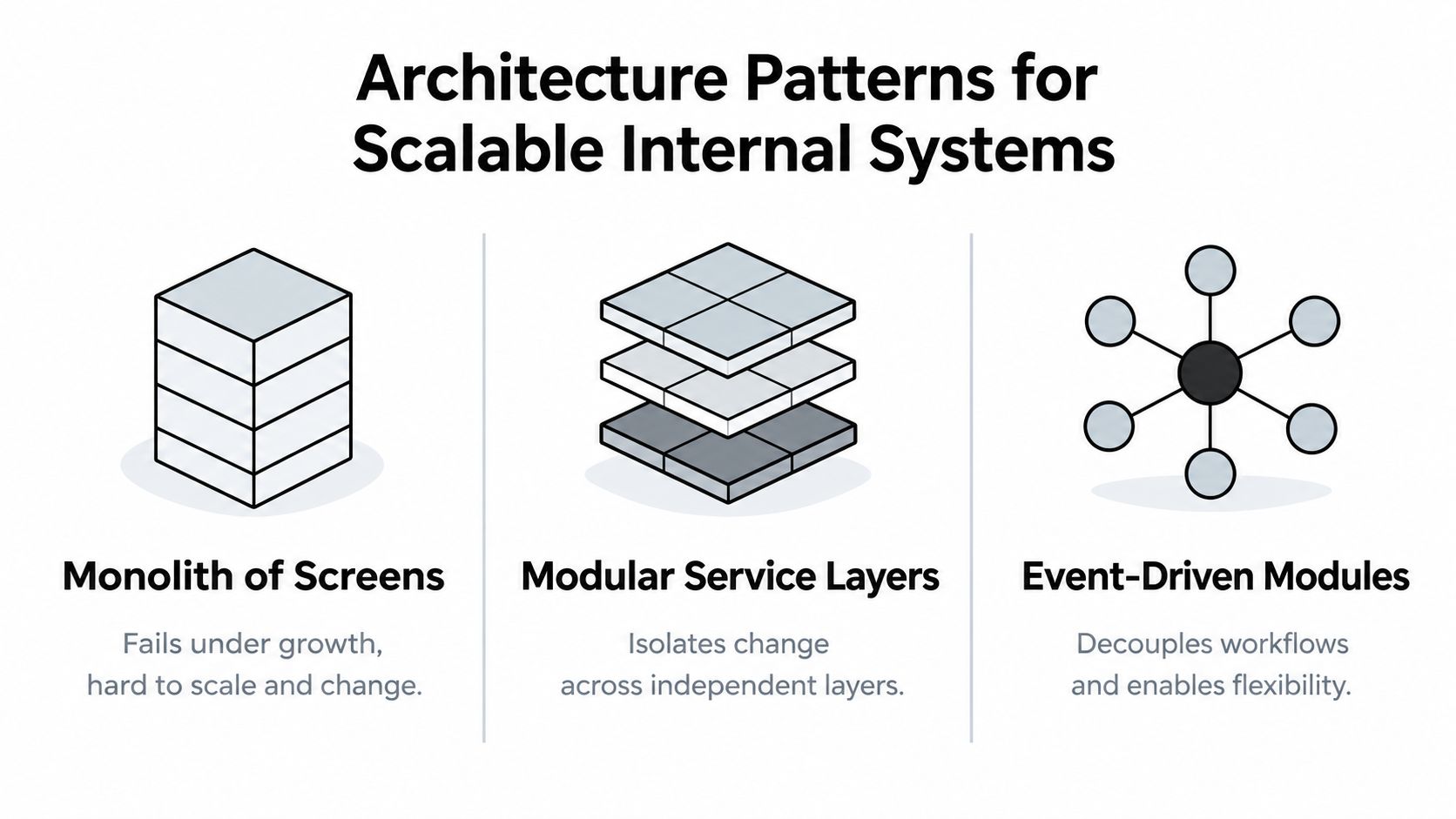
Three patterns hold up better when applied deliberately.
Integration-led systems
Use this pattern when the company already depends on CRM, finance, ticketing, document, and communication platforms. The custom system consumes APIs, normalizes records behind a domain layer, and exposes one operational surface to users.
For a multi-warehouse inventory engine, the domain layer might standardize item, location, availability, reservation, and transfer events even when source systems name them differently. The trade-off is integration maintenance. Webhook failures, rate limits, duplicate events, and inconsistent source data require retries, reconciliation jobs, and clear ownership.
Deterministic orchestration
Use explicit state machines for work that has compliance, approval, or financial consequences. A contract can move from received to extracted, reviewed, approved, rejected, or escalated. Every transition should specify the actor, required evidence, permitted next states, and audit record.
This pattern costs more design effort than a collection of ad hoc triggers, but it provides observability and predictable failure handling. The real estate lead automation system illustrates why routing, status, and follow-up logic should be treated as workflow state rather than scattered notifications.
AI-augmented workflows
Use language models where the work requires interpretation, not where a simple rule is sufficient. Contract clause summarization, support classification, and extracting fields from unstructured documents are sensible candidates. Inventory reservation, payment approval, and permission checks usually belong to deterministic code.
AI introduces latency, cost, variance, and a new failure mode: plausible but incorrect output. Keep model calls bounded, validate structured output, record prompts and responses where appropriate, and provide a deterministic fallback.
The right layering is straightforward: clean integrations underneath deterministic orchestration, with AI placed above the orchestration at controlled judgment points. Don't let an AI agent write directly to a critical system without policy checks, authorization, and an auditable transition.
Scaling AI and Automation Without Losing Control
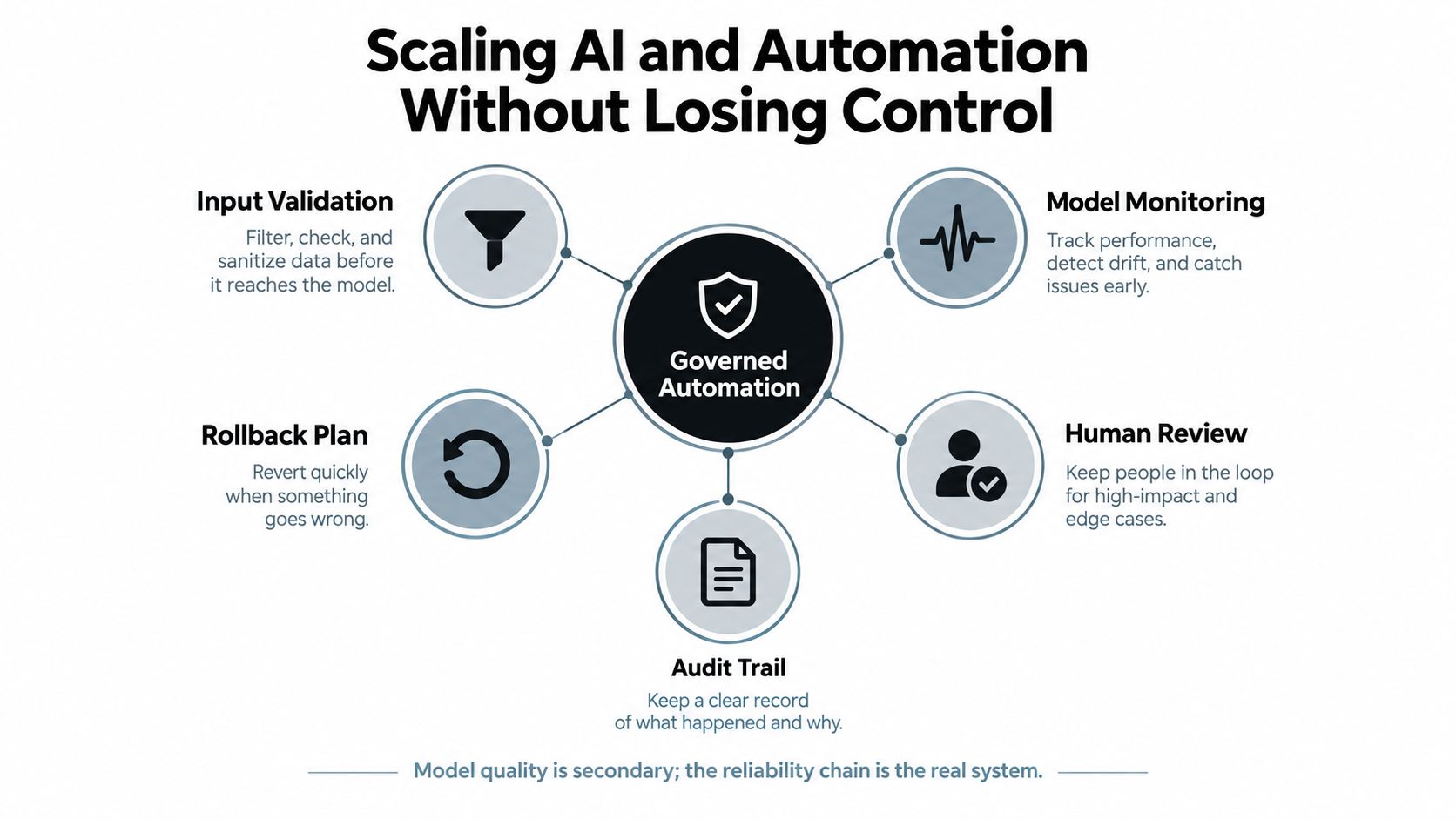
Automation doesn't scale itself. Governance scales it.
A multi-step AI workflow can become unreliable even when each component appears strong. A benchmark reports that a component with 90% reliability can produce about 73% end-to-end reliability when three components are chained, and below 66% when four are chained, as explained in this analysis of deterministic and probabilistic workflow design. Every added probabilistic step creates another opportunity for an invalid, incomplete, or misinterpreted result.
Design the decision boundary first
Before selecting a model, classify each step:
- Fully automated: The system can act when inputs meet defined conditions.
- Human-confirmed: The system prepares a recommendation, but a named person approves it.
- Human-owned: The system may provide context, but the decision remains with an accountable operator.
For example, a customer triage agent may classify a request and suggest a priority. It shouldn't close a complaint, issue a credit, or change a contractual commitment without a policy check and an appropriate approval path.
Input validation should reject missing identifiers, malformed records, and unsupported document types before a model call. Output validation should enforce schemas, allowed values, confidence thresholds, and required citations to source records. Shadow mode lets the team compare AI recommendations with human decisions before granting the workflow authority to act.
Reliability needs an operating owner
Measure each stage separately. An enterprise benchmark reports a 97.3% overall weighted fidelity score on the Thunk.AI platform while separating input validation, information extraction, context lookup, and decision or approval fidelity in its AI reliability benchmark. A single accuracy number hides the stage that fails.
Policy-as-code can enforce limits on data access, approval values, and actions. Monitoring should track invalid outputs, fallback frequency, human overrides, latency, and unresolved exceptions. A custom AI tooling decision should also consider whether the team can operate these controls after launch, not only whether a prototype produces convincing answers. The build-versus-buy comparison for AI tooling is useful when deciding which parts belong in a custom internal system.
Every automated step needs a named owner, a measurable SLA, an audit trail, and a kill switch.
A Phased Roadmap to Build Scalable Operations
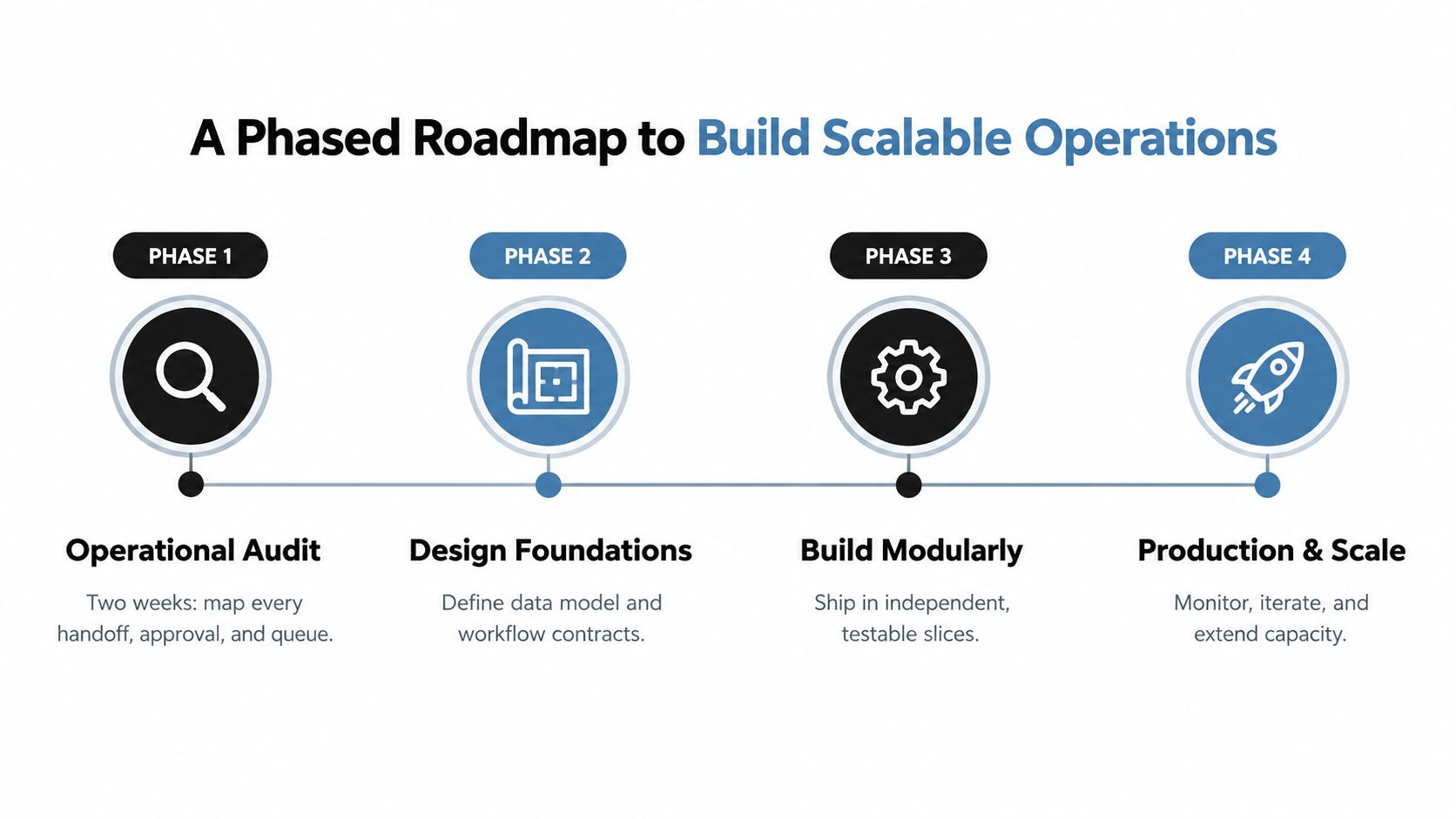
A scalable internal system should earn authority in stages. Skip the audit and you'll automate assumptions. Skip architecture and you'll create a brittle collection of integrations. Skip production controls and you'll turn the operations team into an unpaid support desk.
Phase 1, audit the operating model
Spend two weeks mapping recurring workflows. Record every handoff, approval, data transfer, queue, exception, system, and owner. Rank each process by volume, delay, rework, business impact, and readiness for standardization.
Interview operators, not only executives. Ask them where they copy information, where work waits, which decisions require escalation, and which records they don't trust. The escape hatch is a written decision to stop a workflow from entering the build queue when the process is unstable or the business owner is unavailable.
Phase 2, design the foundations
Define the domain model, integration boundaries, event contracts, workflow states, permissions, and AI decision boundaries. Include an explicit decision-rights matrix showing who can approve, override, escalate, and disable each action.
The target architecture should identify the integration layer, event bus where needed, deterministic orchestrator, user interface, audit log, and observability surface. Don't introduce an AI agent until the source data and state transitions are clear.
Phase 3, build two narrow workflows
Pilot two workflows in parallel, preferably one high-volume process and one judgment-heavy process. Ship independent slices with testable inputs, visible events, retries, and human fallback.
Gate expansion on hard measures such as p95 cycle time, automation coverage, rework rate, unresolved exception age, and decision latency. If the pilot only improves the dashboard while the queue remains unchanged, stop and redesign the workflow. If users bypass the system, treat that as an operating-model defect, not a training failure.
Phase 4, move into production ownership
Production rollout needs alerting, access reviews, runbooks, on-call ownership, and a regular reliability review. Instrument integration failures, queue depth, workflow age, model fallbacks, human overrides, and policy violations.
A 90-day to 12-month program can move from diagnosis to broader adoption, but the calendar should follow evidence rather than a launch date. Quarterly reviews should retire unused automations, revise decision rules, test rollback paths, and confirm that the system still reflects how the business operates.
Audit Checklist and Next Steps
Run this self-assessment in a single afternoon. Answer yes or no, attach evidence, and assign an owner to every no. A vague yes doesn't count.
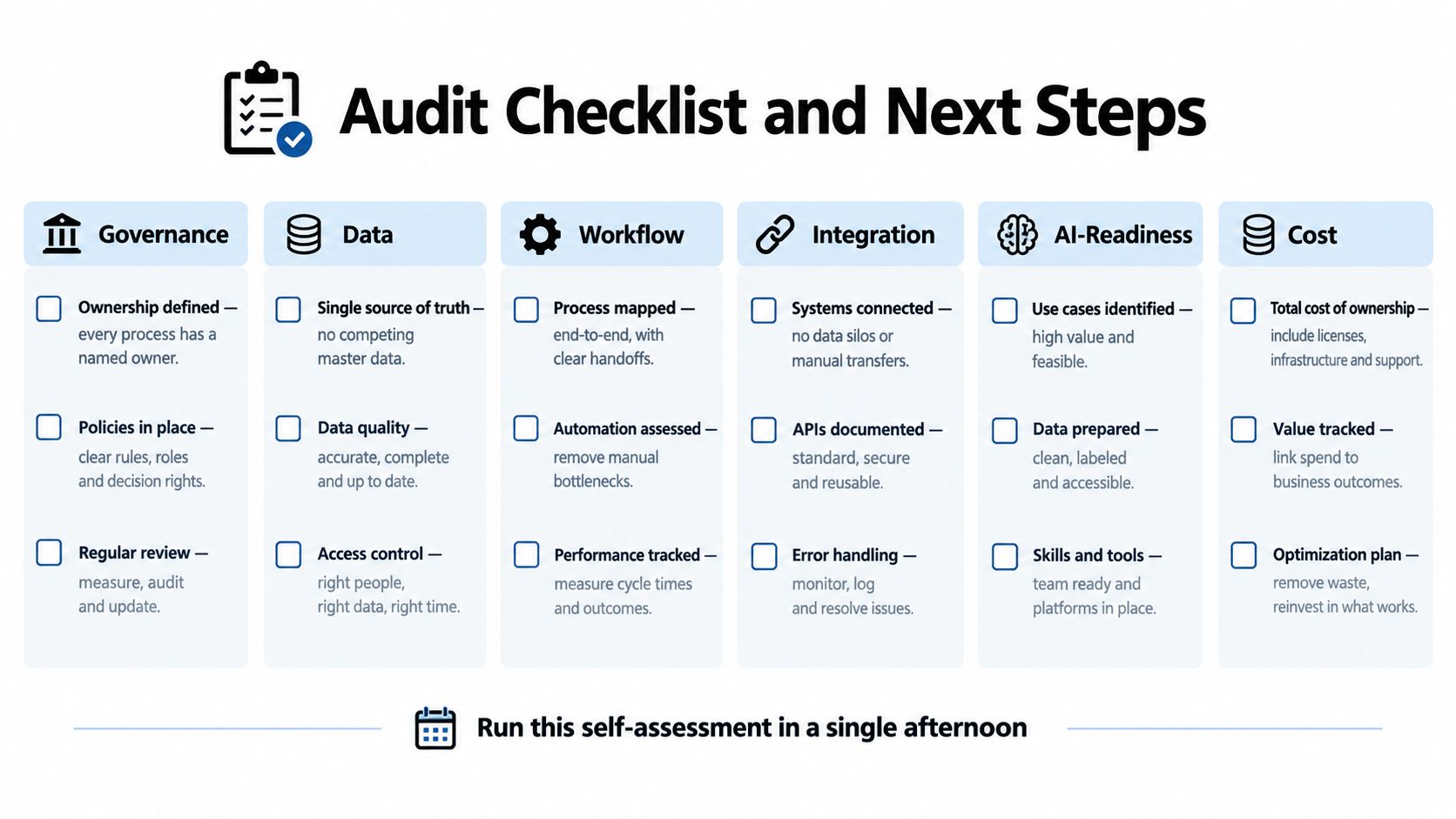
Governance
- Ownership: Does every recurring workflow have a named business owner?
- Decision rights: Can the team identify who approves, overrides, escalates, and disables each critical action?
- Reliability: Does every automated step have an SLA, alert path, and rollback or kill-switch procedure?
Data
- Source of truth: Can operators identify the authoritative record for each important entity?
- Completeness: Do requests enter the workflow with the fields required for the next decision?
- Auditability: Can you reconstruct who changed what, when, and why?
Workflow and integration
- States: Are valid workflow states and transitions documented?
- Queue visibility: Do you know the true p95 approval cycle time for the highest-impact process?
- Failure handling: Do integrations retry, reconcile duplicates, and surface unresolved failures to an owner?
AI readiness and cost
- Override path: Does every AI output have an explicit human override route?
- Evaluation: Are input validation, extraction, retrieval, and decision fidelity measured separately?
- Unit economics: Can you calculate the cost of completing one transaction, including human review and exception handling?
Questions founders ask
Who should own operational scalability? The COO or head of operations should own the outcome, while product or engineering owns system delivery. Finance, compliance, and frontline operators must own the controls and process decisions in their domains.
How do you keep AI workflows reliable after the prototype? Replace demo-based evaluation with stage-level tests, deterministic validation, human review for defined risk classes, monitoring, audit logs, and a documented rollback path. A workflow that can't be paused safely isn't production-ready.
Choose your next move based on the audit. If ownership, decision rights, or workflow states are unclear, fix the operating model first. If the process is stable but teams lose time across tools and queues, invest in custom internal tooling. If the data is structured and one narrow judgment step is suitable for controlled assistance, pilot a bounded AI workflow rather than deploying an agent across the entire operation.
Internal Systems designs and builds custom software, integrations, operational automations, and AI-enabled workflows for teams whose recurring work has outgrown disconnected tools. Start with the Internal Systems operations diagnostic to identify the highest-value build, the workflow to avoid, and the sequence that can make operational scalability measurable.