Operational Efficiency Consulting for Founder-Led Firms
A practical guide to operational efficiency consulting for founder-led and growth-stage firms, covering diagnosis, automation, AI workflows, ROI metrics
Tuesday afternoon is when operational debt becomes visible. A founder has three billing tabs open, a CRM record that no longer matches QuickBooks, and a Slack thread where someone promised to “reconcile this week.” A board meeting is due in 48 hours, so an operations manager exports a CSV by hand, cleans the columns, checks customer names against another system, and hopes nobody changed the source data afterward.
The team isn't incompetent. It scaled faster than its systems. HubSpot handles leads, QuickBooks handles invoices, Slack handles decisions, a project platform handles delivery, and a few Zapier chains attempt to connect everything. Each tool works reasonably well on its own. The failure sits between them, in the manual handoffs, duplicated records, approval delays, and undocumented exceptions.
That work consumes attention without appearing on a budget. Someone checks whether a payment cleared before releasing a project. Someone else copies a client address into a contract. The founder answers questions that should have been resolved by a dashboard or an approval rule. By the time the CSV reaches the board pack, the business has spent hours coordinating information instead of acting on it.
The real bottleneck isn't always the work. Often, it's the coordination of the work.
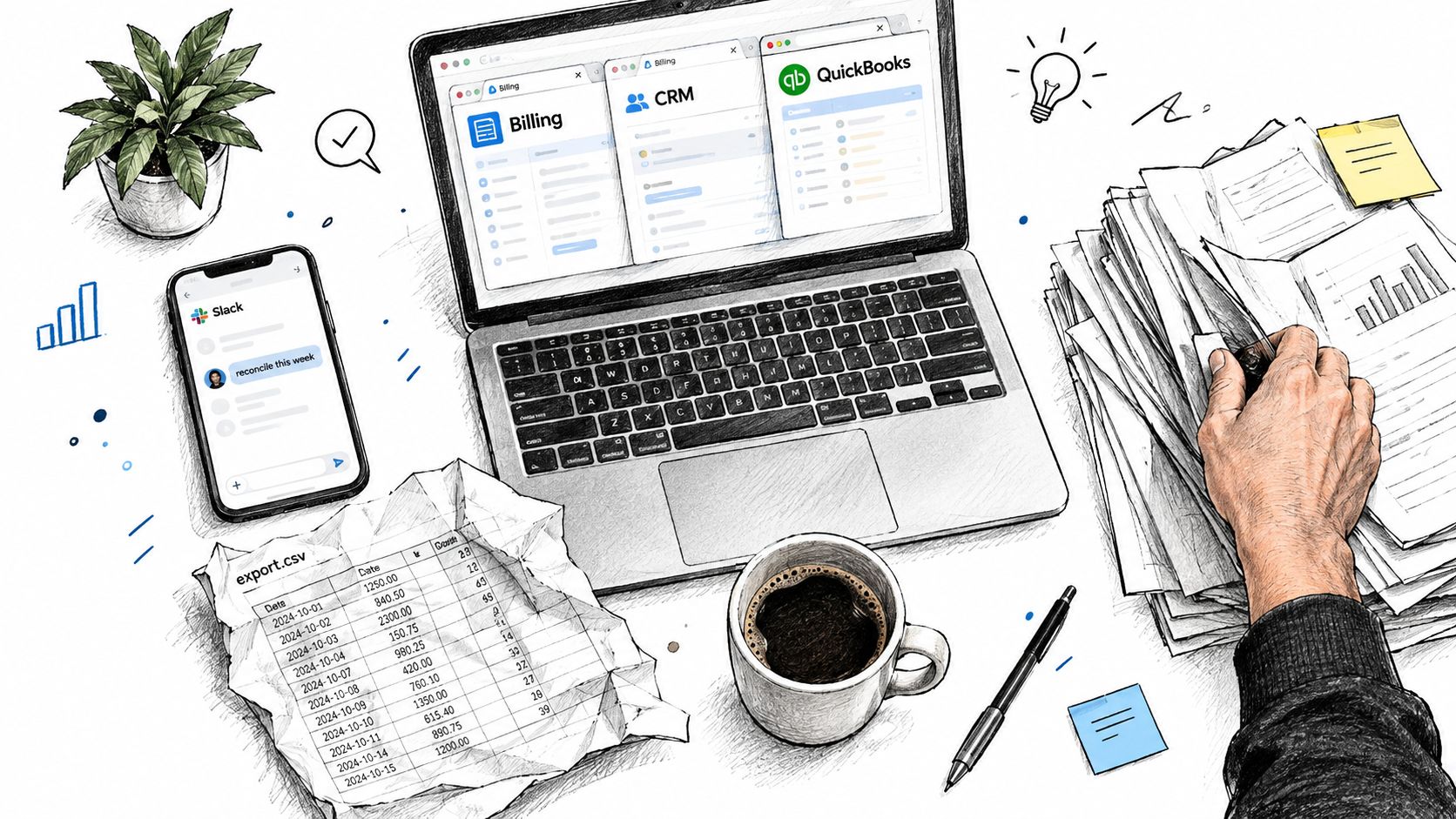
Table of Contents
- The Founder Who Could Not Find the Spreadsheet
- What Operational Efficiency Consulting Actually Is
- The Operational Problems Consulting Solves
- A Typical Engagement From Diagnosis to Handoff
- Custom Builds Versus Off-the-Shelf Tools
- Measuring ROI Without Fooling Yourself
- Choosing a Firm and Avoiding the Common Pitfalls
- What a Good Engagement Actually Leaves Behind
The Founder Who Could Not Find the Spreadsheet
By Wednesday, the founder's calendar is full of decisions that shouldn't require founder attention. A salesperson needs approval to change a proposal. Finance needs clarification on which customer record is current. Delivery is waiting for a signed statement of work, even though the client claims it was sent last week.
On Thursday, the team discovers that the CRM contains an old billing contact. The invoice goes to the wrong person, the customer replies to an account manager, and the account manager forwards the message to finance. A simple data mismatch becomes a chain of recovery work. Nobody planned that work, but somebody has to perform it.
Friday brings a different version of the same problem. A Zapier automation has stopped creating tasks because a field name changed in the CRM. No alert reached the operations team. A coordinator notices the gap only after a project misses an internal deadline, then manually recreates the missing tasks and updates three systems. The automation didn't remove labor. It moved labor into inspection and repair.
This pattern is common in founder-led firms. Teams add tools as new needs appear, patch gaps with custom scripts, and rely on experienced employees to remember how the process really works. The system looks efficient from a distance because every department has software. Up close, the company has a collection of disconnected working surfaces and a growing dependence on human memory.
The founder recognizes the problem when a routine question requires a meeting: Which customer is ready for billing, who approved the exception, and what still needs attention? The answer isn't hidden in the core work. It's scattered across systems, messages, and people.
What Operational Efficiency Consulting Actually Is
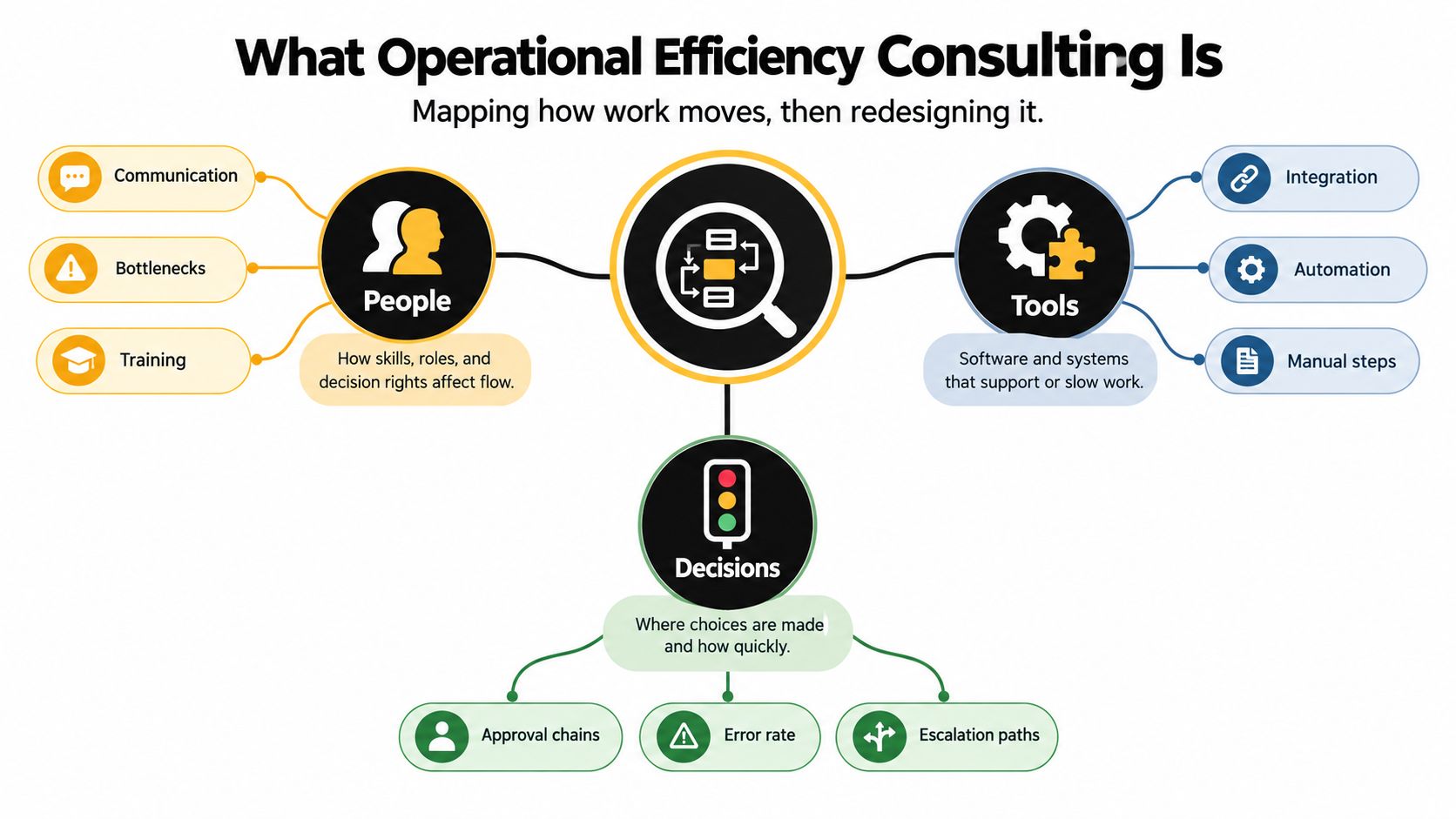
Operational efficiency consulting is decision architecture for how work moves through a company. It maps the people, software, rules, and handoffs involved, then redesigns them so employees make fewer avoidable decisions and recover fewer preventable errors. The consultant should leave behind a working operating system, including clean data, defined workflows, connected tools, monitored automation, and named ownership.
The work goes beyond a strategy deck or a generic recommendation to “improve processes.” A strategy consultant may propose a new operating model. An operational efficiency consultant specifies how a lead becomes a qualified opportunity, which approval rule applies, how a contract reaches finance, and what happens when an exception breaks the standard path.
That last question separates durable work from a short-term cost-cutting exercise. Removing staff from a broken process leaves the same decisions and handoffs for fewer people to catch. A better target is total factor productivity, the relationship between revenue and the workers, capital, and purchased inputs used to produce it, as described in this academic definition of consulting-firm operating efficiency. For a buyer, the test is practical: can the company produce more reliable output from its existing resource base?
The outputs that matter
A sound engagement should improve at least three measurable outcomes:
- Cycle time: the time from a defined starting event to a defined completion event.
- Exception rate: how often work leaves the standard path and needs intervention.
- Rework percentage: how often completed work must be corrected, repeated, or entered again.
Set the event boundaries and denominator before measuring. Track the same case cohort across elapsed cycle time, human touch time, rework, exception rate, and SLA attainment. Workflow automation benchmarking guidance supports this paired view instead of treating automation volume as proof of improvement.
The recommendation to a CFO is direct: less time per transaction, fewer broken handoffs, and decisions that do not depend on one person remembering the spreadsheet. A launch is successful only when the workflow still works after field changes, ownership changes, and routine exceptions.
The Operational Problems Consulting Solves
Most firms don't need another tool before they understand the failure pattern. The following diagnoses help separate a genuine systems problem from a temporary workload spike.
| Problem | Symptom | Typical Cost | Remedy Direction |
|---|---|---|---|
| Tool sprawl | Sales, delivery, and finance each trust different records | Staff reconcile conflicting data before decisions | Define a source of truth, then build integrations around the workflow |
| Manual handoffs | Employees copy customer, billing, or task data between tools | Every transfer creates delay, transcription risk, and review work | Use APIs, event-based sync, and a shared internal working surface |
| Fragile automations | A Zapier chain fails silently after a field or permission changes | Missing tasks and records surface only after a downstream failure | Add monitoring, retry logic, ownership, and a human fallback |
| Decision bottlenecks | Approvals wait in one founder's inbox or Slack messages | Work queues grow while leadership becomes the routing layer | Encode approval thresholds, route standard cases automatically, and escalate only exceptions |
| Unowned processes | One employee knows the sequence, edge cases, and recovery steps | Absence or turnover interrupts the operation | Document decision rights, assign an owner, and transfer system knowledge |
Tool sprawl
A team may call Salesforce the source of truth while finance treats QuickBooks as authoritative and delivery relies on Monday.com. The measurable cost isn't just subscription spend. It includes the time spent resolving which record is current and the rework created when one system changes without updating the others.
A consultant typically maps the data objects and decisions first, then connects the systems that support those decisions. Operational benchmarking guidance from Wipro recommends comparing processes by activity type, execution method, automation level, and business criticality rather than applying generic cost cuts.
Fragile automations and unowned work
An automation without an owner is a scheduled incident. If nobody receives an alert when a webhook fails, the business has created a hidden queue of detective work. Recent coverage on automation failure and operational discipline highlights undocumented workflows, weak measurement, poor change management, and unclear ownership as recurring abandonment causes.
The deeper issue is decision architecture. Fixing one intake form or adding one AI classifier won't solve a process where nobody knows who can approve, what qualifies as an exception, or where the final record belongs. Individual fixes can make the stack look more modern while leaving the operating logic unchanged.
A Typical Engagement From Diagnosis to Handoff
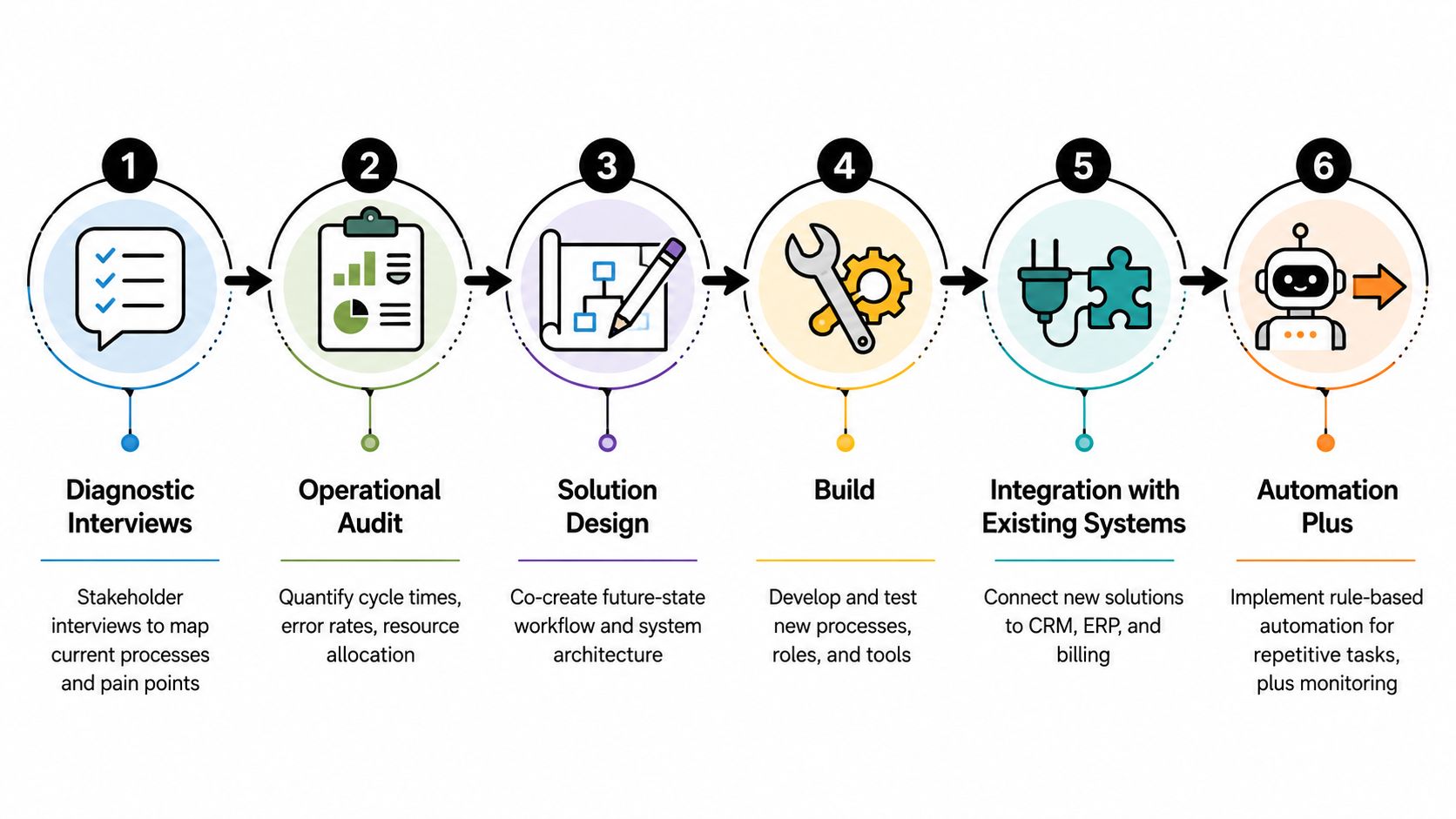
A sound engagement uses gates. Each phase should produce an artifact, resolve a specific uncertainty, and give the founder a clear reason to stop, expand, or pivot.
1. Diagnostic interviews
The work starts with people who perform and receive the process, not only executives. Interviews trace real cases through sales, delivery, finance, and leadership. The output is a current-state map showing tools, handoffs, decisions, exceptions, and points where employees create workarounds.
Scope should expand only when the interviews reveal a constraint worth investigating. If the same approval delay appears across several teams, it becomes an audit priority. If a complaint is isolated and low-impact, it shouldn't become a custom build.
2. Operational audit
The audit tests the map against records, event histories, task queues, and system permissions. It ranks constraints by cost of inaction, not by how impressive a proposed technology sounds. The founder should receive a prioritized backlog, baseline metrics, integration risks, and a recommended build sequence.
A useful audit also identifies the workflow to avoid. Some processes have too much variation, poor data quality, or insufficient volume to justify automation.
3. Solution design
The future-state design defines the working surface, system boundaries, roles, decision rights, data contracts, and fallback paths. The team decides whether an LLM should classify a request, whether a deterministic rule is safer, and when a human must review the output.
4. Build
The build turns the approved design into internal software, admin panels, dashboards, integrations, and tested workflows. Weekly demonstrations matter because they expose wrong assumptions while changes are still affordable.
5. Integration with existing systems
Integration is the quiet success or failure point. A new interface layered over broken CRM, billing, or delivery handoffs merely digitizes confusion. The system must handle duplicate records, changed fields, permissions, retries, and failures without forcing staff to maintain parallel versions.
For a concrete example of an operational dashboard pattern, review this insurance operations dashboard project.
6. Automation plus AI workflow deployment
Rule-based automation should handle repeatable routing, approvals, notifications, and data movement. AI can classify, summarize, recommend, and support decisions where the input is less structured, but every AI workflow needs confidence thresholds, review paths, logging, and a way to correct errors.
The handoff isn't a project-close email. It transfers operational ownership through documentation, training, access controls, runbooks, and monitoring. This short video on the engagement model reinforces the importance of connecting diagnosis to implementation and ongoing operation.
Custom Builds Versus Off-the-Shelf Tools
The right question isn't whether custom software is more
| Dimension | Off-the-Shelf SaaS | Low-Code Platform | Custom Internal Software |
|---|---|---|---|
| Fit | Strong for standardized workflows | Useful for moderate variation and rapid prototypes | Strong when the process is distinctive or cross-functional |
| Cost | Predictable subscription, plus integration and seat costs | Platform fees, configuration, and specialist maintenance | Higher initial design and build effort, with direct control over scope |
| Time-to-value | Fast when the process matches the product | Fast for bounded internal workflows | Slower at the start, stronger when patching would continue indefinitely |
| Ownership | Vendor controls roadmap and core behavior | Shared between platform and internal team | Client owns the code, workflow logic, and architecture |
| Exit risk | Migration depends on vendor data and contract terms | Logic can become difficult to move | Exit depends on documentation, maintainability, and internal capability |
SaaS wins when the workflow is standardized and the vendor roadmap matches the company's needs. A mature CRM, billing platform, or support system can be the sensible choice when the business doesn't need to differentiate through its internal process.
Low-code is useful for a bounded application, such as an approval portal or internal intake queue. It becomes risky when a firm keeps adding exceptions until the platform contains an undocumented business-critical system.
Custom internal software earns its place when the workflow is core IP, integrations would otherwise require duct tape, or seat-based pricing scales poorly. It also makes sense when leadership needs one working surface across CRM, billing, delivery, and AI-assisted routing.
The wrong default is to buy first and patch later. Use a build-versus-buy framework for AI tooling before committing to a platform, especially when the workflow crosses departments.
Measuring ROI Without Fooling Yourself
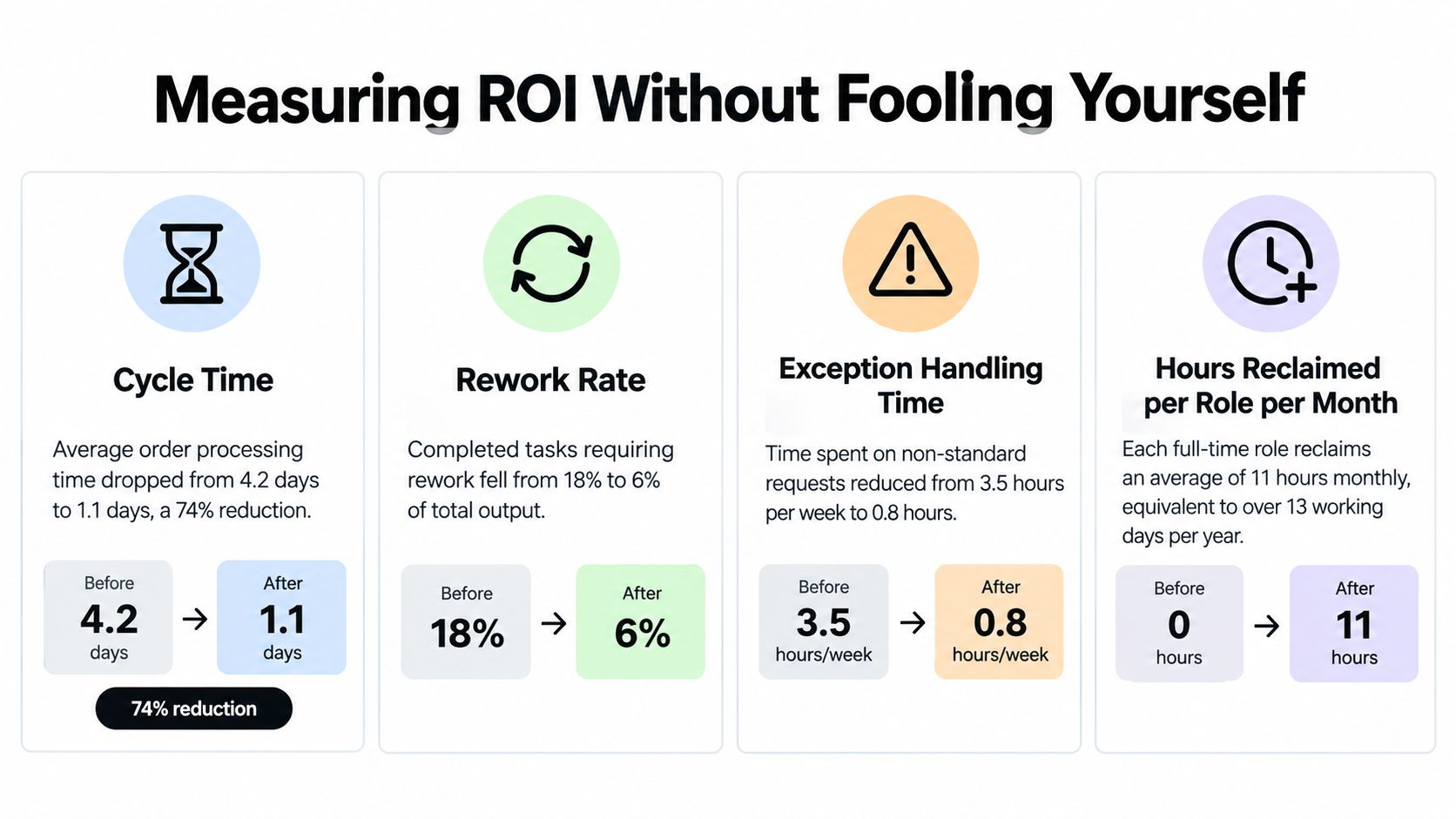
ROI starts with a baseline, not a promise. During the first two weeks, record the same cohort of cases before changing the workflow. After deployment, compare cycle time, human touch time, rework, exception handling, and SLA attainment. A faster process counts as progress only when defects and escalations stay controlled.
Use a paired dashboard:
- Cycle time: Start at a defined event, such as completed intake, and stop at a defined outcome, such as approved handoff.
- Rework rate: Count cases needing correction or duplicate entry, not tickets marked “complete.”
- Exception handling time: Measure human effort outside the standard route.
- Hours reclaimed per role per month: Assign freed capacity to specific roles and activities, then check how teams use it.
Reject “time saved” based on an imaginary baseline. If a consultant says an employee spent an hour on every request, inspect the records. Preserve normal variation in the baseline rather than selecting only the slowest examples.
Benchmarks can frame expectations, but your own records decide whether the engagement paid off. One source reports 250% average first-year ROI and 6–9 month payback for workflow automation programs, attributing gains to labor-cost avoidance, error reduction, and faster cycle times in this automation ROI study. Another reports 55% average cycle-time improvement and 40% fewer handoff errors for cross-functional custom software processes in its ROI analysis. Treat both figures as reference points, not promises.
AI-assisted workflows need an even narrower test. A reported blueprint describes up to a 40% reduction in repetitive work across contract analysis, regulatory reporting, and internal helpdesk automation, as summarized in this AI workflow overview. Track recurring effort, review queues, false classifications, and the person responsible for exceptions. Broken automations and hidden administrative work can erase paper savings after launch. Include those costs in the ROI calculation.
Choosing a Firm and Avoiding the Common Pitfalls
Treat the hiring process as evidence gathering. A polished sales presentation proves that a firm can present a polished sales presentation. It doesn't prove that the firm can recover a broken integration on a Monday morning.
| Signal to Verify | Red Flag to Walk Away |
|---|---|
| Named outcomes from comparable operational engagements | Generic decks with no operational artifacts |
| References from founder-led or growth-stage companies | References only from much larger enterprises with different systems |
| A diagnostic method with measurable exit criteria | Fixed-fee scope before anyone has inspected the workflow |
| Named senior practitioners who will do the work | Senior people sell the project, then disappear after signing |
| Explicit post-launch ownership and monitoring terms | “Your team will maintain it” with no runbook or training plan |
Be wary of ROI promises above 40% when the firm hasn't established a baseline. The problem isn't that improvement above that level is impossible. The problem is that a percentage without fixed definitions, case boundaries, and measurement windows is a sales device, not an operating metric.
Four budget drains
- Strategy without implementation access: Recommendations fail when the people who mapped the process can't test the proposed workflow against real records.
- Tool-first design: A consultant recommends a CRM feature or AI agent before defining the decision it must support.
- Unmonitored AI: An LLM classifies requests, but nobody reviews confidence, drift, exceptions, or incorrect outputs.
- Launch as the finish line: The vendor hands over credentials and leaves the client with scripts, alerts, and failure modes nobody owns.
Ask every finalist two direct questions:
- “Show me a workflow you had to repair after launch. What failed, how did you detect it, and what changed in the operating model?”
- “Who owns the system six months after handoff, and what evidence will show that it still works?”
A firm that can't answer those questions clearly probably hasn't lived through the failure modes you're paying it to prevent.
What a Good Engagement Actually Leaves Behind
Judge the investment by what remains after the consultants leave. A successful deployment isn't a collection of working automations. It's an operating system the client can understand, monitor, correct, and extend without creating another dependency.
A documented operating model
The first artifact defines who decides, who executes, what information each role needs, and when an issue escalates. It should include workflow diagrams, decision rules, system boundaries, and exception paths. Without this model, employees will recreate the old process inside the new interface.
An automation inventory
Every automation needs a name, owner, trigger, destination, business purpose, and failure mode. The inventory should identify whether a workflow uses deterministic logic, an API integration, an AI model, or a human approval. It should also state what happens when data is missing, a service is unavailable, or an AI output falls below the required confidence.
A monitoring layer
Monitoring surfaces drift before it becomes an outage. Useful signals include failed syncs, delayed jobs, unprocessed records, unusual exception volume, stale queues, and changes to critical fields. Alerts should reach a named owner with enough context to act, not merely announce that something broke.
Trained internal owners
Training means more than showing someone where to click. Internal owners should know how to inspect logs, correct a record, retry a failed workflow, update a rule, and escalate a deeper technical problem. A client-owned system also needs documentation and access that don't depend on one consultant's private account.
A durable example is a system designed around portfolio operations, such as this client portfolio agent project. The relevant buying question isn't whether the interface looks impressive. It's whether the underlying workflow, ownership, and maintenance model remain usable when the original builders aren't present.
Score your current or prospective vendor against these four artifacts. If the firm can deliver a launch but not an operating model, inventory, monitoring layer, and trained owners, it hasn't delivered operational efficiency. It has delivered another dependency.
Internal Systems designs and builds custom software, integrations, operational automations, and AI-enabled workflows for teams that have outgrown disconnected tools. Start with the Internal Systems Operations Diagnostic or Operations Audit to identify the highest-value workflows, define the architecture, and create a build sequence your team can own after handoff.