Mobile CRM Application Guide for Growing Teams
A mobile CRM application guide for founder-led growth teams. Covers definition, technical design, buy vs build, integrations, and ROI.
A four-person field services firm wins three new accounts on a Wednesday. By Friday, the CRM still shows last week's pipeline because the rep logged the customer visits from a truck at 9:47 PM, with one bar of signal, after the useful details had already blurred together.
That's not a sales discipline problem. It's an operations design problem. Field work happens between job sites, in parking lots, and in client lobbies, where a laptop CRM is often functionally offline. The result is stale records, forecasts built on guesswork, handoffs that lose context, and customer success teams discovering a churn risk only when the cancellation email arrives.
A mobile CRM application should be the execution surface for field activity, capture, and accountability. It isn't a shrunken desktop view. The right system records what happened where the work happened, preserves it without connectivity, and routes it into structured workflows without forcing people into evening cleanup.
Table of Contents
- The Field Reality Most CRM Pages Ignore
- What a Mobile CRM Application Actually Is
- Technical and UX Considerations That Decide Whether the App Works
- Buy vs Build for Founder-Led Growth Firms
- Integration and Data Architecture Behind a Mobile CRM Application
- Adoption, Training, and ROI in the First 90 Days
- Agentic AI and Operational Automation as the Real 2026 Frontier
- The Diagnostic to Audit to Build Path for Growing Teams
The Field Reality Most CRM Pages Ignore
The first diagnostic question is simple: where does customer work really happen? If the answer includes warehouses, construction sites, client homes, vehicles, clinics, or retail locations, your CRM design must start with those environments rather than the office dashboard.
A field rep may need to confirm a contact, review an open opportunity, capture a voice note, attach a photo, obtain a signature, and assign a follow-up before leaving the site. Each action has operational consequences. A missed activity can delay a quote. An unassigned issue can sit with the wrong team. An incomplete visit record can make the next conversation look careless.
Mobile CRM adoption reflects this shift in working behavior. One 2026 roundup reports that 70% of businesses use mobile CRM systems, while 81% of CRM users access their systems from multiple devices, including smartphones and tablets, according to compiled mobile CRM adoption data. The same source reports that mobile users are 150% more likely to exceed sales goals and that mobile CRM improves productivity by 14.6%. Treat those figures as directional industry data, not a guarantee for your company. The operational lesson is more useful than the headline: people use the system where customer interactions occur when the product makes that possible.
Start with the information delay
Map the time between an interaction and a structured CRM update. Don't accept “same day” as an answer. Ask whether the record is updated before the next person needs it.
For each workflow, identify:
- The field action: What does the rep, technician, or account manager do on site?
- The required evidence: Does the team need a note, image, signature, reading, or customer approval?
- The next owner: Which person or queue must act after submission?
- The failure path: What happens when signal disappears, the device is lost, or two people edit the record?
Practical rule: If a field employee must remember the work until they reach a desk, the system has already lost operational context.
The mobile layer should shorten that gap. It should let a technician log a fault while standing beside the equipment, let a salesperson advance an opportunity before driving to the next appointment, and let back-office staff see the update without waiting for a manual re-entry.
The constraint is rarely pipeline volume at this stage. It's whether leadership can trust the pipeline, whether handoffs preserve context, and whether field activity creates a reliable trigger for the next operational step.
What a Mobile CRM Application Actually Is
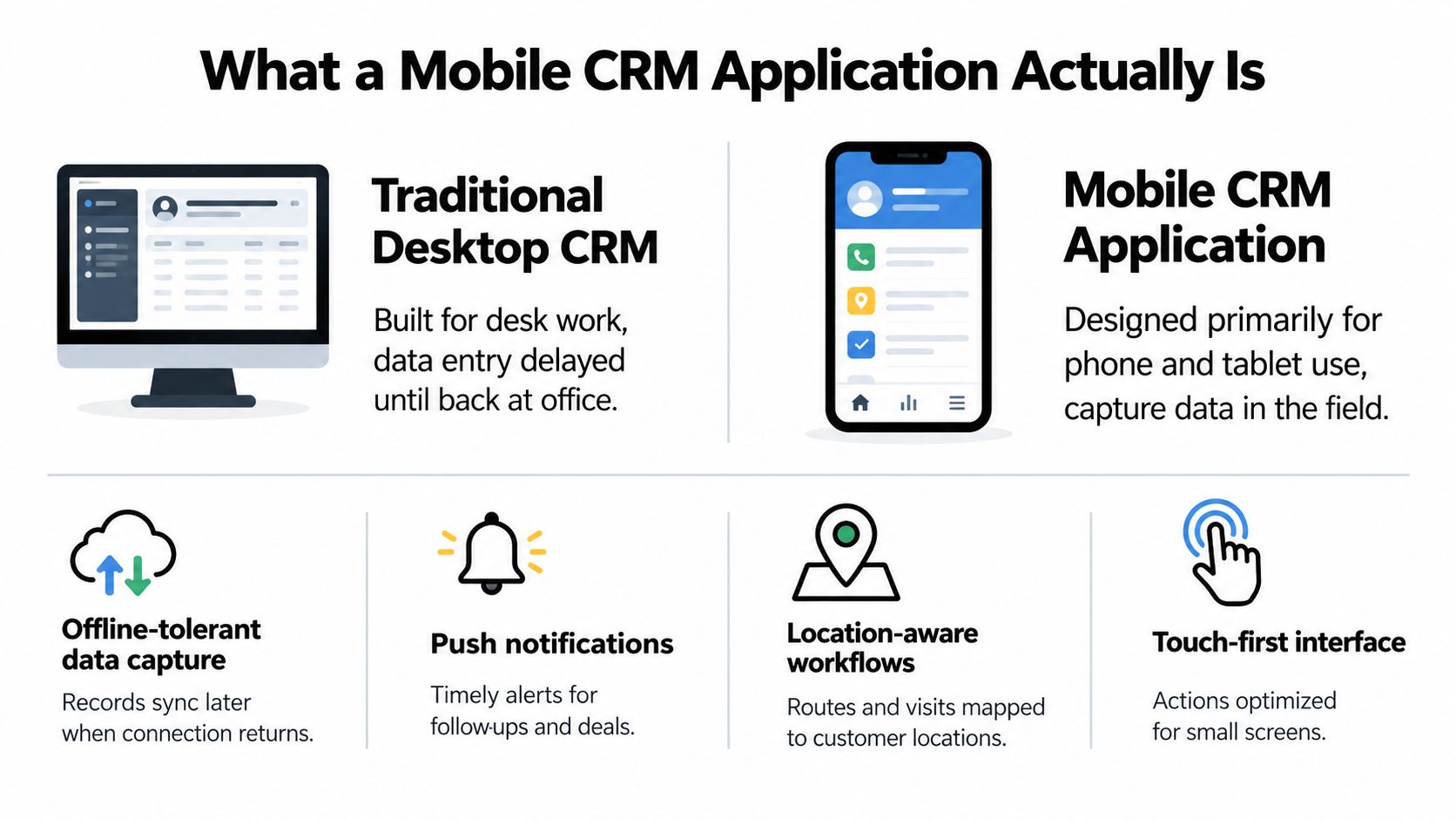
A mobile CRM application is a customer relationship system designed primarily for phone and tablet use. It combines offline-tolerant data capture, push notifications, location-aware workflows, and lightweight interactions suited to one-handed operation.
That differs from a desktop CRM, which generally assumes a seated user with stable connectivity, multiple browser tabs, and time for bulk data entry. A desktop interface can remain valuable as the analytical system of record, but it shouldn't dictate how field staff capture reality.
Think of the difference between a point-of-sale terminal and a back-office accounting suite. The accounting system stores and analyzes the transaction, but the POS is where the transaction occurs. A mobile CRM plays the same operational role for customer interactions. The desktop environment can support forecasting, administration, and reporting. The mobile application must support the visit, call, inspection, and handoff itself.
Separate execution from dashboard mirroring
A mobile companion app that only mirrors dashboards isn't a field execution system. It may show a pipeline chart, but it doesn't necessarily let a user create a complete record, capture evidence, or trigger the next workflow under real conditions.
Use three tests:
- It works offline. Users can create or update the records they need without live connectivity, then synchronize safely when the connection returns.
- It captures activity where it occurs. The interaction, evidence, and customer context are recorded at the site, not reconstructed later.
- It routes activity into structured records. A visit becomes an activity, a fault becomes an issue, and a commitment becomes a task or workflow event without desk-based cleanup.
A useful interface removes decisions that don't belong in the field. Pre-fill the account, contact, visit type, and likely outcome. Put the primary action within thumb reach. Ask for only the information that changes the next step.
Notifications should also be operational rather than decorative. Mobile push alerts can tell an owner that a deal was reassigned, a service issue needs review, or a customer approval has arrived. The HubSpot notification documentation illustrates the broader design principle, notifications should be configurable by event and channel rather than delivered as an undifferentiated stream.
Technical and UX Considerations That Decide Whether the App Works
The best-looking mobile CRM application still fails if it loses data in a dead zone, drains a device during a shift, or makes users wonder whether a submission succeeded. Treat offline behavior, security, performance, and interaction design as acceptance criteria, not polish.
Design synchronization before screens
An offline-first client needs local storage, queued mutations, retry behavior, and conflict rules. When a rep edits a record without connectivity, the application should save the change locally and mark it as pending. Once a connection returns, the sync engine can submit the queued mutation, confirm the server response, and expose any conflict rather than overwriting work without notice.
Some mobile CRM systems support up to 24 hours of offline work before automatic synchronization, according to this review of mobile CRM tools. That figure isn't a universal requirement, but it shows why offline capacity must be tied to the team's working environment. A rural service route and an urban account team have different tolerances.
Last-writer-wins is easy to implement and dangerous to trust. If two reps edit the same opportunity while offline, the later upload can erase a meaningful stage change or customer note. Define field-level ownership, merge rules, version checks, and a human review queue for material conflicts.
Make security survive device loss
A phone leaving the office carries customer information with it. Require device-level encryption, authenticated sessions, remote wipe, role-based permissions, and audit logs. Shared tablets need especially clear access boundaries, because the device may move between employees while the customer records remain persistent.
Minimize locally stored personally identifiable information. Cache only what the field workflow requires, expire sensitive data where practical, and separate the ability to view a record from the ability to export or change it. The application should also show when the last synchronization occurred, so users and managers can distinguish current information from a local copy.
Set hard performance and interaction bars
For a serious build, define performance targets before implementation:
- Startup: Aim for a cold start under two seconds on supported devices.
- Lists: Keep common list interactions below 200ms where the device and dataset allow it.
- Evidence: Image and signature capture should queue independently rather than blocking record submission.
- Battery: Test a full shift with location services, notifications, camera use, and intermittent synchronization enabled.
- Navigation: Keep core actions within thumb reach and avoid multi-screen record creation.
- Defaults: Pre-fill visit details from the account, prior activity, route, or assigned owner.
These are engineering demands, not vendor preferences. A product that feels unreliable in the field gets bypassed, regardless of how complete its feature list looks.
Mobile CRM technical and UX decision matrix
| Consideration | What It Means | Minimum Acceptable Bar |
|---|---|---|
| Offline sync | Users can work without live connectivity | Local writes, queued mutations, retry logic, visible sync state |
| Conflict resolution | Concurrent edits don't silently destroy context | Version checks, field ownership, merge rules, review path |
| Security | Customer data remains controlled outside the office | Encryption, remote wipe, role-based access, audit logs |
| Performance | The app stays usable during real field work | Fast startup, responsive lists, non-blocking media capture |
| Interaction design | Users can complete work with minimal attention | Thumb-reach actions, single-screen capture, useful defaults |
| Battery and storage | The app survives the working day | Tested background behavior and bounded local cache |
Buy vs Build for Founder-Led Growth Firms
There isn't a universal winner. The right decision depends on whether your workflow is ordinary enough to configure or distinctive enough to justify owning the execution layer.
| Decision Factor | Buy | Build | Hybrid |
|---|---|---|---|
| Sales motion | Standard lead, opportunity, and follow-up process | Proprietary operational sequence | Standard CRM with custom field workflow |
| User count | Fewer than 20 users | Larger or operationally complex team | Small core team plus specialized users |
| Connectivity | Reliable coverage | Low-connectivity territory requires offline-first behavior | Custom offline extension for critical routes |
| Integrations | Native connectors or Zapier already cover needs | Core systems require controlled bidirectional sync | Vendor CRM connected to custom orchestration |
| Security | Vendor controls satisfy requirements | Residency, access, or audit constraints demand ownership | Sensitive workflow isolated in a native extension |
| Delivery speed | Team needs deployment within four weeks | Team can fund a deliberate product build | Buy the foundation, build the differentiating layer |
| Strategic value | CRM is administrative infrastructure | Operational data creates a competitive moat | Own the workflow that makes the business distinctive |
An off-the-shelf mobile CRM earns its cost when the sales motion is standard, the team has fewer than 20 users, there's no proprietary field workflow, integrations are already covered by native connectors or Zapier, and the business needs to ship within four weeks. In that situation, building a replacement creates avoidable maintenance work.
Build when a vendor can't support a critical workflow without heavy customization, when data residency or security constraints are strict, when teams work in low-connectivity environments, or when operational data itself supports the company's strategic advantage. A custom mobile CRM rarely costs under $150K when built properly, so compare the investment with the cost of dependency, workarounds, and lost operational intelligence rather than comparing subscription fees alone.
The middle path is usually the most rational. Keep the vendor core for standard contact and pipeline management, then build a targeted native extension for the 20% of the workflow that defines your edge. Use a structured build-versus-buy analysis for AI tooling to separate genuine differentiation from internal preference.
Integration and Data Architecture Behind a Mobile CRM Application
A mobile CRM application is only useful when the surrounding systems agree on what a customer, activity, opportunity, and owner mean. The mobile client can make capture easy, but it can't repair contradictory schemas across the CRM, ERP, support platform, and operational back office.
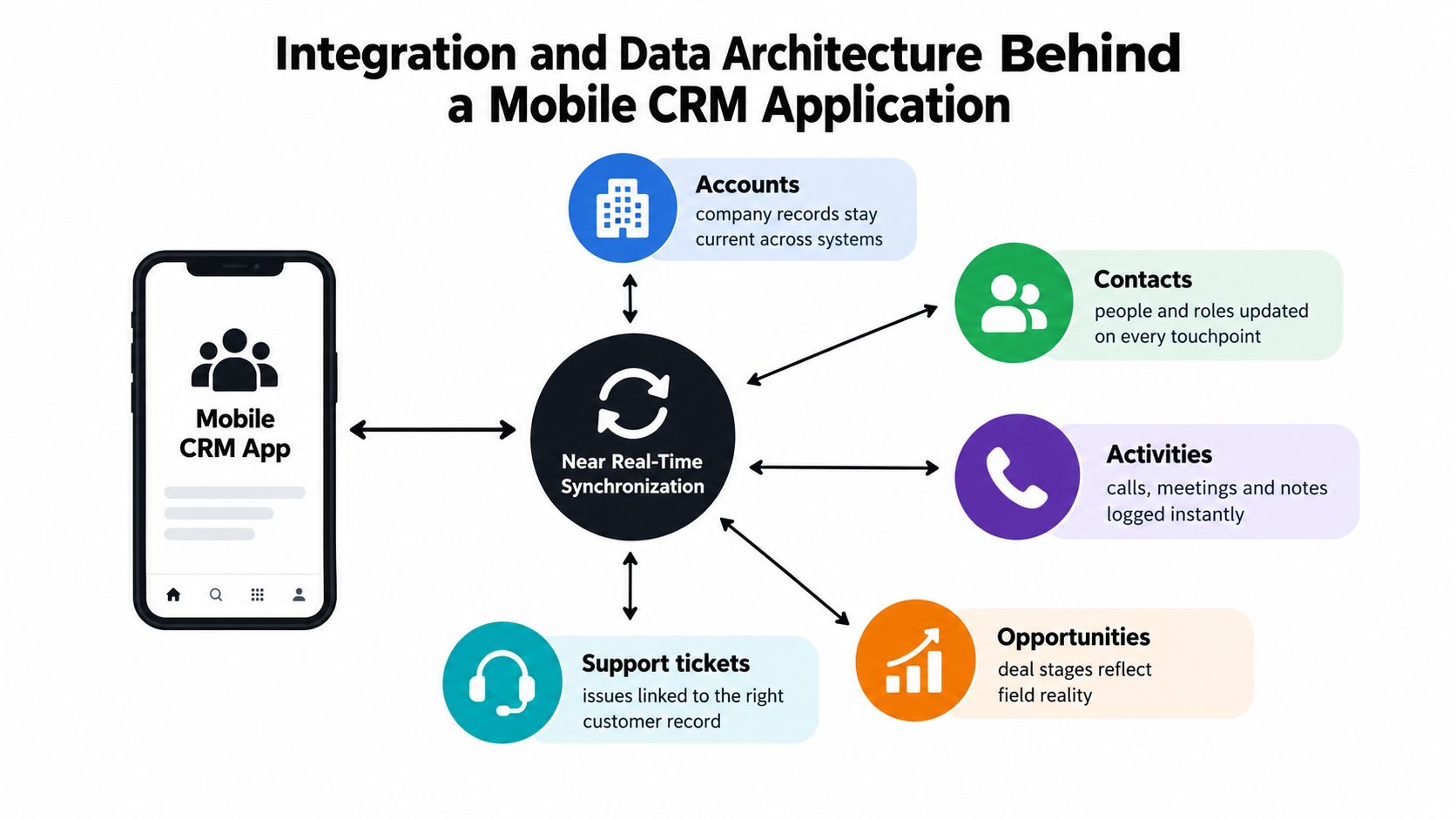
Start with the entities that field teams touch:
- Accounts and contacts: The customer and the people connected to it.
- Activities: Calls, meetings, notes, visits, photos, and signatures.
- Opportunities: Commercial intent, stage, value, owner, and next action.
- Products: Items, services, pricing context, and availability.
- Custom objects: Inspections, sites, assets, service events, or other domain records.
Establish one owner for every important field
Bidirectional sync sounds complete until two systems change the same record. A CRM may own opportunity stage, an ERP may own product availability, and a support platform may own ticket status. If the mobile app also writes all three without explicit authority, the integration will produce last-writer-wins conflicts and unclear accountability.
Create a field ownership register. For every important attribute, define the source of truth, permitted writers, event type, version, and behavior when a write arrives out of order. Use stable record identifiers across systems, not name matching. If an account exists in multiple platforms, establish a canonical identity and map every external identifier to it.
Use the right integration surface
REST APIs work well for deliberate reads and writes. Webhooks notify systems that something changed. Queue-based event streams handle bursts, retries, and asynchronous processing. iPaaS middleware can accelerate common connectors, but it shouldn't hide ownership or error handling behind a black box.
A reliable pattern separates the mobile client from the business systems through a synchronization service. The client submits a mutation, the service validates permissions and schema version, records the event, applies the change to the authoritative system, and returns a clear result. Failed events enter an observable retry path. Conflicts move to a review queue with enough context for a person to resolve them.
Architecture test: If nobody can explain which system owns a field, don't add another integration. Fix the ownership model first.
Schema governance matters more than connector count. Version events, preserve audit history, and make changes backward-compatible where possible. A practical example is a field technician updating an asset inspection while offline. The app should retain the inspection event, attach it to the canonical asset identity, synchronize it through the approved service, and expose the resulting status to both support and operations.
For a related example of connecting operational data into a working workflow, review this real estate lead automation project. The principle applies beyond real estate, the mobile layer must join the process rather than become another silo.
Adoption, Training, and ROI in the First 90 Days
Rollout should follow behavior, not geography. Pilot with two reps for two weeks, fix the friction they encounter, then expand by team. A regional rollout can spread a flawed workflow faster than a small pilot can expose it.
Capture a baseline before launch. Measure how long it takes to turn a visit into a logged activity, how quickly a quote moves after a field interaction, and how often managers need to chase missing context. Without a pre-launch baseline, a later improvement becomes an opinion.
Track behavior before revenue
Week-one indicators show whether the product fits the work:
- Usage quality: Logins per rep per day, interpreted alongside completed actions.
- Mobile capture: Records created or updated from mobile.
- Information delay: Time from customer visit to logged activity.
- Workflow completion: Percentage of field submissions that reach the correct next owner.
- Sync reliability: Pending, failed, and successfully reconciled mutations.
Avoid treating downloads or total logins as success. A rep can open an app repeatedly and still record nothing useful. The important signal is whether the application produces timely, structured operational data.
Train by role and repeatable action
Give each persona a short flow for the three actions they perform every week. A technician might capture a fault, attach an image, and request a work order. An account manager might review the account, log a visit, and create a follow-up. A dispatcher might approve the work order, reassign ownership, and close the exception.
Record the flow and turn it into a one-page playbook. Training should include offline recovery, sync status, conflict handling, and the escalation route for a failed submission. Generic feature demos don't prepare people for the moment their device has no signal.
Leading vs lagging indicators for mobile CRM ROI
| Indicator Type | Metric | Measurement Window | Target Signal |
|---|---|---|---|
| Leading | Mobile records created or updated | First week | Field activity enters the system promptly |
| Leading | Visit-to-activity time | First week | Information delay falls |
| Leading | Failed or pending syncs | First two weeks | Exceptions stay visible and manageable |
| Leading | Workflow completion by next owner | First month | Handoffs become accountable |
| Lagging | Pipeline velocity | First 90 days | Opportunities progress with less delay |
| Lagging | Quote turnaround | First 90 days | Field evidence reaches commercial staff sooner |
| Lagging | Repeat visit rate | First 90 days | Teams resolve issues with fewer avoidable returns |
| Lagging | Churn-risk signal capture | First 90 days | Customer concerns appear before cancellation |
Use a simple ROI model: compare revenue per rep and cycle time before launch with the same measures after adoption, then isolate the portion connected to increased mobile activity and reduced administrative delay. The model doesn't need to be perfect. It needs a defined baseline, consistent measurement, and enough operational detail to distinguish usage from outcome.
Agentic AI and Operational Automation as the Real 2026 Frontier
Mobile CRM is often framed as a sales productivity app. That framing is too narrow. The higher opportunity is an agentic operational layer that turns field observations into actions across sales, service, inventory, and back-office queues.
A service technician could record a fault with a photo and voice note. An AI agent can classify the issue, attach the evidence to the correct asset, create a work order, propose the right queue, and ask for approval when confidence is low. A route salesperson's check-in could trigger an agent to summarize the visit, update the deal stage, create a follow-up task, and notify the account owner.
Recent CRM coverage describes agents that can enrich leads, trigger workflows, update records, and take actions inside the CRM without waiting for human input at every step. One practical example is a rep finishing a meeting and using a voice prompt to auto-log outcomes, advance the deal stage, and create a follow-up task, as outlined in this overview of current CRM trends.
The same pattern works outside sales. A field reading can trigger replenishment when it crosses a threshold. A customer complaint can be classified and escalated. A missed appointment can create a recovery task with the right context already attached.
Build the control plane first
These workflows live or die on data architecture. An AI agent can't reliably act when customer identity is ambiguous, field ownership is unclear, or event history is incomplete. Put approval gates around financial commitments, customer-facing messages, and irreversible record changes. Log the agent's inputs, decision, action, and outcome.
Internal Systems provides custom internal software and AI-enabled workflows for operational teams, including CRM-connected systems, integrations, and automation. That model fits firms that need the mobile experience to execute a distinctive process rather than merely display another CRM dashboard. A relevant example is this client portfolio agent project, which illustrates the broader direction of embedding AI into operational work.
The Diagnostic to Audit to Build Path for Growing Teams
Founders don't need to start with a vendor demo. Start with the work.
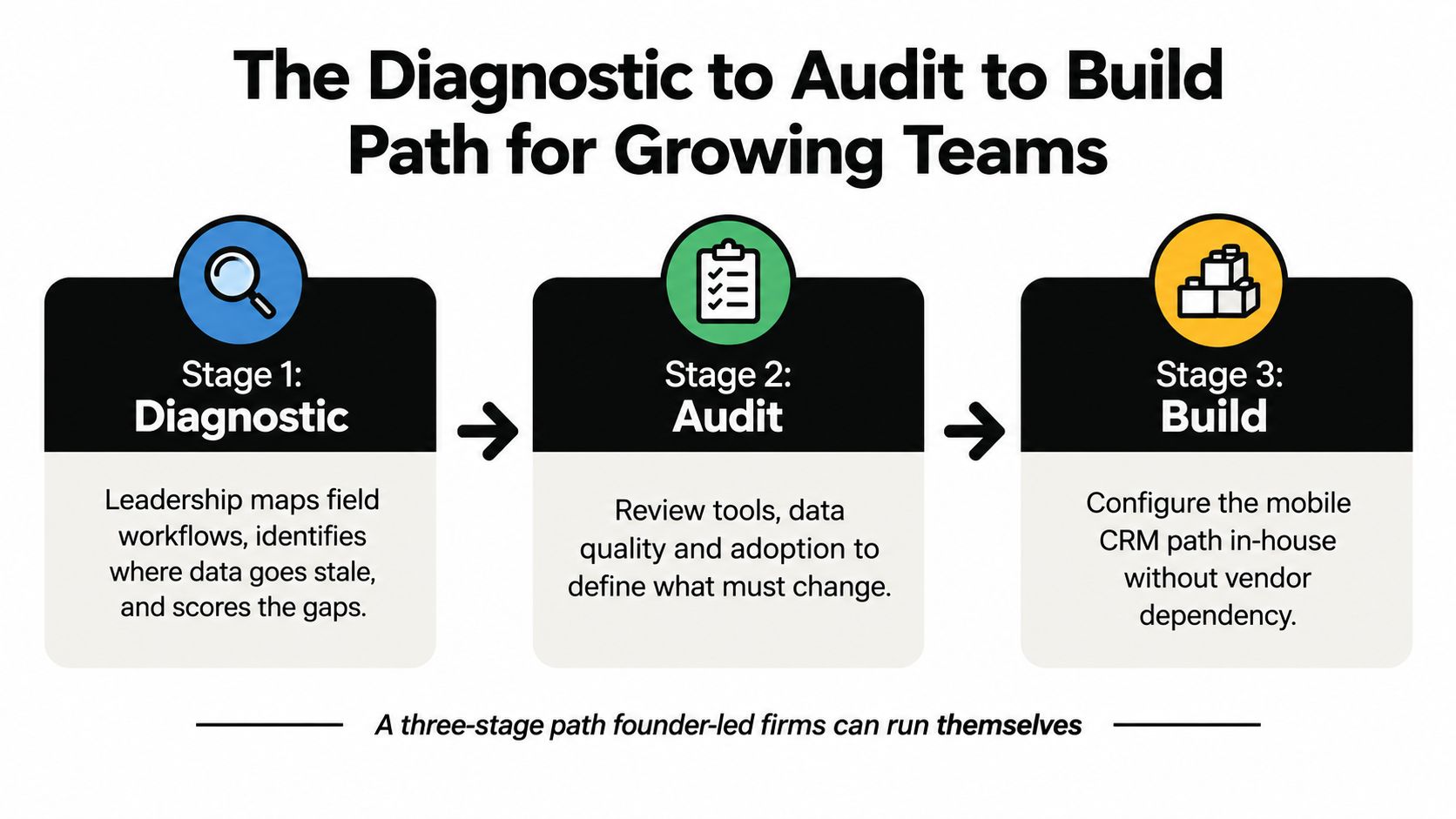
Stage one, diagnostic. Map the field workflow from customer interaction to back-office action. Mark where records go stale, where ownership changes, and where staff recreate information. Score the cost of bad information in delays, rework, missed follow-ups, and avoidable escalations.
Stage two, Operations Audit. Produce a blueprint covering the data model, synchronization strategy, ownership rules, security controls, adoption plan, and a buy-versus-build verdict for each workstream. The audit should expose unresolved integration contracts before implementation begins.
Stage three, build or rollout. Configure the purchased system or build the custom mobile layer for one team. Validate offline behavior, conflict handling, evidence capture, permissions, and downstream automation before expanding.
Pause when two systems claim ownership of the same customer field, when integration contracts remain undefined, or when leaders can't agree on the operational outcome the application must improve. Tool selection won't resolve those problems. An audit should come first.
A useful implementation path is visible in this video:
Internal Systems offers an Operations Diagnostic, fixed-price Operations Audit, custom system builds, integrations, operational automation, and AI-powered workflows for teams that need a mobile CRM application to execute real field processes. Start with Internal Systems to map the information gaps, decide what to buy or build, and create a focused implementation plan.