Legacy System Modernization: A Tactical 2026 Guide
Learn how legacy system modernization cuts costs, boosts security, and speeds up innovation. Practical steps for operators planning an upgrade in 2026.
The COO inherits a finance system that crashes during month-end close, a CRM nobody trusts, and a warehouse tool running on a Windows XP machine in the corner office. The obvious response is a rewrite. That response is often wrong.
Legacy system modernization fails before anyone chooses a framework because nobody owns the complete operating flow. Finance owns one application, sales owns another, warehouse operations protect a third, and the people who understand the integrations are too busy keeping everything alive to document it. The system looks like a technical problem, but the first problem is organizational: unclear decision rights, incomplete visibility, and no agreed definition of success.
Modernization should therefore start with ownership and workflow evidence. Code comes later.
Table of Contents
- Why Modernization Projects Stall Before They Start
- Running the Operational Diagnostic
- Picking the Right Modernization Strategy
- Designing Data and Integration Patterns
- Where AI Actually Helps and Where It Hurts
- Migration, Testing, and Cutover Discipline
- ROI, Success Metrics, and the Handoff Checklist
Why Modernization Projects Stall Before They Start
The COO in this situation can hire a capable custom software team and still lose the project. If the team rebuilds the finance application without understanding how approvals, customer records, warehouse exceptions, and reporting depend on it, the new system will reproduce the same operational confusion in a cleaner interface.
The federal government's experience offers a useful benchmark. In 2025, agencies had partially completed modernization of 65 critical legacy systems identified as most in need of upgrade. 28 systems were completed, 34 were underway, and 3 had not yet begun, showing that large modernization programs move in waves rather than through one replacement event. The legacy system modernization benchmark also illustrates why leaders track the share of mission-critical systems still trapped in older architectures, not only whether a new application has launched.
The three failure patterns
First, leaders treat modernization as a software project. A software project has a backlog, delivery team, and release plan. Modernization also needs an operating model. Someone must decide which workflow changes, who accepts operational risk, who owns the data contract, and who can stop a release.
Second, teams skip the workflow inventory. System diagrams rarely show the manual approvals, email handoffs, copied customer records, or unofficial tools that keep work moving. A CRM can be technically available while sales representatives maintain a separate source of truth because the official workflow doesn't reflect how deals are managed.
Third, leaders underestimate the politics of retirement. People often defend old tools because those tools encode their expertise, authority, or personal safety. Removing a system can feel like removing control. If the modernization team doesn't give those people a defined role in validation and ownership, they may resist the project or subtly preserve the old process.
Practical rule: The first modernization meeting should assign decision rights. It shouldn't debate microservices, cloud providers, or programming languages.
Write down one accountable business owner for each critical workflow, one technical owner for each system, and one executive who resolves conflicts. A clear custom software delivery portfolio can help frame the work around operational outcomes, but no vendor can compensate for an organization that can't decide who owns the result.
Running the Operational Diagnostic
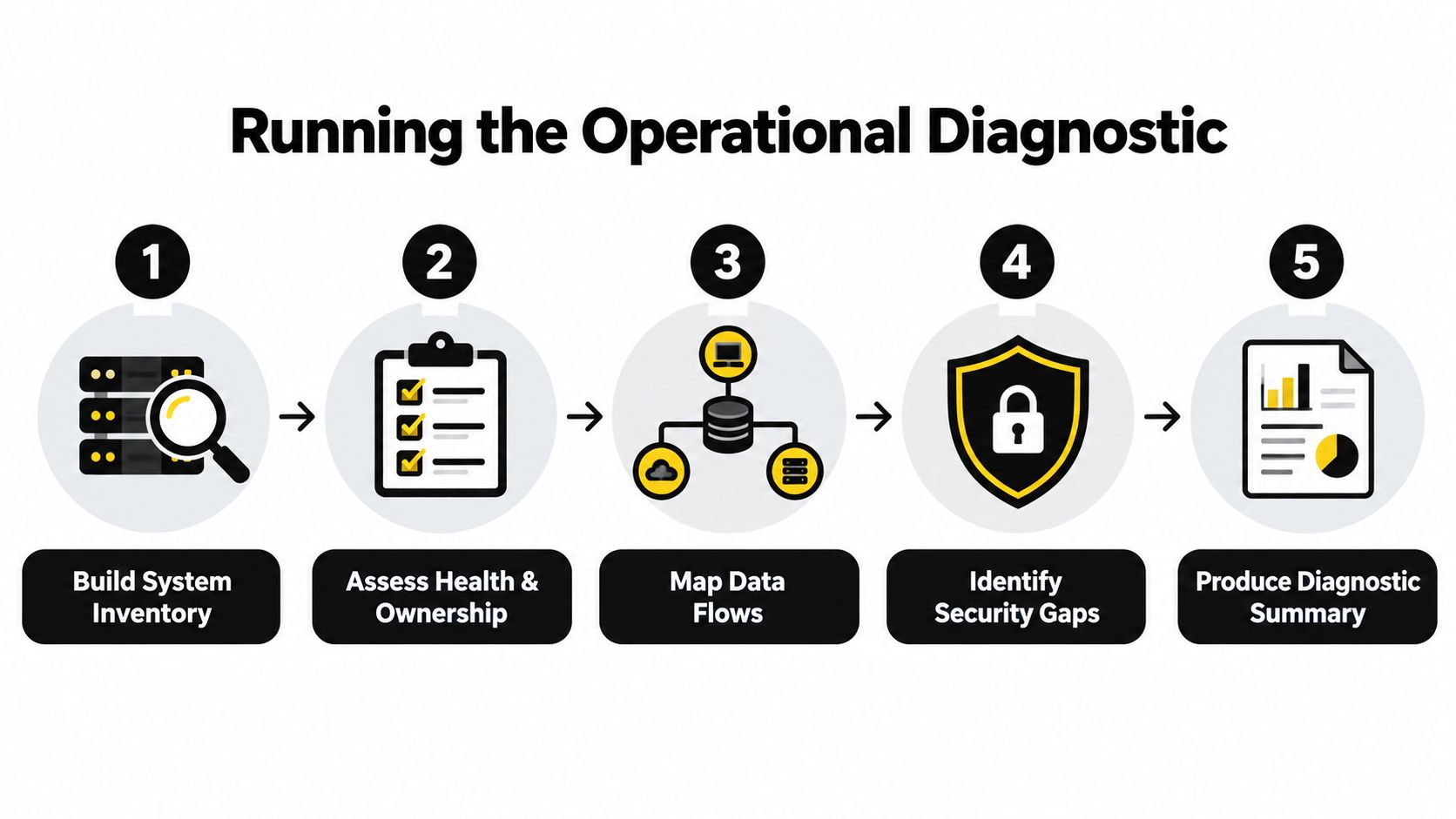
Run the diagnostic before inviting vendors into architecture discussions. A focused operations team can produce the essential artifacts in two to three weeks, provided it interviews the people doing the work rather than relying only on existing documentation.
Start with evidence
1. Build the system inventory. Create a working register with the system name, business owner, technical owner, age, integration points, last meaningful update, and operational role. Include custom applications, APIs, AI services, and internal admin tools. “Nobody knows” is a valid finding, but it must appear as a risk.
2. Map the top ten workflows. Follow each workflow from trigger to completion. For an insurance operations team, that might mean tracing a claim from intake through classification, review, approval, customer communication, and settlement. Record every API call, file transfer, email approval, manual re-entry, and shadow tool alongside the official system.
3. Score pain, risk, and strategic fit. Use a simple 1 to 5 rubric. Pain measures operational friction, risk measures the consequence of failure, and strategic fit measures how closely the workflow supports the company's direction. Keep the scoring definitions fixed so departments don't manipulate the result to protect their preferred tool.
Record failure, then choose the thesis
4. Document failure modes and recovery patterns. For each high-priority workflow, record what breaks, how often the team notices, who responds, what workaround they use, and how recovery is verified. A workflow that recovers through one veteran employee's memory has a governance problem, even if incidents appear rare.
5. Produce a one-page modernization thesis. Name the three problems worth attacking, the accountable owners, the desired operational outcomes, and the work that should wait. The thesis should also state what the team won't modernize yet. A narrow refusal protects the program from becoming a vague application replacement exercise.
These artifacts become the basis for architecture, budget, vendor selection, and sequencing. Without them, teams tend to rewrite the most visible application instead of the workflow causing the most damage.
Picking the Right Modernization Strategy
Don't choose a strategy because it sounds modern. Choose it based on the diagnostic scores, the strategic importance of the workflow, and the organization's ability to own the resulting system.
| Strategy | Best When | Avoid When | Typical Cost Multiplier |
|---|---|---|---|
| Rehost | The immediate need is to move the existing custom application with minimal code change | The system's architecture and operating cost are the core problem | Not stated |
| Refactor | The business logic remains sound, but the code is difficult to maintain or extend | The workflow has changed so much that the old logic no longer fits | Not stated |
| Rebuild | The domain has materially changed and the company can provide strong product and operations ownership | The team hasn't mapped dependencies or can't support a long delivery effort | Not stated |
| Replace | The workflow is standardized and isn't a source of differentiation | The business relies on unique rules, integrations, or service decisions | Not stated |
| Encapsulate | The legacy core can't be replaced yet but must support modern applications and AI-enabled workflows | The core is unsafe to expose and the team hasn't defined controls around the interface | Not stated |
Use the diagnostic to make the call
Rehost is usually the cheapest short-term move and the weakest long-term answer because it preserves the debt. It can make sense when infrastructure risk is urgent, but it shouldn't be presented as modernization complete.
Refactor works when the business rules are still correct. A team might restructure a claims calculation service, preserve its outputs, and place it behind a tested API. That buys maintainability without forcing operations to relearn the domain.
Rebuild earns its place when the old application reflects a business that no longer exists. It requires a capable internal owner, accessible subject matter experts, and disciplined release governance. Most founder-led firms select rebuild too early because a new application feels cleaner than an incremental program.
Replace is right for standardized internal capabilities where custom code creates no meaningful advantage. Encapsulate is the underrated choice for everything else. A facade API, translation layer, or modern operations dashboard can create usable advantage while the core remains stable.
If more than two diagnostic scores are red and the workflow is strategic, choose rebuild or replace. If only pain is red, choose refactor or encapsulate. If risk is red while the other scores are green, encapsulate first to buy runway.
The decision should also name the retirement condition. If the team can't say what evidence would justify shutting down the old module, it hasn't designed a modernization strategy. It has only selected a construction project.
Designing Data and Integration Patterns
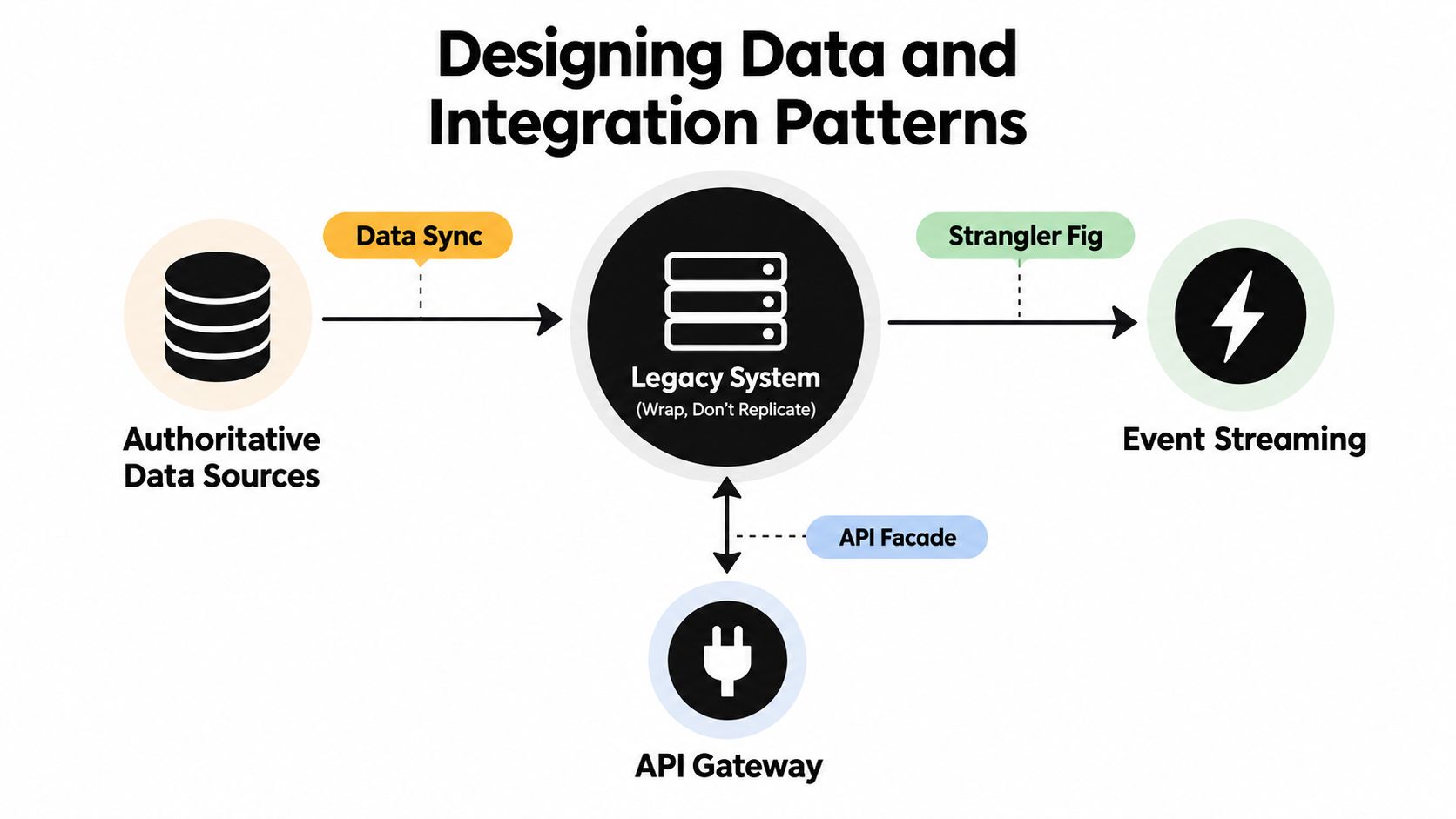
Wrap the legacy core. Don't replicate it casually.
Replication creates two systems that appear authoritative until a transaction, correction, or exception exposes the conflict. Start by mapping every critical entity, such as customer, policy, order, approval, or payment, to an authoritative source. Then document who may read it, who may write it, how changes travel, and what happens when the source is unavailable.
Match the pattern to the flow
Use synchronous APIs when a user needs an immediate decision and the legacy transaction must complete before the modern application responds. Put an anti-corruption layer between the systems so old field names, status codes, and business rules don't leak into the new interface.
Use events or message queues for near-real-time updates that don't require the caller to wait. An order-status event can update a modern operations dashboard while the legacy order platform continues handling the transaction. Define idempotency keys so retries don't create duplicate orders, approvals, or notifications.
Use batch jobs and bulk ETL when the workflow tolerates delay and involves large historical datasets. A strangler facade API is better for incremental application traffic, while bulk ETL is better for controlled backfills and analytical copies. Don't use polling when change data capture can record database changes more accurately and with less unnecessary load.
Make failure behavior explicit
Dual writes require special care. If a modern service writes successfully but the legacy write fails, the integration layer needs a retry, compensation, or reconciliation path. Reconciliation jobs should compare records, identify discrepancies, and route exceptions to a named operator rather than overwriting data.
Version schemas and publish data contracts between teams. Include validation rules, ownership, compatibility expectations, and fallback behavior when the legacy system is down. A modern application should degrade predictably, queue safe work, or show an actionable status. It shouldn't leave operators guessing whether a request completed.
An internal insurance operations dashboard implementation is the kind of application that benefits from this wrapper approach. The dashboard becomes a working surface for operators while integration services manage the relationship with existing systems.
Operating rule: The integration layer owns data quality. The legacy database shouldn't be the only place where validation, reconciliation, and exception handling live.
Where AI Actually Helps and Where It Hurts
AI isn't a modernization strategy. It's a scoped tool that earns budget only when the team can define its input, output, review gate, and failure cost.
Ensono's 2025/2026 research found that 71% of organizations exceeded original modernization budgets, 49% said legacy maintenance costs were higher than planned, 39% said AI tools helped accelerate modernization, and 33% said AI created new challenges. The Ensono modernization research summary also reports that 9 in 10 respondents had at least one talent gap, while 95% were turning to third-party partners to fill gaps. The message is clear: AI can reduce labor in bounded tasks, but it can also add governance, cost, and skills requirements.
Give AI narrow jobs
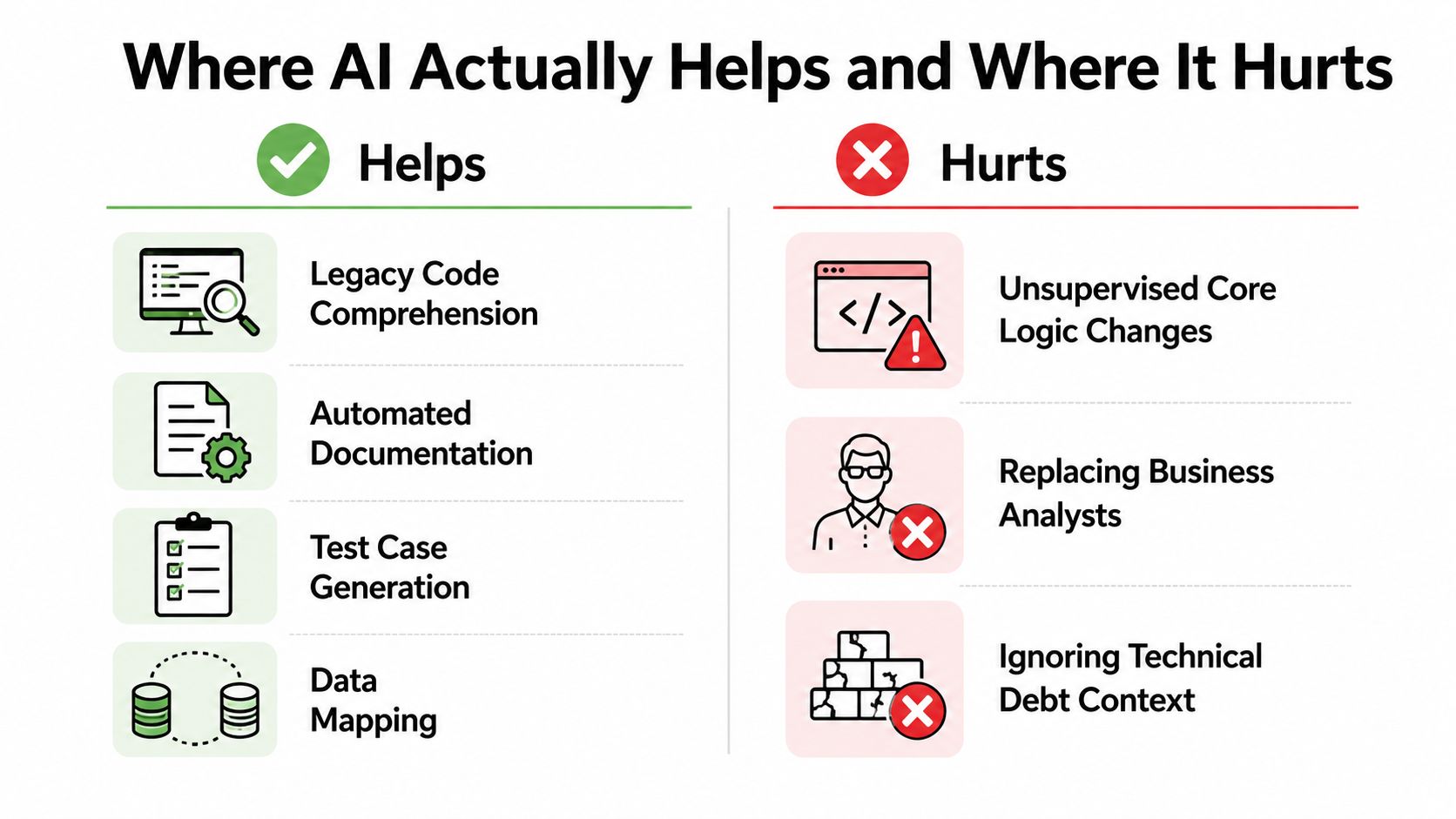
AI earns its place in:
- Legacy comprehension: Summarize modules, identify likely business rules, and surface dependencies for human validation.
- Documentation: Turn code, tickets, and interview transcripts into draft diagrams, requirements, and runbooks.
- Data mapping: Propose mappings between old and new schemas, then flag ambiguous fields for review.
- Test generation: Draft test cases from observed behavior and edge conditions.
- Cutover monitoring: Detect unusual logs, error patterns, or transaction behavior during controlled releases.
Deloitte recommends using generative AI, agents, and reasoning models to help remove technical debt while separating operational improvement from product innovation. That supports a staged program, such as automating a manual approvals queue before redesigning a customer-facing capability. Deloitte's modernization guidance is right to emphasize separation. One ambitious AI initiative shouldn't compete with every operational priority at once.
Keep humans accountable
Don't allow autonomous refactoring of financial logic, unsupervised schema migrations, or customer-facing decisions trained on legacy data without bias review. A hallucinated explanation in a developer notebook is inconvenient. A hallucinated approval, payment instruction, or risk classification is an operational incident.
AI proposes, humans dispose. Require human review for regulated, revenue-impacting, or irreversible flows. Clean the source data first, version prompts and evaluation sets, restrict sensitive telemetry, and account for the cost of running large models over noisy logs.
For teams comparing an internal build with external tooling, AI tooling build-versus-buy considerations should include data boundaries, model evaluation, ownership, auditability, and exit options.
Pin this to the project board:
- Do: Use AI for drafts, discovery, mapping, test generation, and anomaly triage.
- Do: Store prompts, evaluation examples, approvals, and model outputs with the delivery record.
- Don't: Let AI change core business logic without a deterministic test and human sign-off.
- Don't: Treat generated documentation as authoritative until an owner validates it.
Migration, Testing, and Cutover Discipline
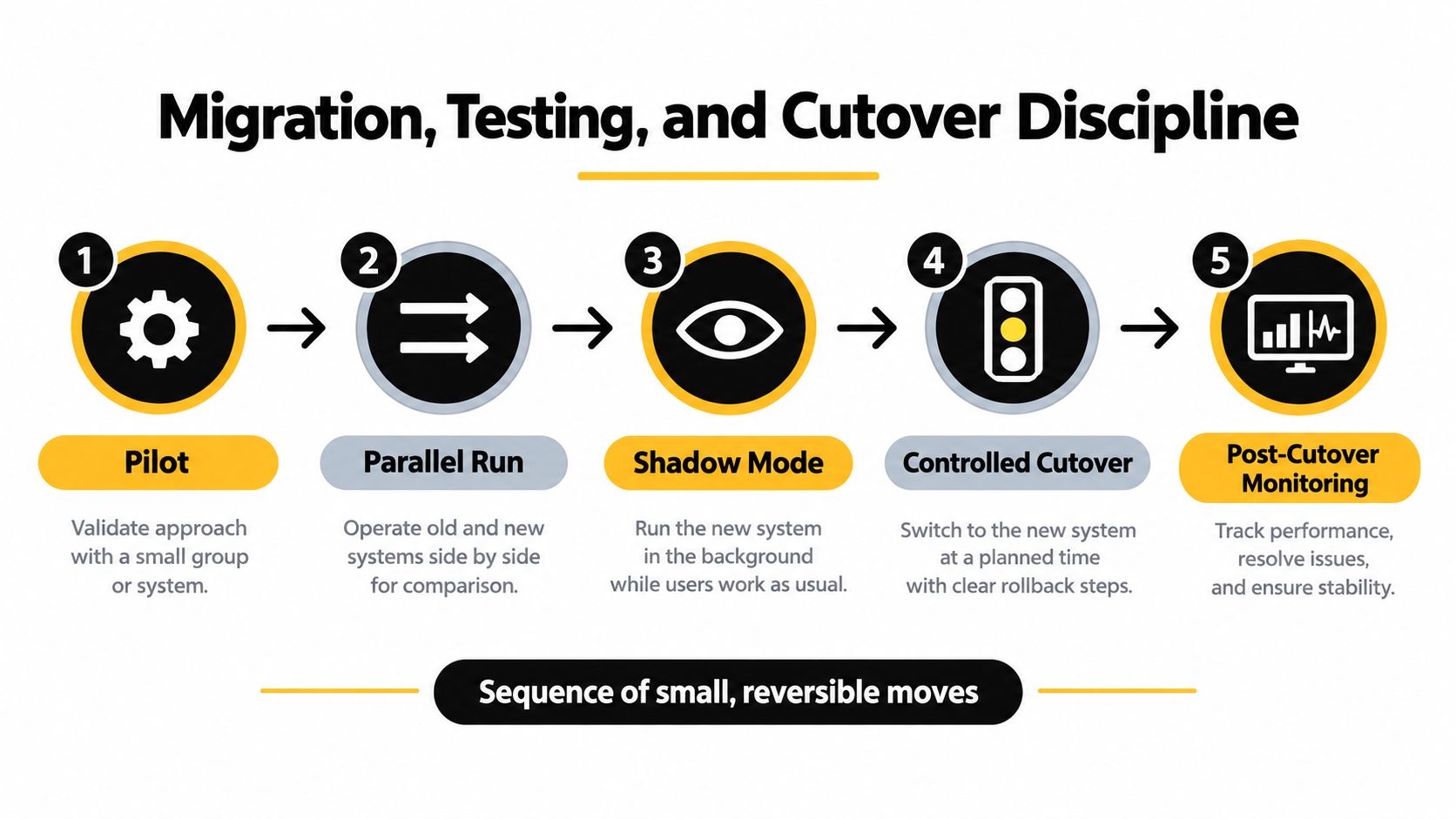
Migration is a sequence of small, reversible moves. A big-bang cutover hides uncertainty until the business has no safe way back.
Move through explicit gates
Pilot: Select a low-risk workflow with a clear owner and measurable output. Establish the baseline, build contract tests, and confirm that the team can observe the new path.
Parallel run: Process the same inputs through the legacy and modern systems. Compare outputs, timing, errors, and downstream effects. A parity harness makes numerical agreement visible, which Mistral describes as the cheapest and most convincing proof that a module is complete in its legacy code modernization guidance.
Shadow mode: Let the modern service observe production traffic without becoming the system of record. This exposes real edge cases without putting customer or revenue outcomes at risk.
Controlled cutover: Use feature flags and traffic shifting to move a defined segment or workflow. Schedule data backfills, communicate the change to support teams, and keep rollback instructions executable rather than theoretical.
Post-cutover monitoring: Watch errors, reconciliation results, queue depth, latency, and operator feedback. Decommission the old path only after the written exit criteria are met.
Test the handoff, not just the code
Every phase needs a named owner, a go or no-go decision, and a written exit criterion. Required checks include contract tests, parity checks, performance baselines, rollback drills, and chaos tests against the integration layer.
Before cutover, prepare support communication that explains what changed, what users should do, and who handles exceptions. After cutover, transfer ownership through runbooks, an on-call rotation, access reviews, and a 30-day hypercare window. The delivery team shouldn't disappear after deployment while operations discovers the missing procedures.
A practical sequence for the project board is:
- Define the workflow boundary and rollback trigger.
- Validate outputs against identical inputs.
- Run failure drills with the support owner present.
- Approve traffic movement in writing.
- Review incidents and unresolved exceptions daily during hypercare.
The embedded walkthrough below provides a useful visual companion to that delivery discipline.
ROI, Success Metrics, and the Handoff Checklist
Architecture purity doesn't pay for modernization. Operational outcomes do.
Report four metric families monthly. Reliability includes incident rate, mean time to recover, and unplanned downtime. Cost efficiency includes cost per transaction and infrastructure spend against the prior baseline. Velocity includes change lead time, deployment frequency, and time-to-fix. User impact includes ticket volume, onboarding time for new workflows, and operator hours saved.
Make the business case auditable
Use a realistic cost model rather than promising abstract transformation. Suppose a mid-market firm spends roughly $1.2 million annually on legacy maintenance, licensing, and incident recovery, then redirects about $380,000 into phased modernization. If the program recovers roughly 2.1 times that investment within eighteen months through lower incident costs, license consolidation, and reclaimed operator capacity, the claim should be tied to evidence from each category, not presented as a single blended victory.
| Line Item | Pre-Modernization Annual Cost | Post-Modernization Annual Cost | Annual Recovery |
|---|---|---|---|
| Legacy maintenance, licensing, and incident recovery | Roughly $1.2 million | Measure after implementation | Calculate from the new baseline |
| Phased modernization investment | Not applicable | About $380,000 in the example | Compare recovered value with investment |
| Incident recovery | Included above | Track against prior baseline | Attribute only verified reduction |
| Licensing | Included above | Track consolidated licenses | Attribute only verified reduction |
| Operator capacity | Included above | Track hours returned to operations | Attribute only verified capacity |
The payback formula is simple:
Payback period = modernization investment ÷ verified monthly recovery
Use the 6-month checkpoint to confirm adoption, reliability, and early cost movement. Use the 12-month checkpoint to test whether the new operating model is reducing recurring work. Use the 18-month checkpoint to assess the full recovery case and decide whether to scale, pause, or change strategy. Don't count projected savings as recovered value.
Complete the handoff
The handoff is part of the product, not an administrative afterthought. Require:
- Named operations ownership: One person accepts responsibility for service health, prioritization, and escalation.
- Complete documentation: Architecture, data contracts, workflows, access rules, and known limitations are current.
- Updated runbooks: Operators can handle normal tasks, common failures, rollback, reconciliation, and vendor escalation.
- Vendor accountability: Contracts identify response obligations, dependencies, access, and deliverables.
- Post-cutover review: Schedule a 90-day review cadence to inspect reliability, cost, velocity, user impact, and unresolved technical debt.
The federal modernization benchmark and the high failure rate reported in industry modernization findings both reinforce the same operating lesson: modernization succeeds through sequenced outcomes, not declarations that a replacement has begun. Treat each module as a business capability with an owner, evidence, and a retirement decision.
Internal Systems diagnoses recurring workflows, designs integration and AI-enabled automation, builds custom operational software, and hands over the code, documentation, and workflows to the client team. Start with the Internal Systems Operations Diagnostic to identify the three highest-value modernization opportunities and the one build you should avoid.