How to Build Dashboards That Actually Get Used
Learn how to build dashboards that drive real decisions. A practical guide to KPI design, data pipelines, AI summaries, and adoption for operational teams.

The popular advice says dashboards succeed when they use the right charts, clean colors, and a polished layout. That advice is incomplete. A dashboard earns adoption when a specific person uses it to make a specific decision during a recurring operating ritual, with enough freshness and context to trust the result.
That changes how to build dashboards from the first workshop onward. You're not assembling a gallery of visualizations. You're designing a decision surface, then building the data pipeline, user experience, alerts, and AI assistance around it. Microsoft's Power BI usage model reflects this operational view by tracking daily views, unique daily viewers, views per user over a 90-day lookback, and daily shares. The practical lesson is simple, a dashboard has to be measured as a product that people use over time, not judged only by whether the first release looks complete. Dashboard utilization guidance supports that shift from publication to adoption.
Table of Contents
- Why Most Dashboards Die on the Vine
- Defining the Decision, Audience, and KPI Set
- Mapping Data Sources and Choosing Your Architecture
- Prototyping the UX With the People Who Will Use It
- Implementation Pipeline From ETL to Front End
- Testing, Performance, and AI Monitoring Before Launch
- Governance, Adoption, and a Clean Client Handoff
Why Most Dashboards Die on the Vine
Most operational dashboards don't fail because the charts are ugly. They fail because nobody can answer three basic questions: Who is this for, what decision does it support, and who owns the response when a number changes?
A request such as “build a support dashboard” sounds concrete until an engineer asks what the support lead should do after opening it. If the answer is “understand performance,” the scope is still too broad. A useful dashboard names the decision, such as reallocating agents, escalating an SLA risk, or investigating a growing queue.
The three quiet failure modes
The first failure is building for everyone. Executives, team leads, agents, finance, and product managers get placed on one screen, so every group receives too much information and too little relevance. The result is a dashboard that can technically answer many questions but helps nobody act quickly.
The second is treating freshness as a backend concern. Users don't care that an ingestion job completed successfully if the visible number is stale. Show last refreshed time, source status, and, where appropriate, metric lineage beside the value. Guidance for modern dashboard development specifically recommends auditing every metric against its system of record and displaying freshness and lineage because trust declines when numbers appear stale. Dashboard trust and adoption guidance makes freshness a product feature rather than an infrastructure footnote.
The third is bolting on AI summaries without defining verification. An LLM can summarize a queue trend, but someone still needs to know when to check the underlying records, approve a recommendation, or switch to manual review. AI-powered analytics adoption remains constrained by compliance and concern about inaccurate or inconsistent generated answers, according to industry reporting on AI-powered analytics adoption. A summary without an owner is just another ungoverned output.
Practical rule: Every tile should map to a choice made by a named person on a known cadence.
A strong build therefore starts with decision design, not chart selection. You'll define the audience and KPI set, choose an architecture based on the decision's freshness needs, prototype with real operators, implement shared metric definitions, test both data and AI behavior, then launch with ownership and a review ritual already in place.
Defining the Decision, Audience, and KPI Set
Start with one audience. For a Tier 1 support dashboard, that audience might be the support lead running a daily queue-health stand-up. The dashboard shouldn't also attempt to serve the VP of Customer Success or the engineering incident manager. Those people may need related products, but they make different decisions at different speeds.
Next, write the decisions in plain language. A vague “support performance” request can become:
- Who needs help now?
- Where is backlog growing?
- Which queues are at SLA risk?
Each question deserves a primary KPI, an action threshold, and one accountable owner. Don't let stakeholders donate metrics just because the data exists. A metric earns its place by changing a decision, not by being easy to query.
Run a focused scoping session
A 60-minute scoping session can produce a signed one-pager if the facilitator keeps the discussion operational. Spend the opening portion naming the audience and meeting ritual. Use the middle to write decisions and candidate KPIs. Reserve the final portion for definitions, thresholds, owners, exclusions, and unresolved data questions.
The one-pager should record:
- Audience: The exact role opening the dashboard.
- Ritual: The meeting, queue review, or automated workflow where it will be used.
- Decisions: The choices the user must make.
- Metric definitions: Numerator, denominator, filters, time grain, and source of record.
- Thresholds: The condition that triggers an action.
- Ownership: The human accountable for investigating and responding.
- Out of scope: Metrics that stakeholders requested but that don't support the named decisions.
A metric glossary prevents teams from arguing over labels after implementation. A rigorous methodology also recommends standardizing metric definitions, calibrating thresholds against global benchmark data, and validating the framework against current literature and usability standards, while separating subjective, behavioral, and technical measures such as SUS or UMUX Lite, DAU/MAU, and LCP, INP, or CLS. Dashboard measurement methodology provides a useful model for keeping those layers distinct.
Use a decision-to-KPI contract
| Decision | Primary KPI | Threshold / Action | Owner | Cadence |
|---|---|---|---|---|
| Who needs help now? | Unassigned critical tickets | Assign a named responder when the threshold is crossed | Queue lead | Daily stand-up |
| Where is backlog growing? | Open-ticket trend by queue | Rebalance capacity or open an escalation when growth persists | Support operations manager | Daily |
| Which queues are at SLA risk? | SLA breach rate | Investigate the top contributing queue and notify its owner | Tier 1 support lead | Daily |
The table becomes a contract between operations, data engineering, design, and software development. If a proposed chart can't fit this structure, it probably belongs in an exploratory view, not the operational dashboard.
Mapping Data Sources and Choosing Your Architecture
Architecture should follow the decision's timing, not the team's preference for a fashionable stack. An operational dashboard can use an event stream and warehouse, scheduled ETL into a serving layer, or reverse-ETL into an operational store. Each option trades freshness, complexity, cost, and failure scope differently.
For the Tier 1 support example, ticket updates, assignment events, SLA clocks, and queue metadata may come from separate systems. The critical question is whether a stale value would cause the support lead to miss an intervention. If the dashboard supports a daily stand-up, a scheduled refresh may be sufficient. If it drives active routing or escalation, freshness below one hour can matter, and some metrics may need event-driven updates.
Compare the architectures
| Architecture | Typical Freshness | Best Fit For | Main Risk |
|---|---|---|---|
| Event stream plus warehouse | Near real time when ingestion and processing are healthy | Queue routing, active incidents, live operational states | More moving parts and greater observability burden |
| Scheduled ETL into a serving layer | Scheduled and predictable | Daily reviews, planning, recurring management reports | A delayed job can hide a developing issue |
| Reverse-ETL into an operational store | Depends on sync schedule and destination behavior | Putting calculated statuses back into an application workflow | Conflicting ownership between analytics and operational systems |
Don't add change data capture merely because the source system supports it. CDC adds value when updates must propagate quickly or when batch extraction misses the decision window. It adds complexity when the dashboard's ritual is slower than the source refresh and the extra freshness won't change an action.
A practical rule is to select the architecture whose worst-case freshness is still newer than the cadence of the decision. Document the contract in the dashboard itself, including expected refresh time, acceptable delay, failure behavior, and the person who receives an alert when the contract is broken.
Before committing to a platform, compare custom implementation choices with the broader question of building versus buying AI tooling. The right answer depends on how tightly the dashboard must connect to proprietary workflows, permissions, and response actions.
Prototyping the UX With the People Who Will Use It
A prototype isn't a design deliverable to approve and archive. It's a co-design artifact that exposes whether the proposed workflow makes sense before engineering commits to data contracts and components.
Start with the KPI table from the scoping session. Draw a low-fidelity wireframe with rough placement, default date ranges, alert states, and action controls. For the support lead, the first screen might show queue health, SLA risk, backlog movement, and a drill-down into tickets that need assignment. Don't add a trend chart just because an empty area feels unfinished.

Test decisions, not opinions
Run two short usability rounds with three to five real operators per round, with each session lasting 30 minutes. In the first round, ask users to narrate the decisions they'd make from each panel. Watch for hesitation, missed filters, misunderstood colors, and questions the dashboard can't answer.
The second round should use a higher-fidelity clickable mockup that addresses the observed gaps. Give users scripted scenarios, such as triaging an SLA incident or reviewing weekly throughput. Score completion time, error rate, and confidence, then compare the behavior across scenarios rather than asking whether users “like” the layout.
The participatory approach has practical support. One usability study used 20 co-designers and combined co-design with heuristic evaluation and usability testing, reporting a mean SUS score of 86.97, with a standard deviation of 5.79, above the commonly cited 70+ usability threshold. The usability study also identifies familiar operational problems, including irrelevant data overload, unclear filters, static dashboards that require IT support to change, and numbers shown without context or trends.
Document the final hierarchy, threshold colors, filter behavior, empty-state copy, drill-down rules, and assignment actions. Then hand the specification to engineering as an implementation contract, not a suggestion. A custom operational example such as the insurance operations dashboard project is useful to review when the interface must connect monitoring with real work rather than stop at visualization.
Implementation Pipeline From ETL to Front End
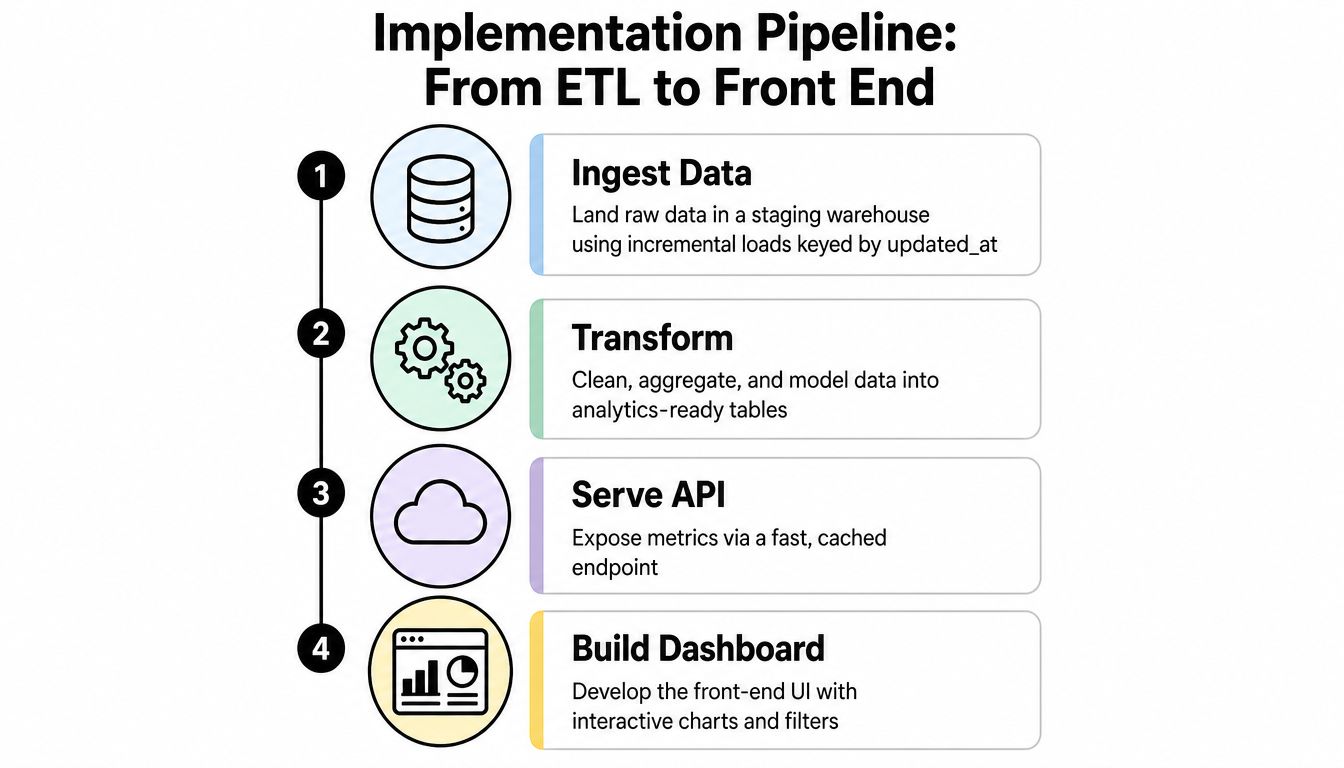
A small team should build the pipeline in the order that reduces rework. Start with data contracts and observability, not the visual shell. If the front end is polished before the metric definitions are stable, every later change becomes a UI, API, and testing problem.
Build the metric once
- Land raw data. Put source records into a staging warehouse using incremental loads keyed by
updated_at. This keeps refresh work bounded and preserves the original fields needed for reconciliation. - Create the modeling layer. Use one fact table per KPI and shared dimensions for team, region, and time grain. Compute each metric once, then reuse it across cards, charts, alerts, exports, and AI prompts.
- Expose a governed interface. Publish the models through a versioned semantic layer or API. The front end and every AI summarizer should read the same definitions, permissions, and freshness metadata.
- Render the product. Use a component library that matches the prototype's hierarchy and chart grammar. Standardize loading, error, empty, stale, and threshold-breach states instead of allowing each panel to invent its own behavior.
Consider an SLA breach rate row. Define the numerator and denominator, record exclusions, set a freshness contract of under 15 minutes, and show the last successful update beside the value. Add an alert when the breach rate exceeds its approved threshold. An AI summary can explain the top three contributing segments in plain language, but it should link each explanation to approved metric outputs and tell the reader when the evidence is incomplete.
A versioned API also protects clients from silent semantic drift. If “open ticket” changes from a status filter to an event-based definition, the contract should change visibly, with a migration note and reconciliation results.
For real-time scoring patterns, the real-time lead scoring project illustrates the kind of integration where a dashboard may need to surface both a model output and the operational action attached to it.
Finish the pipeline with observability hooks. Track row counts, null rates, freshness, schema changes, API errors, and a deploy log tied to every dashboard version. Without those signals, a blank panel looks like a front-end bug even when the source pipeline has stopped updating.
Testing, Performance, and AI Monitoring Before Launch
Pre-launch testing should produce evidence, not confidence based on a successful demo. Run the checks against realistic data, permissions, filters, and failure states. Every result needs a pass or fail status, an owner, and a sign-off date.
Use one launch checklist
| Area | Test | Pass condition |
|---|---|---|
| Data integrity | Compare row counts with the source of truth | Differences are explained and accepted |
| Data quality | Check null rates for each important dimension | Missing values follow documented rules |
| Metric correctness | Reconcile thresholds and spot checks manually | Dashboard and approved reference queries agree |
| API consistency | Compare warehouse aggregates with API responses | The serving layer returns the same definitions |
| Performance | Test p50 and p95 load times with realistic concurrency | Results meet the agreed product target |
| Query behavior | Review any panel taking more than two seconds | Slow queries are optimized, cached, or redesigned |
| Caching | Check repeated date-range requests and a forced cache flush | Warm and cold behavior are understood |
| Accessibility | Verify contrast, keyboard navigation, and screen-reader labels | Core tasks work without a mouse or visual-only cues |
| AI grounding | Restrict summaries to approved metrics and valid citation links | Generated explanations can be traced to source values |
| AI security | Prompt-injection test every user-controlled input | Instructions in data fields can't override system rules |
| AI accuracy | Evaluate a sample of 50 generated summaries against underlying numbers | Unsupported claims are rejected or corrected |
| AI operations | Log model, prompt hash, and token cost for every call | Each invocation is auditable |
The performance target belongs in the product contract, not in a generic engineering wish list. A dashboard used by a small internal team may tolerate a different profile from a customer-facing application, but the team should decide that before launch and test under the expected concurrency.
Treat AI as a monitored workflow
Google Cloud reliability guidance for AI workflow monitoring emphasizes continuous checks for degradation, drift, latency, throughput, errors, output characteristics, schema validity, business KPIs, alerting, and incident integration. AI workflow monitoring guidance also recommends that every alert identify the crossed threshold, why it matters, the response owner, expected response time, immediate action, and whether the workflow continues automatically or moves to manual review.
That model works well for dashboard summaries. If the AI sees incomplete data, it should say so. If a recommendation would change a customer-facing action, the interface should show the verification path. If the model service fails, the dashboard must remain useful through the underlying metrics and manual workflow.
A failed check blocks go-live until it's fixed or formally accepted as a known issue with an owner and due date. “We'll monitor it after launch” isn't a test result.
Governance, Adoption, and a Clean Client Handoff
Governance isn't paperwork added after release. It's the operating system that keeps a dashboard trustworthy once its original builders move on.
Assign three roles for every dashboard: a primary owner who decides what the product should do, a data steward who maintains definitions and source quality, and an on-call responder who handles freshness, API, and alert failures. Record refresh SLAs, escalation paths, threshold-change procedures, and the conditions for switching AI-assisted decisions to manual review.
Design the adoption ritual
A dashboard becomes part of work when somebody opens it at a predictable moment and takes an action. Put it into the weekly review meeting, a queue-health stand-up, or a Slack digest that links directly to the relevant exception. Adoption guidance also recommends limiting the visible set to five to nine metrics and embedding the dashboard into a meeting or Slack digest rather than publishing it. Operational dashboard guidance supports the distinction between a screen that exists and a workflow that uses it.
The review should include a feedback path inside the product. Capture requests in one in-app channel, tag them by metric or workflow, and retire any KPI untouched for 60 days unless its owner documents why it remains necessary. A dashboard should get smaller as the team learns, not larger as every stakeholder adds another request.
Make the handoff executable
The client handoff package should include:
- Ownership matrix: Primary owner, data steward, responder, escalation path, and refresh agreement.
- Lineage diagrams: Source systems, transformations, semantic models, APIs, and visible freshness fields.
- Runbooks: Recovery steps, alert interpretation, threshold changes, permissions, and rollback procedures.
- Version notes: Dashboard release history, model changes, AI prompt versions, and known limitations.
- Hypercare plan: A 30-day period with scheduled reviews, issue triage, and clear transfer of responsibility.
On launch morning, verify owner sign-off, freshness, alert delivery, runbook execution, permissions, and the first review meeting on the calendar. A dashboard without ownership, a meeting, and an exit plan is one data incident away from abandonment.
Internal Systems designs custom internal tools, dashboards, integrations, operational automations, and AI-enabled workflows for teams that need decisions to move through one working surface. Visit Internal Systems to discuss an Operations Audit or a custom system build that connects trusted metrics, alerts, and governed AI assistance to the workflow your team already runs.