Database Design Principles for Custom Software Teams
Master database design principles for custom software and AI workflows. Learn normalization, indexing, and operational resilience for internal systems.
Moving from 1NF to 2NF in a PostgreSQL experiment reduced database size by 10%, increased read throughput by 311%, and reduced energy consumption per transaction by 74%, while moving from 2NF to 4NF changed throughput by less than 1%. Those results point to the practical answer: design for consistent business facts first, then optimize proven access patterns and constrain every AI or integration workflow that touches the data.
A growth-stage operations team usually feels the problem before anyone calls it database design. Leads sit in multiple workbooks, finance owns a different status, an automation copies records into a CRM, and an AI assistant reads whichever version happens to be easiest to access. The team can still complete the work, but nobody can confidently explain which record is authoritative, whether an automated update succeeded, or why an agent made a particular decision.
Custom software should remove that uncertainty, not hide it behind a polished interface. The database becomes the place where ownership, relationships, permissions, processing state, provenance, and recovery behavior are made explicit. These database design principles matter because integrations and AI systems turn small modeling shortcuts into operational failures.
Table of Contents
- Why Spreadsheet Thinking Breaks at Scale
- Normalization Is a Trade-off, Not a Rule
- Designing Indexes Around Access Patterns
- Building Resilience Across Integrations
- Preparing Databases for AI and Semantic Retrieval
- Ensuring Consistency When AI Writes Data
- Monitoring Data Skew in Production Workflows
- Database Design Audit Checklist for Migrations
Why Spreadsheet Thinking Breaks at Scale
A founder in Dubai might begin by tracking leads across separate tabs for inbound enquiries, broker referrals, follow-ups, and closed opportunities. Each sheet makes sense on its own. Problems start when a sales coordinator changes a phone number in one place, finance records a different customer name, and an automation creates a duplicate because it has no stable identity to match.
The team often responds by adding more columns, color codes, and manual instructions. That approach treats a database like a more powerful Excel file. It preserves the underlying weakness, because the system still stores repeated facts without defining which record owns them or how changes should propagate.

The hidden cost of repeated facts
A custom application needs more than fields that look familiar to users. It needs a model of clients, opportunities, assignments, approvals, transactions, documents, events, and permissions, along with the dependencies between them.
Edgar F. Codd established the conceptual foundation for relational database design in 1970 by representing information as relations rather than tying data directly to application procedures or physical storage. His model separated logical organization from implementation and provided a mathematical basis for keys, attributes, relationships, and declarative access. The history of SQL and relational database design shows why that separation still matters when an internal system evolves.
A lead shouldn't be copied into every workflow table just because several teams need to see it. The system should identify the lead once, connect activities and decisions to it, and preserve changes through explicit records. That structure gives an AI agent a reliable object to retrieve and an integration a stable identity to synchronize.
Start with ownership, not screens
Before designing screens or prompts, answer four questions:
- Who owns the fact? Decide whether the CRM, finance service, or custom application is authoritative for each field.
- What identifies the record? Use stable identifiers rather than names, email formatting, or row position.
- What can change? Separate current state from historical events when operators need to reconstruct decisions.
- What happens on failure? Store retry state, validation errors, and unresolved conflicts instead of dropping them.
For teams replacing fragile workflows, a real-estate lead automation system illustrates the kind of boundary that needs deliberate modeling. The value isn't merely moving data into one interface. It lies in defining how an enquiry enters the system, who can change its status, which automation may act, and how the team knows an action completed.
Practical rule: If two systems can edit the same business fact, design the conflict and ownership rules before writing the integration.
Normalization Is a Trade-off, Not a Rule
A custom system usually starts to break in quieter ways than people expect. The first problem is rarely a failed query. It is a client status edited in one table and left stale in another, an AI workflow reading the wrong copy, or an integration pushing updates into a field that was never the source of truth. Normalization matters because it limits those failure paths. Singular facts stay singular, and downstream processes have fewer chances to act on contradictory data.
That does not mean every design should be pushed to the highest normal form available.
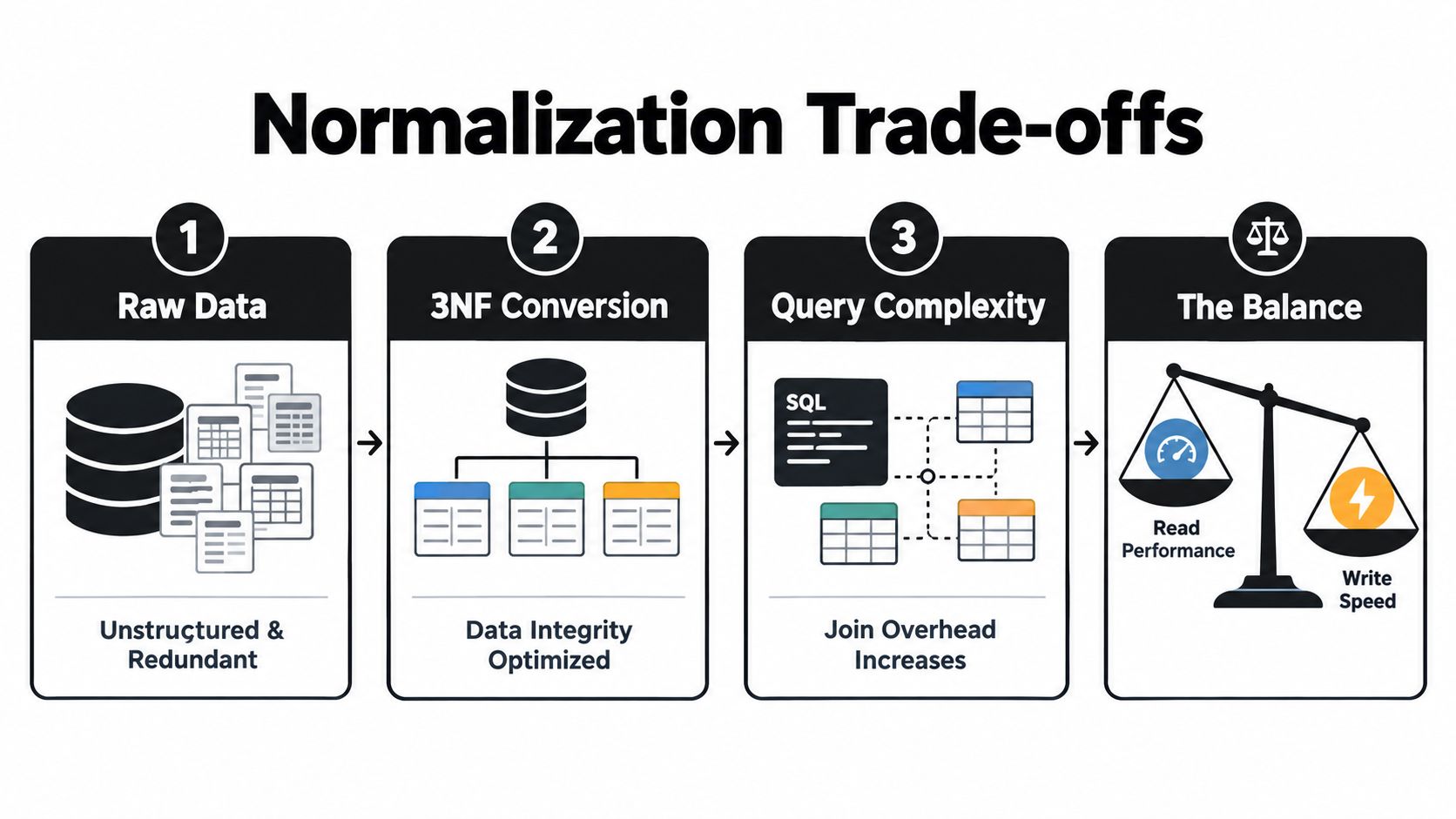
The trade-off is operational shape. Splitting entities reduces duplication and update anomalies, but it also changes how the system is read. More joins can be fine for transactional work and still become expensive for dashboards, retrieval pipelines, or AI context assembly that must pull related state quickly and repeatedly. In production, the right question is not whether a schema looks academically pure. The question is whether writes stay correct while reads stay predictable under actual load.
The normalization benchmark gives a useful reference point. In a PostgreSQL experiment on the public IMDb dataset, moving from First Normal Form to Second Normal Form reduced on-disk size by 10% and increased read throughput by 311% under a single-node, read-only workload with 48 concurrent clients, while energy consumption per transaction fell by 74%. The same study found that moving from 2NF to Fourth Normal Form increased table and row counts and made query structures more complex, while throughput changed by less than 1%. Those results are specific to that workload, but they support a pattern many teams see in practice. Normalize enough to protect write integrity, usually through 2NF and often 3NF, then denormalize only where measured read pressure justifies it.
A safer pattern is to separate write truth from read convenience. Keep transactional tables normalized. Then build a read model for a named consumer, such as a reporting workflow, a support dashboard, or an AI assistant that needs compact context. That read model can be a materialized view, a reporting table, or a cache, but it should be refreshed deliberately and checked against the underlying records.
This matters more with AI integrations than teams often expect. If a claims assistant needs the claimant, current policy state, recent events, extracted attributes, and approved documents, duplicating those values into writable claim columns creates reconciliation risk. Build the context from authoritative records instead. Store refresh status. Make drift visible.
Test the design with mixed reality, not isolated queries. Use representative joins, concurrent reads, write-heavy workflows, asynchronous AI outputs, and production-like cardinality. Uneven relationships and background jobs are where clean diagrams start to fail.
The practical standard is simple: normalize the facts that must never disagree, and create derived views only when a measured workload needs them.
Designing Indexes Around Access Patterns
At 9 a.m., the system feels fine. By noon, the support queue is delayed, a sync job is backing up, and an AI assistant starts timing out on lookups that worked in testing. In production, those failures often come from index design that matched columns people liked, instead of the access patterns the system runs in practice.
Indexes change read cost and write cost at the same time. Every extra index can help one query and slow inserts, updates, deletes, vacuuming, and storage use elsewhere. That trade-off matters in custom software with integrations and background workers, because the busiest database paths are often machine-driven, not clicked by a human once in a while.
Benchmarks comparing indexed queries with full-table scans found measurable gains, with results varying by workload. In the cited tests, B-tree indexes outperformed hash indexes in larger and mixed-query cases, while hash indexes remained suited to narrower equality lookups, as shown in the B-tree and hash index comparison.
Start from a repeated query shape.
If a task queue fetches records by tenant_id, filters on status, and orders by created_at, a composite index on those fields usually serves the workload better than several single-column indexes added one by one. Column order matters because the optimizer uses leading columns first. The order from the UI form or API payload is irrelevant.
That distinction shows up quickly in AI-adjacent workflows. A retrieval step that asks for unprocessed documents within a time range needs ordered traversal and range support. A lookup for one external identifier is different. B-trees fit the first pattern well. Hash indexes are mainly for equality checks, so they help less when the query mixes filtering and ordering.
The failure mode I see in migrations is index sprawl. Teams expose many filters to integrations or AI agents, then try to index every field “just in case.” The result is slower writes, more overlap, harder plan selection, and less predictable latency under concurrent load.
A better loop is operational and narrow:
Review slow queries from the app, jobs, and integrations. Check execution plans for scans, sorts, and inefficient joins. Add the smallest index that matches the actual predicate and order. Then replay write-heavy activity and confirm the gain is still worth the maintenance cost after data volume grows.
Indexing principle: Prioritize the queries executed constantly by queues, integrations, and agents, even if each one looks modest on its own.
Building Resilience Across Integrations
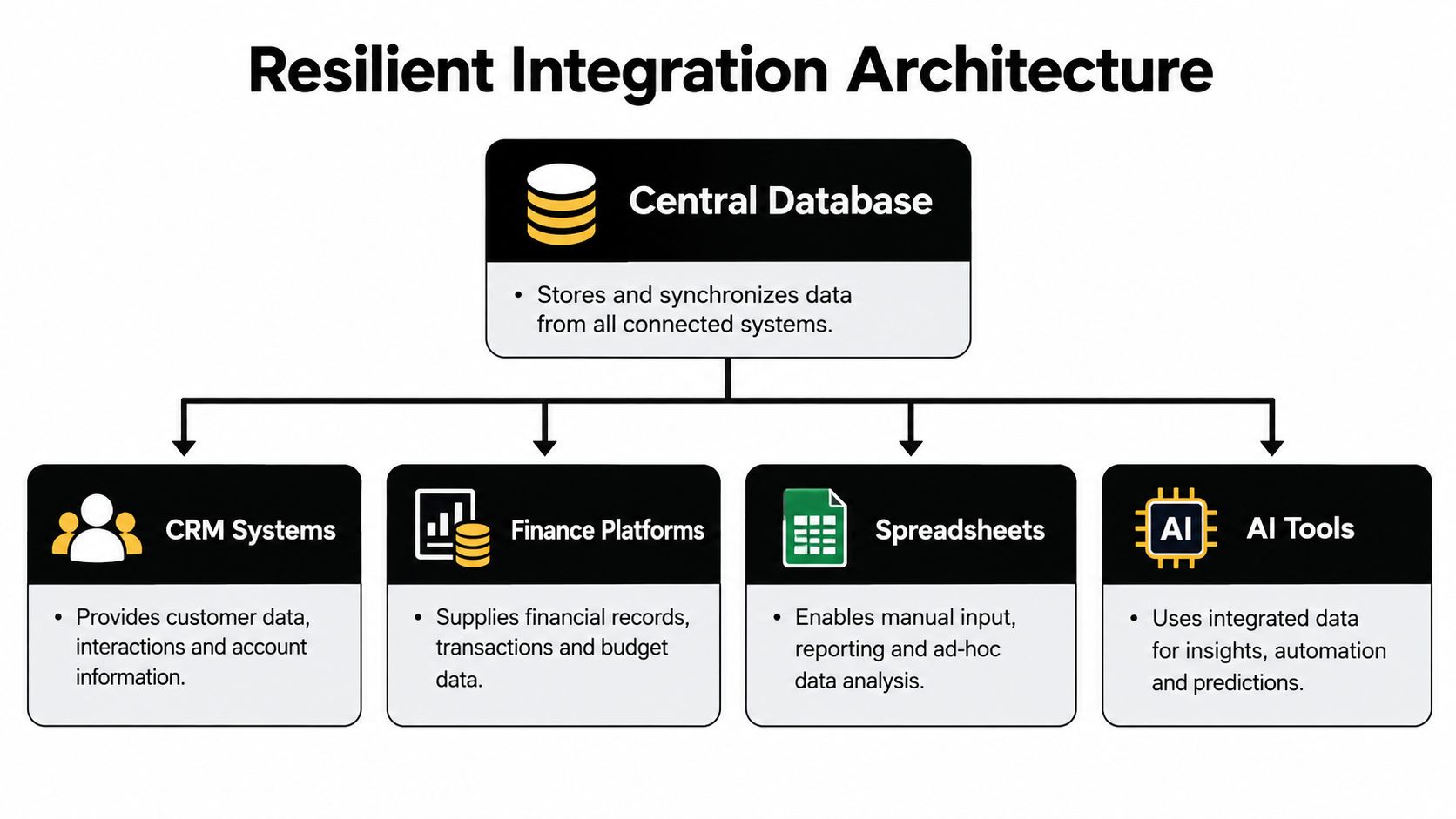
A clean schema can still fail when data crosses system boundaries. A CRM may send a customer update, the finance platform may reject part of it, and the custom application may record the request as complete because it received an acknowledgement from only one step. The database must represent that partial outcome instead of presenting a false impression of consistency.
This risk is operational, not merely technical. 36% of executives surveyed reported concern about outage-related data loss or corruption, according to the State of Resilience 2025 report. A reliable custom system therefore models what happened, what failed, who owns the correction, and whether another attempt is safe.
Make synchronization repeatable
An idempotent import can safely process the same source event more than once without creating a duplicate business result. That usually requires a source-system identifier, an operation or event key, a recorded processing state, and a rule for what happens when the same message returns.
Conflict resolution needs an owner too. If finance controls legal entity names but the CRM controls sales-facing contact details, the integration should encode that boundary. It shouldn't let whichever system synchronizes last overwrite the other.
Useful records include:
- Immutable events: Preserve what arrived, when it arrived, and which source produced it.
- Reconciliation jobs: Compare related records and surface mismatches for review.
- Failure queues: Keep rejected payloads and validation reasons available for retry or correction.
- Soft deletion: Preserve references when a source removes a record, unless a retention policy requires permanent deletion.
- Synchronization state: Distinguish pending, accepted, failed, retried, and reconciled outcomes.
Preserve meaning through handoffs
A field called status rarely means the same thing in every system. Store the source value, the mapped internal value, and the mapping or validation result when the distinction affects decisions. That provenance helps engineers diagnose a bad transformation and helps operators explain why an AI workflow saw a particular state.
A custom insurance operations dashboard needs more than a central table of policies. It needs to show which source supplied a value, whether a claim update reached its destination, and which exceptions require human action.
Resilience rule: Every integration should have a visible failure state. “No error reported” is not the same as “business fact synchronized.”
Preparing Databases for AI and Semantic Retrieval
Traditional schemas assume humans and deterministic applications are the main clients. AI systems change the interface. Copilots, text-to-SQL tools, classification pipelines, and agents can interpret relationships plausibly while still selecting an invalid join, exposing an unauthorized document, or attempting a write that bypasses business rules.
Recent reporting on a 2026 survey found that 96.5% of organizations had experienced at least one AI or LLM interaction with production databases, including internal copilots, analytics, training pipelines, and AI-generated SQL, as described in DataOps reporting on AI and production databases. The schema should assume these interactions need boundaries.
Separate transaction shape from meaning
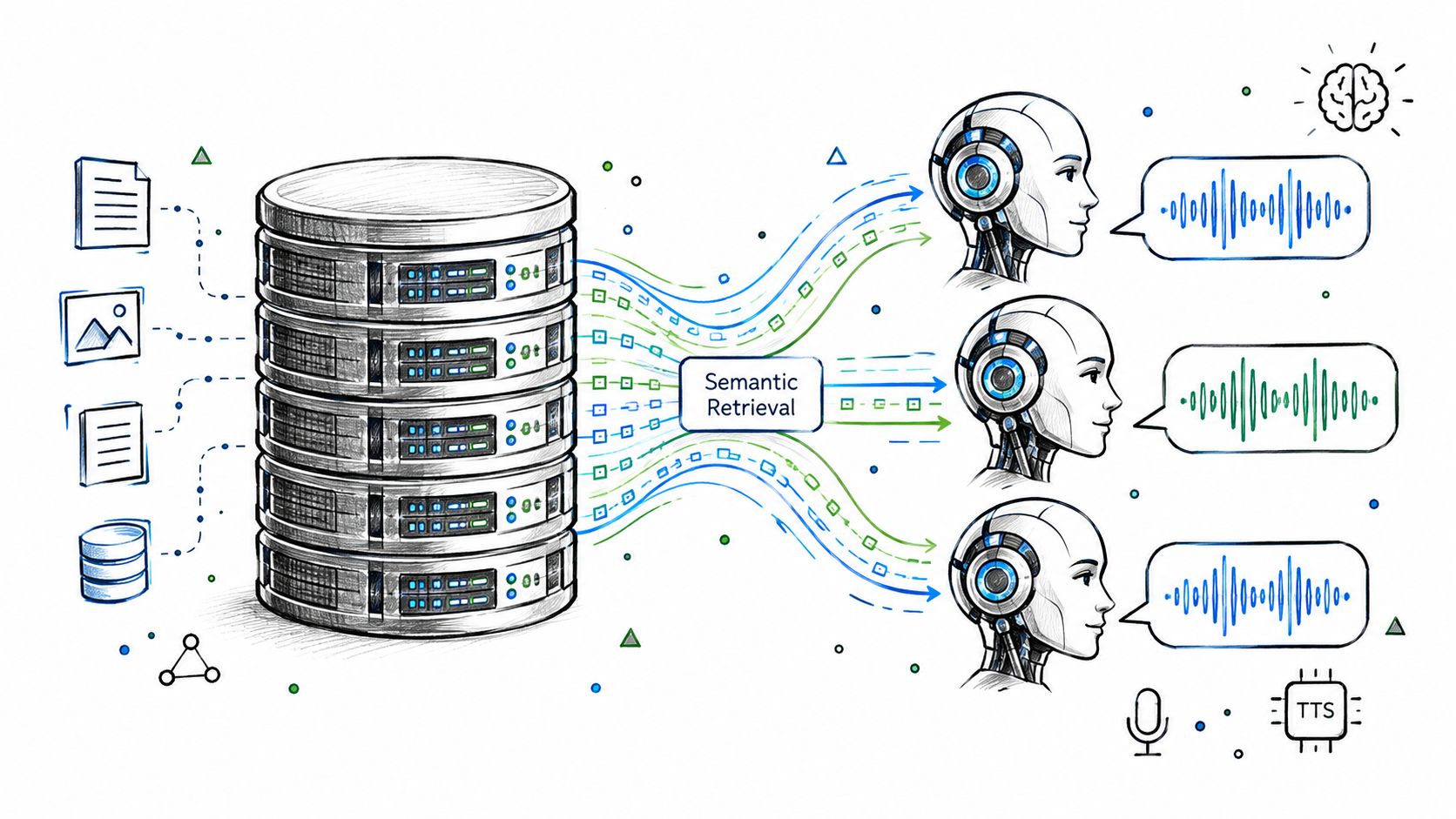
Transactional tables should enforce identifiers, relationships, valid states, and authorization. Semantic retrieval needs embeddings, document chunks, metadata, freshness, and references to the underlying records. AWS describes vector databases as stores for high-dimensional embeddings used in retrieval-augmented generation, while relational databases remain appropriate for structured operational records and relationships in its database selection guidance.
These workloads can coexist when every embedding retains a stable record identifier, authorization metadata, source reference, and freshness state. A client-risk agent might retrieve similar policy clauses, filter them by client permission and current status, then submit a recommendation through a transactional workflow. The embedding should support discovery, not become the authority for policy status.
Design the AI-facing surface deliberately:
- Semantic metadata: Define business terms, metric meanings, ownership, and freshness.
- Restricted views: Expose only the tables and fields the agent needs, preferably read-only for exploration.
- Typed outputs: Store confidence, status, model version, and human-approval state in separate fields.
- Audit trails: Preserve the prompt or workflow version, source records, retrieved context, and resulting action.
- Authorization boundaries: Apply row-level permissions before retrieval, not after the model has already seen the content.
Teams working with sensitive embeddings can also review practical guidance on how to control vector databases, especially where personal data and retrieval permissions overlap. For a wider build decision, an AI tooling comparison helps frame whether the system needs a custom data surface or a packaged capability.
Ensuring Consistency When AI Writes Data
An AI action that changes only a sentence in a draft is different from an action that changes a claim status, extracted attributes, and searchable context. The latter affects the operational record and the model's future understanding of it, so the write path needs explicit consistency rules.
AWS describes ACID behavior through atomicity, consistency, isolation, and durability in its PostgreSQL guidance. For an insurance operations agent, those properties mean the claim transition and related structured updates should commit together where possible, while committed data remains valid, isolated from conflicting work, and safely stored.
Model derived output as derived output
Don't append an untracked AI paragraph to the main business record and assume the system can explain it later. Separate the source record from:
- Derived attributes: Values extracted or classified by a model.
- Processing state: Pending, running, completed, rejected, or awaiting review.
- Model identity: The model or workflow version that produced the result.
- Failure state: Error details, retry count, and the next permitted action.
- Decision events: The evidence and action associated with each automated decision.
If embedding generation is part of the same database operation, commit the status, extracted fields, and embedding together when the work is available synchronously. If embedding generation is asynchronous, use an explicit outbox and retry pattern. The claim should not appear fully processed while its searchable representation is missing.
Give humans a reconstructable history
An audit event should answer what data the agent received, which instructions and model version governed the action, what it produced, and whether a person approved or changed it. That record isn't just for compliance. It lets an operator diagnose a wrong routing decision without guessing which version of the claim the agent saw.
A dependable workflow also makes writes narrow. Let the agent request “propose status transition” rather than granting unrestricted update access to every claim field. The application validates the proposed transition, applies database constraints, records the event, and returns a clear result.
Write rule: Treat AI output as a typed, versioned business event with a controlled application path, not as a note field attached to an otherwise ordinary row.
Monitoring Data Skew in Production Workflows
A lead-routing model can look healthy on a dashboard while production decisions drift for a simpler reason. The inputs hitting the database no longer match the shape, completeness, or meaning of the data used during training. In custom software, that often starts outside the model. A connector changes a field mapping, a sales team adds a new intake path, or an AI enrichment step begins returning empty classifications for one segment. Google Cloud defines data skew as a difference between feature-value distributions in training and serving data, and recommends comparing serving statistics with training baselines before alerting on use-case-specific thresholds, as described in Google Cloud's ML quality guidance.
Treat skew monitoring as a database design problem as much as an ML one.
For each automated decision, keep the feature snapshot in use, when it was captured, which model version ran, what route or action followed, and what business outcome came later. I have seen teams blame model quality when the fault was operational. A nullable field became blank after an import change. A schema transformation merged categories that used to be distinct. Without the stored snapshot, you cannot separate customer behavior change from pipeline damage.
Thresholds still matter, but context matters more. BigQuery ML's documented validation function uses a default anomaly-detection threshold of 0.3 for categorical and numerical features, and custom thresholds can range from 0 up to but not including 1. Start there if you need a baseline. Lower it for high-risk features only when the cost of missing a problem is higher than the cost of investigating noise. A skew alert should open an incident or review path, not trigger automatic retraining.
The monitoring record needs a clear chain of evidence: the training baseline and feature definition, the serving-time values, the alert with its score and threshold, the downstream decision, and the investigation result. That structure gives engineering a way to diagnose failures, and it gives operations a defensible account of why an automated workflow changed in production.
Database Design Audit Checklist for Migrations
Before a migration reaches production, review the model as an operational contract. Start with entities and dependencies, then verify that keys, constraints, and relationships preserve business meaning rather than merely matching the shape of the old system.
Use this checklist with the engineering and operations owners:
- Entity integrity: Does each core business object have a stable identity and clear owner?
- Normalization choice: Are facts normalized through at least 2NF, commonly 3NF where update integrity matters, with denormalization justified by measured read demand?
- Access evidence: Do indexes match observed filters, joins, sorts, and queue retrieval rather than every available field?
- Integration safety: Are imports idempotent, conflicts explicit, failures retryable, and source-of-record rules documented?
- Historical accountability: Are immutable audit events, deletion behavior, validation history, and synchronization state retained?
- AI boundaries: Do semantic metadata, row-level authorization, typed confidence, approval states, and read-only views constrain automated access?
- Write consistency: Are transactional updates and embedding or derived-output updates handled through ACID transactions or an explicit outbox and retry design?
- ML observability: Are feature snapshots, timestamps, model versions, baselines, skew alerts, and outcomes connected?
A migration plan should also define sequencing, ownership, validation, rollback, and handoff. The on-time data migration plan from Kagool provides useful context for turning those concerns into an executable transition rather than treating migration as a one-time data copy.
Database design principles work when they remain connected to the way people, integrations, and AI systems operate. If your team needs to replace fragile cross-tool workflows with custom internal software, Internal Systems provides operations audits, system integrations, custom builds, monitored automation, and AI-powered workflows, with documentation and code handed over for independent operation. Visit Internal Systems to discuss the data model, integration boundaries, and migration sequence your operation needs.