Customer Self Service Portals for Operational Teams
Customer self service portals explained for growth-stage teams. Learn features, AI workflows, ROI math, and a roadmap to launch one without the usual pitfalls.
77% of consumers have used a self-service support portal, 81% prefer self-service for simple issues, and a well-designed portal often lands around 40% to 60% self-service resolution when it's built properly. Most portals still fail because teams measure deflection instead of resolution quality, so they optimize for fewer tickets while customers still end up stuck.
The popular advice is wrong. A customer portal isn't a prettier FAQ page, and it isn't a chatbot bolted onto your support stack. It's an operational system. If it can't authenticate the customer, pull live context, complete a task across your internal systems, and confirm the issue closed, it's not doing the job.
That distinction matters because leadership loves vanity wins. Lower inbound volume looks good in a dashboard. Fewer tickets sounds efficient. But if customers have to search, retry, escalate, and repeat their history to an agent, the portal didn't resolve anything. It just hid the failure upstream.
The fix is straightforward. Build customer self service portals around one standard: can this workflow close a real, multi-step issue without an agent? That standard changes what you ship first, how you wire the architecture, where AI belongs, and which KPIs deserve attention.
Table of Contents
- What a Customer Self Service Portal Actually Does in 2026
- The Business Case and ROI Math Leadership Will Ask For
- Must-Have Features Versus Nice-to-Haves for a First Release
- Architecture Patterns That Separate a Portal From a Help Center
- AI and Automation Workflows That Close Tasks End-to-End
- A 90-Day Implementation Roadmap for Founder-Led Teams
- KPIs and Measurement Strategies That Predict Real Outcomes
- Common Pitfalls and the One Decision That Holds It All Together
What a Customer Self Service Portal Actually Does in 2026
The wrong portal strategy is still everywhere. Teams ship a branded FAQ, add a few forms, then wonder why customers still open tickets, chase updates, and repeat the same issue to support.
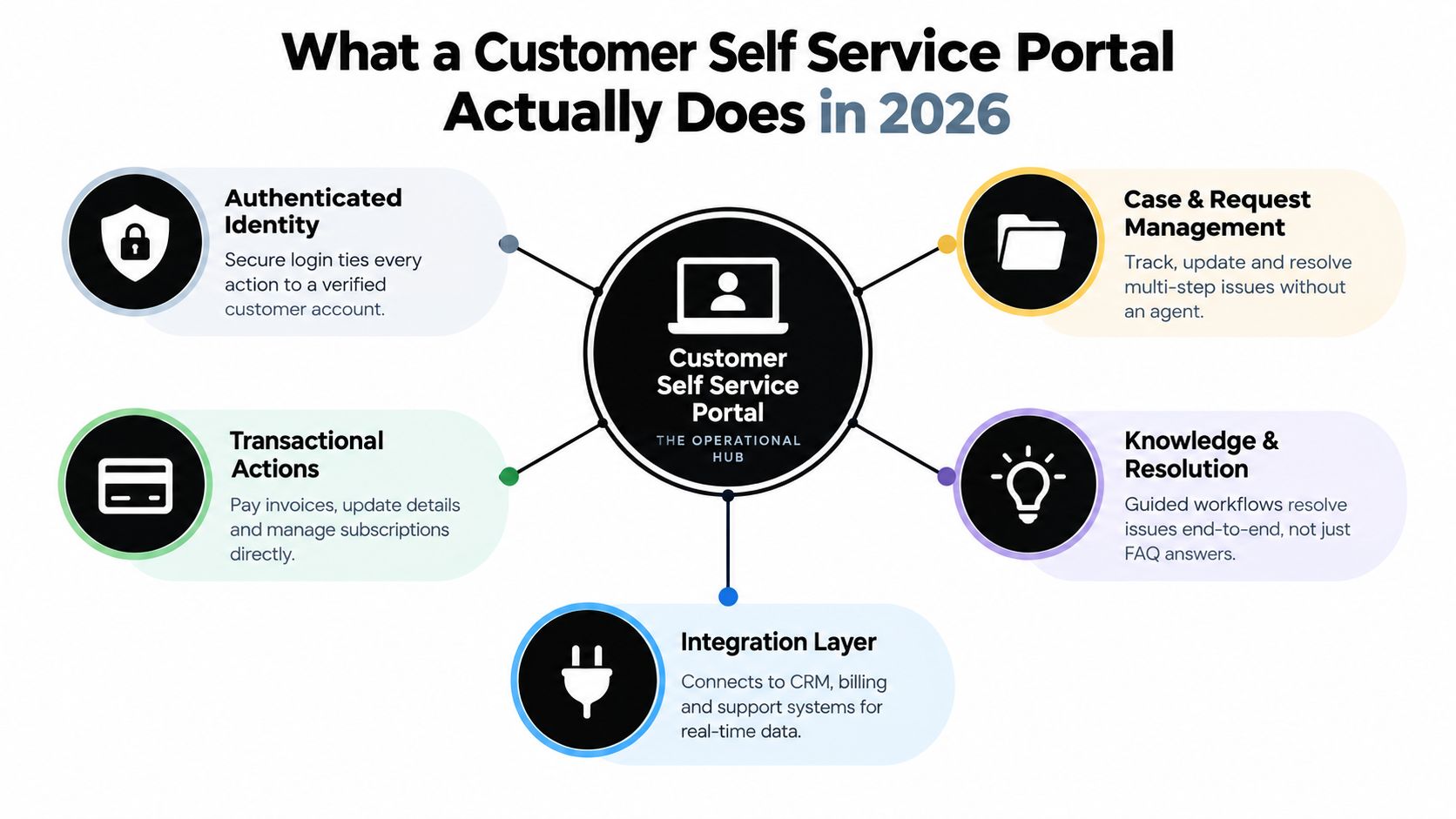
A modern customer self service portal runs customer operations from intake to closure. It authenticates the user, pulls the right account data, completes the task across internal systems, and shows clear proof that the work finished. A content library can support that experience, but content is not the product.
The FAQ-site model is why portals underperform
Customer expectations are already settled. Independent roundup data says 77% of consumers have used a self-service support portal, 74% have used a web-based FAQ, 69% access self-service help on mobile devices, 81% prefer self-service for simple issues, and 70% expect a company website to include a self-service application according to Gitnux's customer self-service statistics roundup.
The takeaway is simple. Customers want the issue handled without waiting in a queue.
Customers open a portal to finish a job, not to read about it.
That standard changes what the portal has to do. It needs to identify the customer, load live records, apply rules, trigger the right workflow, and report status all the way through completion. If any of that breaks, the customer is back in support with more frustration and more context loss than before.
A real portal usually covers four jobs well:
- Verified access: The user signs in through SSO or account login, and every action maps to the correct customer record.
- Live account context: The portal shows the invoices, orders, subscriptions, claims, entitlements, or open requests that belong to that user.
- Task execution: The user can change details, download documents, submit approvals, request service, pay something, or start a process that updates internal systems.
- Closed-loop confirmation: The system shows progress, exceptions, next steps, and final completion instead of dropping the user after submission.
Resolution is the standard
The biggest mistake is treating lower contact volume as the win. It is not. A portal that cuts ticket creation but leaves customers stuck in retries, dead ends, or manual follow-up just moves the work out of sight.
Build the portal as the front end for operations. The customer sees one interface. Behind it, your CRM, billing platform, ticketing system, document store, rules engine, and automation workflows do the work.
Workflows that cannot close the issue end-to-end function as pre-support, not self-service. That is the bar to use for every portal decision in 2026.
The Business Case and ROI Math Leadership Will Ask For
Leadership does not need another soft pitch about convenience. It needs a model that shows whether the portal will close real tasks at a lower cost than an agent queue.
Use the simple unit economics already cited. Self-service resolutions cost about $0.75 versus $12 for live-agent support, and good portals often drive meaningful deflection when they handle authenticated, repeatable tasks, as summarized in AMW Group's customer portal statistics page. That gives you a per-ticket gross saving of $11.25.
Build the case from that number.
Model ROI with one task set first
Start with the request types you can fully resolve inside the portal. Invoice copies, account updates, subscription pauses, document uploads, claim status checks. If the workflow still ends with staff chasing details in email, do not count it as savings.
Use this formula:
Monthly gross savings = Monthly tickets shifted to portal × ($12.00 - $0.75)
Then calculate:
Monthly net savings = Monthly gross savings - monthly software, maintenance, and support cost
Payback period = one-time implementation cost ÷ monthly net savings
Here is a worked table leadership can use.
| Monthly Tickets | Deflection Rate | Tickets Shifted to Portal | Gross Monthly Savings at $11.25 Each | Monthly Portal Cost | Net Monthly Savings | One-Time Implementation Cost | Payback (months) |
|---|---|---|---|---|---|---|---|
| 1,000 | 30% | 300 | $3,375 | $1,000 | $2,375 | $15,000 | 6.3 |
| 2,500 | 25% | 625 | $7,031.25 | $1,500 | $5,531.25 | $20,000 | 3.6 |
| 5,000 | 20% | 1,000 | $11,250 | $2,500 | $8,750 | $30,000 | 3.4 |
That is the baseline case. It is conservative enough to survive a finance review and simple enough for a founder to audit in five minutes.
A quick example
Take a team handling 1,000 tickets per month. If the first release shifts 30% of those requests into true self-service, that is 300 tickets no longer handled by agents.
- 300 shifted tickets × $11.25 gross saving = $3,375/month gross savings
- If the portal costs $1,000/month to run, net savings drop to $2,375/month
- If implementation costs $15,000, payback lands at about 6.3 months
That is a real business case.
Now pressure-test it. If half those customers still create a follow-up ticket because the workflow stalls, your shifted volume is fiction. Your savings collapse with it.
What changes the math
Three inputs decide whether the model holds up.
- Task completion rate: Count only workflows that finish without agent cleanup.
- Ticket mix: High-volume, rules-based requests pay back first.
- Recontact rate: Any issue that reopens within a short window should be treated as agent-assisted, not self-service.
The usual mistake is claiming ROI from portal usage. Usage does not matter. Closed tasks matter. A customer viewing an article or starting a form does not remove cost from operations. A customer who updates an account record, submits the right documentation, clears validation, and gets confirmed completion does.
Use a hard approval standard with leadership: name the exact request categories that will move from agent-handled to system-resolved, estimate monthly volume for each, and show the savings line by line. If that list is vague, the ROI case is vague too.
Must-Have Features Versus Nice-to-Haves for a First Release
Teams wreck first releases by treating the portal like a feature showroom. That is the wrong job. A first release should close a small set of customer tasks from start to finish, without an agent cleaning up the mess afterward.
Use one filter for every feature request: does it help a customer complete a real, multi-step request inside the portal? If the answer is no, cut it from V1.
What belongs in V1
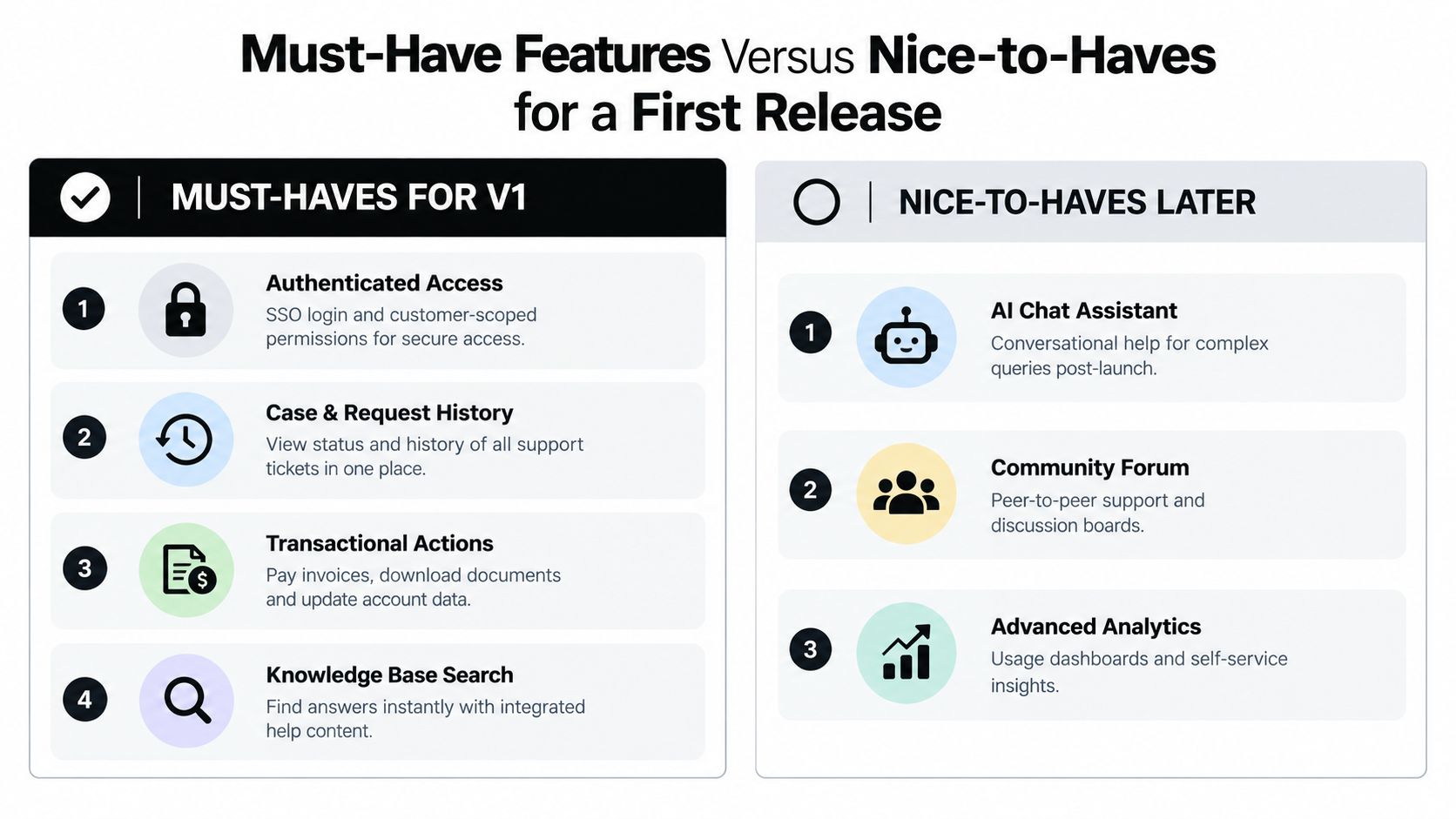
For founder-led firms, I recommend building a narrow operational release around a few request types that already eat support time and follow clear rules.
Start with these:
- Authenticated access: Use SSO or secure account login with customer-scoped permissions. Real self-service work starts after identity is verified.
- A request dashboard: Give customers one place to see open, completed, and blocked work. If they cannot check progress themselves, they will email your team.
- Three to five transactional actions: Pick requests that can resolve in-system. Good early candidates include invoice download, billing detail updates, address changes, document submission, plan changes, and order or case status checks.
- A real status timeline: Show state changes, timestamps, missing inputs, approvals, and the next required action. “We received your request” is not useful.
- Knowledge attached to the task: Articles should appear inside the workflow, at the point where the customer gets stuck. Standalone content rarely closes operational work.
- Escalation with context handoff: If the workflow fails, pass the request, uploaded files, identity, and prior steps to an agent. Do not force the customer to start over.
This walkthrough gives a decent visual of how basic portal expectations look in practice before you layer in custom AI and workflow logic:
What can wait
Useful later does not mean useful now.
Push these out of the first release:
- Community forums: Good for broad peer discussion. Weak for closing account-specific requests.
- Gamified knowledge features: They may increase content engagement, but they do not resolve billing, compliance, or account-change work.
- AI chat widgets: Add them after the portal can already complete actions. Chat layered on top of broken workflows just creates another dead end.
- In-portal surveys: Helpful for research. Irrelevant to first-release task completion.
- Recommendation engines and personalization polish: Nice once the core journeys work. Noise before then.
As noted earlier, industry reporting shows self-service is used far more for troubleshooting than for billing and payment work. That pattern matches what operators already know. Many portals explain problems reasonably well, then fail when the customer needs to update records, submit documents, fix an invoice issue, or complete a request with dependencies.
A one-sprint scope for a small team
Keep the first release small enough that a customer can finish the whole job without hitting a manual gap.
For a two-engineer team, that usually means:
- One identity path
- One dashboard
- Three to five repeatable request types
- One escalation route with full context handoff
- Basic measurement for started, completed, blocked, and escalated tasks
If you are debating forums, AI avatars, or personalization before you have shipped authenticated task completion, you are still building theater, not operations.
Architecture Patterns That Separate a Portal From a Help Center
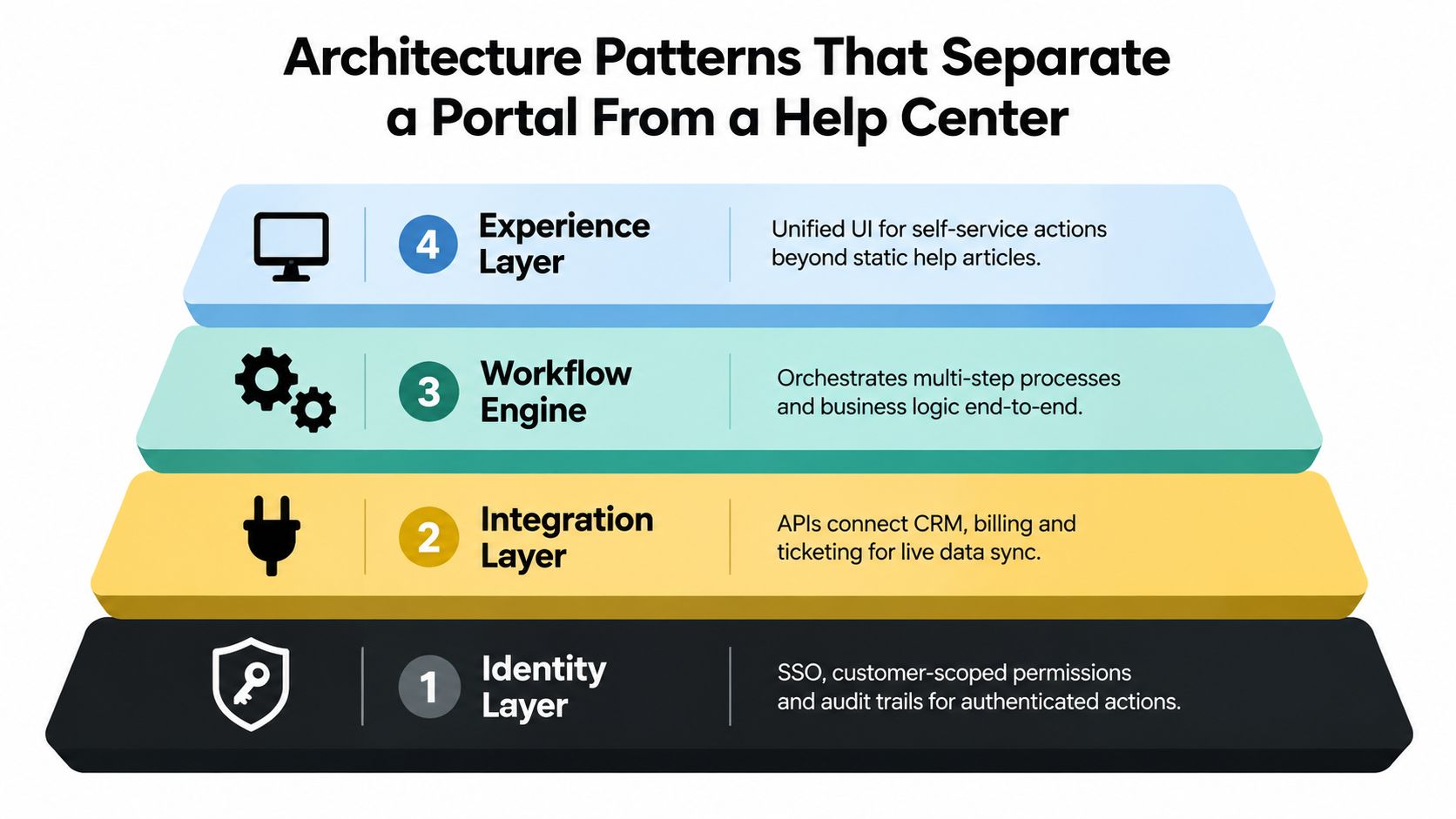
A help center is mostly content and search. A portal is a stack. Skip a layer and the whole thing turns into expensive theater.
Identity layer
This comes first because everything else depends on it. The portal needs SSO, customer-scoped permissions, and audit trails. Every action should tie to a verified account and a known actor.
Skip this layer and you'll fake self-service with forms and email loops. That creates duplicate records, manual verification work, and zero confidence about who requested what.
Integration layer
Most “portal projects” either become useful or die. The portal has to reach billing, CRM, ticketing, order management, and document storage with bidirectional sync. Customers should see live status, not snapshots copied overnight.
If an invoice was paid, the portal should know. If a support case changed status, the portal should show it. If a customer uploads compliance paperwork, the back-office workflow should pick it up immediately.
Workflow layer
This is the missing middle in weak implementations. Teams connect systems, then forget to orchestrate them.
The workflow layer handles approvals, exception routing, retries, document checks, and multi-step business logic. If a billing dispute requires identity verification, invoice retrieval, reason classification, and queue assignment, this layer coordinates it. Without it, the portal becomes a thin shell over disconnected APIs.
The workflow engine is where your operations design shows up. If that logic is sloppy internally, the portal exposes it publicly.
Experience layer
This is what the customer sees, but it should be the last thing you romanticize. A polished UI can't compensate for weak orchestration.
The right experience layer gives the user a single surface for tasks, status, and guided help. It should feel simple because the hard work is happening underneath.
For content-backed measurement, SpotDev's portal KPI guidance argues that portal programs should track whether sessions end in a resolved task rather than a human-handled ticket, and notes that established programs often target roughly 30% to 60% deflection, with more than 60% considered excellent. That only happens when architecture supports real task completion, not just article traffic.
AI and Automation Workflows That Close Tasks End-to-End
Many teams still use AI in the weakest possible way. They put a chat layer in front of a broken process and hope better wording will compensate for missing system actions. It won't.
Here's what useful AI looks like in a portal. A logistics customer logs in and asks why a shipment is late. The workflow authenticates the account, pulls the current order and live tracking event, identifies a customs delay, checks the allowed rerouting policy, triggers the carrier API, updates the CRM record, and confirms the revised delivery path back to the customer. No ticket. No copy-paste. No handoff.
The pattern to reuse
The strongest AI portal workflows follow the same sequence:
- Authenticate the user and confirm scope.
- Retrieve account data, case history, and relevant policy.
- Reason over the request and choose the next valid action.
- Act through an API, workflow engine, or rules service.
- Confirm the result and log the outcome.
That's different from a deflection bot. A weak bot says, “Here's an article about delayed shipments.” A useful system changes the shipment path, updates the record, and tells the customer what happened.
Freshdesk has publicly reported that AI-powered chatbots, help widgets, and FAQ content helped resolve more than one million support tickets through self-service, generating about $900,000 in savings, according to Freshworks' self-service portal page. The important part isn't the headline. It's the operating model underneath: retrieval, intent detection, and escalation rules working together as a system.
Three workflows worth automating first
Start with requests that are repetitive, rules-based, and annoying for both the customer and the team.
- Subscription changes: Pause, downgrade, reactivate, or update billing terms when rules are clear and account status is known.
- Invoice disputes: Retrieve invoice data, collect dispute reason, validate account identity, route exceptions, and track status visibly.
- Onboarding document requests: Ask for missing files, validate submission, confirm receipt, and push records into the right internal queue.
For teams designing these flows, a strong example of action-oriented orchestration is this client portfolio agent build, where the value comes from combining retrieval, decision logic, and operational actions in one surface instead of dumping users into disconnected tools.
Where AI usually fails
It fails when teams skip permissions, skip workflow design, or let the model invent actions it can't take. AI should decide inside a controlled action space. It shouldn't freestyle around billing policy, compliance rules, or customer records.
If your AI can explain the process but can't execute it, don't put it in front of customers yet.
A 90-Day Implementation Roadmap for Founder-Led Teams
Most portal builds go off the rails in the first two weeks. Not because the engineering is hard, but because nobody narrows the scope. Founders keep acting as product manager, support lead, and approval bottleneck all at once.
A better approach is to split the build into three tight phases and assign ownership early.
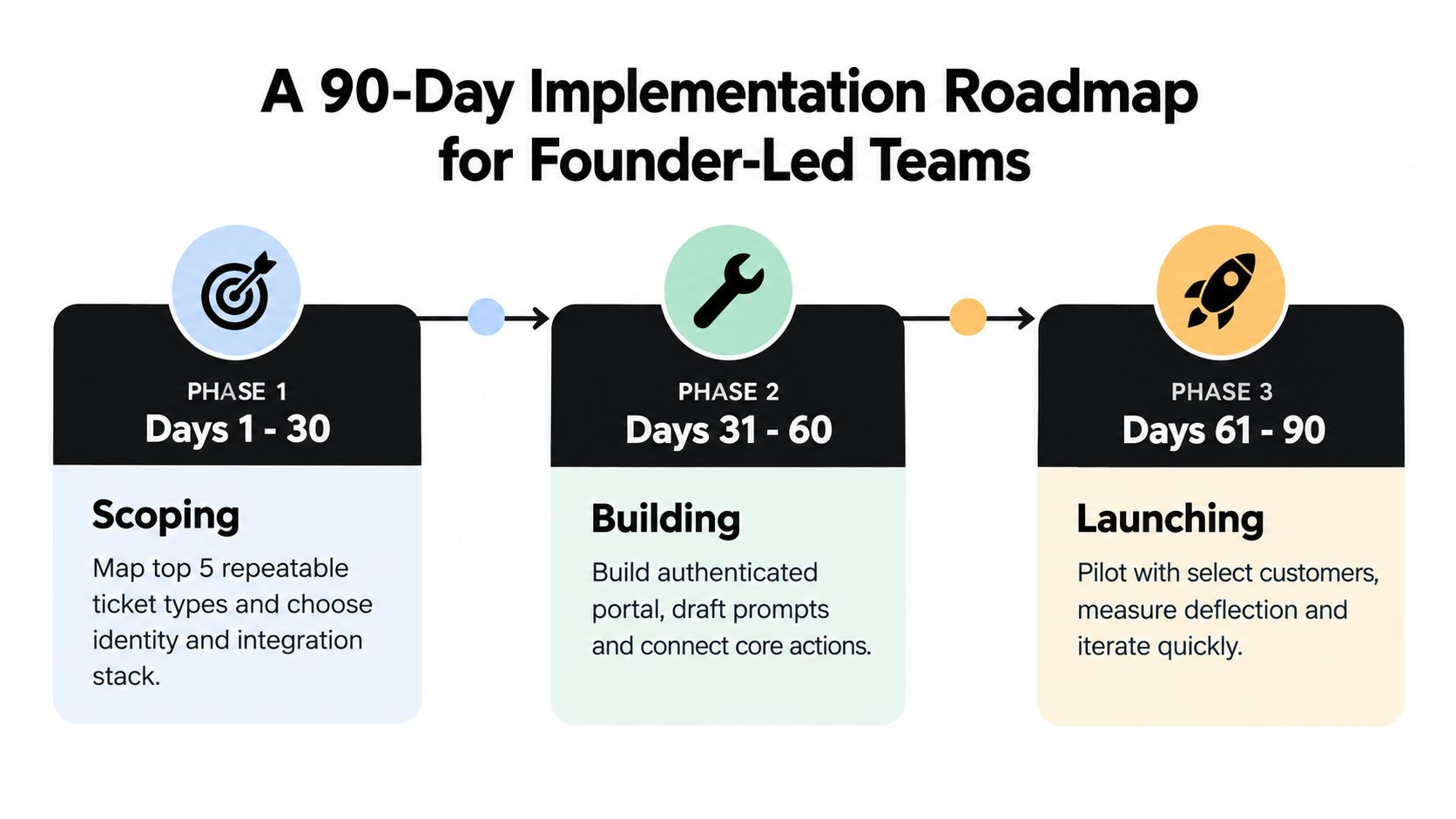
Days 1 to 30
Don't start with design comps. Start with ticket archaeology.
Pull your repeat support requests and isolate the top five workflows that are frequent, structured, and painful. Then decide the identity model, the systems you need to connect, and the exact actions the portal must perform. If you're using AI, define the prompt boundaries and action map now, while the workflows are still concrete.
The core team should be small:
- Product owner: Owns scope and acceptance criteria
- Backend engineer: Owns integrations, workflow logic, permissions
- Frontend engineer: Owns portal UX and state handling
- Fractional ops reviewer: Owns real-world process validation
Days 31 to 60
Build the customer-facing surface and wire the first integrations end to end. Not mock integrations. Real ones.
At this stage, the team should focus on one thin slice that can run in production. For example: signed-in customer, open invoice view, document upload, dispute submission, status timeline, escalation path. Instrument analytics now so completed tasks, failed tasks, and human handoffs are queryable before launch.
Build standard: If you can't inspect why a workflow failed before launch, you're not ready to put customers through it.
Days 61 to 90
Run a closed beta with one customer cohort. Keep the group narrow enough that support can still intervene when needed, but broad enough to expose real edge cases.
Review unresolved tickets every week. Not just total volume. Look for where the workflow broke, where customers abandoned, and where handoffs lost context. Then make the launch decision based on operational readiness, not brand pressure.
One implementation detail founders often overlook is code ownership. If you're using a build partner, source-code handover should be explicit and typically tied to full payment, with repository transfer and operational independence clearly defined, as outlined in Talk Think Do's guide to software IP licensing and source code handover. If your team can't run the portal without the vendor, you didn't buy a system. You bought dependence.
KPIs and Measurement Strategies That Predict Real Outcomes
A portal should be measured like an ops system. The question is simple: can a customer start a task, clear the required steps, and reach a confirmed end state without an agent cleaning it up later?
Ticket deflection does not answer that. Closure does.
Measure completed workflows, not portal activity
Start with one primary KPI for each workflow: confirmed self-service completion rate.
Use this formula:
confirmed completions ÷ started workflows
“Started workflows” means a customer entered a real task flow, not that they viewed a page. “Confirmed completions” means the system recorded the final outcome, such as payment posted, dispute submitted, document accepted, address updated, or claim status delivered and acknowledged.
Then track four operating metrics that explain why completion rises or falls:
- Median time to confirmed completion
- Validation failure rate by step
- Escalation rate after action attempt
- Recontact rate after claimed completion
Kayako's guide to customer self-service measurement is still useful for one reason. It recommends subtracting short-window recontacts so teams do not count false wins as success. Apply that logic to workflow completion, not just to top-line deflection, as described in Kayako's guide to customer self-service measurement.
Instrument one workflow end to end
If you cannot trace a single failed task across events, your KPI stack is theater.
For a dispute submission flow, log a clean event chain like this:
portal_searchworkflow_startedaction_attemptedvalidation_failedescalation_requestedcase_createdworkflow_completed
Attach the same fields to every event:
workflow_nameworkflow_instance_idcustomer_idaccount_idstep_nameerror_codeescalation_reasoncompletion_statuscase_id
That structure lets you answer the question that matters. Did the portal close the issue, or did it just delay the handoff?
A simple containment accuracy query looks like this:
containment accuracy = completed workflows with no human case opened within 48 hours ÷ workflows marked completed
Run the same query by workflow, customer segment, and failure step. That is how you catch fake wins. A portal can show high completion volume while dumping edge cases into support queues a day later.
Build a workflow health view leaders can use
Executives do not need more dashboard clutter. They need one view that shows where tasks finish, where they stall, and where the portal creates extra work.
A useful workflow health dashboard should include:
| Metric | What it answers |
|---|---|
| Started workflows by type | Which tasks customers are actually trying to complete |
| Confirmed completion rate by type | Which workflows can close end to end |
| Median time to completion | How long successful self-service takes |
| Step-level validation failures | Where the flow breaks |
| Escalation rate after failed attempt | Which failures require human recovery |
| Recontact within 48 hours | Which “completed” tasks were not actually resolved |
For a good model of operations visibility, review this insurance operations dashboard example. The value is not prettier reporting. The value is seeing queue state, exception patterns, and throughput in one place so someone can fix the workflow.
The threshold I would use
If a high-intent workflow stays below 60% confirmed completion after the obvious bugs are fixed, stop adding content and stop polishing the UI. The workflow design is weak.
In practice, the failure usually comes from one of three places: missing system access, unclear validation rules, or an escalation path that drops context. Deloitte Digital's service trends coverage discusses how teams overvalue surface metrics like search success while underweighting time to resolution and actual service outcomes, as noted in Deloitte Digital's service excellence trends coverage.
Measure whether the task closed. Then measure exactly where it failed when it did not. That is the only KPI strategy that improves a customer self service portal instead of just making it look busy.
Common Pitfalls and the One Decision That Holds It All Together
Portals fail for operational reasons, not design reasons.
A founder-led team can ship a clean interface, a polished help center, and a decent chatbot and still create more work for support. The pattern is predictable. The portal accepts requests it cannot authenticate, starts workflows it cannot write back to core systems, and escalates exceptions with missing context. Customers do the work twice. Agents clean up the mess.
Four mistakes that show up early
- Publishing before transaction design: Customers can read answers, but they cannot complete the task. Fix this by shipping authenticated workflows before expanding article volume.
- Using AI as a front door only: The assistant explains policies but cannot submit, update, verify, or route anything. Tie AI to approved actions and system permissions, or keep it out of the critical path.
- Ignoring failure handling: Happy-path demos look fine, then real requests stall on mismatched records, missing documents, or validation conflicts. Build retries, exception queues, and audit logs before adding another workflow.
- Leaving ownership unclear: Rules change, content ages, and nobody approves edits to workflow logic. Assign one operator to each workflow family, with authority over policy, copy, and escalation rules.
The cultural problem matters as much as the technical one. Once support teams see the portal create rework, they stop trusting it. They stop promoting it, customers stop trying, and adoption turns into a reporting vanity metric instead of an operational win.
The one decision that keeps the build honest
Use a scoring gate for every roadmap item. Score each one from 0 to 2 on three checks:
- Authentication: Can the portal verify the user and their entitlement to act?
- System write-back: Can it create, update, or complete the record in the system that owns the task?
- Exception handling: Can it recover cleanly when data is missing, rules conflict, or approval is required?
Only prioritize items that score 6 out of 6.
That filter is stricter than feature prioritization frameworks, and it should be. A workflow that reads well but fails one of those checks will not reduce workload. It will produce partial attempts, duplicate tickets, and angry follow-ups.
This is also the practical test for platform choice. If your workflows cross billing, CRM, document storage, and case management with company-specific policy logic, packaged tools hit a wall quickly. Use this guide to compare build vs buy AI tooling for multi-system workflows before you commit to software that cannot support exception-heavy operations.
Five decisions the founder should make in week one
- Pick the first workflow family: Choose requests with clear rules, meaningful volume, and a real system of record.
- Define the completion event: State exactly what counts as resolved in the customer record, not just in the portal UI.
- Set the exception path: Decide which failures can retry automatically, which need review, and what context must transfer.
- Assign workflow ownership: One person owns rules, copy, logic changes, and post-launch performance.
- Lock the scorecard: Roadmap items that do not hit 6 out of 6 wait.
Good portal teams stay disciplined here. They do fewer things, but they finish them end to end. That is how a portal becomes part of service delivery instead of another channel that creates traffic without closing work.