Custom Web Application Dev for Operations Teams
Learn how custom web application dev replaces spreadsheets and SaaS sprawl, from architecture and AI features to cost, timelines, and ROI for ops teams.
Tuesday morning starts with a vendor onboarding tracker that three people are editing at once. Finance is repairing a billing export that breaks during every month-end close. In Slack, someone asks the question that exposes the problem: “Who owns this row?”
That's the point where spreadsheets and no-code tools stop being lightweight solutions and start becoming operational infrastructure nobody can safely change. Shared state collapses, manual handoffs multiply, and the audit trail lives across email, chat, and someone's downloaded copy of the file.
Custom web application dev solves a different problem than adding another subscription. It creates a system around one important workflow, with a canonical data store, explicit permissions, automated handoffs, and reporting that reflects how the operation runs. The browser becomes the access point, but the value comes from encoding business rules that generic tools can't model cleanly.
The decision usually becomes clear through four signals: people reconcile the same data in multiple places, approvals depend on individual memory, failures are difficult to trace, and the cost of manual work keeps rising. When those signals appear together, building may be more practical than buying another tool.
Table of Contents
- When Spreadsheets Stop Working and What Comes Next
- What a Custom Web Application Is
- Architecture Choices That Change Day-to-Day Operations
- The End-to-End Build Process From Diagnosis to Handoff
- Costs, Timelines, and the ROI of Custom Builds
- How to Scope and Select the Right Delivery Partner
- Security Deployment and Measuring Success After Launch
- Practical Use Cases and Where to Start
When Spreadsheets Stop Working and What Comes Next
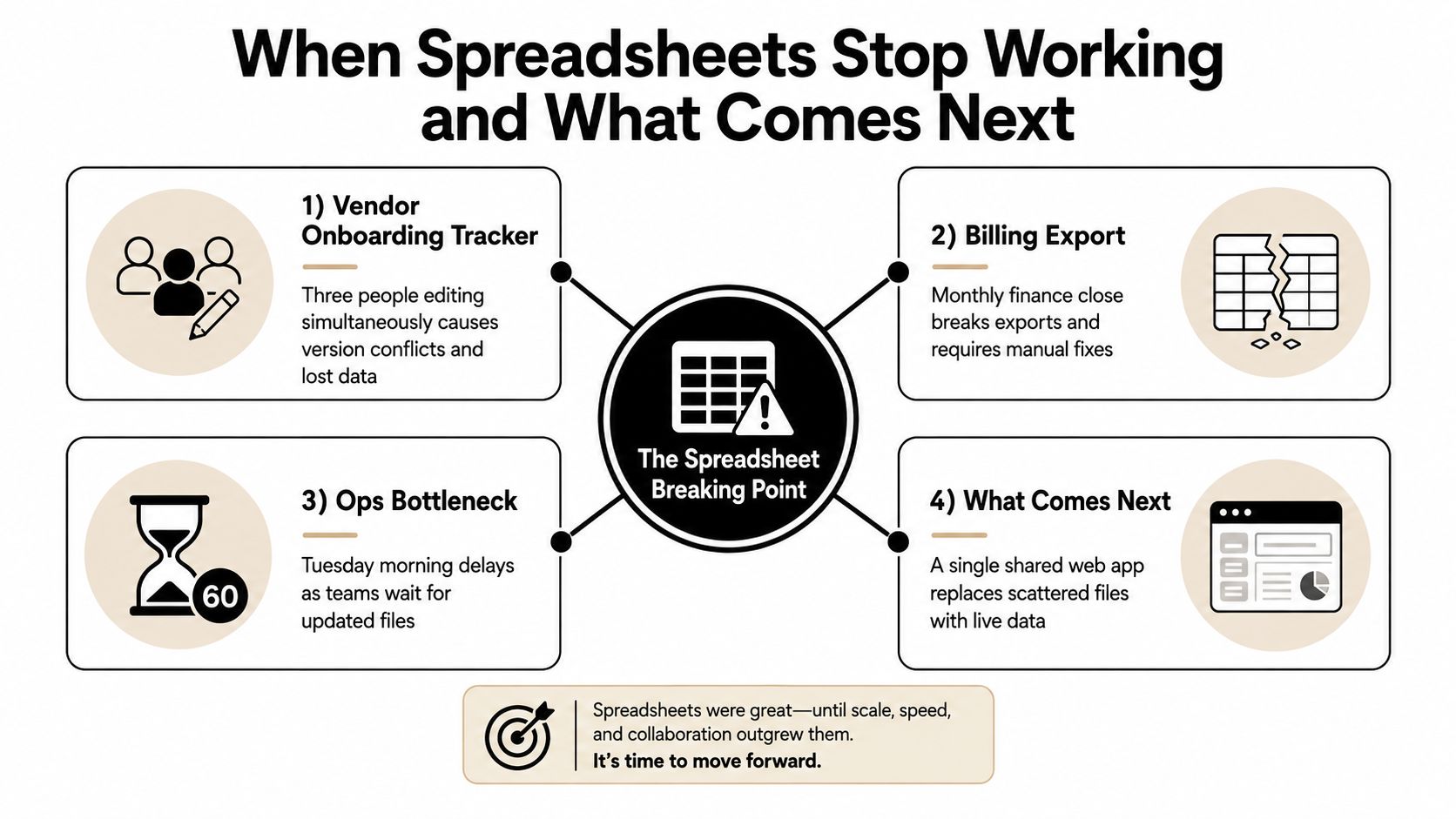
A 60-person operations team often reaches the breaking point gradually. The vendor tracker began as a sensible shared file. Then procurement added fields, finance added validation rules, and compliance needed evidence of every approval. Three people now edit the same records, while a manager exports a copy for reporting and an analyst maintains a second version for follow-up.
The billing export has a different failure mode. It works during ordinary weeks, then breaks when finance closes the month because a column changes, an account is renamed, or an upstream system produces a value the spreadsheet wasn't designed to handle. Someone manually repairs the file, posts a request in Slack, and hopes the next close won't repeat the exercise.
The hidden cost of disconnected tools
SaaS sprawl makes this harder. One tool handles intake, another handles approvals, a CRM stores customer information, and a messaging platform carries exceptions. Each product may work well on its own, but the operation has no reliable place where the full state of a workflow is visible.
That creates predictable symptoms:
- Shared state fails: Two people can update the same record without knowing which value is current.
- Handoffs become personal: A process advances because one employee remembers to send a message.
- Ownership stays ambiguous: Teams can see tasks but not always the decision, dependency, or next responsible person.
- Audit history fragments: The evidence needed to explain a decision sits in email threads and chat messages.
Practical rule: Build when the workflow itself has become a recurring source of operational risk, not simply because a team wants a more polished interface.
A custom web application gives that workflow one working surface. Users access it in a browser, the backend applies the rules, and every approved change updates the same underlying record. The system can show a procurement manager only the actions that belong to that role, trigger an integration when a vendor clears review, and retain an audit trail without asking employees to document every step manually.
The best first build isn't a company-wide replacement for every SaaS product. It's a focused system for the workflow where reconciliation, exceptions, and delays consume the most attention. That focus keeps the project tied to a COO's real concern: whether the team can complete important work without chasing files.
What a Custom Web Application Is
A custom web application is browser-based software built around an organization's specific rules and the workflow problems that generic tools cannot represent cleanly. It accepts input, applies business logic, stores the current state, and sends the result to the next operational action. A login page alone does not make a system custom, and replacing an entire enterprise suite is rarely the right starting point.
A shared kitchen spreadsheet is the loose-paper equivalent of a web application with no backstage coordination. A purpose-built point-of-sale system gives the cashier a clear interface, routes orders to the right station, records payment, and shows the manager a consistent status. A custom web application applies the same coordination to a business process, so staff can see what happened, what must happen next, and who owns it.
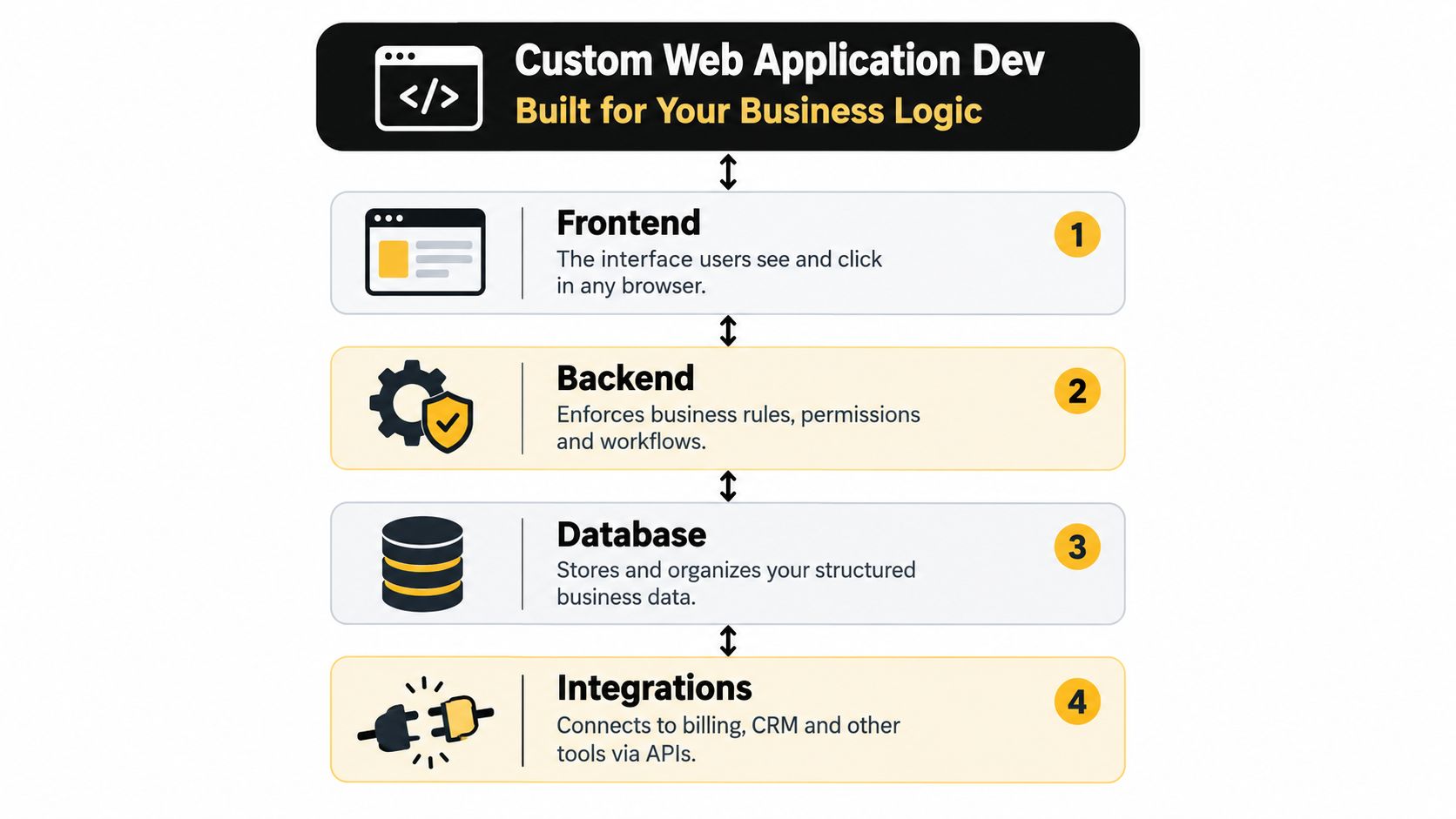
Four parts carry the system
The frontend is the browser experience. It includes forms, dashboards, queues, filters, and approval screens. A vendor manager should be able to identify applications blocked by missing insurance documents without understanding the database.
The backend enforces the rules. It determines who can approve a payment, when a record can advance, and what happens when an integration fails. Permissions belong in this layer, not only in the visual interface. Hiding a button does not protect the underlying business action.
The database holds the canonical state. It stores structured records such as vendors, contracts, approvals, invoices, or customer health signals. A sound data model makes relationships explicit, allowing a manager to trace an approval to the responsible person and the information supporting it.
Integrations connect the application to existing systems. APIs can exchange data with billing platforms, CRMs, payment providers, document services, or internal applications. The custom system coordinates the workflow without requiring the company to discard every tool already in use.
Where it differs from adjacent options
A SaaS product provides a predefined workflow shared by many customers. A low-code tool lets a team configure screens and automations quickly, but its data model, permission system, or integration behavior may become restrictive as exceptions increase. An internal portal may display information from other systems without owning the complete workflow.
Custom development fits when business logic is distinctive, data needs role-based access, or the organization must automate steps that off-the-shelf products represent inaccurately. Browser delivery became practical through milestones including Tim Berners-Lee's World Wide Web proposal in March 1989, the first website in 1991, Mosaic in 1993, JavaScript in 1995, and broader use of the term web application around 1998, as outlined in this history of web application development. Gmail in 2004 and frameworks such as AngularJS, React, and Vue after 2010 helped establish web applications as a standard delivery model for operational software.
The practical choice is straightforward. Buy generic capabilities. Build the workflow where company rules, permissions, and exceptions determine whether work gets completed without manual reconciliation.
Architecture Choices That Change Day-to-Day Operations
Architecture isn't an abstract diagram. It determines how quickly the team can ship a fix, how far an outage spreads, how much infrastructure someone must operate, and whether a small engineering group can support the application without permanent on-call fatigue.
For a mid-sized operations tool, three shapes deserve serious consideration.
Choose the simplest boundary that protects the workflow
A monolith keeps the application in one deployable unit. That reduces network overhead and operational coordination, which can make it a sensible choice for a lightly loaded internal tool. A modular monolith keeps one deployment while separating domains such as onboarding, billing, approvals, and reporting in the codebase. It usually offers a strong compromise, because teams can preserve simple operations while preventing every feature from becoming tangled.
Microservices split those domains into independently deployable services. That can improve fault containment and let a heavily used component scale separately, but it adds service communication, deployment coordination, observability, and data ownership decisions.
An empirical comparison of the same e-commerce system found that, at 100 virtual users, microservices delivered 5.4% higher throughput, 25% lower average latency, and 39% lower p95 latency than a monolith, while the median error rate fell from 0.69% to 0.00%. The study also found that monolith order-creation failures persisted under load, while microservice failures were transient and isolated to one service. Those findings come from the comparative microservices and monolith study, but they shouldn't be treated as a universal architectural verdict.
A separate review found that under normal or sub-100-user traffic, a monolith can perform slightly better because it avoids inter-service request overhead. Another load test recorded Database-per-Service microservice response times of 94 ms, 726 ms, and 2056 ms across low, medium, and high-load scenarios, as reported in this architecture scalability study. The same research showed that replication strategy, API gateway design, and vertical versus horizontal scaling can change the result.
| Architecture | Cost to Maintain | Fault Isolation | Team Size Needed | Best Use Case |
|---|---|---|---|---|
| Monolith | Lowest operational overhead | Low, failures can affect the full application | Small engineering team | Small, lightly loaded internal tools |
| Modular monolith | Moderate, with one deployment surface | Moderate, code boundaries reduce coupling | Small to mid-sized team | Growing operations systems with related workflows |
| Microservices | Highest, because services, gateways, data ownership, and monitoring multiply | High when boundaries are well designed | Multiple engineers able to own services and operations | High-load or independently scaling domains |
The COO-level trade-off is hiring and on-call capacity. Microservices can be the right answer for bursty automation or independently critical functions, but they can also turn a straightforward release into a coordination exercise. For most small operations teams, a modular monolith wins on speed, cost, and incident response until actual workload evidence justifies distribution.
The End-to-End Build Process From Diagnosis to Handoff
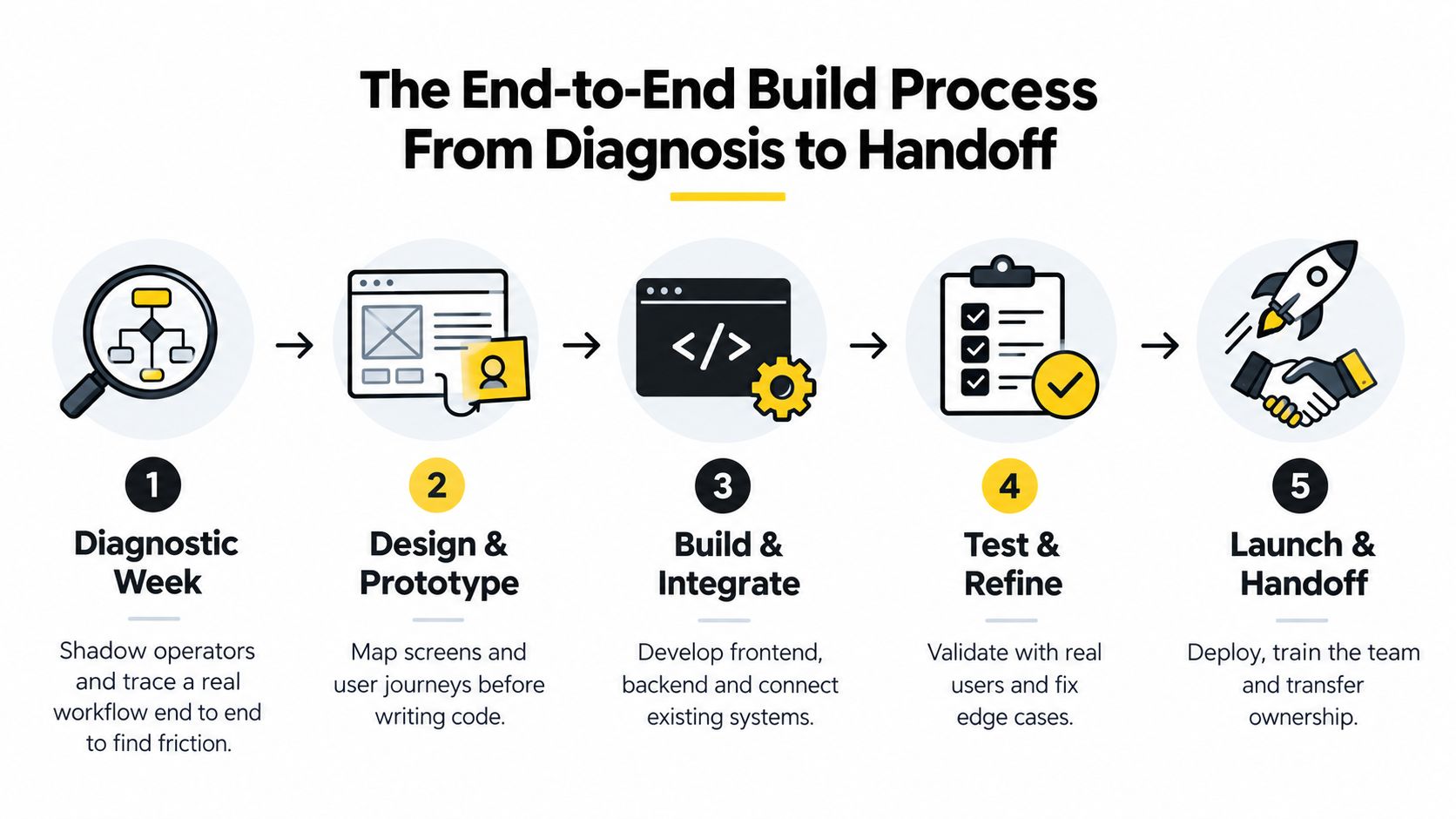
A strong build starts before anyone chooses a framework. During the diagnostic week, the delivery team shadows operators completing a real workflow, including the awkward exceptions that never appear in a requirements document. They trace where information enters, who changes it, which tool holds the authoritative value, and where the process waits for a person to intervene.
That observation produces workflow stories rather than feature wishes. “A manager needs a dashboard” is vague. “A regional operations lead needs to approve a vendor only after insurance and tax documents pass review, while finance can see the approval history but cannot change the decision” gives engineers something testable.
Prototype the risky path first
The team then maps the screens, states, integrations, and permission boundaries. A prototype should expose the difficult parts early, such as a split approval, a failed payment response, or a record that arrives without a required identifier. Architecture becomes concrete at this stage. If the CRM owns customer identity but the new system owns approval state, the integration contract needs to say exactly how those responsibilities interact.
The first build sprint should deliver a thin slice to a small pilot group. For a procurement workflow, that might include intake, document review, approval, and one notification integration. It shouldn't attempt every report, edge case, and administrative preference before operators have used the central path.
Automation and AI belong inside this conversation, not beside it. If staff repeatedly classify incoming requests, a model may suggest a queue while a human confirms the result. If managers spend time reading long tickets, an LLM can summarize them and attach the source record. The application should log acceptance, overrides, and failures, so the team can determine whether the feature helps rather than treating model integration as completion.
Testing includes normal behavior, permissions, integration failure, duplicate submissions, and recovery. Shadow-running the new workflow against the legacy process can reveal mismatched totals and missing states before the old system is retired.
Ownership must be designed before launch. Someone needs authority over the repository, infrastructure, secrets, user access, support queue, and future prioritization.
Handoff is more than a training call. It includes runbooks, administrator instructions, a deployment path, monitoring ownership, and a clear explanation of which system owns each piece of data. A 30-day stabilization period should catch confusing screens, incomplete permissions, flaky integrations, overlooked edge cases, and reports that don't match operational decisions.
For an example of a focused internal build, review this client portfolio agent project. The useful question isn't whether the interface looks impressive. It's whether the system removes a repeated decision or handoff without creating a new dependency on the delivery team.
Costs, Timelines, and the ROI of Custom Builds
The build invoice is only one part of the business case. A credible model includes discovery, design, engineering, integrations, infrastructure, training, stakeholder time, and the cost of maintaining the system after launch. If a COO is replacing a spreadsheet and several no-code automations, the model should show which handoffs disappear and which operating costs remain.
Custom software investments are commonly modeled across a 12–36 month payback horizon. One ROI framework includes development cost, internal stakeholder time, training, and annual maintenance at 15–20% of build cost, as described in this custom software ROI framework. A 12–24 month target can provide a useful planning band for a well-scoped operational build. The result still depends on the workflow, adoption, and the cost of leaving the current process broken.
Count the work finance can audit
Start with operating losses that managers can observe and finance can verify:
- Rework: Hours spent correcting exports, reconciling records, or repairing failed automations.
- Delay: Time between an item entering the process and a decision becoming actionable.
- Error exposure: Incorrect commissions, missed approvals, duplicate work, or incomplete customer records.
- Onboarding drag: Time managers spend teaching a workaround that the system could enforce.
- Maintenance burden: Licenses, integration glue, support effort, and internal administration across the existing stack.
| Cost Category | Custom Build | SaaS Stack |
|---|---|---|
| Discovery and design | Explicit project cost that defines the workflow | Often distributed across configuration and internal trial-and-error |
| Core capability | Built around the organization's rules | Purchased according to the vendor's product model |
| Integrations | Designed around required data ownership and handoffs | May require connectors, exports, or manual reconciliation |
| Ongoing maintenance | Planned technical ownership and support | Subscription administration plus vendor dependency |
| Scaling cost | Infrastructure and support grow with usage and complexity | Licenses, seats, tiers, and additional products may accumulate |
| Exit flexibility | Client can own code and documentation if agreed | Data export and replacement depend on vendor capabilities |
SaaS is not automatically expensive, and custom software is not automatically economical. Compare the full operating cost, including licenses, per-seat growth, manual transfers, reconciliation, and management time. A low subscription can still support an expensive workflow.
Keep the spreadsheet for the financial model, not as the system being replaced. Document the current process, assign a cost to each recurring activity, estimate the reduction conservatively, and include run costs. For automation or model usage, this build versus buy analysis for AI tooling provides a useful way to frame the choice.
How to Scope and Select the Right Delivery Partner
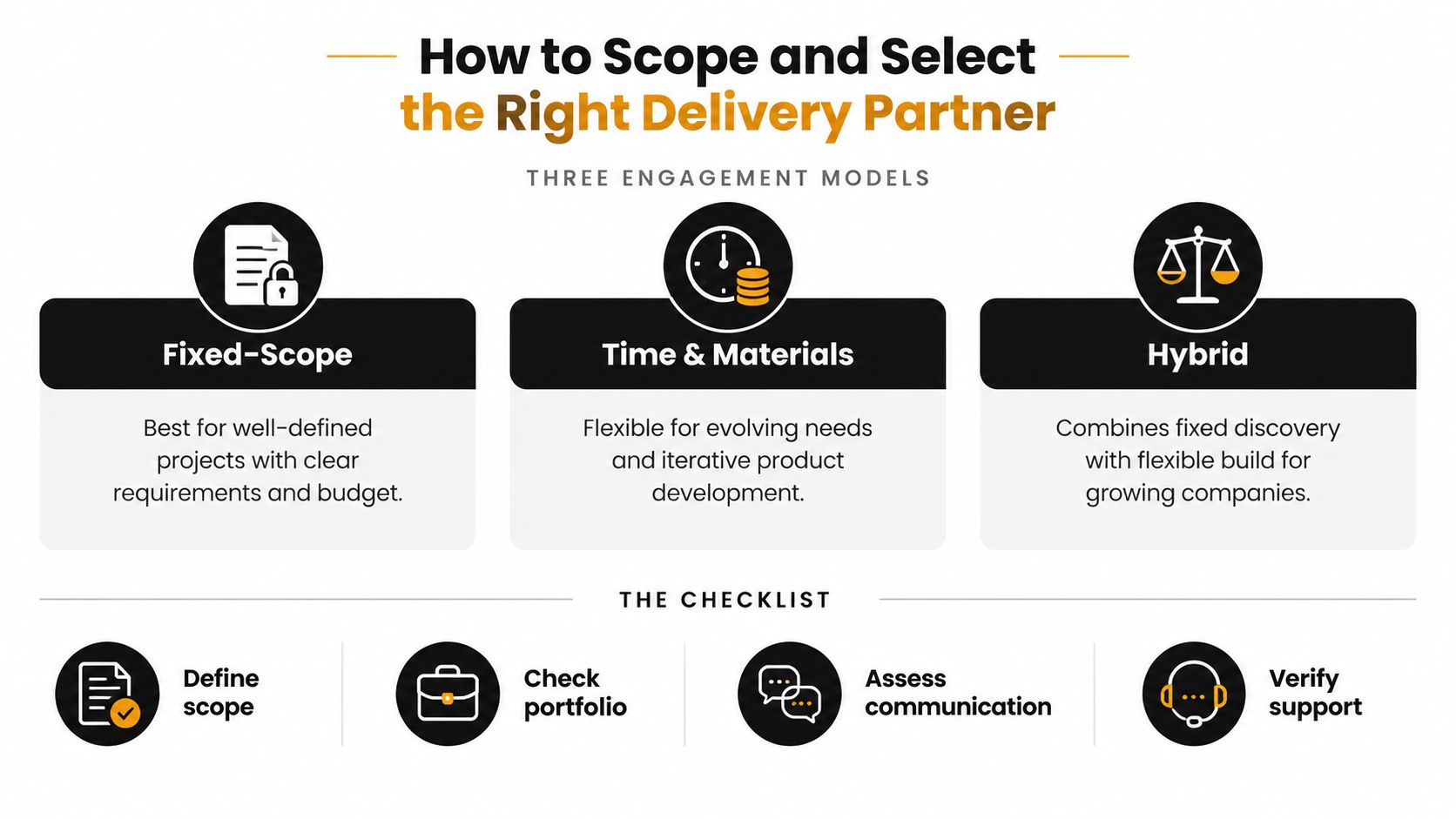
The right engagement model depends on how much of the workflow is known and how much technical capacity exists inside the company.
Fixed scope works when the process, acceptance criteria, and integrations are clear. It gives finance a defined commitment, but it becomes dangerous when stakeholders keep adding exceptions without changing the agreement.
Time and materials suits evolving products and teams that can manage priorities closely. It provides flexibility, but someone on the client side must control decisions, review progress, and challenge work that doesn't improve the workflow.
Hybrid delivery is often practical for growth-stage firms. Discovery and architecture are fixed, while the build proceeds in flexible increments as operators test the system.
Evaluate evidence, not presentation quality
A credible scoping document should contain workflow stories, acceptance criteria, an integration inventory, user roles, data ownership, deployment assumptions, and post-launch responsibilities. It should identify what isn't included. If the document only lists screens and technologies, it hasn't scoped the operational risk.
Ask who will do the work. A senior engineer who has shipped internal systems will spot permission and handoff issues earlier than a team that mostly builds marketing sites. The ratio of senior engineers to junior staff matters, but continuity matters too. Frequent team changes make operational knowledge disappear.
Use this compact scorecard in vendor conversations:
- Discovery depth: Can the team explain the workflow, exceptions, and ownership boundaries?
- Relevant delivery: Have they shipped systems for operations teams with integrations and role-based access?
- Security posture: Can they describe access control, logging, patching, backups, and incident response?
- Communication: Will you see working software regularly, with decisions and risks recorded?
- Code ownership: Will your company receive the repository, documentation, infrastructure knowledge, and workflows?
- Support commitment: Who responds after launch, and what does stabilization include?
A partner should be able to explain what they'll refuse to build yet. Restraint is often stronger evidence of delivery maturity than a long feature list.
Before signing, ask for references involving similar workflow complexity. Ask those clients what happened when an integration failed, a requirement changed, or the first release confused users. Those answers reveal more than a polished portfolio.
Security Deployment and Measuring Success After Launch
Security, deployment, and measurement form one operating discipline. A custom application is only useful when the team can control access, recover from failure, release changes safely, and prove that the workflow is improving.
At go-live, operations inherits more than a URL. It inherits identity and access controls, audit logging, encryption in transit and at rest, dependency patching, backup expectations, and a process for removing access when someone changes roles. The application should distinguish what a user can view from what they can approve, export, edit, or administer.
Match deployment to the team on call
A managed cloud deployment reduces infrastructure work when the internal team doesn't want to operate servers. Containers can improve repeatability and portability, while Kubernetes can support complex service environments but demands deeper platform ownership. A hybrid model may keep sensitive systems or legacy components under tighter control while placing the web layer in managed infrastructure.
The right choice is the one the team can monitor and roll back. A deployment that nobody can diagnose at night is less reliable than a simpler environment with clear alerts and documented recovery.
| Domain | What Ops Owns | Key Metric or Control |
|---|---|---|
| Identity | Role assignments, joiners, movers, and leavers | Least-privilege access review |
| Data protection | Sensitive records and retention decisions | Encryption and backup verification |
| Auditability | Evidence of approvals and changes | Searchable audit events |
| Deployment | Release approval and rollback ownership | Deployment health and rollback path |
| Reliability | Failed jobs, integrations, and queues | Error rate, latency, and completion status |
| Adoption | Whether the workflow replaces the old process | Active usage and completion behavior |
| AI operations | Prompt, model, and output governance | Prompt logs, model versions, drift checks, and human overrides |
For AI workflows, a pilot isn't production value. One synthesis of survey evidence reports that 88% of organizations use AI in at least one business function, while roughly two-thirds of adopters remain in pilot or experimentation phases and few report measurable enterprise-level financial impact, according to this 2026 synthesis of enterprise AI adoption evidence. The application needs an owner, event logging, quality review, and a defined decision about when to change or retrain the model.
Large enterprises are also concentrating LLM use in selected workflows. A 2026 enterprise LLM adoption report says about 85–90% have at least one production deployment, coding reaches about 70% of engineering organizations, and only about 40% report measurable AI ROI. Those figures reinforce a practical point: integration quality, human review, and workflow fit matter more than attaching a model to an existing screen.
Practical Use Cases and Where to Start
A vendor onboarding portal is a good candidate when documents, approvals, and ownership are scattered across email and shared files. A field service dispatch board helps when coordinators reconcile availability, location, urgency, and customer commitments manually.
A partner commission engine becomes valuable when finance repeatedly rebuilds calculations from CRM and billing exports. An internal procurement approval system fits when managers can't see which requests are blocked or who has authority to release them. A customer health scoring dashboard makes sense when account signals sit in several tools and client risk depends on repeated manual interpretation.
For a concrete example of operational dashboard work, see this insurance operations dashboard project.
Use company stage as a starting filter:
- Sub-$10M revenue: Fund a discovery sprint while the team is still validating which workflow deserves investment.
- $10M–$50M revenue: Build a scoped MVP around one known broken process and measure adoption, rework, and cycle time.
- $50M+ revenue: Consider a platform build that consolidates related tools, data ownership, permissions, and reporting.
Before contacting a delivery partner, bring one real workflow, a list of the people who touch it, examples of the current inputs and outputs, and the decisions the new system must support.
Internal Systems designs and builds custom software, integrated operations systems, automations, and AI-enabled workflows for teams that have outgrown spreadsheets and no-code tools. Visit Internal Systems to discuss an operations audit or a fixed-price custom system build tied to a workflow your team needs to run better.