Change Management Software for Ops Teams
Explore change management software for growth-stage ops teams. Learn how custom builds and AI agents replace manual approvals with automated governance.
Most advice about change management software starts in the wrong place. It assumes the central problem is that an IT team needs a better ticket form, another approval queue, or a more polished change calendar. For growth-stage operations teams, the harder problem is usually distributed change across SaaS applications, business workflows, automations, and internal systems that no single ticketing platform understands.
A Salesforce configuration, a billing rule, a customer onboarding sequence, and a permissions change can affect revenue operations just as directly as a server deployment. Yet many organizations still force these changes through workflows designed for infrastructure maintenance. The result is predictable, either teams bypass governance or they accept approval delays that slow the business.
The practical alternative is a custom, AI-enabled governance layer. It connects the systems where changes originate, applies policies according to risk, preserves a defensible record, and keeps monitoring after launch. The objective isn't more process. It's controlled speed.
Table of Contents
- Rethinking Change Management Software for Modern Operations
- The Shift from Event Tracking to Continuous Governance
- Core Features of a Technically Mature Platform
- Evaluating Vendor Platforms Versus Custom Builds
- Integrating AI Agents for Intelligent Workflow Automation
- Implementation Steps and Success Metrics for Ops Teams
- Designing a Continuous Operating Model for Scale
Rethinking Change Management Software for Modern Operations
Legacy IT ticketing tools aren't automatically sufficient just because they have a change module. They may handle requests, approvals, implementation notes, and audit history well inside a defined ITSM environment. They become less useful when the change originates in a business application, crosses several departments, or depends on data that lives outside the ticketing system.
A growth-stage company might change a lead-routing rule in HubSpot, update a pricing configuration in Stripe, alter a workflow in Salesforce, and modify an internal approval service in the same operating period. A conventional ticket can record those activities, but it won't necessarily understand their dependencies, determine who owns the affected process, or verify whether the intended outcome occurred.
The limitation of the ticket as the operating model
Traditional change management software usually treats the request as the center of gravity. The requester fills in fields, a manager approves the work, and someone closes the record after implementation. That structure works for predictable infrastructure changes. It often creates process theater for cross-functional operations, where the record is complete but the business outcome remains uncertain.
The market's scale reflects the growing need for structured controls. The change management software market outlook projects expansion from about USD 1.75 billion in 2025 to roughly USD 3.49 billion by 2033, a projected 9.0% CAGR. The same source estimates North America at more than 40% of global revenue, or about USD 648.54 million in 2025, and places the U.S. market at USD 511.69 million in that year. Those figures signal an established enterprise category, not a niche waiting for basic workflow digitization.
The buying question, therefore, shouldn't be “Which ticketing tool has the most change fields?” It should be:
Which governance layer can understand our systems, enforce our policies, and verify the result without making every routine change a meeting?
Build around the operating reality
Custom software becomes useful when the company's workflows are distinctive enough that configuration inside a vendor platform creates more exceptions than value. A custom system can ingest events from application APIs, CI/CD pipelines, monitoring tools, and business systems, then normalize them into one change record.
That record can include the affected workflow, system owner, customer impact, historical incidents, implementation plan, rollback action, and post-launch health signals. Human approvers still make consequential decisions, but they receive the context in one place.
The strongest design doesn't replace ITSM. It connects ITSM to the wider business. A vendor platform may remain the system of record for formal approvals, while custom services handle cross-system orchestration, AI-assisted classification, and outcome monitoring.
The Shift from Event Tracking to Continuous Governance
Change used to be treated as an event. Someone scheduled maintenance, gathered approvals, implemented the update, and closed the record. That model breaks down when SaaS vendors release frequent updates, business administrators modify configurations directly, and operational workflows depend on several connected applications.
Current change management software increasingly needs to support continuous governance. The system should know what changed, who owns the affected process, whether users adopted the new behavior, and whether support demand increased after release. An approval record without post-launch evidence is only half a control.
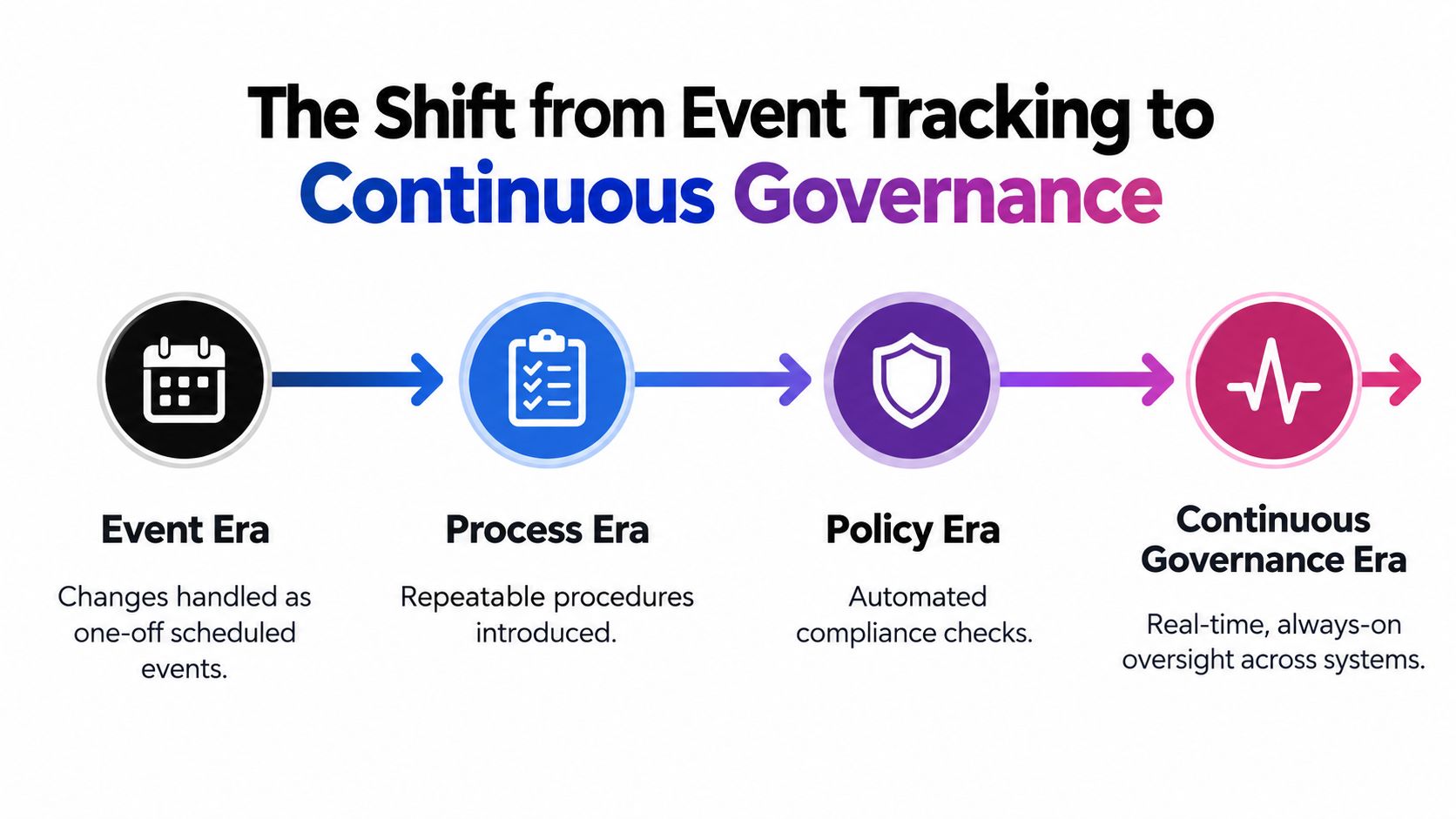
Four operating eras
The first era treated change as an isolated maintenance window. The second introduced standardized tickets and approval workflows. The third encoded governance rules into policy checks, such as mandatory rollback plans, ownership requirements, and blackout windows.
The fourth era is always-on oversight across systems. It combines event intake, policy enforcement, deployment verification, adoption signals, and incident feedback. The change record remains important, but it becomes one component in a broader control loop.
This shift also explains why a one-time rollout tool is insufficient for many operations teams. Independent coverage of change management software and continuous operating needs highlights persistent problems such as unclear ownership, weak adoption visibility, and reactive release support. Software can make approval easier while leaving post-launch drift untouched.
Measure what happens after approval
A custom governance workflow should monitor more than whether a request reached “closed.” Useful signals include:
- Adoption behavior: Check whether the intended teams or customers are using the changed workflow as designed.
- Confusion points: Identify repeated questions, abandoned steps, unusual navigation patterns, or failed submissions.
- Support load: Connect support conversations and incident records to the change window.
- Operational health: Compare relevant alerts, failed jobs, processing errors, and manual overrides before and after implementation.
- Ownership response: Escalate when the responsible team doesn't review an outcome or act on a warning.
The system doesn't need to automate every decision. It needs to make drift visible early enough for an owner to respond.
Operating principle: A change isn't complete when someone approves it or deploys it. It's complete when the organization can show that the intended result held up in production.
AI agents can help interpret these signals, summarize emerging patterns, and route follow-up work. They shouldn't convert ambiguous evidence into automatic approval. Continuous governance works when the system creates a reliable feedback loop and people retain accountability for high-impact choices.
Core Features of a Technically Mature Platform
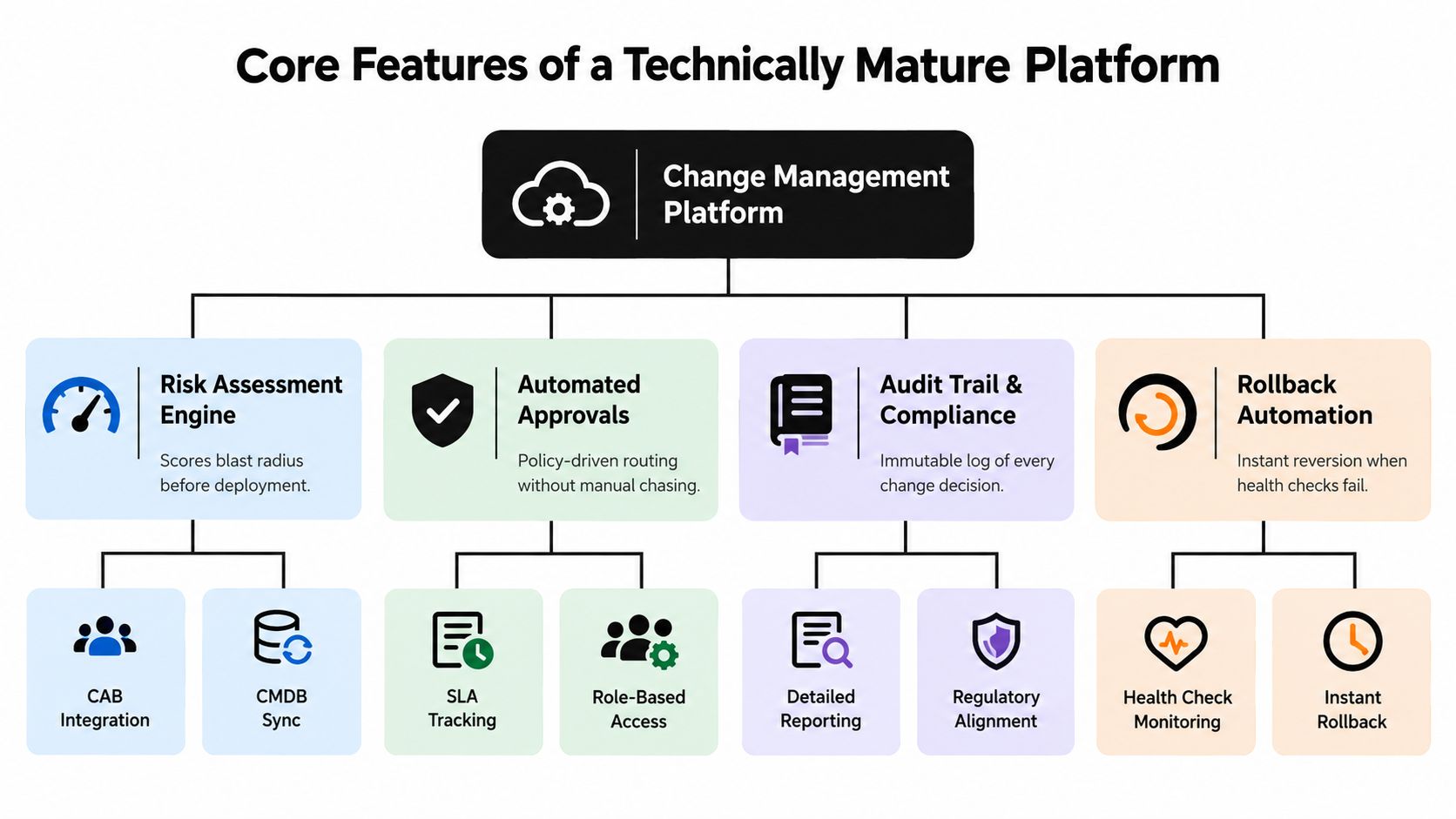
A mature platform translates governance policy into execution. It doesn't merely collect information in a form. When evaluating a custom build or an extensible vendor platform, test whether each feature changes what the team can do operationally.
Start with structured intake
Request fields should adapt to the change type. A routine configuration update needs different evidence from a new customer-facing workflow or a production deployment. Capture the affected systems, process owner, desired outcome, implementation steps, rollback plan, timing constraints, and known dependencies as structured data rather than burying everything in a description box.
The platform also needs risk-assessment templates that reflect the organization's actual exposure. A useful template can combine affected customer groups, business criticality, reversibility, data sensitivity, implementation complexity, and historical incidents. The point isn't to create a decorative risk score. It's to determine the depth of review and the safeguards required.
Route approvals according to policy
Approval routing should respond to context. A low-risk, pre-approved change can follow an automated path. A change affecting a critical customer workflow may require the process owner, security, and operations leadership. A change inside a blackout window should be blocked or escalated before implementation begins.
A technically mature platform should support:
- Custom request fields: Capture structured context without forcing every requester through the same form.
- Dynamic approval routing: Select approvers based on system ownership, risk, business impact, or timing.
- Blackout scheduling: Prevent conflicts with known events and restricted operating windows.
- Conflict detection: Identify overlapping changes that affect related services or workflows.
- Incident linkage: Show whether similar changes preceded outages, support spikes, or failed jobs.
- Audit history: Preserve requests, decisions, actions, overrides, and implementation outcomes.
The technical controls described in this change management software overview are useful because they connect governance to operational mechanisms rather than treating compliance as a separate reporting exercise.
Automate the standard path
The standard-change path is where automation often produces the clearest result. One industry source notes that as many as 70% of standard changes can be automated through pre-approved workflows, integrated execution, and automatic closure with an audit trail, as described in Atlassian's change management guidance.
For example, a pre-approved permissions update could trigger from an authorized request, validate the target user and role, execute through an identity platform, run a verification check, and close the record with the result. A human shouldn't have to chase each handoff when policy already defines the safe path.
Close the feedback loop
The most valuable architecture is a closed-loop control system:
- Historical incidents inform risk classification.
- Risk classification determines routing and approval depth.
- Approved changes execute through connected systems.
- Health and support signals update the change record.
- Outcomes refine future policy and risk rules.
A platform that only automates step two creates a faster queue. A platform that supports all five steps improves governance over time.
Evaluating Vendor Platforms Versus Custom Builds
Off-the-shelf platforms are often the correct starting point. They provide tested authentication, permissions, audit logs, workflow primitives, and integrations that would be expensive to recreate. The problem appears when a company treats the vendor's default data model as a faithful representation of its operations.
Vendor SaaS platforms generally work well when the organization has a conventional ITSM process, a stable system of record, and modest variation in approval logic. They become less comfortable when business teams manage changes across many SaaS applications and each workflow has different owners, dependencies, and evidence requirements.
| Evaluation Criteria | Vendor SaaS Platforms | Custom Internal Systems |
|---|---|---|
| Time to initial deployment | Usually faster when the default process fits | Slower because discovery, architecture, and delivery come first |
| Governance model | Built around the vendor's workflow and data model | Designed around the organization's policies and operating reality |
| Integration depth | Strong for supported connectors, variable for unusual systems | Bidirectional integrations can be designed for the exact stack |
| AI behavior | Depends on the vendor's features, permissions, and data model | Custom agents can classify, route, summarize, and monitor specific workflows |
| Auditability | Usually available through built-in logs and approvals | Must be designed explicitly, including immutable records and evidence retention |
| Maintenance | Vendor maintains the core product, while the customer manages configuration | Customer owns the system and must maintain integrations, policies, and models |
| Flexibility | Configuration can become difficult when exceptions multiply | More adaptable, but architectural discipline is essential |
| Best fit | Standardized IT operations and broad platform coverage | Proprietary, cross-functional workflows with high integration needs |
A practical build-versus-buy assessment should examine total operating cost, not just subscription price. Include implementation services, integration maintenance, user friction, manual reconciliation, approval delays, and the cost of exceptions.
Use the AI tooling build-versus-buy comparison to frame the decision around workflow ownership, integration requirements, and long-term control.
Choose the smallest viable custom layer
A custom build doesn't need to replace the ticketing platform. It might begin as an orchestration service that receives events from several applications, enriches the change request with ownership and dependency data, calls an LLM for classification, and sends a structured decision packet into the existing approval system.
That approach preserves vendor strengths while removing the most expensive gaps. It also creates a clearer boundary for ownership. The SaaS platform manages formal workflow. The custom layer manages company-specific intelligence and cross-system execution.
Build when the workflow is strategically important, exceptions are frequent, existing tools require extensive manual reconciliation, or the process depends on data unavailable in the vendor's model. Buy when the process is conventional, the integrations are supported, and the organization can adopt the platform without distorting how work is performed.
Integrating AI Agents for Intelligent Workflow Automation
AI agents add value when they have memory, tools, permissions, and a defined job, not merely a chat interface. An LLM can interpret a natural-language request, summarize an impact assessment, or extract missing details. An agent can use that interpretation to query connected systems, apply policy, request clarification, route an approval, and report the result.
That distinction matters for change governance. A requester might write, “Update the onboarding workflow so enterprise accounts skip the standard verification step.” An AI-enabled system can identify the likely systems involved, find the process owner, compare the request with prior changes, detect that the exception affects a regulated customer segment, and route it for the appropriate review.
Use agents for context, not unchecked authority
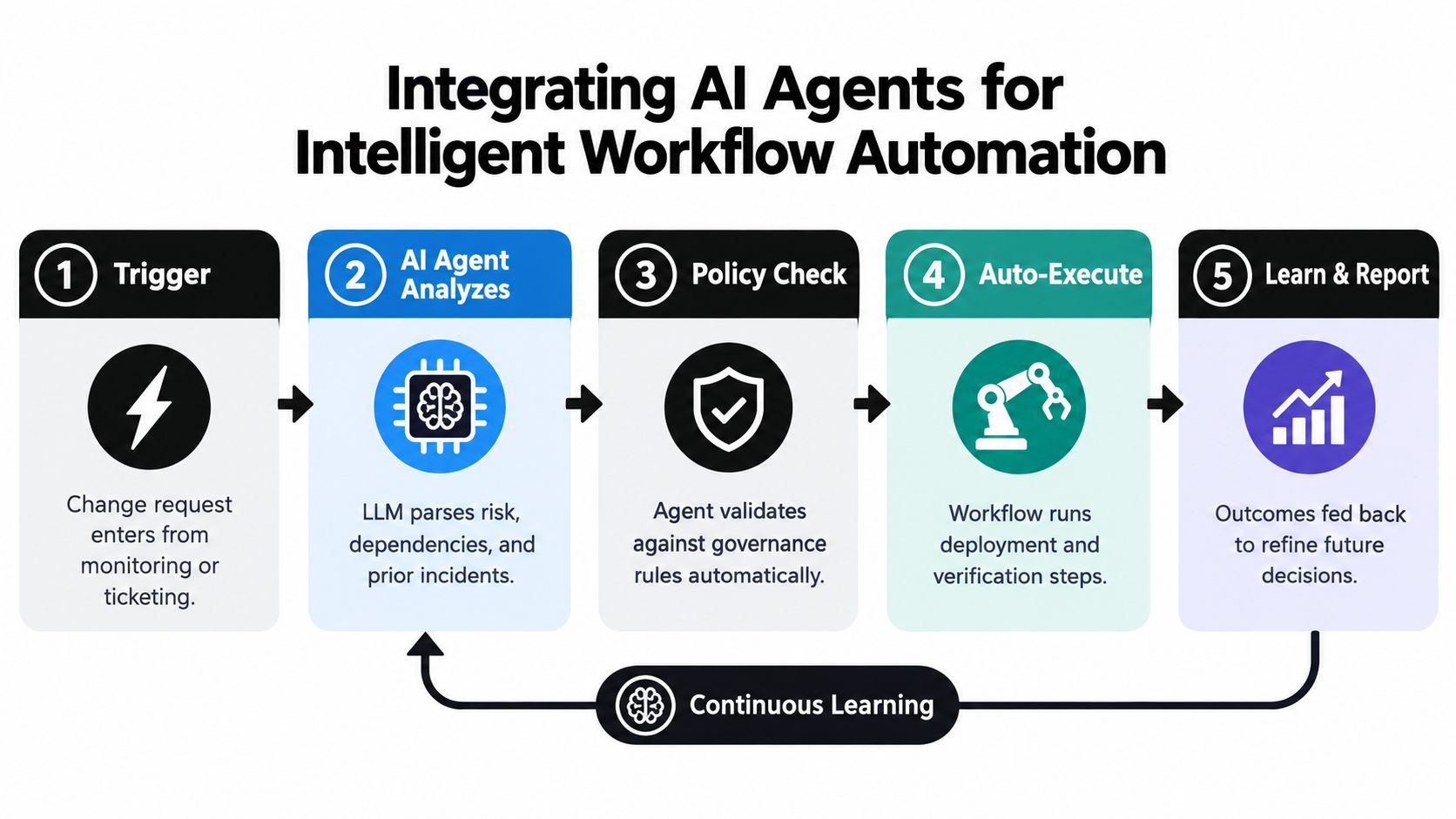
A practical agent workflow can follow five stages:
- Trigger: A monitoring event, ticket, deployment, or business request enters the system.
- Analysis: The agent parses intent, affected systems, dependencies, and prior incidents.
- Policy check: Deterministic rules validate required evidence, ownership, risk thresholds, and timing.
- Execution: An approved workflow performs the change and runs verification steps.
- Learning and reporting: Outcomes, incidents, and support signals update future recommendations.
LLMs are suited to language understanding and generation, while agents add memory, tools, and multi-step execution, as explained in this enterprise workflow automation guide. The architecture should keep policy decisions explicit. An agent can recommend a route, but a rule engine should enforce a mandatory approval or block an unauthorized action.
The client portfolio agent example illustrates the broader pattern of combining structured data, workflow actions, and AI-assisted decision support in an operational system. The same pattern applies to change governance across applications, provided the agent has narrow permissions and clear escalation rules.
Govern SaaS sprawl without another review queue
Cross-system governance becomes useful when the agent can inspect the actual environment. It might query application metadata, deployment history, incident records, ownership directories, and internal documentation. It can then produce a concise review packet instead of sending every approver to several systems.
Recent coverage identifies AI-driven risk scoring, predictive impact forecasting, scenario testing, and embedded training as emerging directions for change management tools, especially as SaaS sprawl and frequent vendor updates increase manual coordination. The practical design response is not to let an agent approve everything. It's to let the agent handle the information work that makes human approval slow.
A 2026 review of AI agents in business analyzed 875 studies published from 2020 to 2025 and identified technical, organizational, and hybrid perspectives, while highlighting accountability, transparency, and system integration as major challenges in its review of AI agents in business. Those challenges should shape the build from the beginning. Log which sources the agent used, expose confidence and uncertainty, preserve human overrides, and prevent the agent from accessing systems beyond its assigned scope.
The enterprise workflow automation research says generative AI and AI agents can automate 60% to 70% of employee time in banking and insurance when properly integrated, and that a scoped pilot with clear metrics can reach shadow-mode operation in four to eight weeks. Treat those figures as context for pilot design, not as a promise for every organization.
A 2026 survey summary reported that 57% of more than 1,300 professionals had AI agents in production, while the share of larger organizations scaling agents in at least one function increased from 27% to 40% over the previous year, according to coverage of agentic AI adoption. Adoption is moving quickly, but governance must move with it.
Implementation Steps and Success Metrics for Ops Teams
A custom change system should begin with a narrow operational problem, not an ambitious platform map. Choose one workflow where changes are frequent, ownership is clear, and the cost of poor coordination is visible. Examples include customer onboarding rules, pricing configuration, claims-processing workflows, or production deployment governance.
Establish the baseline
Document the current path from request to outcome. Identify where information is copied, who waits for context, which systems are queried manually, and where records become incomplete. Define the minimum evidence required for low-risk, moderate-risk, and high-risk changes.
Useful baseline measures include:
- Decision cycle speed: How long a request waits for a complete decision.
- Change-caused incidents: How often an implementation precedes an operational failure.
- Adoption visibility: Whether the team can identify who used the new workflow successfully.
- Support load: Whether questions, escalations, and rework increase after launch.
- Audit completeness: Whether a reviewer can reconstruct the decision from the record.
Avoid optimizing only for ticket closure. A system that closes requests faster while missing post-launch failures is producing misleading efficiency.
Run a scoped pilot
Build the smallest vertical slice. Connect one or two source systems, one approval path, one execution mechanism, and one monitoring signal. Use an AI agent for classification, summarization, or routing before granting it the ability to trigger consequential actions.
A shadow-mode pilot lets the agent produce recommendations while humans continue using the existing process. Compare the agent's classification and context with the decisions people make. Record false positives, missing dependencies, inappropriate routes, and useful discoveries.
The insurance operations dashboard project reflects the kind of operational visibility required for this phase. The dashboard is not the governance model by itself. It provides a working surface where owners can see queues, risks, exceptions, and outcomes without assembling the picture manually.
Move to controlled enforcement
Once the recommendations are understood, enforce only the rules that are stable. Block changes without an owner, rollback plan, or required approval. Allow the agent to route routine cases automatically when policy conditions are explicit. Keep high-impact and novel changes under human review.
Assign one accountable owner for the system, one owner for each policy domain, and one owner for integration reliability. Weak ownership is a common cause of adoption failure because users can't tell who resolves a bad recommendation, broken connector, or stale policy.
Review the system after launch using the same outcome measures established at the beginning. Add new integrations only when the current workflow is reliable enough to support them.
Designing a Continuous Operating Model for Scale
Software doesn't solve change failure by itself. It can move the failure point from an approval bottleneck to post-launch drift, stale ownership data, silent integration errors, or an AI recommendation that nobody understands.
A durable operating model combines four elements: resilient integrations, explicit policy, accountable human decisions, and continuous measurement. The system should make routine changes easy, make risky changes visible, and make outcomes available for the next decision.
Founders and operations leaders should review governance as an operating capability, not a one-time implementation. Policies need owners. Integrations need monitoring. AI agents need permission boundaries and review practices. Dashboards need signals that lead to action, not decorative metrics.
The best architecture may include a vendor ITSM platform, custom orchestration services, LLM integrations, agent workflows, and operational dashboards. The test is whether those components create one coherent control loop for the business. If teams still copy context between systems, wait for unclear approvals, and discover failures only after users complain, the architecture isn't finished.
Final design test: Governance should slow down unsafe work and accelerate safe work. If it slows everything, people will route around it.
Internal Systems designs custom software, integrations, operational automations, and AI-powered workflows for teams that need cross-system change governance without forcing their business into a rigid IT ticketing model. If your operations team is dealing with approval bottlenecks, SaaS sprawl, or weak post-launch visibility, visit Internal Systems to discuss an operations diagnostic or a scoped custom build.