Business Process Integration Software: A Practical Guide
Learn how business process integration software connects your tools, automates workflows, and scales operations with practical examples and a clear roadmap.
A 35-person SaaS company can have a surprisingly complicated operating model. Sales closes a deal in the CRM, finance retypes the contract into the ERP, customer success waits for an internal message, and support learns about the new account through a Slack ping. Everyone is busy, yet no single person owns the complete handoff.
The cost appears as duplicate entry, missed service-level commitments, delayed onboarding, and avoidable customer frustration. Business process integration software can connect these systems, but connecting them isn't the first decision. The first decision is whether the process deserves to be connected at all, who owns it, how quickly information must move, and how the team will know when the workflow fails.
Table of Contents
- What Business Process Integration Software Actually Does
- The Four Core Capabilities That Matter
- Choosing Between SaaS, iPaaS, and Custom Build
- How Data Flows Across an Integrated Workflow
- When to Integrate, Redesign, or Walk Away
- A 60 to 90 Day Implementation Roadmap
- Monitoring, Maintenance, and ROI You Can Defend
What Business Process Integration Software Actually Does
Business process integration software connects discrete SaaS tools, internal services, and human tasks into one executable workflow. It can receive an event from a CRM, transform the payload, create or update a record in an ERP, open an onboarding task, generate a document, request an approval, and notify the right person when the workflow reaches a decision point.
That definition is broader than “an API integration.” An API moves data between systems. Integration software coordinates the movement, applies business rules, handles errors, records what happened, and determines what happens next. A workflow might use APIs, webhooks, queues, event streams, and human approvals in one process.
It also differs from robotic process automation. RPA imitates a user operating a screen, which can help when a legacy system has no usable interface. A durable integration usually works closer to the application layer, where it can validate data, preserve identifiers, retry failed operations, and avoid breaking when a page layout changes. iPaaS platforms provide reusable infrastructure and connectors, but a platform alone doesn't define the operating model.
The operational layer between systems
Consider the SaaS company again. The CRM remains the system of record for the opportunity. The ERP remains the system of record for billing. The ticketing system remains the system of record for support work. The integration layer shouldn't blur those responsibilities. It should coordinate them.
A sound design answers four questions:
- Ownership: Which system owns each field and business decision?
- Latency: Does the next team need the information immediately, or is scheduled synchronization acceptable?
- Reliability: What happens when the ERP rejects a customer record or a webhook arrives twice?
- Accountability: Who receives the alert, investigates the exception, and approves a replay?
Good integration design reduces redundant records by synchronizing shared information across applications, which improves data quality and reduces inconsistent copies. Research on business process integration also connects effective integration with higher productivity, more reliable implementations, and lower manual integration-management cost because staff spend less time reconciling systems and more time on operational work, as described in this research on business process integration benefits.
Practical rule: Don't buy business process integration software because it has a long connector list. Buy or build it when a stable process needs controlled ownership across multiple systems.
The market's direction supports this broader view. Enterprise application integration software is estimated at USD 20.39 billion in 2026, up from USD 17.67 billion in 2025, with a projection of USD 41.79 billion by 2031 and a 15.42% CAGR from 2026 to 2031, according to Enterprise Application Integration Market research. Large enterprises generated 60.25% of market revenue in 2025, while iPaaS represented 33.10% of the market. Those figures describe market adoption, not a reason for every company to purchase a platform. For a founder-led business, the right question remains whether integration will make a specific process more reliable and economical.
The Four Core Capabilities That Matter
Connector breadth is easy to demonstrate. Reliability is harder. A platform that connects to hundreds of applications but can't explain a missing invoice, duplicate lead, or rejected approval creates operational risk instead of removing it.
Four capabilities demand top priority: data orchestration, event handling, governance, and observability.
Data orchestration
Data orchestration maps fields between systems, transforms formats, validates required values, and applies idempotency. Idempotency means the workflow can safely process the same event more than once without creating duplicate customers, tickets, or contracts.
A canonical customer identifier matters more than a clever connector. If the CRM uses an account ID, the ERP uses a customer number, and the ticketing tool uses an organization key, the integration should preserve the relationships explicitly. Never rely on company names as identity.
Event handling
Events need triggers, retries, backoff rules, and dead-letter queues. A failed payment update shouldn't disappear because a downstream service was temporarily unavailable. The system should retain the event, record the reason for failure, and route it to an owner.
Governance
Versioning, environment promotion, access control, and audit trails separate a production system from an experiment. A workflow needs a controlled path from development to testing to production. It also needs a record of who changed a rule and which version processed a business transaction.
Observability
Observability shows whether the process worked from end to end. It should expose correlation IDs, payload inspection, processing status, exception reason, and alerts. A 2026 integration review reports that 54% of companies struggle with integrations that fail without warning, with pain concentrated in warehouse ingestion, data correlation, application reuse, and sending insights back into user-facing systems, as reported in this integration solutions review. The lesson is direct: a green connector status isn't proof that the business process completed.
| Capability | What It Actually Unlocks | Operational Outcome | Criticality |
|---|---|---|---|
| Data orchestration | Consistent schemas, transformations, identity, and idempotent writes | Fewer duplicate CRM records and cleaner downstream decisions | Essential |
| Event handling | Durable triggers, retries, queues, and controlled replay | Failed work becomes recoverable instead of invisible | Essential |
| Governance | Version control, audit trails, permissions, and promotion paths | Changes become reviewable and production risk falls | High |
| Observability | Traces, payload inspection, alerts, and ownership routing | Operations teams diagnose incidents without guesswork | Essential |
For a founder-led company entering its first serious automation cycle, rank the capabilities this way: observability first, event handling second, data orchestration third, and governance fourth. Governance becomes equally urgent as the number of workflows and contributors grows, but an unobservable workflow can fail before anyone knows who should fix it.
The investment case can be material. Literature on enterprise integration cites case evidence of up to a 50% reduction in integration cost in some EAI deployments, while another source notes that EAI costs can represent 10% to 60% of ERP software price, depending on industry and function, in this Communications of the ACM discussion of ERP and EAI. Those figures aren't a promise for a particular implementation. They show why reusable connectors, real-time synchronization, and lower developer effort deserve attention after reliability primitives are in place.
Choosing Between SaaS, iPaaS, and Custom Build
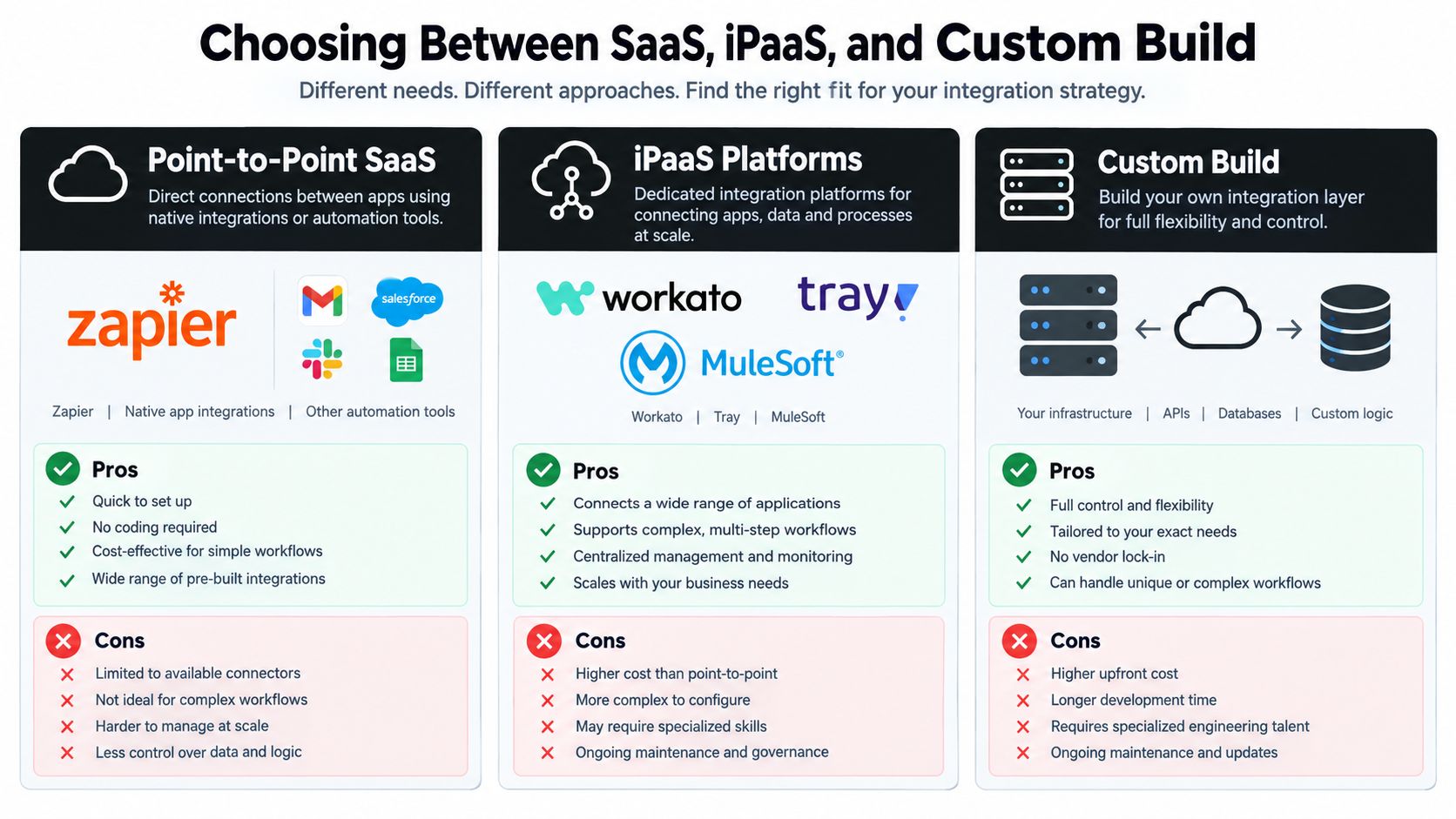
The right integration pattern depends on process complexity, data volume, failure cost, and how much of the workflow is unique to the business. Company size is a useful shortcut, but it isn't a substitute for architectural judgment.
Point-to-point SaaS connectors
Native integrations and tools such as Zapier work well when a workflow is short, data volume is modest, and the business rule is obvious. A small company with under 15 employees might connect a form to a CRM, send a notification, and create a task without introducing a platform team.
This pattern becomes fragile when several automations update the same record, when workflows need bidirectional synchronization, or when an exception requires controlled replay. Point-to-point connections also tend to hide business logic inside individual recipes, making ownership difficult when the original builder leaves.
iPaaS platforms
Workato, Tray, and MuleSoft are better suited to a company with 15 to 100 employees and revenue-critical processes crossing multiple applications. An iPaaS can centralize credentials, transformations, retries, logs, and environment management while giving operations teams a visible place to manage workflows.
The tradeoff is platform cost and governance overhead. A low-code canvas can make a complex process look simple, even when the underlying rules are not. Assign an owner before building, and document which application owns each decision.
Custom build
Beyond 100 employees, or whenever the business has proprietary data models, custom services become more defensible. A custom build can use queues, workers, internal APIs, and dedicated services to enforce domain-specific rules and support higher data volumes. It also gives the team control over deployment, observability, and long-term behavior.
Custom doesn't automatically mean better. It means the company accepts responsibility for infrastructure, security, testing, incident response, and maintenance. Regulated data residency, unusual security boundaries, or sub-second latency requirements can justify that responsibility even when the company is smaller.
A useful comparison of build-versus-buy decisions for AI and internal tooling is available in this build versus buy guide for AI tooling. Use it to test whether the process is genuinely differentiated or whether a standard platform already handles the hard parts.
Choose the smallest pattern that can make failures visible and recovery routine. Moving to custom infrastructure before the process is stable usually creates a more expensive version of the same confusion.
How Data Flows Across an Integrated Workflow
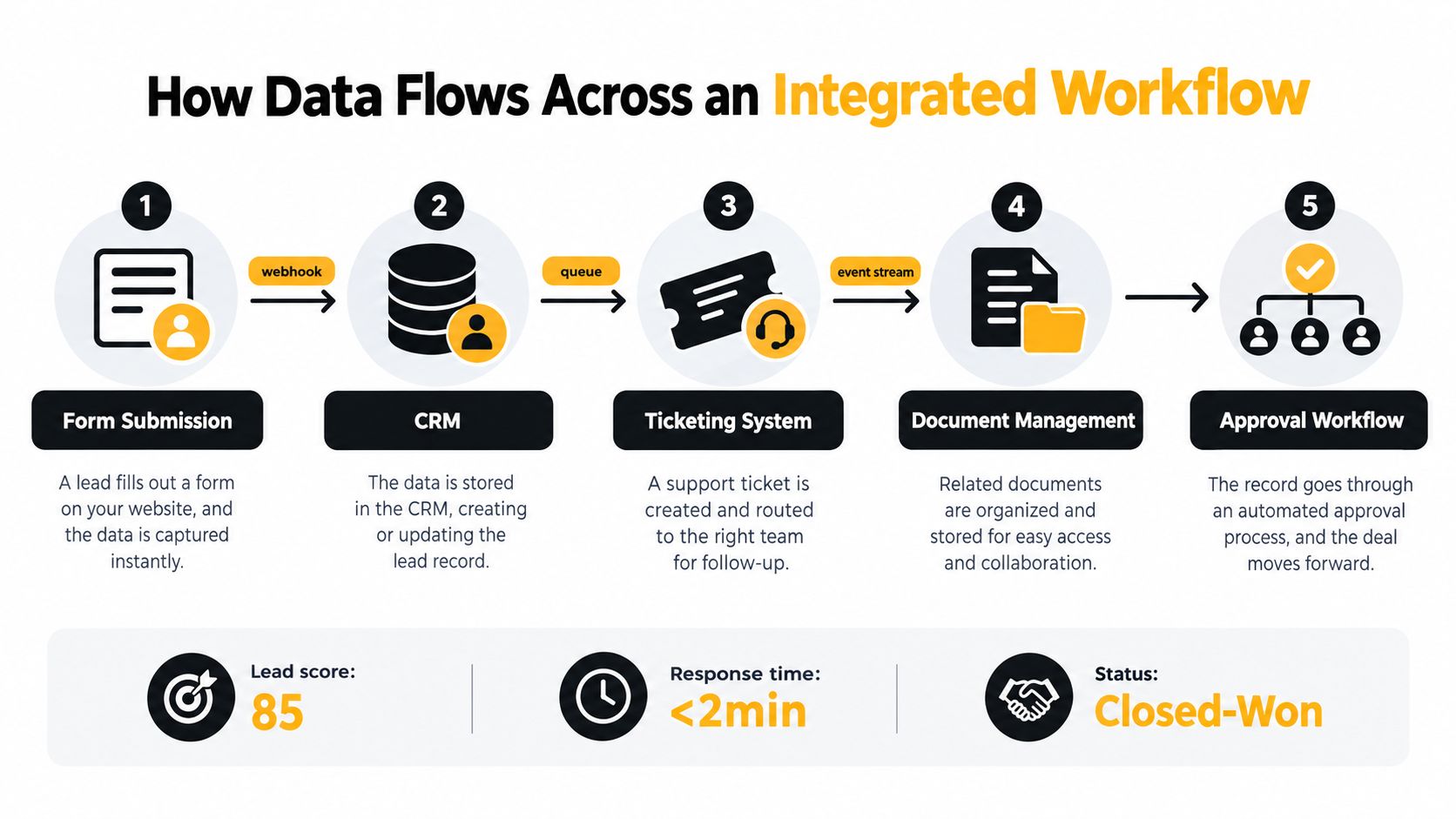
A lead-intake workflow shows why integration is a process design problem. The goal isn't merely to copy a form submission into a CRM. The goal is to create a trusted path from inquiry to qualification, service response, document preparation, approval, and closed-won status.
Start with one durable event
The form service emits a submission event containing the raw request, contact details, consent status, source, and a unique submission ID. A webhook sends the event to an intake endpoint, which validates the payload and places it on a queue. The queue protects the workflow from temporary downstream outages and creates a durable starting point for replay.
The system then checks the submission ID and normalized contact identity. If the visitor submitted the form twice, the idempotency key prevents a second opportunity from being created. The CRM receives the canonical customer record, while the original payload remains available for audit and troubleshooting.
Use AI for enrichment, not authority
An LLM can classify the inquiry, summarize requirements, extract fields, and recommend a sales or service queue. It shouldn't replace system-of-record logic. A rules engine should decide whether a required field is present, whether an approval threshold has been met, and whether a contract can advance.
An LLM integration guide describes a practical chain in which a model reads an email, classifies the request, extracts fields, creates a ticket, assigns a department, drafts a response, and sends it for approval. It also recommends structured JSON output and fallback routines for unexpected responses, patterns covered in this guide to LLM integration for businesses. Apply the same discipline to lead intake. The model produces structured enrichment, and the workflow engine validates it before taking action.
A lead-scoring workflow can pass the enriched record to the CRM, create a ticket for a response team, store relevant documents, and route a proposal to an approval system. A human should remain in the loop for compliance-sensitive contract decisions, unusual pricing, or incomplete consent records. The approval should write its decision back to the canonical workflow state, not merely send an email.
For a concrete example of a custom real-time lead scoring system, see this real-time lead scoring project.
The broader case for this architecture is application fragmentation. One cited 2026 statistic says only 27% of the average organization's 957 applications are connected, according to these workflow automation statistics. The practical response isn't to connect everything. Connect the applications that govern a valuable workflow, then make the data path traceable.
When to Integrate, Redesign, or Walk Away
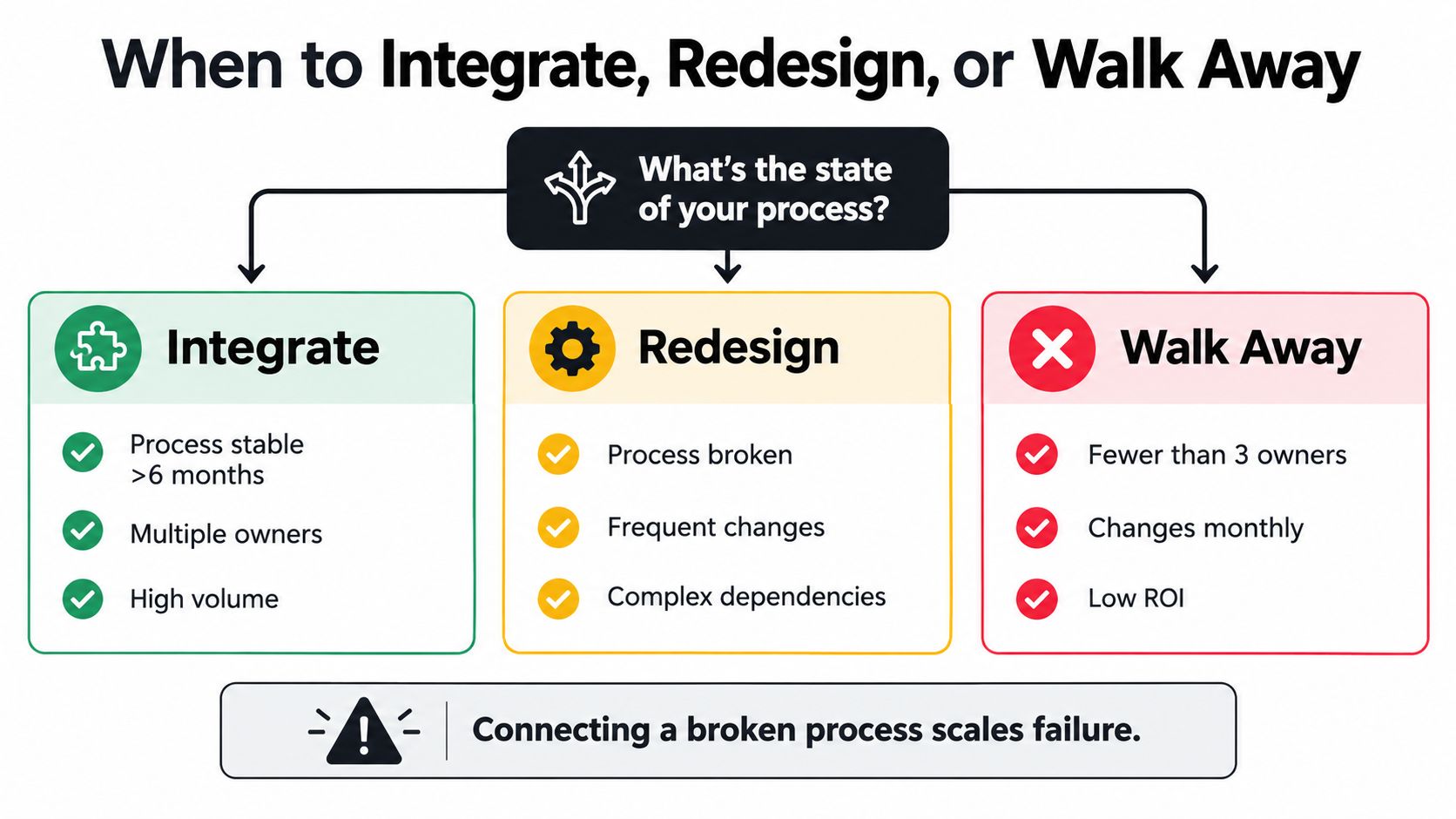
Connecting a broken process doesn't fix it. It lets the broken process move faster, touch more systems, and produce errors that are harder to unwind.
Start with a decision tree:
- Does the process have fewer than three owners and change monthly? Automate it inside one tool first. Don't create an integration surface for a process that hasn't settled.
- Does it cross functional boundaries but run at low volume? Redesign the handoffs before connecting systems. Remove duplicate approvals, clarify the decision owner, and standardize the required inputs.
- Is the process stable, owned, and costly when delayed or performed incorrectly? Integrate it. The maintenance cost is easier to justify when the business outcome is visible.
- Does the process produce little value or depend on unclear decisions? Retire it or consolidate it. A workflow that nobody can explain shouldn't receive more infrastructure.
Score the process before selecting software
Use a simple score from low to high for each dimension:
- Process maturity: Has the workflow stayed consistent, or does the team change it constantly?
- Ownership clarity: Can one person approve rules, handle exceptions, and accept the handoff?
- Transaction volume: Does enough work pass through the process to justify automation and monitoring?
- Error cost: Do failures create rework, compliance exposure, missed revenue, or customer harm?
A low maturity score with frequent changes points to redesign. High maturity and high error cost point to integration. Low volume and low error cost usually point to consolidation or retirement. Don't let the existence of an API determine the decision.
The organizational tradeoff matters as much as the architecture. A 2026 BPM challenges article argues that organizations often automate before redesigning processes spread across ERP, CRM, HR, and industry systems, as discussed in this analysis of business process management challenges. The operational implication is clear: first remove low-value steps and settle the handoff, then encode the improved process.
Integration complexity is also cited as the main reason technology investments fail to deliver expected results by 59% of operations leaders, while 47% identify user adoption as another major blocker in PwC's 2026 operations survey, as reported in the same analysis. Treat adoption as a workflow requirement. If users can't understand the next action, the system will generate workarounds that bypass the integration.
A 60 to 90 Day Implementation Roadmap
A founder-led team without dedicated integration engineering should avoid a grand platform rollout. Pick one valuable workflow, assign one accountable owner, and create a path from manual execution to monitored automation.
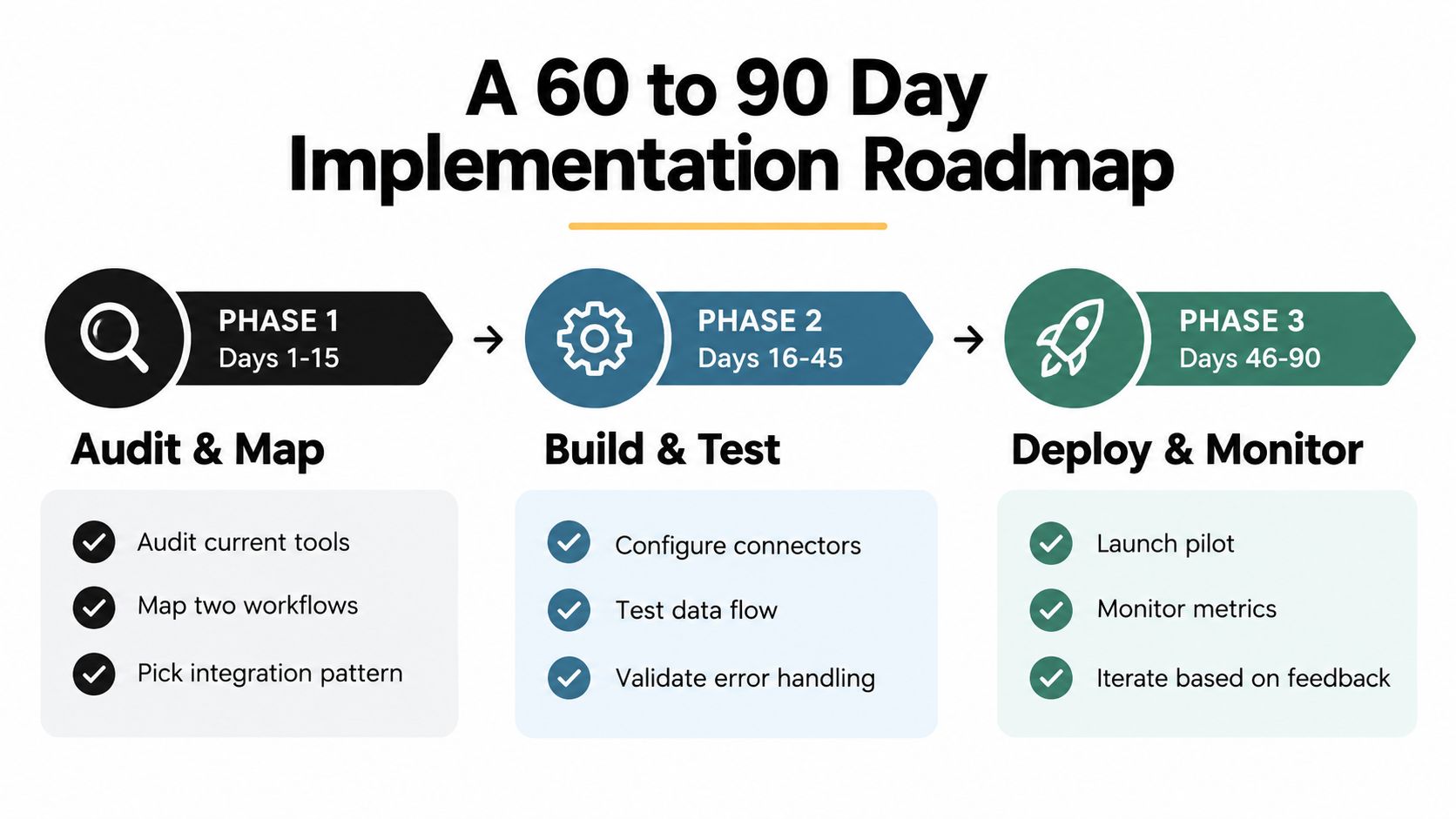
Days 1 to 15
Audit the current tools, permissions, manual handoffs, duplicate records, and exception paths. Map two candidate workflows from trigger to final outcome. For each, identify the system of record, required data, decision owner, failure owner, and evidence that the workflow completed.
Choose the integration pattern only after this audit. A short SaaS chain may need native connectors. A cross-functional revenue process may justify iPaaS. A proprietary process with unusual data or control requirements may require custom services.
The phase ends when the team has selected one workflow, written its acceptance criteria, named its owner, and documented the current manual process. If nobody can agree where the process starts or ends, don't build yet.
Days 16 to 45
Build the first production-shaped flow in a sandbox. Define the canonical data model, including identity keys, required fields, status values, and ownership. Add idempotency before testing volume, because duplicate prevention is part of correctness, not a later enhancement.
Run the automated flow beside the manual process. Compare records, decisions, notifications, and exceptions. Test rejected payloads, unavailable systems, duplicate events, expired credentials, and model outputs that don't match the expected schema.
The team should approve a cutover only when the workflow produces the intended business outcome, every failure has an owner, and the operations lead can explain how to retry or escalate an exception.
Days 46 to 75
Cut over one workflow, not the entire department. Instrument event status, processing latency, exception reasons, and successful completion. Train the operations owner using real incidents rather than a feature tour.
The founder should stop acting as the default exception queue. The named owner handles routine questions, maintains the runbook, and decides which changes require engineering support. Keep a short daily review during the initial cutover, then reduce it as the workflow proves stable.
Days 76 to 90
Retire the manual steps that the new workflow now owns. Remove duplicate notifications, archive obsolete automations, and document the final data ownership model. Establish a weekly review for exceptions, changes, and new requests.
The handoff is complete when the operations lead has access to the workflow, understands the alert paths, can replay a safe failure, owns the business rules, and has a written escalation route for infrastructure issues. The founder should retain decision authority over material process changes, not operational custody of every run.
Monitoring, Maintenance, and ROI You Can Defend
Monitoring, maintenance, and ROI belong to one operating discipline. A workflow that saves labor while hiding failures creates operational risk. A workflow with perfect logs but no meaningful reduction in work has little value.
Track four metrics for every critical flow: uptime, end-to-end latency, exception rate, and mean time to repair. Set a target for each before launch, then confirm the threshold with the workflow owner. Do not copy a vendor's generic service-level target. A lead-response flow and a monthly reporting flow have different business requirements.
| Metric | Target | Owner | How to Measure |
|---|---|---|---|
| Integration uptime | A business-approved availability threshold | Platform owner | Successful workflow availability and blocked-event records |
| End-to-end latency | A threshold tied to the process promise | Workflow owner | Timestamp from source event to completed business action |
| Exception rate | A declining, explainable rate | Workflow owner | Failed or quarantined events divided by total events |
| Mean time to repair | A response threshold based on error cost | On-call rotation | Time from alert creation to restored processing |
For a production example of how these measures are instrumented, review this insurance operations dashboard project. Use the same discipline in your own system: measure whether the process stays available, finishes within its promise, limits exceptions, and returns to service quickly.
Assign ownership before the first alert
The platform owner maintains infrastructure, credentials, deployments, and runtime health. Workflow owners maintain business rules, field mappings, and acceptance criteria. The on-call rotation handles incident response, communication, and recovery.
Three maintenance failures appear repeatedly:
- Silent schema drift: A source system changes a field or status, while the integration continues processing incomplete data. Add contract tests and inspect payload changes.
- Orphan credentials: A workflow depends on a departing employee's account. Use managed service identities, rotation procedures, and an ownership register.
- Zombie workflows: An automation keeps running after the underlying process has been retired. Review usage, owners, and destinations during quarterly audits.
The ROI calculation should stay simple:
ROI = labor hours reclaimed + error cost avoided + revenue cycle acceleration, minus build and operating cost.
For a hypothetical 50-person company, build the model from observed labor, rework, and delay data. Do not claim savings before measuring the current process. One 2026 source cites Kissflow research reporting that 60% of enterprises recover their automation investment within 12 months, as summarized in these AI workflow automation statistics. Use that finding to prioritize visible, repetitive labor leakage, not to promise a payback period.
AI can add value when it handles classification, routing, summarization, and recommendations inside a controlled workflow. McKinsey estimates that AI-powered automation could create substantial annual value across the global economy. For an operations team, keep the application narrower: let an LLM triage inbound requests, extract fields, and recommend a queue, while deterministic rules control approvals and escalations.
When adding an integration, preserve existing contracts, version the payload, test replay behavior, and release the new path under control. Extend the system only when the owner, failure mode, audit trail, and business outcome are clear. Connector count is not ROI. Reliable execution, visible exceptions, and clear ownership are.
Internal Systems designs and builds custom software, system integrations, operational automations, and AI-powered workflows for teams that need reliable execution across existing tools. If you need to decide whether to redesign, integrate, or build a monitored internal system, start with Internal Systems to discuss the workflow, ownership model, and delivery path.