Business Process Automation Consulting: A Practical Guide
Business Process Automation Consulting. Learn when and how to hire a business process automation consultant. Understand pricing, ROI, delivery phases, and how
Most firms don't need a massive all-at-once automation program. With 66% of organizations already using automation in at least one business function and only 23% reporting that generative AI is fully deployed, the stronger path is a phased portfolio that starts with narrow, high-certainty workflows and earns the right to scale.
That's the situation many operations leaders face now. Leadership wants faster answers, but the underlying information arrives late. Staff copy data between disconnected systems, repair fragile automations, and chase approvals through email while AI pilots sit beside the actual workflow instead of inside it. Business process automation consulting is useful when the problem isn't a lack of software, but a lack of sequencing, integration, ownership, and control.
Table of Contents
- Why Operations Teams Seek Business Process Automation Consulting
- What Business Process Automation Consulting Actually Delivers
- Typical Engagement Phases and What You Receive
- When to Engage a Consultant Rather Than Automating Internally
- ROI Examples and Realistic Payback Timelines
- How to Choose the Right Automation Consultant
- Practical Checklist and Next Steps for Internal Teams
Why Operations Teams Seek Business Process Automation Consulting
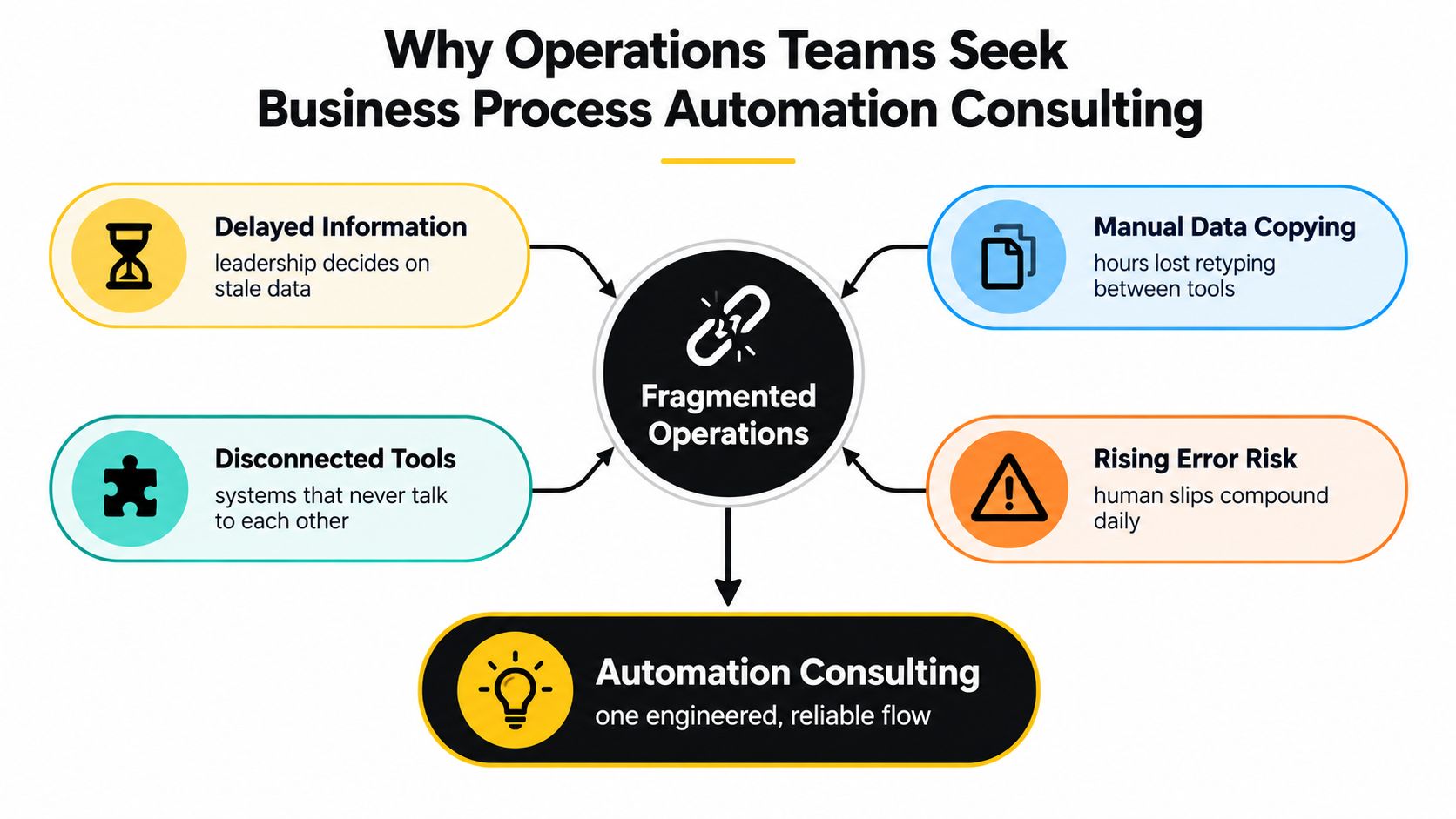
A typical operations bottleneck starts. A customer request enters one system, an employee retypes it into another, a manager checks a third source before approving it, and leadership receives a report after the decision window has narrowed. No single step looks catastrophic, but the chain creates delay, duplicate work, and uncertainty about which record is accurate.
Manual handoffs also hide ownership problems. When an automation fails, nobody knows whether the process owner, application administrator, or technical team should fix it. When a rule changes, the team updates one workflow and forgets another. Over time, people build workarounds around the automation, which leaves the business with more tools and less trust.
The market reflects how far automation has moved beyond experimentation. The business process automation market grew from USD 9.8 billion in 2020 to a projected USD 19.6 billion in 2026, a 12.2% CAGR over that period, according to MarketsandMarkets' business process automation market analysis. That growth doesn't mean every workflow deserves automation. It means companies increasingly need help redesigning and connecting processes before investing further in software.
The hidden cost of disconnected work
Consultants earn their value by separating repetitive, rules-based work from work that depends on judgment, negotiation, or incomplete information. A reliable candidate might be routing inbound leads using defined attributes. A poor candidate might be an approval process where every case follows a different path and the rules exist only in one manager's experience.
A diagnostic can map the current flow, identify failure points, and show where an integration or custom interface would remove the most friction. An insurance operations dashboard example illustrates the kind of working surface that can replace scattered status checks with a more coherent operational view.
The practical objective isn't to automate the greatest number of tasks. It's to create a small number of dependable flows that improve decision quality, expose exceptions, and give a named owner responsibility for keeping them healthy.
What Business Process Automation Consulting Actually Delivers
A useful engagement turns an informal operating habit into an engineered system. Consider lead intake. A team may receive enquiries through a website, email, partner referral, and a sales representative. A consultant can design a custom workflow that normalizes the incoming data, applies an AI-assisted score, routes the lead to the right person, and sends uncertain cases to human review.
That solution isn't merely a trigger connected to a form. It needs a data model, routing rules, access controls, error handling, monitoring, and an interface where an operator can correct a bad classification. The consultant should also document what happens when the enrichment service is unavailable or when the model encounters an unfamiliar lead.

From process ambiguity to usable software
The same approach applies to portfolio risk assessment. A custom system might collect current exposure from several internal sources, summarize relevant changes with an LLM, highlight missing information, and present a risk queue to an investment or operations team. The model can support analysis, but it shouldn't make a consequential decision without a review path.
Delay prediction offers another practical example. A workflow can combine project status, dependencies, and incoming updates to flag a likely delay. The useful deliverable isn't a prediction alone. It's a prioritized queue, an explanation of the signals involved, an escalation rule, and a way for staff to record whether the alert was useful.
For client routing, the system might classify an enquiry by service, geography, urgency, or account status. Deterministic rules should handle clear cases. An AI model can handle unstructured text, while low-confidence cases move to a human. This blend is more reliable than forcing an LLM to perform every step.
What separates consulting from implementation
Generic IT implementation often starts with a product configuration. Business process automation consulting starts with the operating problem and selects technology around it. The result may include custom software, API integrations, dashboards, admin panels, workflow orchestration, and AI-powered decision support, but each component should have a defined operational purpose.
Enterprise AI is increasingly being embedded into existing systems rather than used as standalone chat. A report citing OpenAI says that, across more than 1 million business customers, ChatGPT message volume grew 8x year over year, while API reasoning token consumption per organization increased 320x. The report also describes reusable assistants that codify institutional knowledge and integrations that automate workflows through internal systems, as summarized in this report on enterprise AI usage.
The handoff matters as much as the build. Internal teams should receive documented workflows, ownership rules, monitoring guidance, and access to the code or configuration they need to operate the system. A real estate lead automation project is the relevant shape of work: connect intake, classification, routing, and follow-up into a process people can run.
Typical Engagement Phases and What You Receive
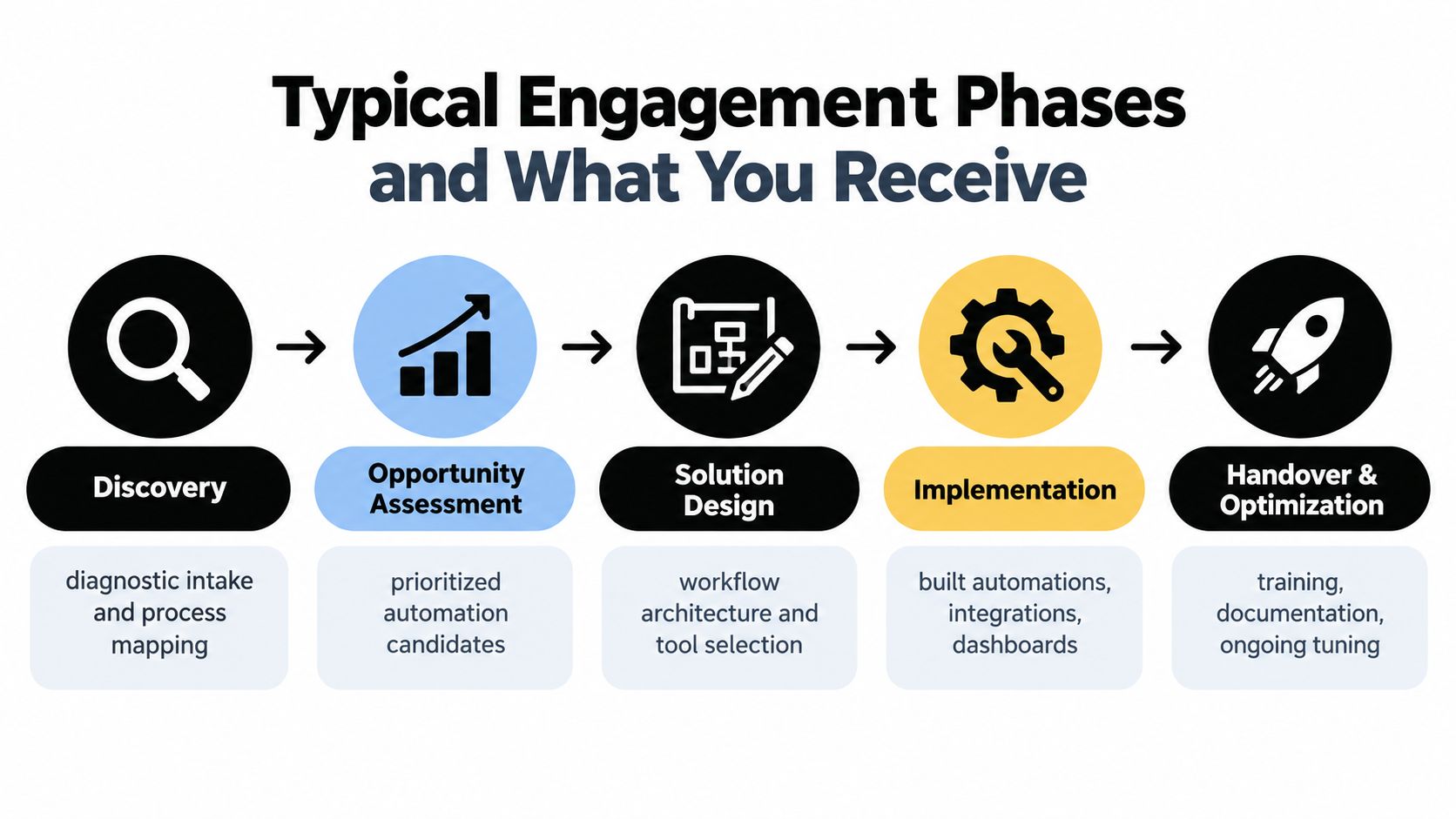
The strongest engagements make the work visible before development begins. A consultant should be able to explain what will be learned, decided, built, tested, and transferred at each phase. If the first deliverable is a large technology roadmap without a clear workflow baseline, the project is probably moving too quickly.
Discovery and opportunity assessment
Discovery usually begins with interviews, system walkthroughs, sample records, and process mapping. The consultant should capture who initiates each step, what data enters the process, which tools are involved, where decisions occur, and what happens when something goes wrong.
The next phase turns observations into a prioritized portfolio. Candidates should be ranked by business value, technical feasibility, data readiness, exception complexity, and risk. The output is more useful when it identifies what to build first, what to defer, and what to avoid.
Practical rule: A process owner should be able to explain the current workflow and approve the future one before development starts.
Solution design and implementation
The architecture document should describe system boundaries, integrations, authentication, data movement, business rules, AI components, human review points, and failure handling. It should answer practical questions, such as whether the workflow uses an API, an event trigger, a scheduled job, or a controlled interface for a legacy application.
Implementation then produces working software, not only diagrams. Depending on the scope, that may include:
- Operational interfaces: Dashboards and admin panels that show queues, statuses, exceptions, and ownership.
- Integrations: Bidirectional connections that keep systems aligned and reduce repeated data entry.
- Automation orchestration: Reliable sequences for approvals, notifications, record updates, and escalations.
- AI-assisted steps: Classification, summarization, routing, or decision support with confidence thresholds and human fallback.
- Controls and observability: Logs, alerts, audit records, and clear procedures for resolving failures.
Testing should include normal cases, incomplete inputs, duplicate records, permissions issues, unavailable services, and unusual exceptions. A demonstration on a perfect sample is not evidence that the workflow is ready for daily use.
Handover and optimization
Handover includes training, documentation, ownership assignment, and a period of tuning. The internal team should know how to change a rule, inspect a failed run, review an AI decision, and escalate an infrastructure issue.
Optimization should be based on observed workflow behavior. If staff keep overriding the same classification, the model, rule, or input data needs attention. If a dashboard is accurate but unused, the issue may be workflow design rather than analytics.
When to Engage a Consultant Rather Than Automating Internally
Internal teams can safely automate when the process is well understood, the data is structured, the integrations are simple, and a process owner can test and maintain the result. A small custom tool for routing a clearly defined request may not require an outside engagement.
The case for a consultant becomes stronger when the process crosses departments or systems, includes sensitive data, or has no reliable documentation. The same is true when a team has built several automations that nobody monitors, or when an AI pilot produces useful outputs but has no permissions model, review policy, or route for uncertain results.
Governance is a particularly important dividing line. In a 2025 survey, 35% of respondents identified a lack of integration between governance tools and AI platforms as their top enforcement challenge, while 46% said technology that automates governance requirements would be the most critical improvement over the next 12 months, according to the OneTrust data and AI survey. Those findings point to a practical need for connected controls, not just faster workflow execution.
A decision matrix for engagement timing
| Situation | Internal automation | Consultant-led work |
|---|---|---|
| Scope clarity | The steps and rules are stable and documented | Teams disagree about the real process or its owner |
| Integration needs | One application or a well-supported API | Several systems, legacy interfaces, bidirectional synchronization |
| Compliance exposure | Low-risk internal activity | Regulated data, audit requirements, or model-risk concerns |
| AI role | Simple drafting or summarization with review | Routing, scoring, prediction, or decisions that need controls |
| Change capacity | A process owner has time to test and maintain it | Staff are already overloaded or adoption is fragmented |
Integration friction remains common. UiPath's 2025 agentic AI research reports that 61% of respondents cited lack of integration with other business applications as a major limitation, while 31% cited inaccurate results or hallucinations. The same report says 68% found AI integration with existing IT infrastructure at least fairly easy, which suggests the question isn't whether integration is possible, but whether the architecture and ownership are appropriate for the workflow. The build versus buy decision for AI tooling should therefore follow process and risk analysis, not a preference for a particular delivery model.
ROI Examples and Realistic Payback Timelines
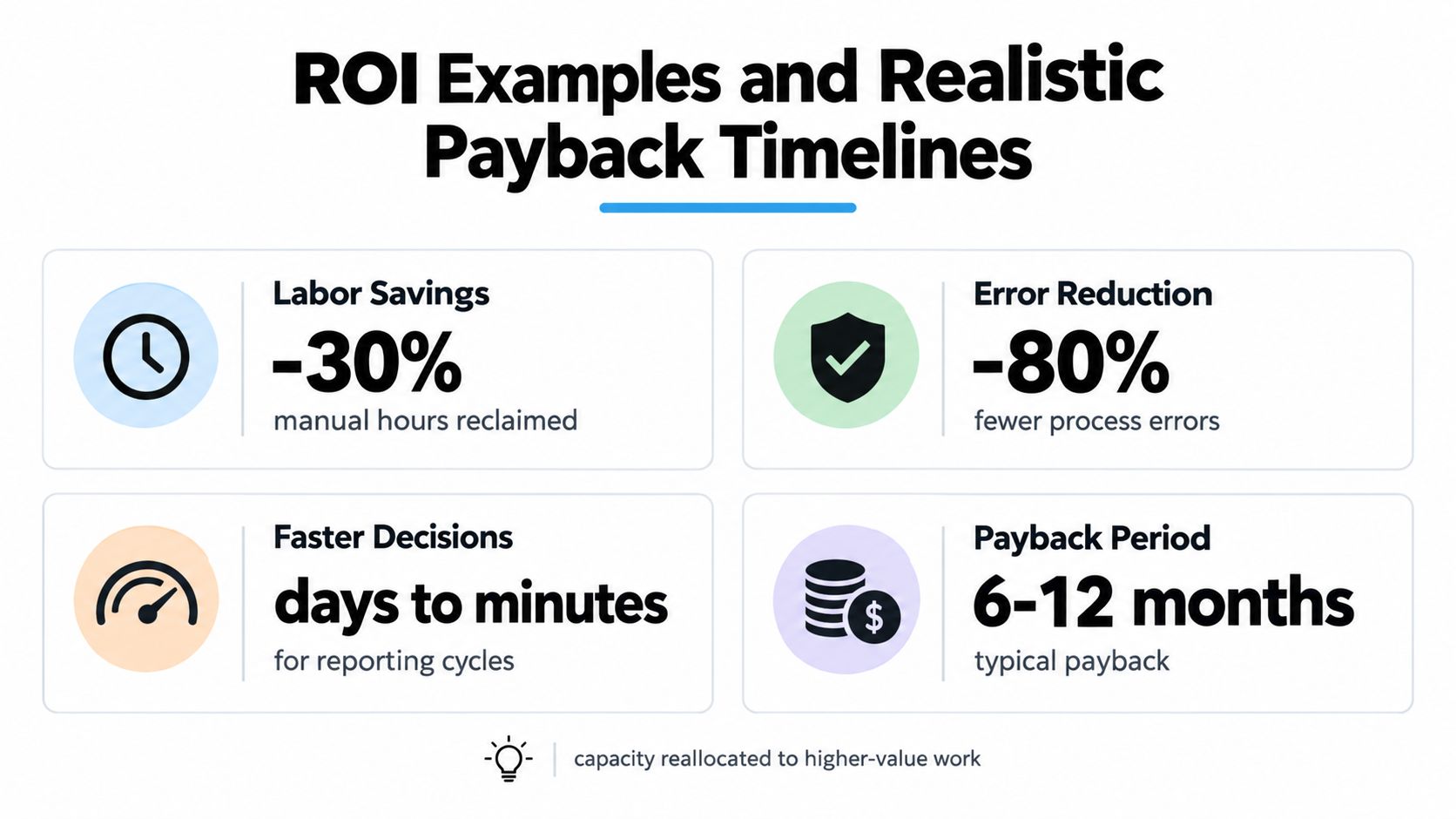
Automation ROI becomes credible when the team defines the baseline before building. Direct labor savings are one measure, but they're not the whole case. A workflow may justify investment by reducing rework, shortening an approval queue, improving the speed of a risk review, or allowing experienced staff to handle more valuable decisions.
Take a client-routing workflow. The direct benefit may come from removing repeated classification and assignment. The operational benefit may come from getting urgent cases to the correct team sooner. The control benefit may come from recording why a request was routed and whether a human changed the result.
Compare value, not just hours
A useful business case separates outcomes into four categories:
- Capacity: Repeated data transfer and status checking no longer consume the same amount of staff attention.
- Quality: Validation rules and structured inputs reduce avoidable corrections.
- Speed: Automated routing and summaries help teams move from waiting for information to reviewing it.
- Risk: Audit trails, approval controls, and exception queues reduce dependence on informal workarounds.
LLM-enabled projects are usually better sequenced as a portfolio than launched as one large program. In a survey of 502 senior technology professionals at US companies with 1,000 or more employees, 60% planned to initiate up to three LLM-integrated projects per year over the next two years, while 37% expected four or more. The same survey found 58% expected automation to materially shorten information-rich processes and 55% expected LLM-powered processes to improve both quality and speed, as reported in the Vertesia and Censuswide survey.
Why fast-payback promises fail
A narrow workflow can produce visible value quickly, but a complex build may require data cleanup, integration work, user training, and several rounds of exception handling. A compilation on automation roadmaps reported that 15% of organizations experienced negative first-year ROI, mainly because of overscoped implementations and insufficient training. A separate 2025 to 2026 summary found that only 6% of executives in Europe and the Middle East saw payback in under a year, according to this analysis of business process automation consulting.
Those figures are a warning against treating every benefit as immediate labor reduction. Error avoidance, capacity reallocation, and risk mitigation can be valuable while taking longer to measure.
Paid discovery and fixed-price delivery solve different problems. Paid discovery is appropriate when the workflow, integrations, or scope are unclear. Fixed-price delivery is more useful after the architecture, assumptions, acceptance criteria, and responsibilities are defined. Trying to force a fixed price before discovery often hides uncertainty in change requests. Staying in open-ended discovery after the build is understood can delay value without improving the result.
How to Choose the Right Automation Consultant
Evaluate a consultant by the system your team can operate after handoff, not by the number of tools they can demonstrate. A polished AI prototype can classify a clean sample while failing on incomplete records, ambiguous requests, permission boundaries, or a downstream system outage.
Start with the delivery model. Ask whether the consultant offers a diagnostic, a paid audit, or a fixed build, and what each phase produces. The scope should identify the workflow owner, data sources, integrations, AI responsibilities, human review points, testing approach, and conditions that would change the price or timeline.
Questions that expose delivery quality
- Who does the work: Confirm who will lead discovery, make architecture decisions, and remain accountable during implementation. A rotating team can create avoidable context loss.
- What will we own: Require clarity on code, documentation, credentials, workflow definitions, prompts, evaluation records, and deployment knowledge.
- How do we see progress: Look for working increments, regular demonstrations, and a way to course-correct before the final delivery.
- How are exceptions handled: Ask for examples involving bad data, duplicate submissions, low-confidence AI output, failed integrations, and manual overrides.
- What happens after handoff: Confirm training, monitoring guidance, maintenance responsibilities, and the process for changing rules or models.
- How many projects run at once: Limited concurrency can protect senior attention, while a large queue of simultaneous builds may signal an account-management-heavy model.
Red flags in proposals
Be cautious when a proposal recommends a tool before documenting the process. Vague phrases such as “intelligent automation layer” or “AI transformation” don't explain what the system will do on a Tuesday afternoon when an input is missing.
Subcontracting isn't automatically a problem, but the accountable lead should disclose who writes the software and who supports it. A consultant that prioritizes licenses, seats, or feature adoption over operational outcomes may optimize for implementation activity rather than a reliable process.
For a founder-led or growth-stage team, weekly visibility and direct access to the senior delivery lead often matter more than a large presentation team. The right partner should be comfortable saying that a workflow is not ready, an AI component is unnecessary, or a simpler integration will produce a safer result.
Practical Checklist and Next Steps for Internal Teams
Good consulting starts before the first workshop. Internal teams should arrive with enough operational evidence to make trade-offs, while accepting that the current process may differ from the documented one. The most useful preparation is concrete, not polished.
Prepare the workflow evidence
- Document the current path: Write down the trigger, actors, systems, decisions, approvals, outputs, and common exceptions.
- Collect representative records: Include incomplete, duplicated, delayed, and unusual examples, not only successful cases.
- List every integration: Record where data originates, where it is copied, who can access it, and which systems need to write back.
- Name the owner: Assign one person who can approve process changes and resolve disagreements between teams.
- Define the failure cost: Describe what happens when a request is delayed, misrouted, duplicated, or approved without the required information.
Then define a pilot that is narrow enough to test properly. A good first workflow has a clear start and finish, a manageable number of exceptions, an available process owner, and an outcome that the team can measure. Don't begin with the most politically important process if nobody can agree on its rules.
Questions to ask during an audit
Ask the consultant which candidate they'd build first and which one they'd avoid. Ask what assumptions the estimate depends on, what data is missing, how integrations will be tested, and which actions remain human-controlled. For AI workflows, require a clear explanation of confidence handling, evaluation examples, prompt or model change management, permissions, and auditability.
Agree on success measures before approving the build. Those measures might include time spent per case, queue age, manual correction volume, routing accuracy, completion rate, or the proportion of exceptions resolved without escalation. A dashboard that no process owner uses isn't a success metric, even if it looks polished.
Make handoff part of the scope
Training and change management should appear in the delivery plan from the beginning. Staff need to understand what the automation does, what it doesn't do, when they must intervene, and how to report a failure. Managers need ownership rules and an escalation path.
A paid discovery engagement is often the safest way to test fit when the problem is still ambiguous. It should end with a ranked opportunity list, a recommended sequence, an architecture document, and a decision about whether to proceed. That approach gives founders, COOs, and operating partners enough evidence to approve a custom build without committing to an oversized program.
Internal Systems designs custom software, system integrations, operational automations, and AI-powered workflows for teams that need to replace fragmented manual processes with reliable internal systems. Visit Internal Systems to discuss an operations audit, a phased build, or a focused workflow pilot with clear ownership at handoff.