Bulk SQL Insert: Practical Patterns for Faster Loads
Practical bulk SQL insert patterns across databases, drivers, and stacks. Covers native loaders, batching, error recovery, and performance tuning.
A published comparison loaded 200,000 rows in about 39.5 seconds with multiple INSERT calls, versus about 3.1 seconds with SqlBulkCopy, while another test loaded 1,000 rows in 205 ms with regular inserts versus 17 ms with BULK INSERT (benchmark comparison). Those results are useful, but they don't tell the whole production story. Once client overhead is removed, the transaction log, storage layer, lock strategy, and managed-database write limits often become the ceiling.
A reliable bulk SQL insert pipeline isn't just a faster SQL statement. It combines the right native loader or driver API with controlled batching, typed streaming, transaction design, and instrumentation that shows where the database is spending its time. The patterns below focus on custom software and AI-enabled operational systems, where a loader must be fast without making downstream workflows unreliable.
Table of Contents
- What Bulk SQL Insert Actually Changes Under the Hood
- Native Commands for Bulk Loading Across Databases
- Client and Driver Batching That Actually Works
- Streaming CSV and JSON Imports the Right Way
- Performance Tuning Beyond Syntax and Parallelism
- Transactions, Indexes, and Error Recovery
- Putting It Together in Production Pipelines
What Bulk SQL Insert Actually Changes Under the Hood
A 200,000-row CSV needs to land in PostgreSQL or SQL Server before a downstream job starts. A row-at-a-time INSERT loop runs for 22 minutes, while the native loader completes the same movement in 90 seconds. The obvious controls are batch size and parallelism, but neither fixes the fundamental problem if every row still carries the full cost of parsing, network travel, logging, validation, and transaction handling.
Bulk loading changes the unit of work. Instead of asking the database to process one complete statement repeatedly, the client sends a larger set of rows through an API designed for ingestion. The engine can amortize parse and plan work across many rows, reduce client-server round trips, and group log activity more efficiently.
The per-row costs that disappear
A row-by-row loop repeatedly pays for work that doesn't scale well:
- Statement processing: The server handles the statement shape again and again unless the client reuses a prepared statement.
- Network latency: Each request waits for a response or acknowledgement, which becomes expensive across a remote connection.
- Transaction logging: Each logical operation creates log records and may trigger flush behavior that a larger transaction can manage more efficiently.
- Constraint and trigger execution: Every inserted row can invoke checks, indexes, triggers, and generated-column work independently.
- Client serialization: The application repeatedly converts objects into protocol messages instead of streaming a structured block.
A native loader doesn't necessarily bypass validation or logging. SQL Server documentation treats bulk import as a formal engine feature and states that, under the full recovery model, row-insert operations during bulk import are fully logged in the transaction log. The same Microsoft bulk insert documentation also points to prerequisites for minimal logging, so recovery configuration remains part of the design.
Practical rule: Optimize the unit of work first. Increase concurrency only after the database can process each batch efficiently and the log can sustain the write rate.
This is why native loaders, driver batching, staging tables, and careful index handling all serve the same goal. They reduce the amount of overhead attached to each row. Batch size and parallelism are useful speed knobs, but they're second-order controls. If the loader is spending most of its time waiting on per-row round trips or log flushes, adding workers often just creates more contention.
Native Commands for Bulk Loading Across Databases
Native loaders can remove client-side serialization and round trips, but they do not remove database bottlenecks. They work best when the source already matches the loader's format and the database can sustain the resulting log and write rate. Each command also has its own file-access rules, escaping behavior, permissions, and failure semantics, so portability is the main trade-off.
PostgreSQL
COPY is the server-side path when PostgreSQL can access the file:
COPY events
FROM '/data/events.csv'
WITH (FORMAT csv, HEADER true);
For a file on the client machine, psql's \copy sends the data through the client connection:
\copy events FROM './events.csv' WITH (FORMAT csv, HEADER true)
PostgreSQL COPY fits CSV, TSV, and other delimiter-based text formats. It is not a general JSONL loader. JSONL normally needs a streaming parser that maps each object to columns before sending rows to COPY. In production, benchmark the server-side and client-side forms separately. Their file location and network path can make their throughput differ substantially.
MySQL
MySQL's file-oriented loader expects delimited text:
LOAD DATA LOCAL INFILE '/data/events.csv'
INTO TABLE events
FIELDS TERMINATED BY ','
LINES TERMINATED BY '\n'
IGNORE 1 LINES;
LOCAL changes the trust boundary because the client reads the file and sends it to the server. Many teams disable it unless the application explicitly requires that behavior. Validate server and driver settings, restrict file access, and avoid enabling it as a blanket workaround. Also measure the load against the database's write-rate limit. A faster client does not help once the server is waiting on log or storage capacity.
SQL Server
SQL Server's native command handles CSV with explicit formatting:
BULK INSERT dbo.Events
FROM 'C:\imports\events.csv'
WITH (
    FORMAT = 'CSV',
    FIRSTROW = 2,
    FIELDQUOTE = '"'
);
The SQL Server service must read a server-side path. A client-side file usually requires bcp, SqlBulkCopy, or another driver API. Check field terminators, quoted delimiters, encoding, and line endings. A malformed row can shift columns without producing the error shape the application expects.
Oracle
Oracle SQL*Loader uses a control file to describe source and target mapping:
sqlldr userid=user/password@service control=events.ctl
It supports delimited and fixed-width text through the control-file definition. JSONL still requires transformation before loading unless the target deliberately stores the document in a JSON-capable column.
| Database | Command | Expected format | Notes |
|---|---|---|---|
| PostgreSQL | COPY or \copy |
CSV, TSV, delimited text | COPY reads from the server; \copy reads from the client |
| MySQL | LOAD DATA [LOCAL] INFILE |
Delimited text, commonly CSV | LOCAL introduces a client-file security trade-off |
| SQL Server | BULK INSERT |
CSV and delimited text | Server-side file access and field terminators matter |
| Oracle | SQL*Loader | Delimited or fixed-width text | Control files define mapping and parsing rules |
File limits affect loader selection. PostgreSQL documents a 1 GB per COPY field limit, MySQL behavior depends on max_allowed_packet, and SQL Server terminator handling can make a valid-looking file parse incorrectly. Validate files before loading, then test batch size under mixed production writes. A loader that wins an isolated benchmark may still slow down when application traffic shares the same log and storage.
Client and Driver Batching That Actually Works
Native commands aren't always available. A custom application may receive records from an API, an AI extraction workflow, or an object-storage stream rather than a local file. In that case, the driver API matters more than the SQL text.
Python clients commonly use psycopg's copy_from for PostgreSQL streams or execute_values for multi-row statements. Node applications can use pg-copy-streams for PostgreSQL or a stream-based query path in mysql2. Java applications typically use JDBC addBatch and executeBatch, while ODBC clients can use SQLBulkOperations.
Two batching patterns
The first pattern builds a fixed buffer and flushes it as one operation. A client might accumulate 1,000 to 5,000 rows before sending the next request. The second reuses a prepared statement and sends a parameter array, which keeps parsing and statement construction out of the hot path.
The correct choice depends on row width, indexes, transaction-log capacity, and driver behavior. A large batch can reduce network overhead but increase rollback cost and memory pressure. A tiny batch gives quick failure boundaries but may spend too much time on protocol overhead.
For .NET and SQL Server, the canonical bulk-copy shape looks like this:
using Microsoft.Data.SqlClient;

await using var connection = new SqlConnection(connectionString);
await connection.OpenAsync();

await using var bulk = new SqlBulkCopy(
    connection,
    SqlBulkCopyOptions.TableLock,
    null
);

bulk.DestinationTableName = "dbo.Events";
bulk.BatchSize = 5000;
bulk.BulkCopyTimeout = 0;

bulk.ColumnMappings.Add("EventId", "EventId");
bulk.ColumnMappings.Add("OccurredAt", "OccurredAt");
bulk.ColumnMappings.Add("Payload", "Payload");

await bulk.WriteToServerAsync(reader);
The reader should stream typed values rather than materializing the complete source in a DataTable. In an external SQL Server benchmark, SqlBulkCopy with TableLock took 1.802 seconds for 100,000 rows, compared with 6.364 seconds using a reader without table lock and 9.353 seconds using a DataTable (benchmark details). The result illustrates that lock mode and data shape can matter as much as the API.
Pipeline without accidental transactions
PostgreSQL clients can reduce waiting further with libpq pipeline mode or extended-query support where the driver exposes it. But watch autocommit. If every flushed batch becomes its own transaction, the application may create more commit and log pressure than expected.
Start at 1,000 rows per batch, measure write throughput and latency, then increase the batch until the database or platform limit begins to bite. That starting point is a measurement strategy, not a universal optimum.
Streaming CSV and JSON Imports the Right Way
A production loader should move data through a bounded pipeline:
- Read a small chunk from disk or object storage.
- Parse one record at a time.
- Normalize types and nulls.
- Add the record to the bulk-loader buffer.
- Pause the parser when the database applies backpressure.
- Commit or retry according to the batch policy.
For Node and PostgreSQL, a CSV stream can feed COPY FROM STDIN through pg-copy-streams:
import fs from "node:fs";
import pg from "pg";
import { from as copyFrom } from "pg-copy-streams";

const client = new pg.Client(connectionString);
await client.connect();

const copy = client.query(copyFrom(
  "COPY events (id, occurred_at, payload) FROM STDIN WITH (FORMAT csv)"
));

fs.createReadStream("./events.csv")
  .pipe(copy);

await new Promise((resolve, reject) => {
  copy.on("finish", resolve);
  copy.on("error", reject);
});

await client.end();
In Python, csv.DictReader can normalize values before writing them to a psycopg copy object. Convert identifiers to integers, timestamps to a consistent ISO-8601 representation, and empty values to the target database's null convention. Don't let the database infer types from inconsistent input.
JSONL needs a streaming JSON parser such as ijson or a Node streaming parser. Read one object, validate required fields, flatten or map nested values, then send the typed row to the bulk loader. A 2GB file should never become one in-memory array.
Format decisions that prevent corrupted loads
- UTF-8 BOM: Strip it from the first header or key before schema mapping.
- Embedded newlines: Use a real CSV parser that understands quoted fields. Splitting on newline is unsafe.
- Timestamps: Normalize timezone handling before insertion instead of relying on session defaults.
- Nulls: Define whether
"",\N, and JSONnullmean null, empty text, or a rejected value. - Object storage: Use chunked S3 reads or ranged GETs, and preserve backpressure when the loader is slower than the parser.
| Aspect | CSV | JSONL |
|---|---|---|
| Shape | Compact tabular records | Flexible objects with nested data |
| Parsing risk | Quoting, delimiters, embedded newlines | Schema drift and missing keys |
| Best loader path | COPY, BULK INSERT, LOAD DATA |
Parse and map, then bulk load |
| Memory strategy | Stream rows and bounded buffers | Stream objects and transform immediately |
| Transformation | Light column normalization | Often requires flattening and validation |
Use DuckDB or Polars as an intermediate transformer when you need column selection, type cleanup, joins, or format conversion before insertion. Keep the database loader as the final write stage rather than using the transformation tool as an unbounded staging area.
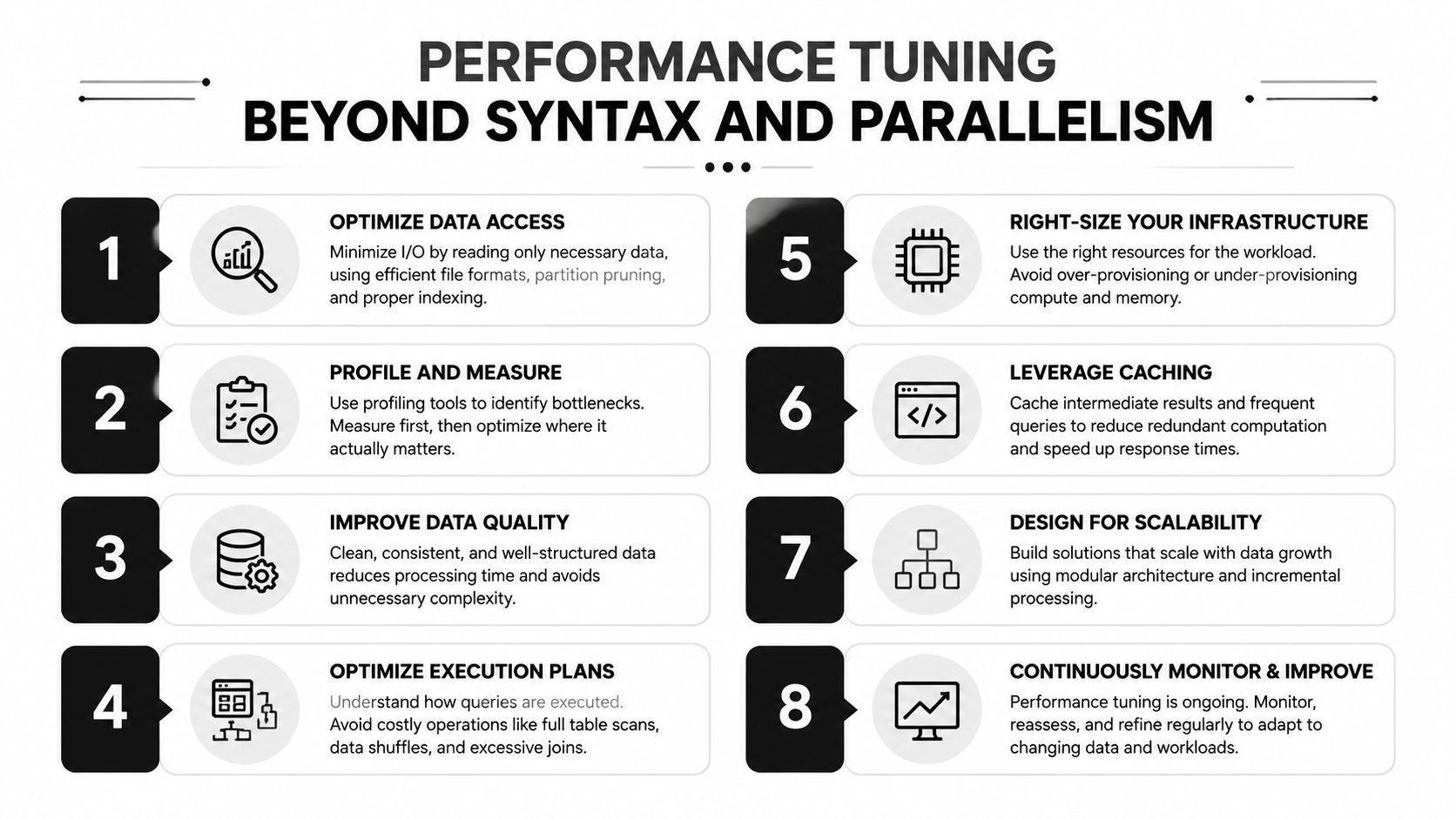
Performance Tuning Beyond Syntax and Parallelism
Parallel inserts are an attractive first move because they appear to use more available client and database capacity. In managed environments, they can also push the transaction log into its write-rate ceiling faster. Microsoft Q&A identifies transaction-log generation as a frequent bottleneck for high-volume Azure SQL bulk inserts and notes that Azure SQL imposes a hard log write-rate limit, so additional client parallelism can't overcome that platform boundary (Azure SQL throughput guidance).
For Azure SQL Hyperscale, the practical guidance in that discussion is to reduce concurrent bulk sessions, increase batches to 50,000 to 100,000 rows, and test TABLOCK on a dedicated heap staging table. Those values aren't a universal setting. They're a useful starting point when the platform is throttling sustained log writes.
Measure the ceiling you actually have
On PostgreSQL, inspect statement behavior with pg_stat_statements, then correlate it with WAL and storage observations. On SQL Server, sys.dm_io_virtual_file_stats helps expose file I/O behavior, while wait statistics can distinguish log flush waits from lock waits. MySQL teams can use Performance Schema to examine statement latency, waits, and file activity.
Track at least:
- Rows per second, separated by parsing time and database time.
- Transaction-log or WAL growth, including flush latency.
- Lock waits, especially when concurrent workers target the same indexes.
- Storage latency, because slow I/O can dominate an otherwise efficient loader.
- CPU and memory pressure, including managed-service DTU or vCore saturation.
Microsoft also warns that large buffer pools combined with slow I/O can worsen bulk-import performance. The infrastructure can therefore matter more than the syntax. A fast client connected to an undersized or storage-bound database still produces a slow load.
PostgreSQL tuning often involves WAL flush cadence and checkpoint distance. SQL Server tuning may involve BATCHSIZE and TABLOCK, particularly for heap staging tables where table-level locking can change logging and lock behavior. On any platform, prepared statement reuse and wire compression can reduce client and network overhead, but neither should be evaluated without log and storage measurements.
The fastest batch is the largest batch that stays below the platform's log, latency, memory, and rollback limits.
Average row width gives you a practical sizing lens. Narrow rows can support more records in a bounded buffer, while wide JSON payloads may require fewer rows per batch even when the row count looks modest. Size batches against transaction-log capacity and observed latency, then test a controlled increase. If log flush waits rise while client CPU remains low, stop adding workers and fix orchestration or capacity instead. For teams building operational risk systems, the same discipline applies to ingestion paths such as a custom flight-delay risk predictor.
Transactions, Indexes, and Error Recovery
Bulk loading into a heavily indexed production table can turn the index maintenance into the dominant workload. Every inserted row may update several index structures, enforce constraints, and fire triggers. If the load is large and the destination can tolerate a staged swap, dropping nonclustered indexes before loading and rebuilding them afterwards can be faster than maintaining them row by row.
That decision carries operational risk. The rebuild needs capacity, the table may be unavailable or degraded during the operation, and constraints must still protect data quality. Where the engine supports it, defer non-essential CHECK or foreign-key validation, but validate the complete dataset before making it visible to downstream workflows.
Choose transaction boundaries deliberately
Wrapping every row in a transaction is usually the wrong shape. Wrapping an entire multi-hour import in one transaction can create an enormous rollback surface and hold resources for too long. A better design groups several batches into a controlled transaction and uses savepoints where the driver and database support them.
The failure path should be explicit:
- Begin the transaction.
- Create a savepoint before the next batch.
- Load and validate the batch.
- Release the savepoint or commit the transaction group.
- Roll back to the savepoint when a recoverable batch error occurs.
- Record rejected rows with enough source identity to replay them.
A savepoint won't make a malformed record valid. It gives the loader a clean boundary so one bad batch doesn't poison all prior work.
Make reruns safe
Idempotency starts with a stable identity. Use a natural key or source-system identifier, load into a staging table, and then merge into the target according to an explicit conflict policy. In PostgreSQL, a staging insert can use ON CONFLICT DO NOTHING when duplicates should be ignored, or an upsert when newer source values should replace existing values.
A row-hash column adds another useful control. Hash the normalized source fields, store the result, and compare it during replay. This distinguishes an unchanged duplicate from a corrected source record without relying on arrival order.
| Engine | Drop before load | Defer constraints | Recommended approach |
|---|---|---|---|
| PostgreSQL | Consider removing secondary indexes on a staging table | Use supported deferrable constraints where appropriate | Load staging, validate, then merge or swap |
| SQL Server | Consider dropping nonclustered indexes for controlled offline loads | Use a staging boundary when constraints can't be deferred safely | Bulk load the heap, validate, rebuild or publish |
| MySQL | Evaluate secondary-index maintenance and table availability | Apply engine-supported validation controls carefully | Load an isolated table, reconcile, then promote |
| Oracle | Use SQL*Loader options and index strategy suited to the load | Follow constraint handling supported by the target operation | Separate ingestion, validation, and publication |
A loader can report success while still producing an incomplete business result. Check for row-count mismatches, sequence drift after COPY, missing downstream records, and rejected batches. Reconcile source and target with counts, grouped keys, and checksums. For operational systems such as an insurance operations dashboard, that reconciliation is part of correctness, not an optional monitoring enhancement.
Putting It Together in Production Pipelines
A production bulk loader should know the source shape, select a compatible transport, respect the database's sustained write capacity, and leave enough evidence to explain every rejected or committed row. The bottlenecks that remain after client-side tuning are usually transaction log pressure, managed-database write-rate limits, and interference from mixed production workloads.
Start with the source, not the SQL. Profile delimiters, encoding, header behavior, null conventions, timestamp fields, quoted newlines, row width, and expected key uniqueness. Choose the loader according to the transport. A native command with a staging table usually beats a streaming ORM when the input is clean CSV. Client-side batching still fits records arriving from APIs, AI classification workflows, or event-driven services.
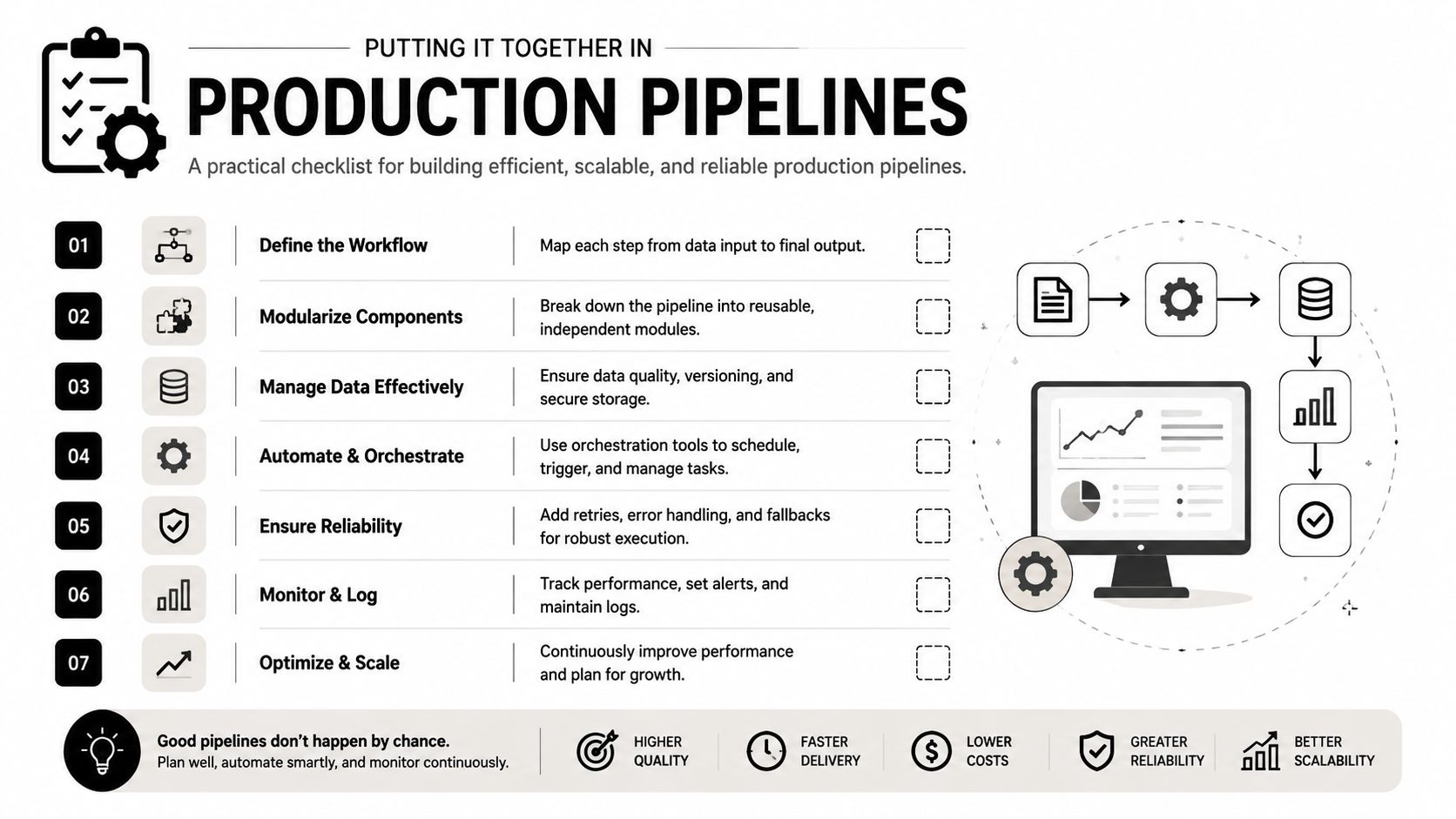
A practical release checklist
- Profile the input: Confirm schema, encoding, null markers, row width, and malformed-record behavior.
- Select the transport: Use
COPY,BULK INSERT,LOAD DATA, SQL*Loader, or a driver API according to file location and format. - Set batch size from evidence: Start with a controlled batch. Increase it until latency, memory, rollback cost, or the managed database's write-rate limit becomes the constraint.
- Protect the target: Use a staging table when indexes, constraints, or mixed writes make direct loading unsafe.
- Control concurrency: Add workers only while log pressure, lock waits, and storage latency remain healthy.
- Instrument the path: Record source rows read, accepted and rejected rows, commit boundaries, log pressure, retries, and elapsed database time.
- Reconcile before publish: Compare counts, keys, and row hashes before downstream jobs consume the dataset.
Benchmark results establish what a loader can achieve under test conditions. They do not predict performance beside reporting queries, operational writes, indexes, triggers, and a constrained cloud transaction log. Independent tests show that bulk operations can substantially outperform single-row patterns, while table locks, buffering, row shape, logging, and recovery configuration can change the result. Size batches against sustained write capacity, then retest with representative mixed traffic.
Escalate from a simple loader to a scoped custom build when managed-database throttling continues after batch and concurrency controls, or when the target's index footprint makes direct loading unsafe without a staged swap. The build then needs orchestration, observability, retry semantics, schema mapping, and publication rules aligned with the business workflow. A real-time lead-scoring pipeline is one example where ingestion timing, routing, and downstream publication must operate together.
AI-generated or AI-routed records require the same discipline. LLM workflows can classify requests, extract document fields, summarize handovers, identify missing information, and route exceptions. Their output still needs typed validation, provenance, and a replayable import path. EnterpriseBench covers 500 tasks across software engineering, HR, finance, and administrative work, and its experiments found state-of-the-art LLM agents completed 41.8% of tasks (EnterpriseBench research). Those results support guardrails, process ownership, and human review before generated records reach production tables. A cloud ERP study reported a 28% reduction in task completion time with an LLM-powered natural-language interface (cloud ERP interface study). That upside strengthens the case for usable internal tools, while validation and reconciliation still protect the database.
Define ownership, failure handling, validation, and publication before chasing another benchmark result. Research on enterprise LLM deployment emphasizes accuracy, reliability, cost, privacy, and operational constraints over benchmark scores alone (enterprise LLM workflow considerations). A review of AI process automation recommends starting with one representative task and defining its inputs, rules, outputs, exceptions, and owner before scaling (AI process automation review).
Internal Systems designs and builds custom data pipelines, operational software, and AI-enabled workflows that make bulk ingestion reliable across real business systems. Visit Internal Systems to scope a monitored loader, staging architecture, or end-to-end automation around your database limits and operating process.