Bug Report Template That Engineering Teams Actually Use
A practical bug report template with copy-paste fields, triage steps, and governance tips for custom software and AI workflow teams.
Tuesday morning starts with a queue nobody wants to own. Monday night's outage logs are still open, fifteen Slack messages describe the same symptom in different ways, an AI extraction step has mislabeled invoices, and a half-finished spreadsheet contains customer-reported bugs with no environment details. The product manager remembers the issue, support remembers the customer, and engineering has to reconstruct the incident from fragments.
A bug report template turns that noise into operational data. It gives support a consistent intake path, gives engineers the context needed to reproduce a defect, and gives automation something reliable to parse. For custom internal software and AI workflows, that structure matters because a report can become more than a ticket. It can become a routing signal, an evaluation record, an SLA event, and a training example for an AI-assisted triage system.
Table of Contents
- The Tuesday Morning Triage Queue and Why Templates Matter
- Field by Field Walkthrough of the Bug Report Template
- What Structured Reports Actually Buy Your Team
- Triage, Severity, and How to Route Reports Fast
- Minimal Intake Versus Full Enterprise Template
- Wiring the Template Into Your Stack and AI Workflows
- SLAs, Quality Metrics, and Governance for Ops Teams
The Tuesday Morning Triage Queue and Why Templates Matter
The first cost of an ad-hoc report is rarely the fix itself. It's the handoff. An engineer opens “invoice parser broken,” searches Slack for the original message, asks which build the reporter used, and discovers that the attached screenshot shows a different account from the one mentioned in the ticket. A second engineer starts a parallel investigation because nobody can tell whether the issue is new or a duplicate.
A consistent template prevents that drift by forcing the reporter to provide the core fields needed for triage: a clear title, reproduction steps, expected and actual behavior, severity, and environment details. Modern examples also add browser, operating system, affected feature, date, and frequency where those details improve reproducibility and prioritization, as shown in this bug report template example.
Practical rule: A report should let a different person reproduce the issue without asking the original reporter to narrate the incident again.
That standard is especially important in AI-enabled workflows. A report that says “the agent routed this wrong” is only a symptom. An actionable report identifies the input, model version, confidence score, expected route, actual route, and evidence from the orchestration layer. Without those fields, the engineering team can't separate a prompt problem from a retrieval failure, a stale model deployment, or a downstream integration defect.
The template also creates a useful record for automation. A component tag can assign the ticket to the platform team. A severity value can start an escalation timer. A structured model-version field can group incidents by deployment. A reproducibility value can tell an AI classifier whether the report is ready for active investigation or needs more evidence.
The best template isn't the longest form your team can design. It's the smallest operational contract that preserves enough context for the next action. The sections below treat the template as a working artifact, with practical fields, trade-offs, routing logic, and governance for teams that ship custom software or operate AI pipelines.
Field by Field Walkthrough of the Bug Report Template
A useful template makes every field answer one operational question. Keep the reporter-facing form short where possible, and let the system populate metadata automatically.
Core fields for every report
Title: Identify the feature, failure, and condition.
Admin panel example:Approval flow stalls after selecting a pending invoice.
AI workflow example:Billing intent routed to refunds model for invoice inquiry.Environment: Pin down where the defect appeared.
Admin panel:Staging, app build 4.8.2, Chrome, Windows, internal admin account.
AI workflow:Production, orchestration release 2026.03, model version invoice-router-v3.Steps to reproduce: Give numbered actions from a known starting state.
Admin panel:1. Open Pending Approvals. 2. Select invoice INV-1842. 3. Click Approve. 4. Confirm the modal.
AI workflow:1. Submit the attached invoice inquiry. 2. Run extraction. 3. Inspect intent and destination queue.Expected result: State the correct outcome.
Admin panel:The approval completes and the invoice moves to Approved.
AI workflow:The request is classified as Billing and sent to the billing queue.Actual result: Record what happened without guessing at the cause.
Admin panel:The modal closes, but the invoice remains Pending.
AI workflow:The request is classified as Refunds and sent to the refunds queue.Severity: Describe functional impact, such as critical, major, or minor.
Example:Major, a core approval action is blocked for affected users.Priority: Describe business urgency separately from impact.
Example:High, the workflow blocks a revenue-related customer operation.Reproducibility rate: Capture how often the issue occurs.
Example:3 out of 5 attempts with the same input and account state.
Evidence and ownership
Logs: Attach relevant application, console, network, or model-evaluation logs.
Example:Trace ID 8f21, tool call returned 200, classifier payload attached.Screenshot or recording: Show the failure state or the sequence that produces it. A short recording can be more useful than a long explanation when the defect involves UI state or agent behavior. Guidance on capturing visual proof and logs supports including evidence alongside the core fields.
Affected user count: Use a count when the system can provide it automatically.
Example:All users assigned to the invoice approval role in this workspace.Workaround: State whether users can continue safely.
Example:Approve from the legacy invoice list instead of the detail view.Reporter and triage owner: Identify who observed the issue and who owns the first review.
Example:Reporter: Support queue. Owner: Workflow platform triage.
AI and ML fields
For AI-driven pipelines, add data sample ID, model version, confidence score, and the original prompt or input payload. Mark sensitive payloads for controlled access rather than copying private customer data into an unrestricted ticket.
Make title, environment, reproduction steps, expected result, actual result, and evidence mandatory. Make logs, workaround, affected user count, and AI diagnostics conditionally mandatory based on the component. The full template should exist as a copy-paste block and downloadable Markdown version, while the capture form can expose only the fields the reporter needs at that moment.
What Structured Reports Actually Buy Your Team
Structured intake changes the economics of triage because engineers spend less time reconstructing context. A 2024 survey of 1,200 development teams reported that teams resolved bugs 63% faster when the initial report included reproduction steps, environment details, and a screenshot. The same source illustrates why form design needs judgment: a 3-field form had a 74% completion rate and an 18-minute average triage time, while a form with 10 or more fields had a 22% completion rate and a 3-minute triage time.
The trade-off is easy to miss. A long form can produce a fast review when someone completes it, but it can also suppress reporting. A short form encourages submissions, but it shifts discovery work to engineering. The right design depends on whether the reporter is a support specialist, an internal power user, an automated test, or an AI workflow that can populate metadata without human effort.
| Metric | Ad-Hoc Report | Structured Template |
|---|---|---|
| Reproduction | Context must be reconstructed from messages and memory | Numbered steps and environment create a repeatable path |
| Clarification | Questions often arrive across separate channels | Missing fields are visible at submission |
| Prioritization | Impact and urgency are mixed together | Severity and priority can be evaluated independently |
| Automation | Free text is difficult to route reliably | Fields can drive assignment, alerts, and classifiers |
| Analysis | Duplicate and trend detection is inconsistent | Component, model, and release data can be queried |
A quality model should treat completeness, readability, structure, and reporter reputation as measurable dimensions, rather than treating every filled field as equally useful. Research on bug-report evaluation also indicates that stack traces, attachments, and clear structure improve the chance that a report is actionable and routed correctly, as discussed in this empirical analysis of bug-report quality.
For custom operational systems, the practical payoff is a cleaner dataset. A lead-scoring workflow, for example, can distinguish a routing defect from a data-quality issue when reports consistently capture input IDs, workflow versions, and expected destinations. Teams building real-time lead scoring systems can apply the same discipline to bug intake, because both systems depend on structured events and reliable routing attributes.
Triage, Severity, and How to Route Reports Fast
Triage should begin as soon as a report arrives, but the first review shouldn't become an open-ended investigation. Use a short first-touch check to confirm that the report contains reproduction steps, the environment is identifiable, the evidence is accessible, and the issue describes one defect rather than several unrelated symptoms.
Then classify the report on two independent axes. Severity measures functional impact, such as data loss, a broken workflow, degraded behavior, or a cosmetic mismatch. Priority measures business urgency, such as a blocked revenue path, an AI safety threshold breach, or an approaching service commitment. A cosmetic defect can be urgent if it appears on a critical operational screen, while a severe defect in an isolated internal tool may receive a lower business priority.
A practical routing model
Use reproducibility as a routing signal, but define the bands according to your own operating context. One workable policy sends reports reproduced above 80% to the active sprint, sends reports between 40% and 80% for a clarification request with a 24-hour response clock, and tags reports below 40% as needs-evidence until the reporter supplies more context. Those thresholds are policy choices, not universal engineering standards.
| Severity | Priority | Repro Rate | Route To | Response SLA |
|---|---|---|---|---|
| Critical | High | Above 80% | Incident or platform owner | Immediate triage |
| Major | High | Above 80% | Active engineering sprint | Same operating day |
| Major | Medium | 40% to 80% | Triage lead for clarification | Clarification within 24 hours |
| Minor | Low | Below 40% | Evidence backlog | Review during scheduled triage |
Consider an AI support router that sends billing questions to a refunds model. The report should begin with the exact input or sample ID, identify the model and workflow versions, and show the expected billing destination alongside the actual refunds route. The triage lead can classify the issue as major severity because the workflow is broken, then raise priority to high because the affected path is tied to revenue operations.
The report belongs in the model evaluation queue, not only the application backlog. The owner should check whether the error comes from classification, retrieval, prompt construction, or destination mapping. A target fix window, evaluation case, and regression check should be recorded with the ticket so the eventual fix can be validated against the same input.
For teams supporting insurance operations dashboards, the same separation helps route defects by operational consequence. A display mismatch and a failed claim-handling action may share a screen, but they shouldn't receive the same escalation path.
Minimal Intake Versus Full Enterprise Template
A minimal form is not a poor template. It's a deliberate choice for situations where capture speed matters more than immediate analytical depth. The basic version asks for title, steps to reproduce, and expected versus actual behavior. That can work well for early-stage custom software, internal teams that sit close to engineering, or high-volume AI workflows where a long form discourages people from reporting edge cases.
The full version adds environment metadata, logs, severity, priority, reproducibility count, affected user count, screenshots, and component tags. It makes more sense when reports feed automated triage, SLA tracking, release analysis, or model evaluation. The extra fields create friction, but they also turn an isolated complaint into a record that can be filtered and compared.
| Field | Minimal Intake | Full Enterprise Template |
|---|---|---|
| Title | Required | Required |
| Steps to reproduce | Required | Required, numbered |
| Expected versus actual | Required | Required, separated |
| Environment | Added in follow-up | Required or auto-captured |
| Evidence | Optional | Required for applicable defects |
| Severity and priority | Assigned during triage | Reporter suggestion plus triage confirmation |
| Reproducibility | Added later | Captured at intake |
| Component tags | Assigned manually | Required or inferred |
| AI metadata | Added only for ML issues | Sample ID, model version, confidence, payload |
The choice should follow the bottleneck. If your team can't get enough reports into the system, start with the minimal form. If your team receives reports but spends its day asking for missing context, add fields or automate their collection.
A hybrid model usually works best for custom AI software. Let a reporter submit the short form, then enrich the ticket with session context, browser data, trace IDs, model version, and screenshots. The reporter sees a fast capture experience, while engineering receives the structured record needed for routing and diagnosis.
A template earns its place when the information it collects changes the next action.
Wiring the Template Into Your Stack and AI Workflows
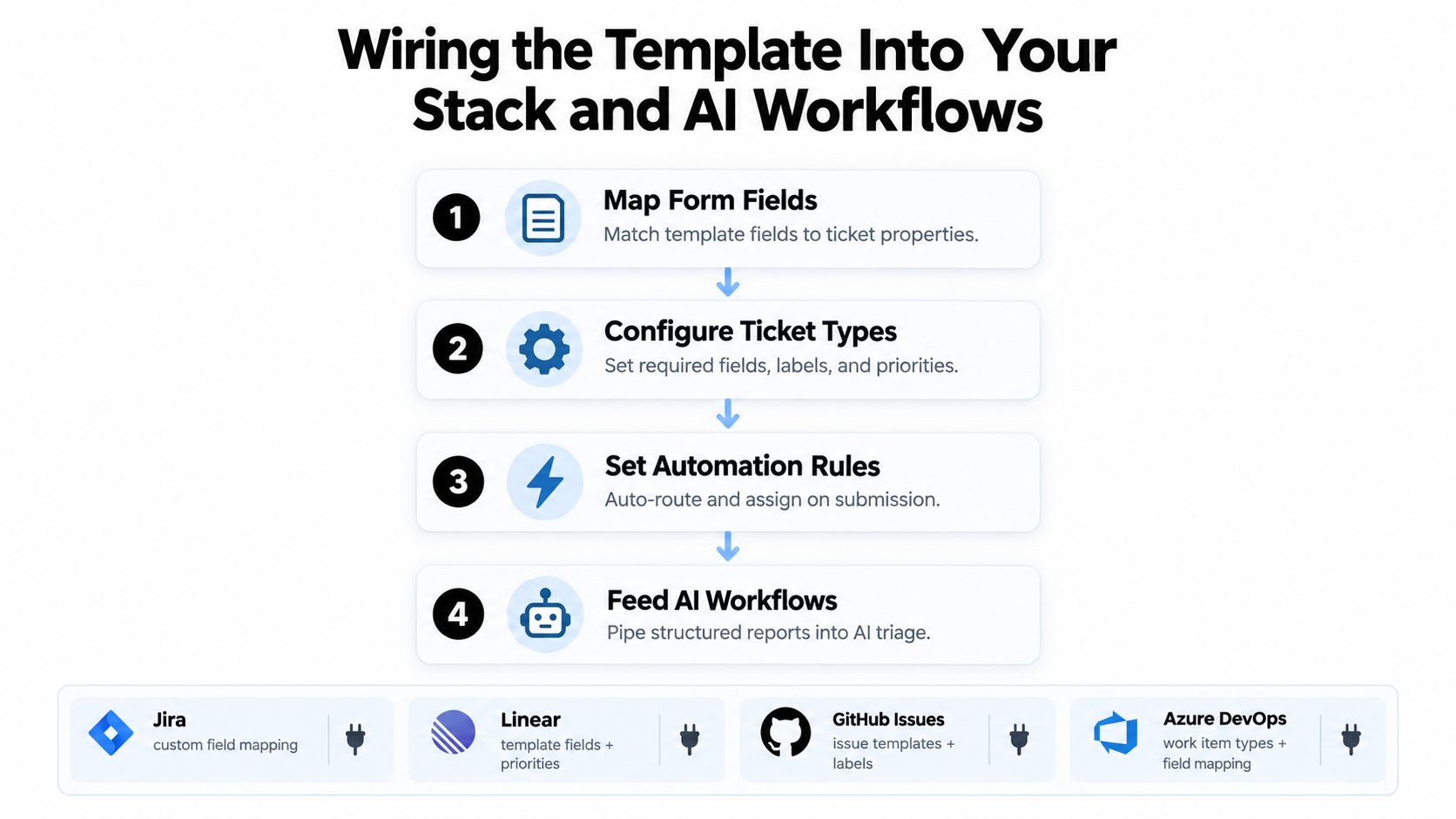
A static Markdown template becomes useful when its fields map directly to the systems that act on them. Start by creating one canonical schema, then map each field into Jira, Linear, GitHub Issues, or Azure DevOps. Don't create separate definitions for support, QA, and engineering unless the differences are intentional and documented.
Map the intake to the ticket
Create required fields for title, reproduction steps, expected result, actual result, environment, and component. Use conditional requirements for logs or model metadata, because a UI defect doesn't need the same evidence as an LLM routing error. Configure labels consistently, for example admin-panel, integration, agent-routing, and model-evaluation.
Then add the operational rules:
- Route by component: Assign admin-panel defects to the internal tools team, integration failures to the platform owner, and model behavior issues to the ML owner.
- Alert by severity: Send high-severity submissions to Slack or Teams with the ticket ID, impact, environment, and owner.
- Start SLA timers: Begin the relevant acknowledgement timer when the report enters the tracker, not when someone notices it in a chat channel.
- Detect duplicates: Compare normalized titles, component tags, trace IDs, and input sample IDs before creating a new investigation.
Add the AI layer carefully
An LLM can classify incoming reports into component, severity, and priority using the title, expected and actual results, reproduction steps, and logs. It can also draft a concise reproduction summary for the assigned engineer. The classifier should return structured fields and confidence, not a paragraph that someone must manually interpret.
Keep ownership explicit. A platform owner maintains the form schema, a triage lead maintains routing and escalation rules, and an ML owner maintains the classifier prompt and evaluation set. Teams evaluating whether to build or buy AI tooling should include schema ownership and feedback operations in that decision, not just model capability.
Guardrail: Require human review for every AI-classified report during the first 30 days, and log corrections as labeled feedback for classifier evaluation.
The workflow should preserve the original report, the AI classification, the human correction, and the final routing decision. That audit trail lets you identify systematic errors, such as the classifier confusing refunds with billing, without inadvertently turning bad labels into training data.
A short implementation walkthrough can help teams visualize the handoff from form submission to ticket enrichment, automated routing, and AI review.
SLAs, Quality Metrics, and Governance for Ops Teams
A bug report process needs an operating contract. Without one, the template becomes a form attached to an unowned queue. Define who acknowledges each severity tier, who can change priority, when a stale report escalates, and who verifies the fix in the affected custom software or AI workflow.
Use a small set of metrics that reflect report quality and flow. First-time completeness rate shows whether reports arrive with the fields needed for triage. Time to reproduce reveals whether the template and evidence are working. Stale-report percentage shows where ownership or prioritization is failing. For AI workflows, add evaluation coverage, model-version distribution, and the rate of human corrections to automated classifications.
The following matrix is a starting policy rather than a universal benchmark. Set the acknowledgement and resolution windows to match your contractual commitments, operational risk, and team capacity.
| Severity | Acknowledge Within | Resolve Within | Quality Metric | Target |
|---|---|---|---|---|
| Critical | Defined by incident policy | Defined by incident policy | Complete evidence and confirmed owner | 100% owner assignment |
| Major | Same operating day | Planned against business impact | Reproduction steps and environment present | High first-time completeness |
| Minor | Next scheduled triage | Planned maintenance window | Clear scope and component tag | Low stale-report percentage |
| Cosmetic | Scheduled review | Bundled with related work | Screenshot or precise affected element | Consistent categorization |
A simple quality score can combine field completeness, evidence availability, reproducibility clarity, and routing accuracy. Keep the formula stable long enough to compare teams and releases. Don't reward reporters for filling irrelevant fields, and don't use the score as a performance weapon. Its purpose is to identify friction in the intake system.
Monthly governance review
- Schema: Remove fields that no longer influence routing or diagnosis.
- Routing: Review misassigned tickets and update component rules.
- SLA flow: Examine acknowledged, resolved, reopened, and stale reports by severity.
- AI classification: Sample human corrections and add representative cases to the evaluation set.
- Evidence: Check whether logs, screenshots, trace IDs, and model metadata are accessible to the assigned team.
- Ownership: Confirm that the platform, triage, and ML owners still have clear decision rights.
Governance closes the loop between form design and engineering outcomes. A custom admin panel, an automated approval flow, and an LLM-based support router may need different evidence, but they can share the same principles: one defect per report, observable behavior, reproducible conditions, explicit impact, and an accountable owner.
Internal Systems designs and builds custom internal software, integrations, operational automations, and AI-enabled workflows that turn fragmented bug intake into a reliable operating process. If your team needs a template connected to triage, dashboards, SLA tracking, or model evaluation, visit Internal Systems to discuss the workflow.