Automating Email Responses: A Practical Playbook
Learn automating email responses the practical way. Build reliable workflows with AI triage, escalation controls, monitoring, and trustworthy automation.
Monday morning starts with an ops lead opening a shared inbox and finding hundreds of unread threads from customers, sales prospects, vendors, and colleagues. Some need only an acknowledgment. Others involve a billing dispute, a sensitive customer situation, or a decision no model should make alone. The hard part isn't writing a fast reply. It's deciding what deserves one, what can be answered safely, and what must reach a person.
Automating email responses works best as a communication-quality and data-governance system, not a send button with an AI model behind it. A dependable workflow separates acknowledgment, triage, drafting, and auto-send, then applies different controls to each. The result should be fewer missed messages and more consistent handling without sacrificing accuracy, privacy, or trust.
Table of Contents
- Why Speed Alone Will Not Save Your Inbox
- Designing Triggers, Integrations, and Intake Routing
- Reply-Worthiness, Classification, and Confidence Thresholds
- Privacy, Data Boundaries, and Review Controls
- Rollout Sequencing From Shadow Mode to Auto-Send
- Measuring Communication Quality, Trust, and Drift
- Your 90-Day Operating Plan and Common Failure Modes
Why Speed Alone Will Not Save Your Inbox
An immediate reply isn't necessarily a useful reply. If an automated message confidently answers the wrong question, exposes information from an internal system, or dismisses a complaint, the team has traded a visible queue for a harder-to-find problem.
Response speed does matter. In a 2018 test of 1,000 companies, 62% didn't respond to a prospect-style email, only 10% sent an acknowledgment, and responding companies took about 12 hours on average; the response-time test gives a concrete reason to improve first response without assuming every message deserves an instant final answer. Freshworks' customer research, summarized in the same verified findings, reported that email and web-support interactions saw a 9.6% drop in satisfaction for every 12-hour response delay, and average CSAT was 86.7 for companies responding within four hours versus 78.5 for slower responders. These results support prompt acknowledgment and clear routing, not blanket autonomous sending.
Start with the inbox, not the model
Before choosing a model or writing prompts, audit the inbox. Record the kinds of messages arriving, the action each one needs, and what the team did. Separate replies from messages that need a task, a handoff, or no response. Then distinguish transactional messages, such as status requests and document instructions, from relationship-sensitive communication, such as apologies, negotiations, and complaints.
A useful intent taxonomy should be small enough for staff to apply consistently and detailed enough to drive different actions. For example, a support inbox might label messages as pricing requests, order-status questions, acknowledgment-only messages, document requests, complaints, or unclear intent. Keep sensitive categories separate from routine requests from the start. Otherwise, an apparently good average score can conceal poor handling of the cases that carry the most risk.
Historical coverage can help set realistic expectations. In one evaluated email-answering system, 9 reusable answers addressed approximately 72% of incoming messages, while the most common inquiry represented 42% of messages; the review of automated email-answering research describes how simple categories can cover a repetitive support stream. That's a planning example, not a promise that another inbox will have the same distribution. The practical lesson is to find the repetitive, low-ambiguity categories in your own data and prove coverage before widening the scope.
Practical rule: Acknowledge broadly, answer narrowly, and route exceptions deliberately.
Write a scope engineering can build
A one-page scoping document should name the inboxes, supported intents, excluded intents, approved information sources, response owner, escalation destination, and success measures. Include example messages for each intent, along with the action expected for each. That gives engineering or a build partner an operational contract, rather than an open-ended request to “add AI to email.” For a useful view of how a purpose-built system can structure these workflows, see how SupportGPT handles email.
Designing Triggers, Integrations, and Intake Routing
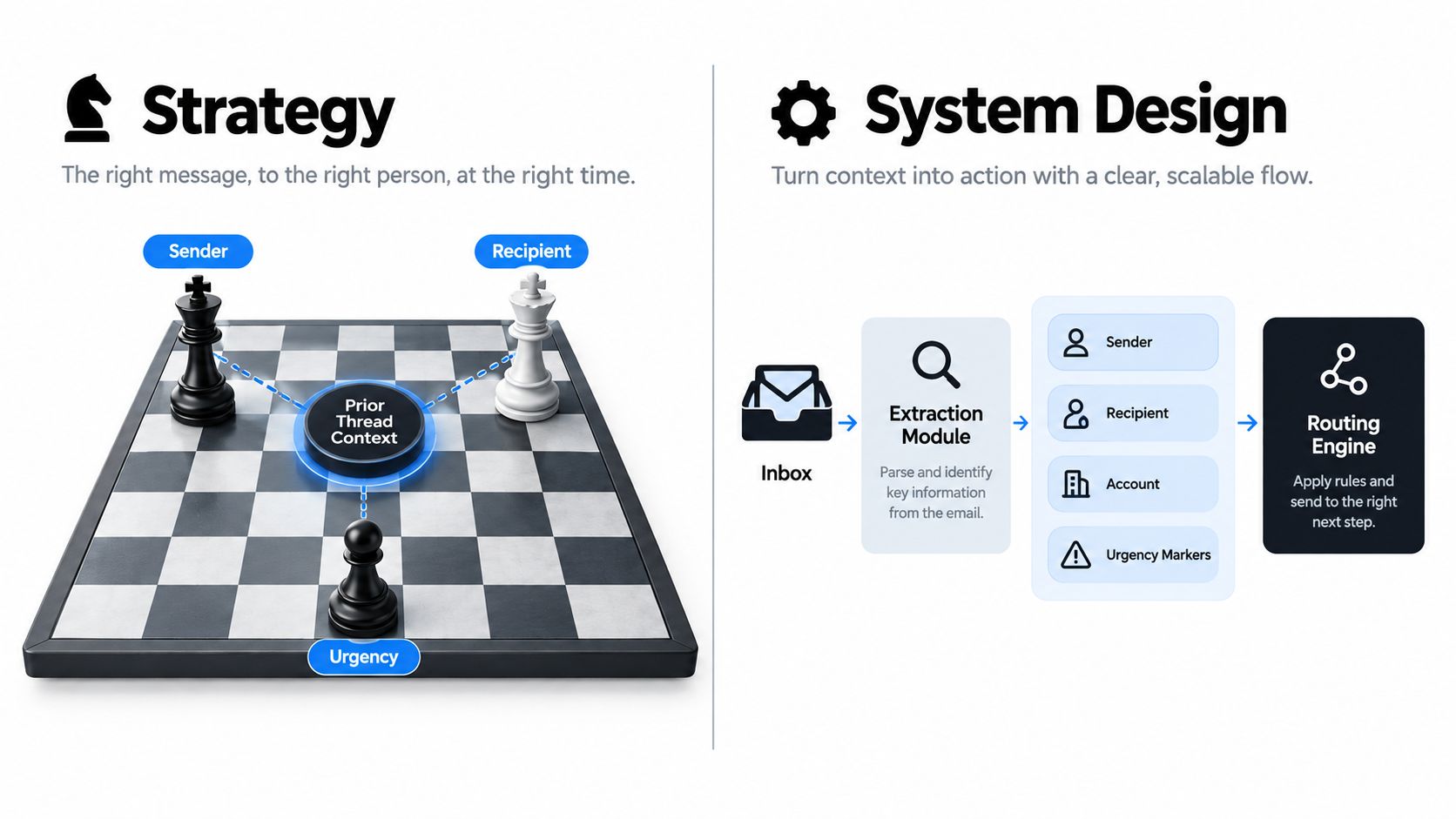
The system should capture an incoming message once, establish what it refers to, and route it before a model drafts a response. Build intake around a stable message identifier and a record of thread context so that retries or duplicate notifications don't create duplicate replies.
Extract fields before deciding what to do
At intake, capture sender, recipient, account or customer, urgency markers, thread history, and any attachment metadata needed for routing. Then enrich those fields from systems the team already relies on. A CRM can provide account status and assigned owner; a ticketing platform can expose open issues and priority; a document system can confirm whether a requested file exists; finance software can supply an approved payment status. Keep data access limited to what the intent requires.
Treat synchronization as part of the design, not a later enhancement. If the email agent can read an account record but can't see whether it changed, it may produce an outdated answer. If it can update a ticket but not record that update against the email thread, humans lose the audit trail. Teams mapping event-driven workflows can compare this approach with an example of real-estate lead automation.
Choose a routing pattern that exposes failure
| Pattern | Latency | Failure Visibility | Best Fit |
|---|---|---|---|
| Event-driven webhook | Usually low | Good if retries and dead-letter handling are logged | A platform that reliably emits message events |
| Polling | Depends on polling interval | Straightforward when each scan is recorded | Systems with limited event support |
| Middleware queue | Depends on queue and consumers | Strong when retries, backlog, and errors are monitored | Multiple services, complex routing, or bursty traffic |
Billing disputes, legal language, security disclosures, and complaints need distinct labels at intake. This prevents a routine-response path from treating a high-risk message as ordinary. For a broader implementation perspective, the AgentStack email automation guide is a useful reference for connecting triggers and response workflows.
Reply-Worthiness, Classification, and Confidence Thresholds
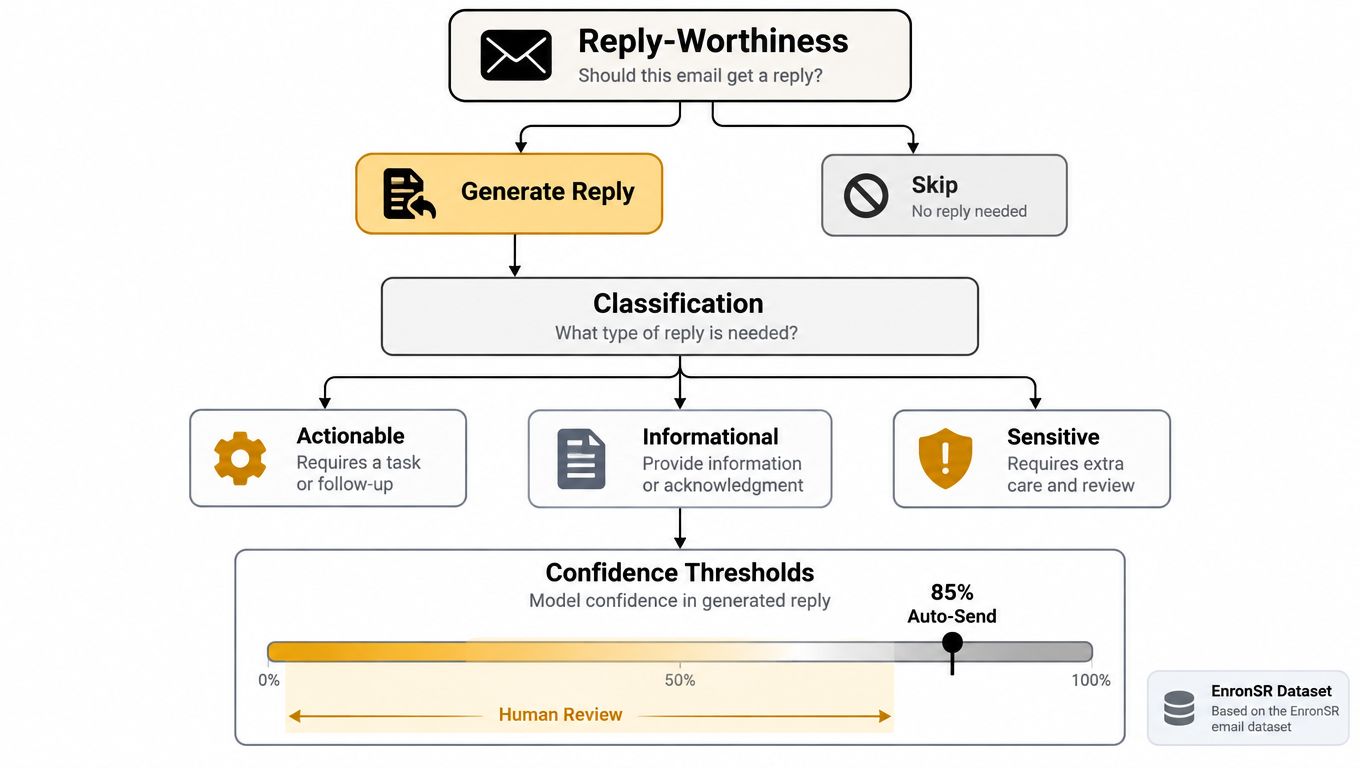
An automated reply to a notification creates noise; a missed customer request leaves work unattended. Before drafting, a reply system must answer Should this message receive a reply? Then it can decide what should that reply say? Combining those decisions lets fluent text conceal a routing mistake.
On the EnronSR benchmark, Google Smart Reply achieved 68.0% accuracy when detecting whether a human reply would occur, but missed 63.6% of messages that did receive a human reply and suggested responses for 60% of messages that didn't receive one, according to the EnronSR benchmark paper. Topic classification and reply-worthiness need separate evaluation: knowing what a message concerns doesn't establish whether answering it is appropriate.
Measure errors that matter
Evaluate reply-worthiness using precision, recall, false-positive rate, and calibration. Precision measures whether selected messages warrant responses. Recall exposes requests the system misses; false-positive rate tracks unnecessary replies. Calibration checks whether stated confidence matches observed performance.
Split a representative dataset chronologically to reflect incoming messages after earlier training examples. Label outcomes as replied, ignored, escalated, or resolved through another channel. Treat those labels as operational evidence, since a historical reply isn't automatically the correct policy decision. Review results by intent and sensitivity so an aggregate score doesn't conceal failures in consequential categories. Teams designing comparable scoring layers can examine real-time lead scoring work.
Set thresholds by risk
Confidence is not permission to send.
A global threshold simplifies configuration but treats unequal consequences alike. Routine acknowledgments may qualify for auto-send, while refunds, legal commitments, security reports, and complaints should default to escalation. Set thresholds by intent, and define whether uncertain cases receive further classification or human review. Keep that decision separate from how convincing the draft sounds.
Model choice can follow the same risk boundaries. Stanford's 2025 AI Index reports that querying a model with GPT-3.5-equivalent MMLU performance fell from $20 per million tokens in November 2022 to $0.07 per million tokens by October 2024, a reduction of more than 280 times, with further inference-cost declines varying by task. A tiered design can use a lower-cost model for routine classification or template selection and reserve stronger models or human judgment for uncertainty. Lower cost changes the economics of review, not the consequences of an incorrect reply.
Privacy, Data Boundaries, and Review Controls
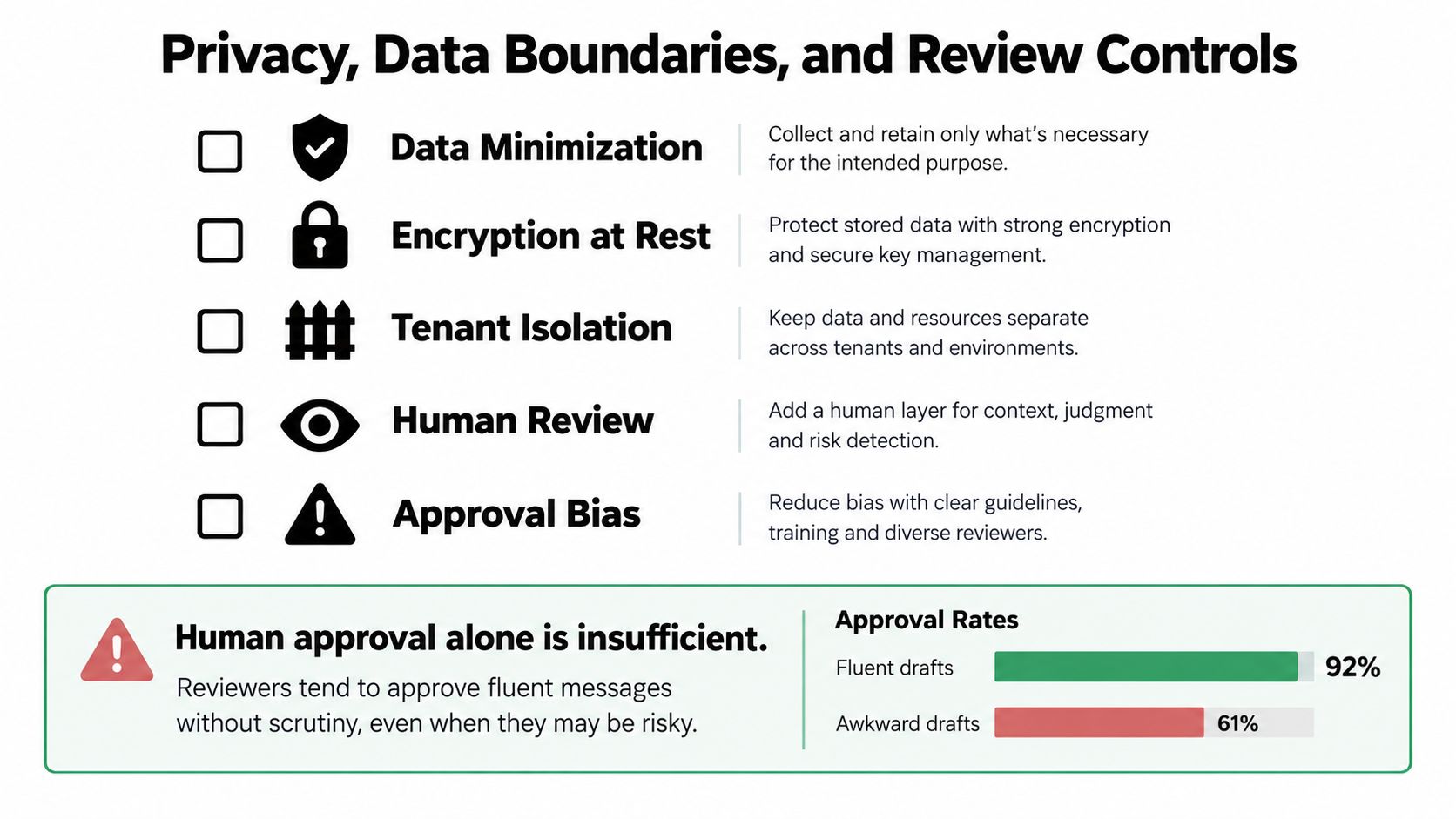
Human approval doesn't guarantee a reply protects private information. A reviewer can approve fluent text without noticing that it includes an unnecessary internal note, personal detail, or commercial fact drawn from a connected system.
A task-based study of 300 participants found that people sometimes preferred an AI-generated reply with more privacy leakage than a human-written alternative. Harmful disclosure increased from 15.7% to 55.0% when participants evaluated the agent response; the study on privacy leakage in AI-generated replies challenges the assumption that a human in the approval loop is a sufficient safeguard.
Put privacy controls before generation
Classify sensitivity at intake, then reduce the context the model sees. Redact personal or confidential details that aren't needed to answer the request. Restrict each workflow to approved data sources, so a response about delivery status can't pull in unrelated finance or HR information. Make external recipients, legal matters, financial details, and attachments require explicit review.
For every generated reply, record which source data and policy path informed it. That makes it possible to investigate a disclosure, identify the integration or rule involved, and correct the workflow. Keep the approval interface useful for that task: show the proposed reply alongside the relevant source facts and highlight sensitive content, rather than asking reviewers to trust a fluent paragraph on its own.
Before enabling auto-send, confirm that the workflow can:
- Minimize context: Send only the message history and fields needed for that intent.
- Enforce boundaries: Limit which connected systems and records the model can access.
- Require review: Escalate legal, financial, sensitive, or external-recipient cases.
- Preserve evidence: Log the source data, classification, and action for each reply.
- Support recovery: Provide a way to pause automation and correct or reverse actions where possible.
Human review is a control, not a substitute for data minimization.
Rollout Sequencing From Shadow Mode to Auto-Send
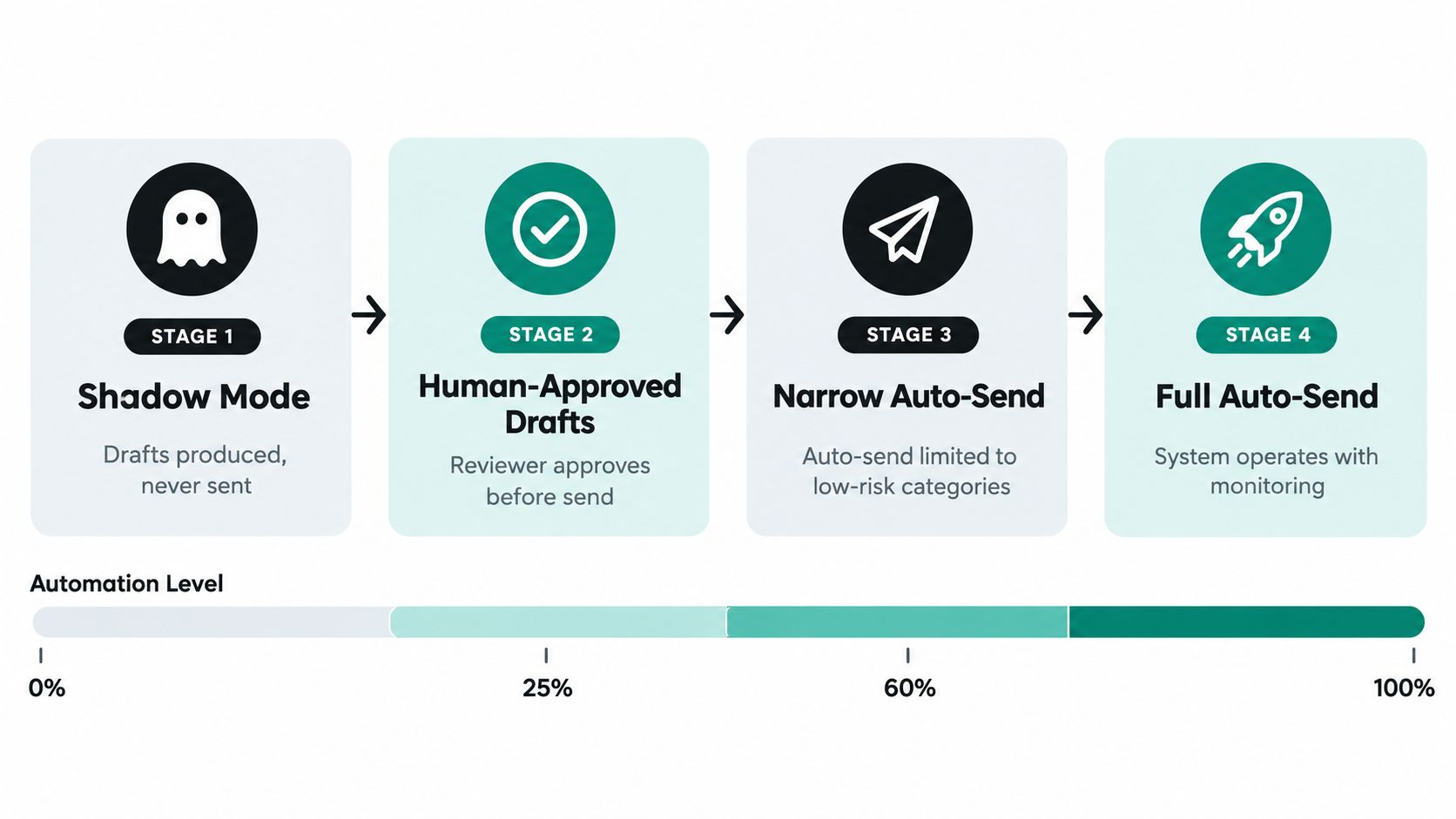
Don't launch autonomous sending across an entire inbox. Roll out one intent at a time, and make every stage earn the next one through measured behavior. Before moving forward, define the evaluation window, the message sample, the acceptable error level for that intent, and who can halt the workflow. The required threshold should be stricter for higher-risk categories.
Advance only when the evidence supports it
Shadow mode: The system classifies messages and produces drafts, but sends nothing. Compare its decisions with human outcomes, inspect misses and false positives, and fix labels or routing rules before the model influences customers.
Human-approved drafts: Reviewers approve, edit, or reject every proposed reply. Track how often people change the response and why. Frequent edits signal a problem with context, policy, or tone, not a need to persuade reviewers to approve faster.
Narrow auto-send: Enable sending only for tightly defined, low-risk intents that have passed the agreed quality gates. Keep all uncertain, sensitive, and out-of-scope messages on human review.
Expand by evidence: Add intents only after the current scope remains reliable under ongoing sampling. If routing errors rise, a connector fails, or reviewers report a serious disclosure, pause auto-send and return to the previous stage.
Assign one named workflow owner per inbox. That owner maintains response policy and escalation rules, reviews samples, and watches auto-send rate, human-edit rate, incorrect-routing rate, and unresolved-message age. Microsoft's 2025 Work Trend Index found that 67% of leaders were familiar or extremely familiar with AI agents, compared with 40% of employees; the Work Trend Index on the rise of AI agents underscores why teams need enablement and a clear owner, not just deployed software. A staged agent workflow can also be considered alongside client-portfolio agent work.
Measuring Communication Quality, Trust, and Drift
Response time is easy to count, but it can't tell you whether recipients trust the message or whether the system is making communication worse. A fast, impersonal answer may close a queue item while prompting the recipient to write again, opt out, or escalate.
A 2025 study of 1,100 professionals found that only 40%–52% viewed supervisors as sincere when they used high levels of AI assistance, compared with 83% for low-assistance messages. Perceived professionalism also fell from 95% for low-AI messages to 69%–73% for heavy AI use; the study on AI-assisted workplace writing points to a practical boundary: routine transactional and informational messages are better automation candidates than relationship-sensitive ones.
Give trust its own scorecard
Keep apologies, negotiations, performance conversations, escalations, and messages to strategic clients under human authorship. Automate suitable acknowledgments, status updates, scheduling, and structured intake responses. Then monitor quality by message type and recipient group, rather than letting a healthy average hide a poor result for one audience.
Track correction rate, escalation rate, recipient sentiment, opt-out requests, repeat-contact rate, and privacy incidents alongside first-response time. Define a pause condition for each measure before launch. For example, any confirmed privacy incident can trigger an immediate stop; a sustained rise in corrections or repeat contacts can return an intent to human approval while the team investigates. The exact threshold depends on the organization and risk, so set it from observed baseline performance rather than inventing a universal benchmark.
Review drift weekly. Compare message types, sender groups, language, departments, and volume against the operating baseline. A changing mix of inquiries can make a previously reliable template or classifier unsafe without any code change. Keep decisions traceable: the owner should be able to identify what shifted, which intent was affected, and whether the remedy is a better rule, revised data access, or a return to human review.
Your 90-Day Operating Plan and Common Failure Modes
A practical rollout fits into a clear operating rhythm. In the first month, audit inboxes, label representative examples and outcomes, agree on sensitive categories, and document the response policy and integrations. In the second month, run shadow mode and then human-approved drafts, recording edits, misclassifications, and escalation reasons. In the third month, enable controlled auto-send for proven low-risk intents and review drift weekly.
The calendar isn't the success criterion. The system advances only when its owner can show that the selected intents meet their quality gates and that sensitive cases route correctly. Microsoft's 2025 Work Trend Index reported that 46% of leaders said their organizations were fully automating workflows with AI agents, while 50% reported using agents to automate workstreams or processes for entire teams or functions; the 2025 Work Trend Index report provides context for treating agent automation as an operational workflow, with ownership and controls, rather than a standalone chatbot.
Expect production failures and plan for them
- Intent drift: New inquiry types weaken old classifications. Sample recent traffic and add or revise labels before expanding coverage.
- Template fatigue: Recipients see repeated, generic wording. Refresh approved language and use thread-specific facts only when verified.
- Reviewer habituation: People approve drafts without close inspection. Rotate samples for deeper review and highlight sensitive fields.
- Connector outages: Context goes stale or messages fail to route. Detect missing events, retry safely, and alert the workflow owner.
- Prompt injection: A message may contain instructions designed to override policy. Treat email content as untrusted input and enforce system-level permissions outside the model.
- Mis-routed escalations: Difficult cases repeatedly reach expensive processing paths. Investigate routing rules and keep an explicit human fallback.
FAQ
How should we estimate cost? Count model calls, average message length, integration work, monitoring, and human review. Stanford's documented cost trend makes tiered model use worth evaluating, but your actual cost depends on the workflow and the share of cases escalated.
Who owns the system? Name one inbox workflow owner responsible for policy, sampling, escalation rules, and performance review. Engineering owns reliability; operations owns the communication outcome.
Should we buy or build? Use an existing product when its permissions, integrations, and review controls fit the workflow. Custom software makes more sense when the process depends on organization-specific routing, sensitive data boundaries, or systems that off-the-shelf tools can't safely coordinate.
When should we retire it? Pause or remove automation if quality gates keep failing, privacy controls can't be demonstrated, or the workflow adds more review burden than it removes. Preserve logs and policies, return affected intents to human handling, and document the reason for retirement.
Internal Systems designs and builds custom software, system integrations, and AI-enabled operational workflows, including classification, routing, and human-reviewed response generation. If your email process spans disconnected tools or sensitive decisions, visit Internal Systems to discuss a scoped audit or custom system build.