Autocomplete Address API: A Practical Integration Guide
Choose and integrate an autocomplete address API with confidence. Covers provider criteria, client and server flows, validation, and monitoring tips.

A customer types an address into an operations dashboard, selects the first suggestion, and moves on. Later, the shipping label fails, the CRM stores an incomplete unit number, or a fraud rule receives a location that was never confirmed as deliverable. The autocomplete dropdown looked successful, but the system accepted an unresolved address.
That's the integration problem. An autocomplete address API can reduce typing and guide users toward structured locations, but it isn't a complete address pipeline. Reliable implementations connect suggestion search, session management, server-side validation, observability, and operational fallbacks into one controlled flow.
Table of Contents
- Why Address Autocomplete Deserves a Real Integration Plan
- Turning Business Needs Into Provider Requirements
- Comparing Autocomplete Address API Providers
- Wiring Up Client and Server Integration Flows
- Designing UX, Validation, and Edge Case Handling
- Testing, Monitoring, and Performance Tuning
- Deployment Checklist and Ongoing Maintenance
Why Address Autocomplete Deserves a Real Integration Plan
Address autocomplete is often introduced as a small interface enhancement. A developer adds a JavaScript widget, binds it to a form field, and considers the work finished. That approach can function for a narrow customer-facing form, but internal systems usually send the captured address to several downstream processes, including shipping, billing, fraud screening, routing, CRM enrichment, and regulatory reporting.
The risk appears when each consumer interprets the provider response differently. One system may store a formatted string, another may expect structured components, and a third may assume that selecting a suggestion proves deliverability. The result is technical debt disguised as convenience.
A 2024 independent analysis of more than 5,000 ecommerce sites found Google Places-based address autocomplete in 73% of implementations and reported that autocomplete could cut manual entry by 30%. The analysis positioned the feature as a high-confidence checkout optimization pattern, not an unusual enhancement, as described in the ecommerce checkout optimization analysis. That adoption makes provider selection important, but it doesn't remove the need for system design.
Separate suggestion search from address assurance
Autocomplete answers, “What location might this person mean?” Validation answers, “Does this address refer to a real, deliverable place, and how should we standardize it?” Those are different decisions and should have different API calls, error states, logs, and ownership.
Google's address-capture example makes the distinction clear. Places autocomplete returns places as the user types, while Address Validation determines whether the address refers to a real deliverable place and normalizes it for mailing.
Treat billing as part of architecture
Provider pricing can depend on how a session is opened, continued, and terminated. Google's newer Places API bills each Autocomplete request in a session under a dedicated Autocomplete Session Usage SKU. A session can also include an optional Place Details Essentials request at no charge if it happens before the terminating Address Validation request, according to Google's session pricing documentation.
That means the frontend, backend, and analytics layer need a shared session identifier. Without one, finance may see unexplained usage, while engineers lose the ability to connect keystrokes, suggestions, selection, and validation.
Design for failure before launch
Provider outages, regional coverage gaps, quota exhaustion, slow responses, and malformed results are normal integration risks. Decide in advance whether the form will fall back to manual entry, switch to a secondary provider, or allow submission into a review queue.
Practical rule: A slow autocomplete service must never block a user from entering an address manually.
The requirements document should therefore include provider evaluation, session billing, security boundaries, validation behavior, and observability. The feature may begin in a checkout field, but its data contract should be designed for every operational system that will consume the result.
Turning Business Needs Into Provider Requirements
Start with the business workflow, not the vendor catalog. “We need a fast and global autocomplete address API” sounds useful, but it gives an engineering team nothing objective to test. Convert that request into a specification that product, finance, legal, and operations can score together.
Write the requirements matrix first
Record the target markets and the address structures users submit. A US residential address, a Dubai office tower, a European apartment, and a rural delivery location may require different fields, ranking behavior, language handling, and unit capture.
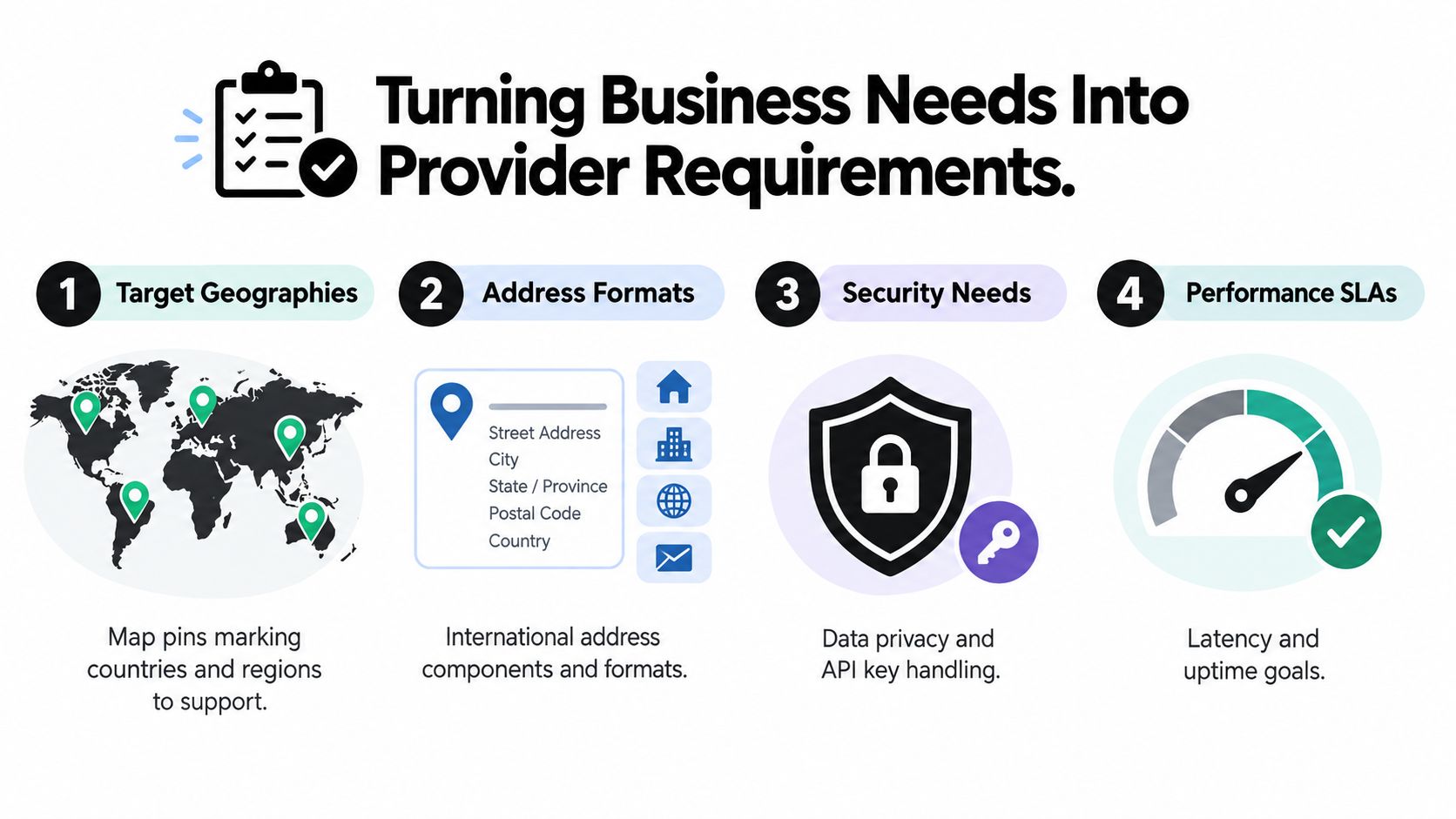
Capture these requirements explicitly:
- Geography: List the countries, territories, cities, postal areas, and delivery zones that must work at launch.
- Address structure: Identify required components, such as building number, street, locality, postal code, apartment, suite, floor, or landmark.
- User context: Record whether users type in a browser, mobile application, internal dashboard, call-center tool, or AI-assisted workflow.
- Downstream use: Name every consumer, including shipping labels, tax calculation, CRM records, fraud models, routing, invoicing, and compliance reports.
- Performance: Define acceptable suggestion latency, validation latency, timeout behavior, and the maximum delay before the interface feels unresponsive.
- Privacy: Document retention, regional processing, caching restrictions, access controls, and whether raw queries may enter application logs.
- Accuracy: Decide what counts as a usable suggestion and what requires manual review or a validation retry.
A real-estate lead workflow, for example, may prioritize locality and property context, while a shipping workflow needs precise delivery components. Teams designing those systems can use the real-estate lead automation project as a useful reference point for thinking about location data as part of a broader operational pipeline.
Ask the questions stakeholders avoid
Product should clarify whether users select known places, complete full addresses, or frequently submit free text. Finance should explain whether the company prefers predictable session pricing or accepts variable request billing. Legal should define data-processing and retention constraints. Operations should identify the errors that create failed deliveries, duplicate records, or manual investigations.
Produce three concrete artifacts before provider demos:
- A one-page requirements matrix with measurable acceptance criteria.
- A sample query trace showing input, suggestions, selection, validation, storage, and downstream events.
- A session-billing estimate based on the intended interaction model, including abandoned searches and retries.
Those artifacts turn vague priorities into a provider scorecard. They also expose disagreements early, before a team commits to an API that satisfies the frontend but fails the operational workflow.
Comparing Autocomplete Address API Providers
A provider that looks strong in a demo can still fail in production. Test subpremise precision, regional ranking, privacy terms, session billing, and backend controls against the workflows that depend on address data. Use a weighted decision matrix rather than a feature checklist.
Autocomplete Address API Provider Comparison Matrix
| Criterion | What to Measure | Why It Matters | Common Gotcha |
|---|---|---|---|
| Country and POI coverage | Address, postal, landmark, and point-of-interest support in each target market | Internal tools often mix addresses with facilities, branches, and landmarks | Global coverage can hide uneven performance in specific regions |
| Suggestion accuracy | Ranking quality, spelling tolerance, language matching, and house-number precision | Poor ranking creates selection errors and frustrates operators | A polished dropdown can still return incomplete or incorrect components |
| Billing model | Per-keystroke, per-request, per-session, details, and validation charges | Usage must map to completed workflows and finance forecasts | Per-keystroke billing can raise costs when users type slowly or abandon searches |
| Service levels | Published uptime commitments, response-time expectations, quotas, and regional behavior | Operations needs predictable failure handling | An SLA may cover availability without guaranteeing useful latency or coverage |
| Privacy and retention | Query retention, caching permissions, regional processing, and deletion controls | Address data may contain personal or commercially sensitive information | Strict terms can prevent caching or replaying raw queries for support |
| SDK support | Web, iOS, Android, backend libraries, and version stability | Consistent behavior limits duplicated implementation work | A strong mobile SDK may offer weak server-side tooling |
| Server integration | REST quality, authentication, session support, webhooks, validation handoff, and payload control | The backend must enforce policy and protect downstream systems | A client-only implementation can expose credentials or bypass internal controls |
Autocomplete and validation should be scored as separate capabilities, even when a provider sells them together. Autocomplete helps a user choose a likely address. Validation checks whether the selected address is deliverable and returns the structured result your operational systems can trust. Combining those steps may change the billing model and the data flow.
Google's current stack shows why session economics need their own test. The next-generation Autocomplete announcement gives a pricing example of $25 per 1,000 sessions for a combined Autocomplete and Address Validation flow, compared with $32 per 1,000 sessions when the products are purchased separately. This is provider-specific, but it demonstrates how the boundary between suggestion, selection, and validation can affect cost. Model abandoned searches, retries, and sessions that never reach validation.
Weight the matrix by workflow
Checkout-heavy systems may assign more weight to latency, session economics, mobile behavior, and abandonment recovery. Logistics systems should prioritize house-number precision, delivery-zone coverage, structured output, validation, and fallback routing. Internal dashboards often need auditability, role-based access, retention controls, and a safe way to replay failed requests without exposing raw queries.
Record provider, region, query fixture, response time, selected suggestion, and structured components during testing. That evidence helps operations distinguish provider coverage problems from client bugs or malformed data. It also gives finance a defensible basis for estimating usage.
Score two or three vendors against the same fixture set, then run a paid proof of concept through real application flows. A build-versus-buy decision should include ownership of monitoring, provider changes, test fixtures, and incident response, not only API price. The build-versus-buy comparison for AI tooling provides a useful framework for comparing ongoing maintenance with initial implementation.
Wiring Up Client and Server Integration Flows
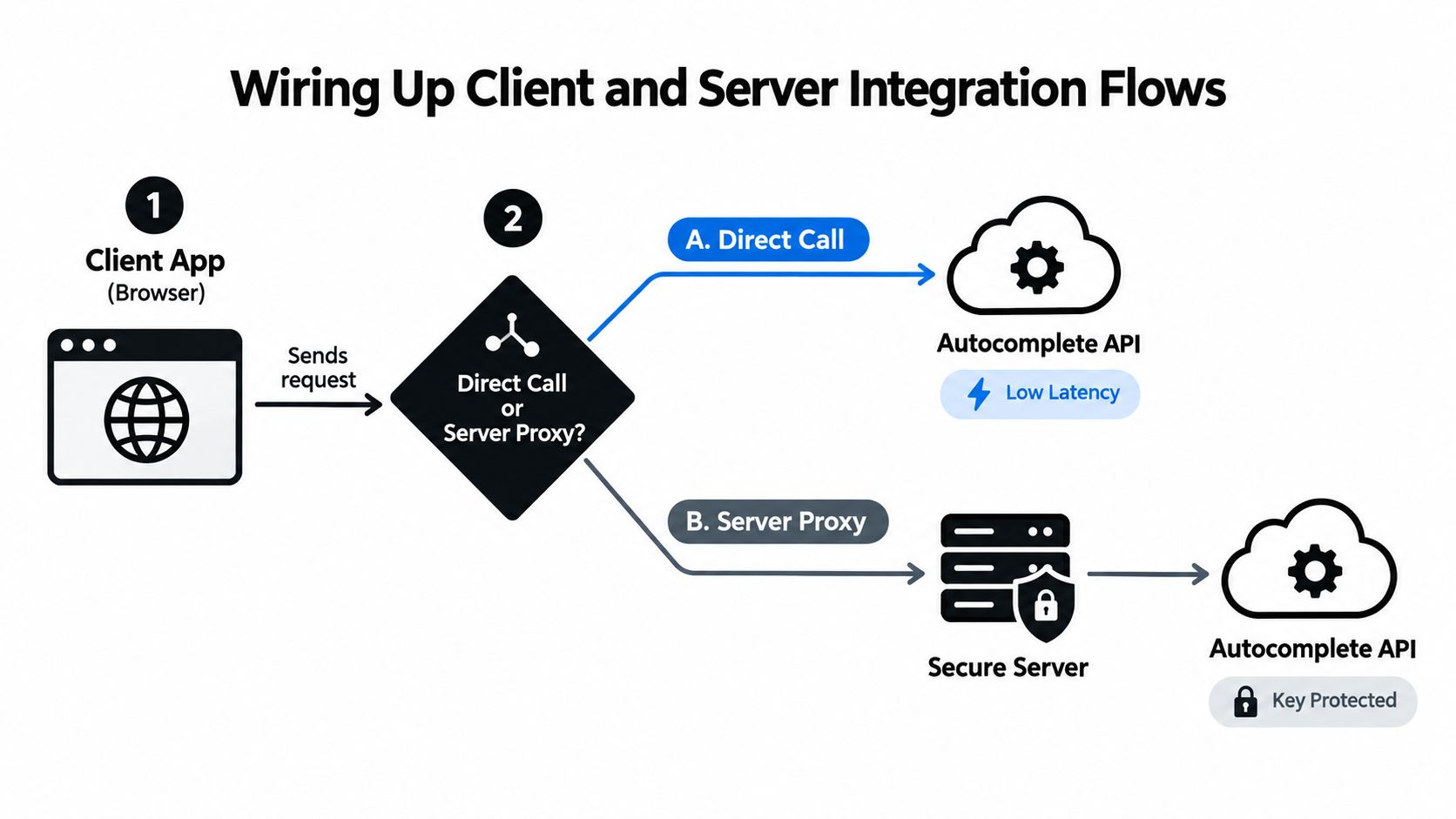
There are two practical topologies for an autocomplete address API. A client-direct call sends requests from the browser or mobile app to the provider. A server-proxied flow sends the query to your backend first, where the application controls credentials, policy, logging, and provider selection.
Client-direct requests can reduce network hops and simplify the first implementation. They also expose a browser-restricted key and make it harder to enforce consistent rate limits, redact sensitive queries, or switch providers without releasing a new client.
A server proxy gives the engineering team more control. Use it when the address feeds internal systems, when provider credentials need stronger protection, or when the organization must apply country restrictions and audit rules centrally. Per-session tokens issued by the backend can preserve session billing without handing broad provider authority to the client.
Shape the request deliberately
The client should send only what the service needs, such as:
- Query text: The current input after the interface has enough characters to produce useful results.
- Session identifier: A stable identifier shared by suggestion, selection, details, and validation events.
- Country filter: A restriction when the workflow has a known operating market.
- Locale: The user's language and formatting preference.
- Bias coordinates: A permitted location signal when proximity should influence ranking.
- Workflow context: A non-sensitive label such as shipping, billing, dispatch, or lead intake.
The frontend can begin querying after 3 to 4 characters and debounce keystrokes by 150 to 250 milliseconds when that behavior fits the provider and user experience. These values belong in configuration, not scattered through components, because different markets and workflows may need different tuning.
Protect the provider and the form
Apply a token-bucket rate limiter at the edge or backend. Use short-lived caches for repeated normalized prefixes where the provider's terms permit caching. A Redis key can include country, locale, normalized prefix, and a coarse location bias, but avoid storing raw personal data longer than necessary.
Return a controlled response shape to the client. Include an internal request ID, provider status, suggestions, and a flag indicating whether the result is partial, stale, or unavailable. Never expose provider-specific fields to every downstream consumer by accident.
Timeouts should produce an empty suggestion state, not a frozen input. Let the user continue with manual entry, record the timeout, and let server-side validation decide whether the submitted address can proceed. If the provider supports server-side verification callbacks, use them for workflows that need an asynchronous confirmation rather than forcing the user to wait inside the form.
Designing UX, Validation, and Edge Case Handling
The dropdown is a suggestion tool, not a proof of address quality. Many failed implementations copy the selected label into a database and treat the interaction as complete. That breaks when a result lacks an apartment, represents a broad place rather than a point address, or reflects a stale location record.
Use a selection contract that preserves the provider's stable place reference, structured components, display label, country, and the original user input. Then send the selected result through backend validation before issuing a shipping label, approving an account, updating a CRM record, or triggering an automation.
Google's Address Validation API overview describes a workflow that validates components, standardizes the address for mailing, returns the best known latitude and longitude, and flags potentially incorrect components for correction. That makes validation a distinct control point rather than a cosmetic formatting step.
Make the dropdown usable under pressure
Operators often work faster than consumer users, so keyboard and focus behavior matter. Support arrow-key navigation, an explicit selection state, readable secondary address lines, and a clear distinction between a locality, landmark, road, and complete address. On mobile, a dedicated selection sheet can prevent the keyboard from obscuring results.
Don't overfill the list. Show enough context to distinguish similar addresses, but keep the result payload small and the visual hierarchy stable. A user choosing “Main Street” needs locality and country context. A user choosing a complete building address needs the house number and postal information visible before selection.
Design for imperfect addresses
P.O. boxes, rural routes, new subdivisions, multi-tenant buildings, and local-language spellings can produce partial or zero-result searches. An address in a MENA or APAC workflow may not follow the field order expected by a Western checkout form. Global solutions therefore need broad coverage, structured and single-line return options, and multilingual support. Recent provider comparisons also identify coverage across 200+ countries and 200+ languages as a differentiator, as discussed in Melissa's address autocomplete coverage guidance.
Offer a manual-entry path when confidence is low. The form should preserve what the user typed, explain that the address couldn't be matched, and request only the missing fields relevant to the market. If the user ignores suggestions and submits free text, don't discard it without logging. Store the raw input, run validation where possible, and route unresolved records to a review state.
An internal insurance workflow, for example, may need to retain the submitted address and the normalized version separately for auditability. The insurance operations dashboard project reflects the broader design principle: operational systems need traceable decisions, not just attractive input controls.
Testing, Monitoring, and Performance Tuning
Production testing should use address fixtures, not only happy-path typing. Build a per-market set containing ordinary addresses, misspellings, abbreviations, apartment and suite values, multilingual input, rural locations, P.O. boxes, new developments, and intentionally incomplete entries. Compare the provider response with the result your downstream workflow needs.
Synthetic checks from multiple regions can detect provider regressions before operators report them. Monitor the complete path, from keystroke to dropdown, selection to validation, and validation to stored record.
Track the metrics operators experience
| Metric | Target | Why It Matters |
|---|---|---|
| Suggestion latency p50 | Set from the interaction budget | Shows the typical response experience |
| Suggestion latency p95 | Set an upper-bound experience that prevents stalls | Exposes slow tails hidden by averages |
| Keystroke-to-dropdown time | Define by device and network class | Captures client rendering and network delay together |
| Selection-to-validation success rate | Establish by market and workflow | Shows whether suggestions produce usable addresses |
| Cost per completed address | Model against completed workflows | Connects provider usage to business value |
| Provider error rate | Set alert levels by endpoint and region | Detects outages, quota issues, and regressions |
| Cache hit rate | Track only where caching is permitted | Reveals avoidable repeat requests |
A high-scale implementation should measure p50 and p95 under realistic concurrency. One independent engineering case study reported a baseline of 63 ms median, 149 ms average, and 548 ms p95 at 8 requests per second, then reached 38 ms average and 218 ms p95 at 120 requests per second after optimization. The address autocomplete performance case study attributes the methodology to indexing, query shaping, payload reduction, and backend bottleneck analysis rather than infrastructure size alone.
Log internal request IDs, provider request IDs where available, session state, country, locale, timing stages, response status, and validation outcome. Redact or hash query text according to your privacy policy. Support staff should be able to replay the workflow with a safe fixture, not inspect unrestricted personal addresses.
Performance rule: Tune debounce, result count, response shape, and cache behavior before assuming that larger infrastructure will solve latency.
When performance or accuracy degrades, activate the documented fallback. That may be a secondary provider for selected markets or a manual-entry mode with later validation. The fallback should be tested as a real production path, not left as an unverified feature flag.
Deployment Checklist and Ongoing Maintenance
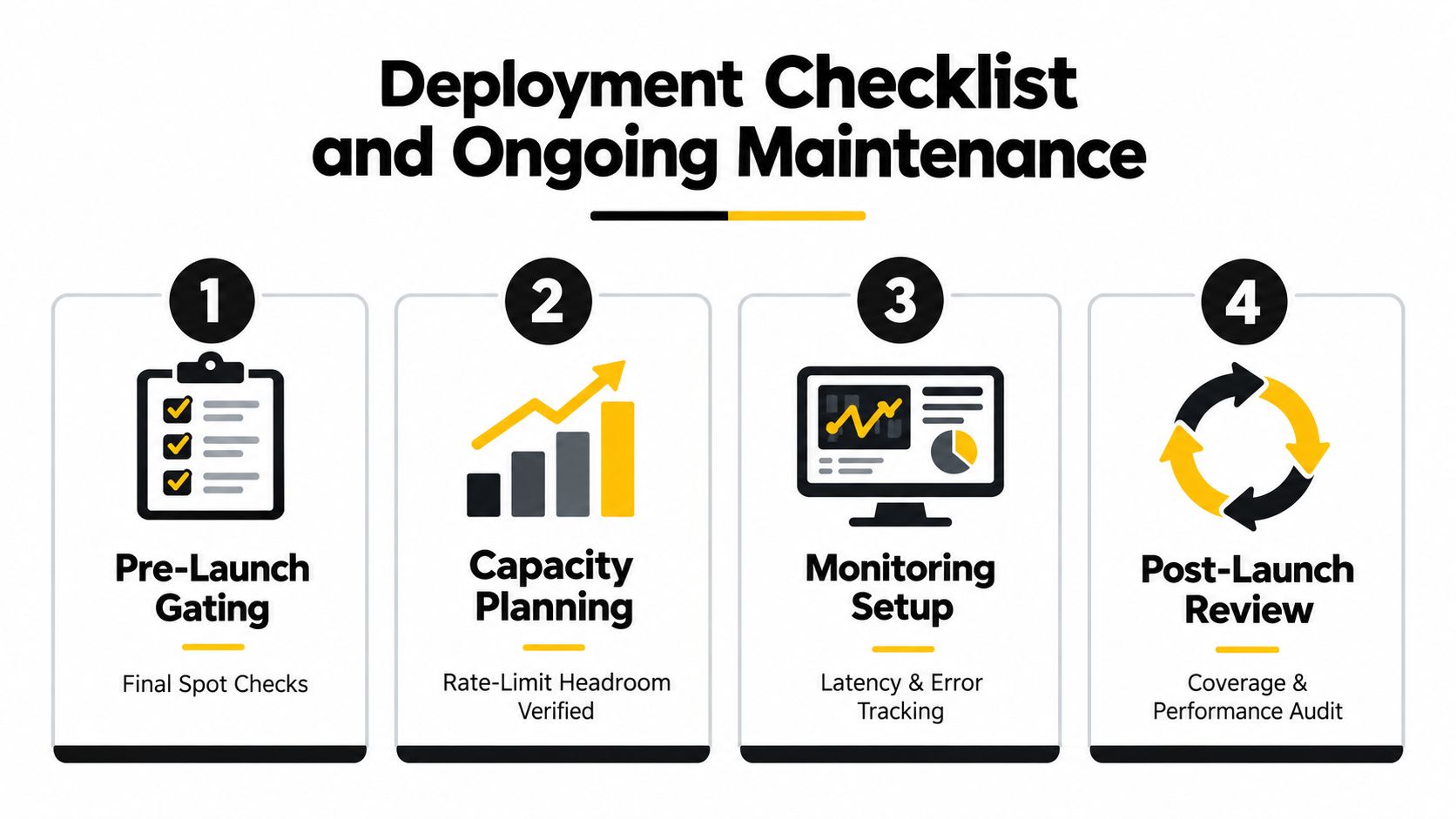
A production rollout needs an owner, a runbook, and a reversible switch. Before enabling autocomplete, spot-check coverage in every launch market, confirm rate-limit headroom against expected traffic, store credentials in the organization's secret manager, and define a rotation policy. Test the fallback while the primary provider is unavailable, and verify that autocomplete and address validation remain separate steps in the workflow.
Gate the release in stages
Start with a feature flag and a dark launch that records provider responses without changing the user-visible form. This exposes coverage, billing, session handling, and latency under real traffic while the existing manual-entry path remains available.
Enable the feature next for internal accounts. Ask operations users to test addresses synthetic fixtures often miss, including buildings, local abbreviations, rural locations, and multilingual entries. Then ramp by percentage while monitoring latency, validation outcomes, provider errors, cost per completed address, and support tickets.
Stop the rollout automatically when the error budget is exceeded or validation success falls below the agreed threshold for a market. A graceful rollback should restore manual entry without deleting captured input. Record the flag change and the reason so on-call staff can reconstruct what happened.
Keep the address pipeline current
Provider coverage, session billing, and response behavior can change, so maintenance belongs on the engineering calendar. Run accuracy audits against fresh ground truth in each important market, review provider changelogs, reassess privacy and retention terms, and revisit service levels at renewal. Update the fallback list when a vendor changes coverage or retires a region.
Google's combined flow shows why pricing reviews matter. Its published example compares $25 per 1,000 sessions for combined Autocomplete and Address Validation with $32 per 1,000 sessions when purchased separately, as documented in the earlier Google product announcement. Treat those figures as provider-specific configuration inputs, not permanent assumptions. Confirm that session boundaries in your client and server flows match the billing model.
Assign one owner for the address pipeline, schedule the first accuracy audit, and add incident steps to the on-call rota. The runbook should identify who can switch providers, disable suggestions, replay a failed session safely, and route unresolved addresses to manual review. Dashboards should expose these events to operations teams, not only to the application team.
The right autocomplete address API is one component of the system. Durable operation depends on a precise data contract, protected integration flow, separate validation, observable performance, predictable billing, and a fallback that staff have rehearsed.