AI Workflow Automation Roadmap for Operational Teams
Learn how ai workflow automation boosts operations with integration patterns, ROI insights, use cases, governance, and a build vs buy checklist.
Your operations team starts the morning with a familiar puzzle. A customer request sits in an inbox, a manager decides whether it belongs in support or finance, an urgent item gets escalated through a Slack message, and someone copies the final status into a ticketing system. By the end of the day, the work may be complete, but nobody can easily explain how many handoffs occurred, where the delay began, or which decisions depended on incomplete information.
AI workflow automation replaces that fragmented chain with a connected process. An AI model can classify an incoming request, extract the relevant details, summarize supporting documents, and recommend the next action. A deterministic orchestration layer can then route the task, request approval, update internal systems, and preserve a record of what happened.
The important shift isn't from “manual” to “automatic” in one dramatic jump. It's from isolated AI pilots to reliable, governed production workflows that remove recurring coordination work while keeping people in control of exceptions and consequential decisions.
Table of Contents
- Introduction to Operational AI Workflow Automation
- Understanding AI Workflow Automation
- Business Value and ROI for Operational Teams
- Common Architectural and Integration Patterns
- Real-world Use Cases
- Implementation Roadmap
- Monitoring and Governance
- Build vs Buy Decision Checklist
Introduction to Operational AI Workflow Automation
A growing operations team often builds its own informal system before it has a real one. A coordinator watches a shared inbox, checks a customer record in a CRM, searches a ticketing queue, asks a manager for approval, and records the outcome in another tool. Each step feels manageable in isolation. Together, they create a fragile process that depends on memory, perfect copying, and constant availability.
The cost appears in places leadership may not see immediately. A request gets routed to the wrong owner. An urgent issue waits for the next manual review. A director spends time assembling a report instead of resolving a bottleneck. When the process grows, the company often adds headcount to maintain the handoffs rather than redesigning the workflow.
AI workflow automation offers a different operating model. An incoming message can be interpreted by an LLM, matched against a defined routing policy, and sent to the appropriate queue. The workflow can summarize a long incident report for an executive, trigger an approval request for a sensitive action, or ask a human to review an ambiguous case.
This capability has moved beyond a niche experiment. By 2025, 88% of organizations regularly used AI in at least one business function, up from 78% in the previous year, according to McKinsey-cited adoption data. That adoption makes reliability more important, not less. Once AI touches customer service, IT, operations, or knowledge work, the advantage doesn't come from having a model. It comes from embedding that model inside a workflow with clear ownership, integrations, safeguards, and measurable outcomes.
Understanding AI Workflow Automation
Think of an AI-enabled workflow as a digital assembly line. A physical assembly line receives materials, moves them through specialized stations, checks quality, and delivers a finished product. An operational workflow does the same with requests, documents, tickets, and decisions.
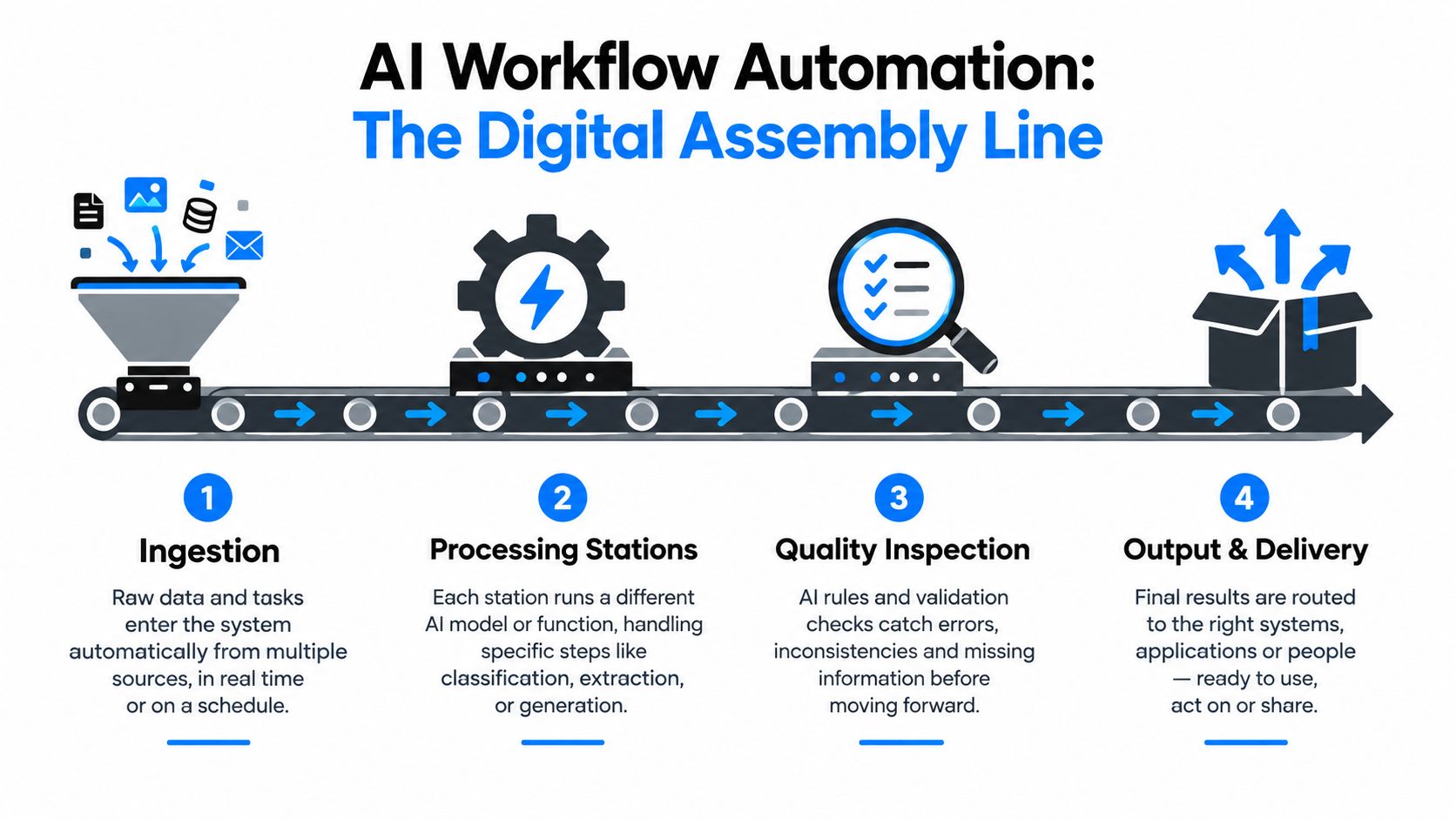
The four parts of the assembly line
Ingestion is the intake point. A webhook, API, email listener, or event from a ticketing platform places new work into the system. The application should capture the source, timestamp, requester, and relevant identifiers before an AI model interprets the content.
Processing stations perform focused tasks. An LLM can classify a support request, extract contract terms, summarize an incident, or generate a draft response. A machine learning model might score risk, while a conventional service validates required fields or checks a policy.
Quality inspection prevents an attractive but unreliable output from moving forward. The system can validate a category against allowed values, check whether required fields were extracted, compare a recommendation with policy rules, and send low-confidence results to a human reviewer.
Output and delivery completes the operational action. The workflow might update Jira, create a ServiceNow ticket, request approval in Slack, write a record to an internal application, or notify a specific team.
The distinction from traditional robotic process automation is useful. RPA follows predefined instructions well, but it struggles when the input is unstructured or the next step depends on meaning. AI adds interpretation. Custom software supplies the surrounding control plane, including authentication, APIs, queues, state management, permissions, and audit records.
An AI agent goes further by planning and executing multiple tool calls toward a goal. That flexibility can help with open-ended work, but it also increases the need for boundaries. Most operational teams should begin with a structured workflow, then introduce agent behavior only where the task, tools, and approval rules are well defined.
Practical rule: Let AI interpret the parts that require context, and let deterministic software control the actions that must be predictable.
Business Value and ROI for Operational Teams
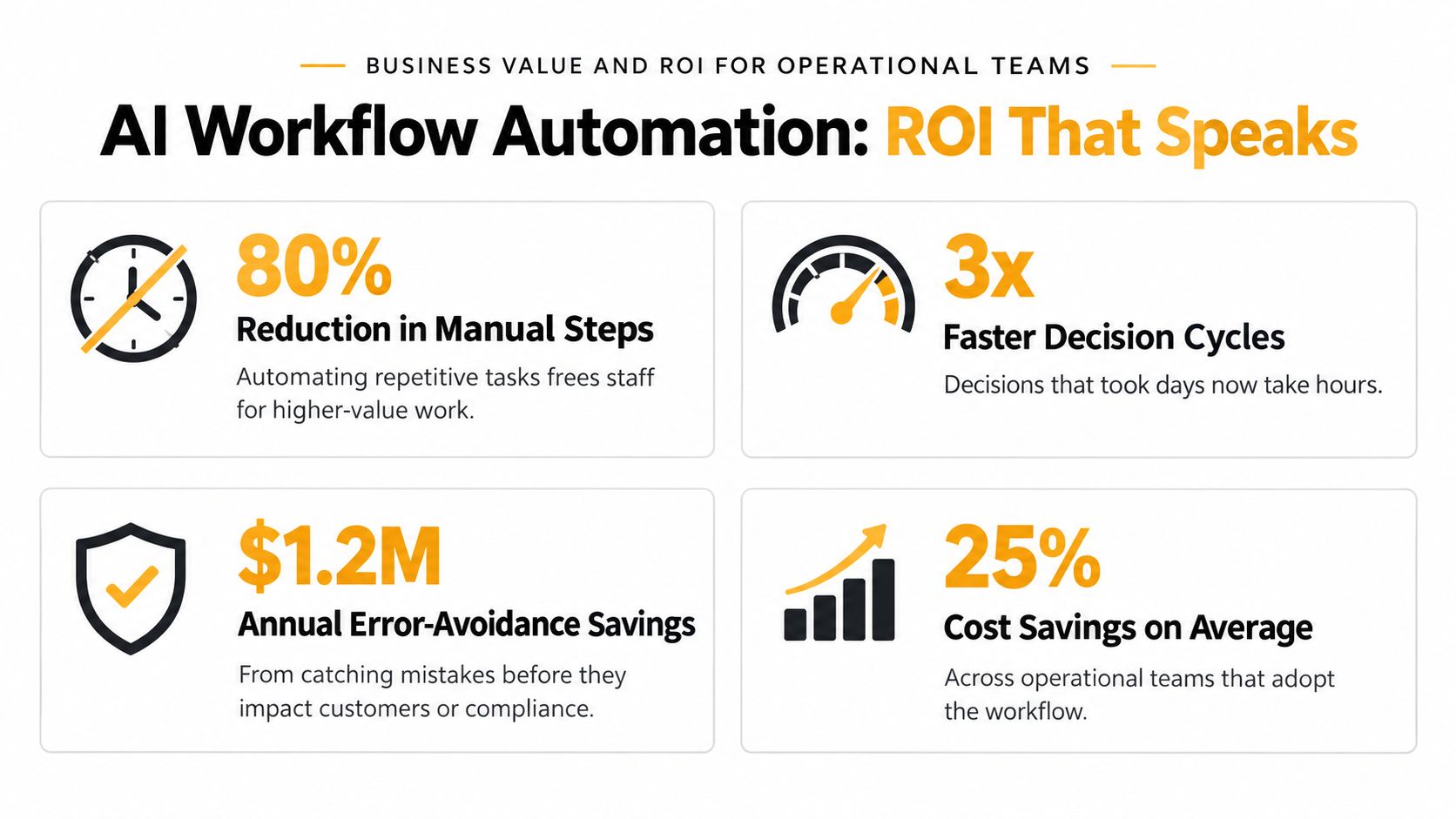
The strongest business case for AI workflow automation usually comes from partial automation, not complete replacement. Industry research estimates the annual value of AI-powered automation at $2.6 trillion to $4.4 trillion globally, as summarized in industry coverage of the McKinsey estimate. That large range describes a broad productivity opportunity, not a guaranteed return for any individual company.
For an operations leader, the useful question is narrower: which recurring workflow consumes time, creates avoidable errors, or delays a decision? A team might automate request classification while keeping final approval with a manager. It might summarize incident evidence without allowing the model to close the incident. These smaller interventions often produce a clearer return because they target a repeated bottleneck without requiring the company to automate an entire business process.
A practical ROI model
Start with the current workflow, not the AI feature. Document who performs each step, which systems they open, how often the task occurs, and what happens when information is missing. Then measure three value sources:
- Recovered capacity: Estimate the staff time no longer spent copying, searching, classifying, or preparing routine summaries.
- Avoided rework: Record the operational cost of misrouting, duplicate entry, incomplete approvals, and preventable escalations.
- Reduced decision latency: Track how long a request waits for context, ownership, or authorization before someone can act.
A custom workflow should expose these measures in its operational interface. If an AI classifier sends a ticket to the wrong queue, the team needs to see the error, correct the route, and understand whether the correction should update the model prompt, routing policy, or source data.
Why simple redesign can beat more AI
A messy process can make an impressive model look ineffective. If five people approve a low-risk request because ownership is unclear, adding an agent won't solve the underlying policy problem. The better design may be a shorter approval path, a clean internal data contract, and one AI step that identifies exceptions.
That's why the return calculation should compare AI automation with simpler systems engineering. A deterministic rules service may handle structured requests more consistently. A custom internal application may reduce integration overhead more effectively than adding another general-purpose tool. AI earns its place when interpretation, summarization, or adaptive decision support removes enough friction to justify its operating and governance cost.
Common Architectural and Integration Patterns
Most production teams combine more than one architecture. The choice isn't a contest between a vendor platform and custom software. It's a decision about where each layer should live, who owns it, and how much control the workflow requires.
Vendor-created tools
Vendor tools provide prebuilt connectors, hosted model access, workflow interfaces, and managed updates. They can suit a team that needs to validate an idea quickly across common business applications. A SaaS-native company with straightforward support routing may prefer this path because the team can focus on workflow configuration rather than building every connector.
The trade-off is control. Complex permissions, unusual data structures, regulated information, or detailed rollback behavior may exceed what the platform handles comfortably. Vendor changes can also affect prompts, connectors, pricing, or execution behavior.
Orchestration layered over existing systems
An orchestration platform sits between business events and the tools that execute them. It can receive a ticket from ServiceNow, call an LLM, apply routing logic, request approval, and update Jira or a messaging system. This model keeps existing systems in place while adding a coordinated execution layer.
It works well when the organization already has stable operational tools but lacks a consistent way to connect them. The integration should be API-first, with explicit event schemas and idempotent actions so retries don't create duplicate approvals or records.
Custom internal systems
A custom framework makes sense when the workflow is central to the company's operating model. The application can combine a customized user interface, specialized connectors, model routing, policy enforcement, evaluation tools, and detailed audit history. A regulated insurer, for example, may need a specific approval experience and strict control over which AI outputs can trigger downstream actions.
A 2026 report found that organizations operationalize AI automation through vendor-created tools at 61%, workflow automation and orchestration platforms at 58%, and custom-built frameworks at 54%, according to the Global State of IT Automation report. The overlap matters. Production teams often use vendor components, orchestration platforms, and custom services together.
| Approach | Adoption Rate |
|---|---|
| Vendor tools | 61% |
| Orchestration platforms | 58% |
| Custom frameworks | 54% |
Choose the layer based on integration complexity, data sensitivity, internal engineering capacity, and the cost of vendor dependence. Keep the core workflow model portable where possible, even if the first implementation uses a managed platform.
Real-world Use Cases
A useful AI workflow has a defined trigger, a bounded AI task, a controlled action, and a way to review the result. The following examples show how that pattern applies to everyday operational work.
Support triage
A new support ticket enters through email or a customer portal. The application sends the message and relevant account context to an LLM, which returns a category, priority recommendation, detected entities, and a concise rationale. A routing service checks that output against allowed values, assigns the ticket to the right queue, and sends uncertain cases to human triage.
The model shouldn't decide priority from free-form text alone. The workflow can combine the AI classification with deterministic signals such as account status, service impact, or an existing incident identifier. The result is a faster first pass without allowing an opaque output to bypass operational policy.
Vendor onboarding
A procurement request arrives with a vendor name, service description, and supporting documents. AI extracts the relevant details and identifies missing information, while custom software checks whether the request requires security, finance, or legal approval. Role-based triggers then create the correct approval chain and notify each owner through the team's existing work surface.
The workflow should store the source documents, extracted fields, approvals, and changes. If a reviewer rejects the request, that outcome becomes useful evaluation data and helps the team distinguish a poor model result from an unclear policy.
Document summarization
An executive shouldn't need to read every page of an incident report before deciding whether to allocate resources. A document service can split the report into manageable sections, retrieve relevant context, and ask an LLM to produce a structured summary with affected systems, unresolved risks, recommended actions, and source references.
The summary should remain linked to the original document. A reviewer needs to verify important statements, especially when the output informs compliance, customer communication, or a financial decision.
Decision support
For a credit approval or resource allocation workflow, an AI model can organize evidence and recommend an action without making the final decision. The system gathers approved data, applies eligibility rules, presents the recommendation with supporting factors, and pauses for an authorized reviewer when risk or uncertainty exceeds the configured boundary.
Teams exploring domain-specific patterns can also review this real estate lead automation example. The central lesson is consistent across industries: automate the preparation and routing of a decision before handing over irreversible authority.
Implementation Roadmap
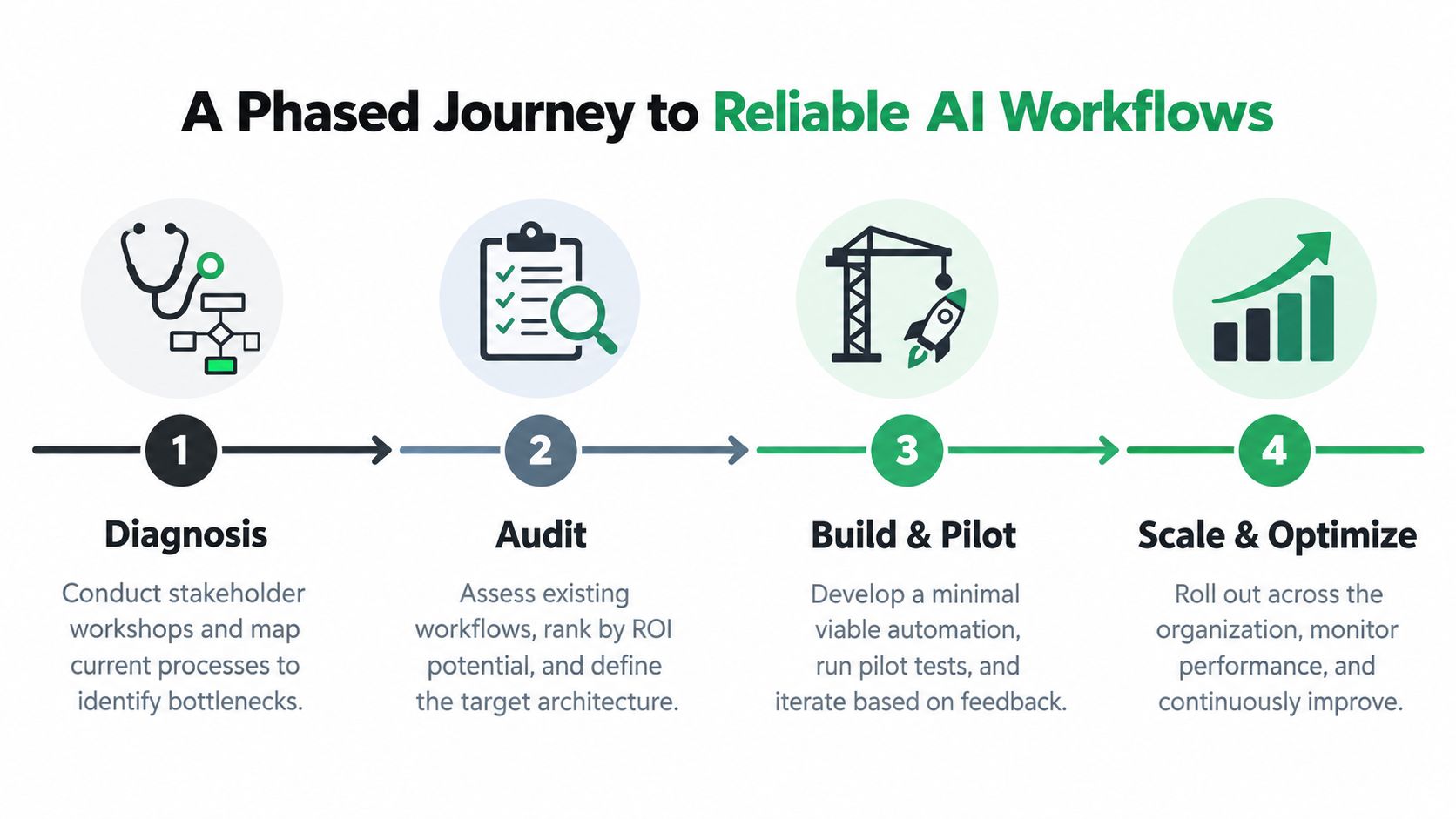
Reliable delivery begins with process clarity. A team that skips diagnosis often automates a confusing workflow and then spends its time maintaining exceptions.
Diagnosis
Bring operations owners, system administrators, frontline users, and decision-makers into the same working session. Map the actual path of a request, including inbox work, side conversations, manual lookups, rework, and exceptions. Don't document only the ideal process.
The deliverable is a current-state map and a short list of candidate workflows. Rank candidates by repetition, friction, data availability, decision risk, and integration feasibility. A good first candidate has a clear owner, a stable trigger, and an outcome the team can measure.
Audit
Inspect the systems behind the process. Identify available APIs, authentication requirements, data ownership, retention needs, and places where the workflow currently loses context. Then define the target architecture, including the model, orchestration service, internal interface, approval gates, and failure paths.
Write an ROI hypothesis before development begins. It should specify what the team expects to improve, how the baseline will be measured, and which conditions would make the project unsuitable for production.
Build and pilot
Build the smallest complete workflow, not an isolated AI demo. Connect the trigger, model call, validation layer, action service, reviewer interface, logging, and alerting. Use representative inputs, including ambiguous and incomplete cases, rather than testing only clean examples.
Keep humans in the loop where the consequences justify review. A pilot should reveal whether the system reduces work or moves work into a new exception queue. Collect corrections from reviewers and use them to improve prompts, retrieval, rules, or data contracts.
Scale and optimize
A handoff is complete only when ownership is clear. Provide runbooks, architecture documentation, model and prompt inventories, integration credentials through approved secret management, escalation procedures, and instructions for changing policies safely.
The internal owner should know how to pause the workflow, replay a failed event, inspect a trace, and reverse an incorrect action. External partners can support architecture and delivery, but the client team needs operational independence after launch.
Handoff standard: A workflow isn't production-ready until someone can explain what it does, stop it safely, investigate a failure, and improve it without relying on the original developer.
Monitoring and Governance
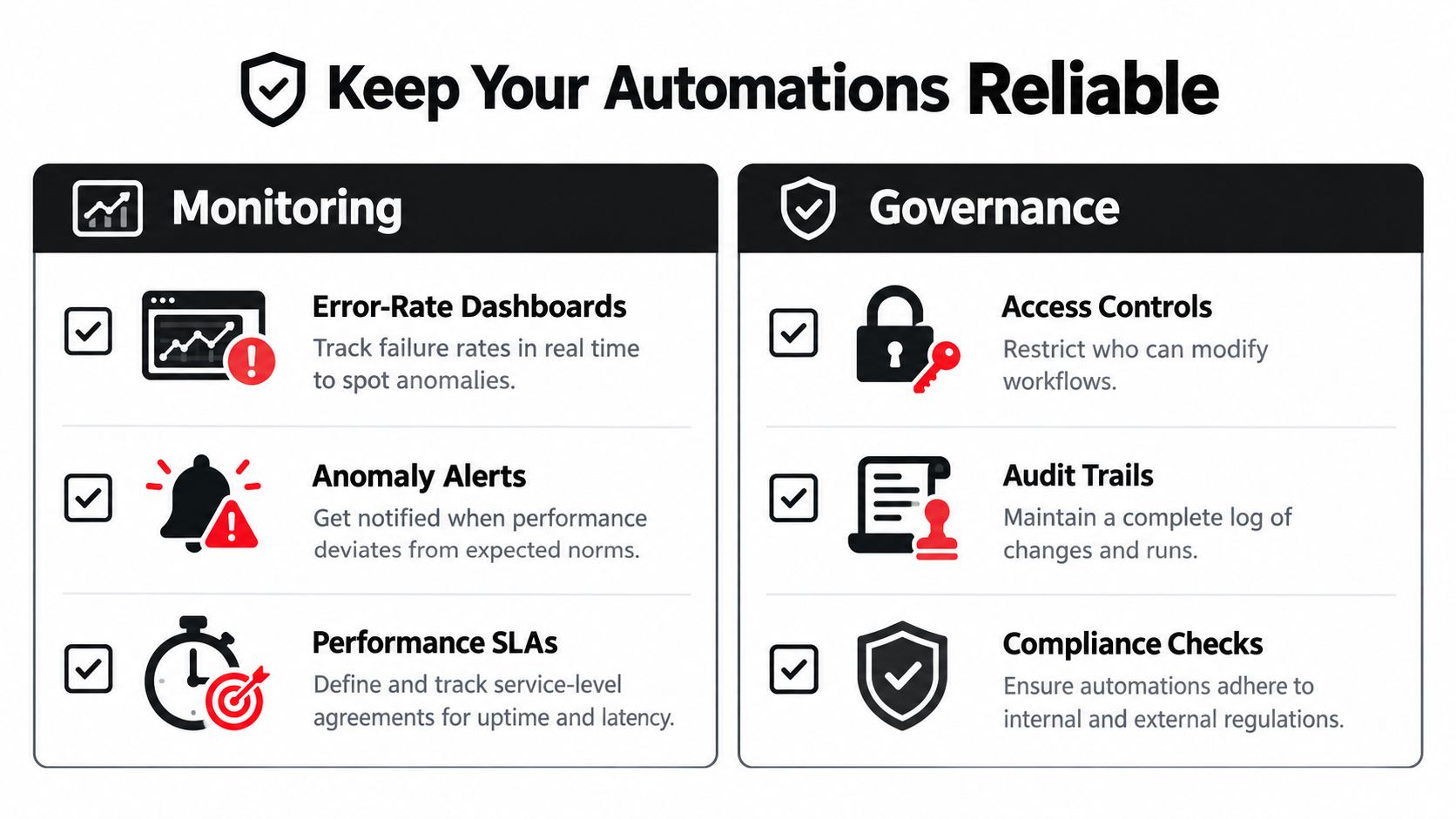
Production reliability depends on more than model quality. An LLM may produce a plausible answer while selecting the wrong category, omitting a critical detail, or calling a tool with the wrong parameters. Monitoring must therefore cover the entire workflow, not just the model response.
A 2026 study of more than 6,000 publicly available n8n workflows found that explicit reliability mechanisms such as structured fallback paths, repair loops, failure-specific alerts, and human approval gates remain relatively uncommon, as reported in the AutomationBench-related workflow research. That finding points to a common production gap. Teams connect a model to a trigger and action, but don't design what happens when the model is uncertain or a downstream system fails.
Reliability controls
Build a structured fallback for every meaningful AI step. If classification fails, route the item to a human queue. If an integration times out, retry safely and prevent duplicate actions. If an output violates its schema, reject it and request repair or manual review.
Track operational and AI-specific signals together:
- Execution failures: Identify which connector, model call, validation step, or permission check failed.
- Decision quality: Compare AI outputs with reviewer corrections and later outcomes.
- Latency: Separate model delay from queue delay and downstream API delay.
- Exception volume: Watch whether the workflow is reducing manual work or creating a hidden review burden.
An internal operations dashboard can make these patterns visible. For an example of a related insurance operations dashboard, the important design principle is not visual polish. It's giving owners enough context to act on an operational signal.
Governance controls
A governance-ready system should retain traces, prompt versions, human actions, and evaluation results immutably, with retention aligned to the strictest applicable framework, according to enterprise guidance on LLM audit trails. Access should use SSO and role-based access control, with reads logged. Prompt and configuration changes should require approval, and the approval itself should be recorded.
Each AI-assisted action should answer basic audit questions: What input did the system receive? Which model and prompt version ran? Which tools did it call? What output did it produce? Who approved or corrected it? What happened afterward?
Governance also needs operational boundaries. Restrict tool permissions, redact sensitive information before external model calls where necessary, require human approval for high-impact actions, and maintain a kill switch. A workflow that can act autonomously should also be easy to pause.
Build vs Buy Decision Checklist
The build-versus-buy decision should follow the workflow's operating requirements, not enthusiasm for a particular AI product. A managed platform may be appropriate when connectors are standard, the process is relatively uniform, and the team values speed over deep customization. Custom software becomes more compelling when the workflow carries unique business logic, requires specialized interfaces, or must preserve detailed control over data and actions.
Recent research indicates that only 15–20% of organizations put AI agents into production workflows despite broad experimentation, highlighting the importance of build-versus-buy economics for AI workflow automation. The gap between experimentation and production usually reflects integration, governance, ownership, and operating cost rather than a lack of model access.
Use this checklist before committing:
- Total cost of ownership: Include model usage, platform fees, integration maintenance, monitoring, support, and human review.
- Integration complexity: Count the systems, permissions, event types, and failure paths the workflow must handle.
- Time to value: Choose a managed component when it can validate the workflow quickly, but avoid a short pilot that creates long-term lock-in.
- Internal expertise: Confirm who will own prompts, evaluations, connectors, security, and incident response.
- Governance needs: Check whether the option supports trace retention, approvals, RBAC, data controls, and safe rollback.
- Portability: Preserve your data model, workflow definitions, and evaluation set so you can change models or platforms later.
Use this build-versus-buy comparison for AI tooling to structure the discussion with stakeholders. The right answer may be hybrid, with a managed model, an orchestration layer, and custom software around the workflow's most important controls.
Internal Systems designs and builds custom software, integrations, and AI-powered workflows for operational teams, from diagnosis and architecture through delivery and handoff. Visit Internal Systems to discuss a workflow that can classify, route, summarize, or support decisions with reliable production controls.